diff --git a/.github/images/readme/dashboard.png b/.github/images/readme/dashboard.png
new file mode 100644
index 0000000..1be6291
Binary files /dev/null and b/.github/images/readme/dashboard.png differ
diff --git a/.github/images/readme/files.png b/.github/images/readme/files.png
new file mode 100644
index 0000000..b2e05df
Binary files /dev/null and b/.github/images/readme/files.png differ
diff --git a/.github/images/readme/login.png b/.github/images/readme/login.png
new file mode 100644
index 0000000..695e9df
Binary files /dev/null and b/.github/images/readme/login.png differ
diff --git a/.github/images/readme/mobile-files.png b/.github/images/readme/mobile-files.png
new file mode 100644
index 0000000..89e5c54
Binary files /dev/null and b/.github/images/readme/mobile-files.png differ
diff --git a/.github/images/readme/mobile-retrieve.png b/.github/images/readme/mobile-retrieve.png
new file mode 100644
index 0000000..d6feed6
Binary files /dev/null and b/.github/images/readme/mobile-retrieve.png differ
diff --git a/.github/images/readme/mobile-send.png b/.github/images/readme/mobile-send.png
new file mode 100644
index 0000000..9e4ec0f
Binary files /dev/null and b/.github/images/readme/mobile-send.png differ
diff --git a/.github/images/readme/retrieve-dark.png b/.github/images/readme/retrieve-dark.png
new file mode 100644
index 0000000..9d1e1f3
Binary files /dev/null and b/.github/images/readme/retrieve-dark.png differ
diff --git a/.github/images/readme/send.png b/.github/images/readme/send.png
new file mode 100644
index 0000000..55eba6b
Binary files /dev/null and b/.github/images/readme/send.png differ
diff --git a/.github/images/readme/settings.png b/.github/images/readme/settings.png
new file mode 100644
index 0000000..3aae883
Binary files /dev/null and b/.github/images/readme/settings.png differ
diff --git a/readme.md b/readme.md
index 783a317..50508de 100644
--- a/readme.md
+++ b/readme.md
@@ -1,194 +1,116 @@
+

+
# FileCodeBox
-### 文件快递柜 - 匿名口令分享文本和文件
+**开箱即用的自托管文件快递柜**
-

+匿名分享文件与文本。无需注册,输入口令即可取件。
-像拿快递一样取文件,无需注册,输入口令即可获取
+[在线演示](https://share.lanol.cn) · [使用文档](https://fcb-docs.aiuo.net/) · [快速部署](#快速部署) · [English](./readme_en.md)
-[](https://github.com/vastsa/FileCodeBox/stargazers)
-[](https://github.com/vastsa/FileCodeBox/network)
-[](https://github.com/vastsa/FileCodeBox/issues)
-[](https://github.com/vastsa/FileCodeBox/blob/master/LICENSE)
-[](https://hub.docker.com/r/lanol/filecodebox)
+[](https://github.com/vastsa/FileCodeBox/releases/latest)
+[](https://hub.docker.com/r/lanol/filecodebox)
+[](./LICENSE)
+[](https://github.com/vastsa/FileCodeBox/stargazers)
-[](https://www.python.org)
-[](https://fastapi.tiangolo.com)
-[](https://vuejs.org)
-
-[English](./readme_en.md) | [在线演示](https://share.lanol.cn) | [部署教程](https://github.com/vastsa/FileCodeBox/wiki/部署教程) | [常见问题](https://github.com/vastsa/FileCodeBox/wiki/常见问题) | [QQ群: 739673698](https://qm.qq.com/q/PemPzhdEIM)
+
-
-|
-
-### 🚀 轻量高效
-- FastAPI + SQLite3 后端
-- Vue3 + Element Plus 前端
-- Docker 一键部署
-- 资源占用极低
-
- |
-
-
-### 🔒 安全可靠
-- IP 上传频率限制
-- 提取码错误次数限制
-- 文件自动过期清理
-- 支持管理员认证
-
- |
-
-
-### 📤 便捷上传
-- 拖拽上传
-- 复制粘贴上传
-- 命令行 curl 上传
-- 批量文件上传
-
- |
-
-
-|
-
-### 🎫 灵活分享
-- 随机/自定义提取码
-- 可设置有效期(时间/次数)
-- 支持永久有效
-- 文本和文件统一管理
-
- |
-
-
-### 💾 多存储支持
-- 本地文件系统
-- S3 兼容存储
-- [OneDrive](./docs/guide/storage-onedrive.md)
-- [OpenDAL](./docs/guide/storage-opendal.md)
-
- |
-
-
-### 🌍 国际化
-- 简体中文
-- 繁体中文
-- English
-- 响应式设计 / 深色模式
-
- |
-
-
-
----
-
-## 🖼️ 界面预览
-
-> 前端源码仓库:[2024主题](https://github.com/vastsa/FileCodeBoxFronted) | [2023主题](https://github.com/vastsa/FileCodeBoxFronted2023)
-
-
-🎨 新版界面 (2024)
-
+ 打开 http://localhost:12345,完成首次初始化,即可开始分享。
+
+
+
+
+
+  +
+
+## 为什么选择 FileCodeBox
+
- |
- |
+
+
+### 简单直接
+
+无需账号体系。上传内容后获得取件码,对方输入口令即可下载文件或查看文本。
+
+ |
+
+
+### 自托管优先
+
+一个 Docker 容器即可运行,数据与配置保存在自己的服务器,迁移和备份都足够清晰。
+
+ |
+
+
+### 面向真实使用
+
+支持批量、分片和预签名上传,提供过期策略、容量限制、管理后台与多存储后端。
+
+ |
+
+
+## 核心能力
+
+| 分享体验 | 管理与安全 | 存储与部署 |
+| --- | --- | --- |
+| 文件与文本统一分享 | 首次启动安全初始化 | 本地文件系统 |
+| 拖拽、粘贴与批量上传 | 管理员会话与权限控制 | S3 兼容对象存储 |
+| 随机或自定义取件码 | 上传频率与错误次数限制 | OneDrive 与 WebDAV |
+| 按时间、次数或永久有效 | 文件过期清理与容量配额 | OpenDAL 扩展存储 |
+| 分片上传与断点续传 | 文件状态与存储健康视图 | Docker 多架构镜像 |
+| 响应式界面与深色模式 | 中英文管理界面 | 反向代理友好 |
+
+## 产品预览
+
+
- |
- |
+ |
+ |
- |
- |
+简洁的文件与文本发送流程 |
+围绕文件健康和存储策略设计的仪表盘 |
-
-
-📦 经典界面 (2023)
-
-
----
+
+  +
+
 +
+
 +
-## 🚀 快速开始
+> 当前主题源码位于 [FileCodeBoxFronted](https://github.com/vastsa/FileCodeBoxFronted),镜像构建时会自动拉取其默认分支的最新版本。
-### Docker 部署(推荐)
+## 快速部署
-生产环境建议使用固定版本标签(例如 `2.4.0`)以便复现和回滚;
-`latest` 仅在正式版本发布时更新,`edge-*` 是 master 分支开发镜像。
-
-**方式一:Docker CLI**
-
-```bash
-# Docker Hub(推荐)
-docker run -d --restart always -p 12345:12345 -v /opt/FileCodeBox:/app/data --name filecodebox lanol/filecodebox:2.5.0 # x-release-please-version
-
-# 国内镜像(如果 Docker Hub 拉取缓慢)
-docker run -d --restart always -p 12345:12345 -v /opt/FileCodeBox:/app/data --name filecodebox docker.cnb.cool/aixk/filecodebox
-```
-
-**方式二:Docker Compose**
+### Docker Compose
```yaml
services:
@@ -200,27 +122,29 @@ services:
- "12345:12345"
volumes:
- ./data:/app/data
- environment:
- - WORKERS=4
- - LOG_LEVEL=info
```
```bash
docker compose up -d
```
-**环境变量说明**
+生产环境建议固定版本号以便回滚。`latest` 指向最新正式版,`edge-*` 为 `master` 分支开发镜像。
-| 变量 | 默认值 | 说明 |
-|------|--------|------|
-| `HOST` | `::` | 监听地址(支持 IPv4/IPv6 双栈) |
-| `PORT` | `12345` | 服务端口 |
-| `WORKERS` | `4` | 工作进程数(建议设为 CPU 核心数) |
-| `LOG_LEVEL` | `info` | 日志级别:`debug` / `info` / `warning` / `error` |
+### 手动运行
-### 反向代理配置
+```bash
+git clone https://github.com/vastsa/FileCodeBox.git
+cd FileCodeBox
+pip install -r requirements.txt
+python main.py
+```
-使用 Nginx 时,请添加以下配置以正确获取客户端 IP:
+默认访问地址为 `http://localhost:12345`。首次打开站点时,按引导设置管理员密码。
+
+### 反向代理
+
+
+Nginx 示例
```nginx
location / {
@@ -229,247 +153,122 @@ location / {
proxy_set_header X-Real-IP $remote_addr;
proxy_set_header X-Forwarded-For $proxy_add_x_forwarded_for;
proxy_set_header X-Forwarded-Proto $scheme;
- client_max_body_size 100m; # 根据需要调整上传大小限制
+ client_max_body_size 100m;
}
```
-### 手动部署
+
+
+## 使用方式
+
+| 操作 | 流程 |
+| --- | --- |
+| 分享文件 | 选择或拖入文件 → 设置有效期 → 获得取件码 |
+| 分享文本 | 输入文本 → 设置有效期 → 获得取件码 |
+| 获取内容 | 输入取件码 → 在线查看文本或下载文件 |
+| 管理系统 | 访问 `/#/admin` → 查看文件、统计和系统设置 |
+
+命令行同样可以上传:
```bash
-# 1. 克隆项目
-git clone https://github.com/vastsa/FileCodeBox.git
-cd FileCodeBox
-
-# 2. 安装依赖
-pip install -r requirements.txt
-
-# 3. 启动服务
-python main.py
-```
-
----
-
-## 📖 使用指南
-
-### 基础操作
-
-| 操作 | 步骤 |
-|------|------|
-| **分享文件** | 打开网页 → 选择/拖拽文件 → 设置有效期 → 获取提取码 |
-| **获取文件** | 打开网页 → 输入提取码 → 下载文件或查看文本 |
-| **管理后台** | 首次访问站点完成初始化 → 访问 `/#/admin` → 输入初始化时设置的密码 |
-
-### 命令行使用(curl)
-
-
-点击展开 curl 使用示例
-
-**上传文件**
-
-```bash
-# 基础上传(默认 1 天有效期)
-curl -X POST "http://localhost:12345/share/file/" \
- -F "file=@/path/to/file.txt"
-
-# 指定 1 小时有效期
curl -X POST "http://localhost:12345/share/file/" \
-F "file=@/path/to/file.txt" \
-F "expire_value=1" \
- -F "expire_style=hour"
-
-# 指定下载 10 次后过期
-curl -X POST "http://localhost:12345/share/file/" \
- -F "file=@/path/to/file.txt" \
- -F "expire_value=10" \
- -F "expire_style=count"
+ -F "expire_style=day"
```
-**分享文本**
-
-```bash
-curl -X POST "http://localhost:12345/share/text/" \
- -F "text=要分享的文本内容"
-```
-
-**下载文件**
-
-```bash
-curl -L "http://localhost:12345/share/select/?code=提取码" -o filename
-```
-
-**有效期参数**
-
-| `expire_style` | 说明 |
-|----------------|------|
-| `day` | 天数 |
-| `hour` | 小时 |
-| `minute` | 分钟 |
-| `count` | 下载次数 |
-| `forever` | 永久有效 |
-
-**返回示例**
-
-```json
-{
- "code": 200,
- "msg": "success",
- "detail": {
- "code": "abcd1234",
- "name": "file.txt"
- }
-}
-```
-
-**需要认证时**(管理员关闭游客上传后)
-
-```bash
-# 1. 获取 token
-curl -X POST "http://localhost:12345/admin/login" \
- -H "Content-Type: application/json" \
- -d '{"password": "<初始化时设置的管理员密码>"}'
-
-# 2. 携带 token 上传
-curl -X POST "http://localhost:12345/share/file/" \
- -H "Authorization: Bearer " \
- -F "file=@/path/to/file.txt"
-```
-
-
-
----
-
-## 🛠 开发指南
-
-### 项目结构
-
-```
-FileCodeBox/
-├── apps/ # 应用模块
-│ ├── admin/ # 管理后台
-│ └── base/ # 基础功能
-├── core/ # 核心模块
-├── data/ # 数据目录(运行时生成)
-├── docs/ # 文档
-└── main.py # 入口文件
+完整的接口、分片上传和存储配置,请查看:
+
+- [快速开始](https://fcb-docs.aiuo.net/guide/getting-started)
+- [上传与分片](https://fcb-docs.aiuo.net/guide/upload)
+- [存储配置](https://fcb-docs.aiuo.net/guide/storage)
+- [安全设置](https://fcb-docs.aiuo.net/guide/security)
+- [API 文档](https://fcb-docs.aiuo.net/api/)
+
+## 技术架构
+
+```text
+Browser / CLI
+ │
+ ▼
+FastAPI · Uvicorn
+ │
+ ├── SQLite · Tortoise ORM
+ ├── Local / S3 / OneDrive / WebDAV / OpenDAL
+ └── Vue 3 · Vite frontend
```
-### 本地开发
+| 层级 | 技术 |
+| --- | --- |
+| API | FastAPI · Pydantic · Uvicorn |
+| 数据 | SQLite · Tortoise ORM |
+| 异步 I/O | aiofiles · aiohttp · aioboto3 |
+| 前端 | Vue 3 · TypeScript · Vite · Tailwind CSS |
+| 交付 | Docker · GitHub Actions · VitePress |
-**后端**
+## 本地开发
```bash
+# 后端
pip install -r requirements.txt
python main.py
+
+# 测试
+python -m pytest tests
```
-**前端**
+前端在独立仓库 [FileCodeBoxFronted](https://github.com/vastsa/FileCodeBoxFronted):
```bash
-# 前端仓库: https://github.com/vastsa/FileCodeBoxFronted
-cd fcb-fronted
-npm install
-npm run dev
+pnpm install
+pnpm dev
```
-### 技术栈
-
-| 类别 | 技术 |
-|------|------|
-| **后端框架** | FastAPI 0.128+ / Uvicorn |
-| **数据库** | SQLite + Tortoise ORM |
-| **数据验证** | Pydantic 2.x |
-| **异步支持** | aiofiles / aiohttp / aioboto3 |
-| **对象存储** | S3 协议 / OneDrive / OpenDAL |
-| **前端框架** | Vue 3 + Element Plus + Vite |
-| **运行环境** | Python 3.8+ / Node.js 18+ |
-| **容器化** | Docker / Docker Compose |
-
----
-
-## ❓ 常见问题
+## 常见问题
-如何修改上传大小限制?
+如何备份或迁移?
+
+停止服务后备份整个 `data` 目录。它包含数据库、运行配置和本地存储文件。
-在管理面板中修改 `uploadSize` 配置项。如果使用 Nginx 反向代理,还需修改 `client_max_body_size`。
-如何配置存储引擎?
+如何调整上传大小?
+
+在管理后台修改上传限制。如果前面还有 Nginx、CDN 或网关,也需要同步调整其请求体限制。
-在管理面板中选择存储引擎类型并配置相应参数。支持本地存储、S3、OneDrive、OpenDAL 等。
-如何备份数据?
+支持哪些存储?
+
+内置支持本地、S3、OneDrive、WebDAV 与 OpenDAL。详细参数见[存储配置](https://fcb-docs.aiuo.net/guide/storage)。
-备份 `data` 目录即可,包含数据库和上传的文件。
-
-如何修改管理员密码?
+## 参与项目
-登录管理面板后,在系统设置中修改 `adminPassword` 配置项。
-
+Issue、功能建议与 Pull Request 都很欢迎。提交代码前请使用清晰的 Conventional Commit:
-更多问题请访问 [Wiki](https://github.com/vastsa/FileCodeBox/wiki/常见问题) 或加入 [QQ群: 739673698](https://qm.qq.com/q/PemPzhdEIM)
-
----
-
-## 🤝 贡献指南
-
-欢迎提交 Issue 和 Pull Request!
-
-```bash
-# 1. Fork 并克隆
-git clone https://github.com/your-username/FileCodeBox.git
-
-# 2. 创建分支
-git checkout -b feature/your-feature
-
-# 3. 提交更改
-git commit -m "feat: add your feature"
-
-# 4. 推送并创建 PR
-git push origin feature/your-feature
+```text
+fix: 修复文件下载问题
+feat: 增加新的存储适配器
```
----
+- [提交 Issue](https://github.com/vastsa/FileCodeBox/issues/new/choose)
+- [查看贡献指南](https://fcb-docs.aiuo.net/contributing)
+- [查看版本记录](https://fcb-docs.aiuo.net/changelog)
+- [加入 QQ 群:739673698](https://qm.qq.com/q/PemPzhdEIM)
-## 📊 项目统计
+## 许可证
+
+FileCodeBox 基于 [LGPL-3.0](./LICENSE) 发布。使用本项目时请遵守所在地法律法规,并保留项目地址与版权信息。
-
-  -
-
-
-
-[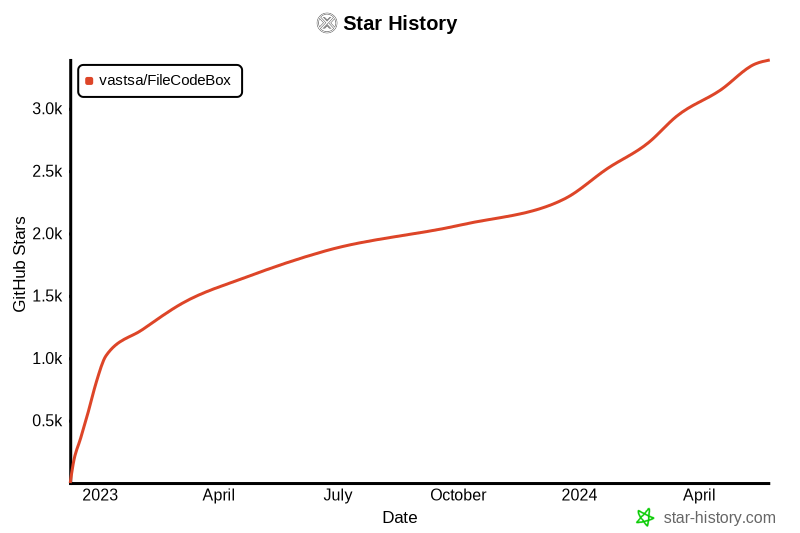](https://star-history.com/#vastsa/FileCodeBox&Date)
-
-
-
-**如果觉得项目不错,欢迎 ⭐ Star 支持!**
-
-Made with ❤️ by [vastsa](https://github.com/vastsa)
+如果 FileCodeBox 对你有帮助,欢迎点亮一个 [Star](https://github.com/vastsa/FileCodeBox/stargazers)。
+Made by [vastsa](https://github.com/vastsa)
diff --git a/readme_en.md b/readme_en.md
index bd08994..a426fa1 100644
--- a/readme_en.md
+++ b/readme_en.md
@@ -1,195 +1,116 @@
+
+
# FileCodeBox
-### Anonymous File & Text Sharing with Passcode
+**A self-hosted file locker that works out of the box**
-
+Share files and text anonymously. No account required—just enter a passcode.
-Share files like picking up a package — no registration required, just enter the passcode
+[Live Demo](https://share.lanol.cn) · [Documentation](https://fcb-docs.aiuo.net/en/) · [Quick Start](#quick-start) · [简体中文](./readme.md)
-[](https://github.com/vastsa/FileCodeBox/stargazers)
-[](https://github.com/vastsa/FileCodeBox/network)
-[](https://github.com/vastsa/FileCodeBox/issues)
-[](https://github.com/vastsa/FileCodeBox/blob/master/LICENSE)
-[](https://hub.docker.com/r/lanol/filecodebox)
+[](https://github.com/vastsa/FileCodeBox/releases/latest)
+[](https://hub.docker.com/r/lanol/filecodebox)
+[](./LICENSE)
+[](https://github.com/vastsa/FileCodeBox/stargazers)
-[](https://www.python.org)
-[](https://fastapi.tiangolo.com)
-[](https://vuejs.org)
-
-[简体中文](./README.md) | [Live Demo](https://share.lanol.cn) | [Documentation](https://github.com/vastsa/FileCodeBox/wiki/Deployment-Guide) | [FAQ](https://github.com/vastsa/FileCodeBox/wiki/FAQ)
+
-
-|
-
-### 🚀 Lightweight & Fast
-- FastAPI + SQLite3 backend
-- Vue3 + Element Plus frontend
-- One-click Docker deployment
-- Minimal resource usage
-
- |
-
-
-### 🔒 Secure & Reliable
-- IP upload rate limiting
-- Passcode attempt limiting
-- Auto file expiration cleanup
-- Admin authentication support
-
- |
-
-
-### 📤 Easy Upload
-- Drag & drop upload
-- Copy & paste upload
-- Command line curl upload
-- Batch file upload
-
- |
-
-
-|
-
-### 🎫 Flexible Sharing
-- Random / custom passcodes
-- Set expiration (time/count)
-- Permanent validity support
-- Unified text & file management
-
- |
-
-
-### 💾 Multiple Storage
-- Local file system
-- S3-compatible storage
-- [OneDrive](./docs/guide/storage-onedrive.md)
-- [OpenDAL](./docs/guide/storage-opendal.md)
-
- |
-
-
-### 🌍 Internationalization
-- Simplified Chinese
-- Traditional Chinese
-- English
-- Responsive design / Dark mode
-
- |
-
-
-
----
-
-## 🖼️ Screenshots
-
-> Frontend repositories: [2024 Theme](https://github.com/vastsa/FileCodeBoxFronted) | [2023 Theme](https://github.com/vastsa/FileCodeBoxFronted2023)
-
-
-🎨 New Interface (2024)
-
+ Open http://localhost:12345, complete first-run setup, and start sharing.
+
+
+
+
+
+
+
+
+## Why FileCodeBox
+
- |
- |
+
+
+### Effortless sharing
+
+No account system. Upload content, get a passcode, and let the recipient download the file or read the text.
+
+ |
+
+
+### Self-hosting first
+
+Run everything in one Docker container. Your data and configuration stay on infrastructure you control.
+
+ |
+
+
+### Built for real workloads
+
+Batch, chunked, and presigned uploads with expiration policies, capacity limits, an admin console, and multiple storage backends.
+
+ |
+
+
+## Highlights
+
+| Sharing | Administration & security | Storage & delivery |
+| --- | --- | --- |
+| Unified file and text sharing | Secure first-run setup | Local filesystem |
+| Drag, paste, and batch upload | Admin sessions and access control | S3-compatible storage |
+| Random or custom passcodes | Upload and passcode rate limits | OneDrive and WebDAV |
+| Time, count, or permanent expiry | Automatic cleanup and quotas | OpenDAL integrations |
+| Chunked upload and resume | File and storage health views | Multi-architecture Docker images |
+| Responsive UI and dark mode | Chinese and English admin UI | Reverse-proxy friendly |
+
+## Product Preview
+
+
- |
- |
+ |
+ |
- |
- |
+A focused flow for sending files and text |
+A dashboard built around file health and storage policy |
-
-
-📦 Classic Interface (2023)
-
-
----
+
+
+
+
+
+
+
-## 🚀 Quick Start
+> The active theme lives in [FileCodeBoxFronted](https://github.com/vastsa/FileCodeBoxFronted). Image builds automatically use the latest commit from its default branch.
-### Docker Deployment (Recommended)
+## Quick Start
-Pin a version tag (for example, `2.4.0`) in production for reproducible
-deployments and rollbacks. `latest` moves only on formal releases; `edge-*`
-identifies development images built from master.
-
-**Option 1: Docker CLI**
-
-```bash
-# Docker Hub (Recommended)
-docker run -d --restart always -p 12345:12345 -v /opt/FileCodeBox:/app/data --name filecodebox lanol/filecodebox:2.5.0 # x-release-please-version
-
-# China Mirror (if Docker Hub is slow)
-docker run -d --restart always -p 12345:12345 -v /opt/FileCodeBox:/app/data --name filecodebox docker.cnb.cool/aixk/filecodebox
-```
-
-**Option 2: Docker Compose**
+### Docker Compose
```yaml
services:
@@ -201,27 +122,29 @@ services:
- "12345:12345"
volumes:
- ./data:/app/data
- environment:
- - WORKERS=4
- - LOG_LEVEL=info
```
```bash
docker compose up -d
```
-**Environment Variables**
+Pin a version in production for reliable rollbacks. `latest` tracks the newest stable release; `edge-*` identifies development images from `master`.
-| Variable | Default | Description |
-|----------|---------|-------------|
-| `HOST` | `::` | Listen address (supports IPv4/IPv6 dual-stack) |
-| `PORT` | `12345` | Service port |
-| `WORKERS` | `4` | Worker processes (recommended: CPU cores) |
-| `LOG_LEVEL` | `info` | Log level: `debug` / `info` / `warning` / `error` |
+### Run from source
-### Reverse Proxy Configuration
+```bash
+git clone https://github.com/vastsa/FileCodeBox.git
+cd FileCodeBox
+pip install -r requirements.txt
+python main.py
+```
-When using Nginx, add the following configuration to properly obtain client IP:
+The default URL is `http://localhost:12345`. Follow the first-run flow to create the administrator password.
+
+### Reverse proxy
+
+
+Nginx example
```nginx
location / {
@@ -230,246 +153,121 @@ location / {
proxy_set_header X-Real-IP $remote_addr;
proxy_set_header X-Forwarded-For $proxy_add_x_forwarded_for;
proxy_set_header X-Forwarded-Proto $scheme;
- client_max_body_size 100m; # Adjust upload size limit as needed
+ client_max_body_size 100m;
}
```
-### Manual Deployment
+
+
+## How It Works
+
+| Action | Flow |
+| --- | --- |
+| Share files | Select or drop files → choose expiry → receive a passcode |
+| Share text | Enter text → choose expiry → receive a passcode |
+| Retrieve content | Enter a passcode → read text or download files |
+| Manage the service | Open `/#/admin` → inspect files, metrics, and settings |
+
+Uploads also work from the command line:
```bash
-# 1. Clone the repository
-git clone https://github.com/vastsa/FileCodeBox.git
-cd FileCodeBox
-
-# 2. Install dependencies
-pip install -r requirements.txt
-
-# 3. Start the service
-python main.py
-```
-
----
-
-## 📖 Usage Guide
-
-### Basic Operations
-
-| Operation | Steps |
-|-----------|-------|
-| **Share File** | Open website → Select/drag files → Set expiration → Get passcode |
-| **Retrieve File** | Open website → Enter passcode → Download file or view text |
-| **Admin Panel** | Complete first-run setup → Visit `/#/admin` → Enter the password set during setup |
-
-### Command Line Usage (curl)
-
-
-Click to expand curl examples
-
-**Upload File**
-
-```bash
-# Basic upload (default 1 day expiration)
-curl -X POST "http://localhost:12345/share/file/" \
- -F "file=@/path/to/file.txt"
-
-# Set 1 hour expiration
curl -X POST "http://localhost:12345/share/file/" \
-F "file=@/path/to/file.txt" \
-F "expire_value=1" \
- -F "expire_style=hour"
-
-# Set expiration after 10 downloads
-curl -X POST "http://localhost:12345/share/file/" \
- -F "file=@/path/to/file.txt" \
- -F "expire_value=10" \
- -F "expire_style=count"
+ -F "expire_style=day"
```
-**Share Text**
-
-```bash
-curl -X POST "http://localhost:12345/share/text/" \
- -F "text=Text content to share"
-```
-
-**Download File**
-
-```bash
-curl -L "http://localhost:12345/share/select/?code=PASSCODE" -o filename
-```
-
-**Expiration Parameters**
-
-| `expire_style` | Description |
-|----------------|-------------|
-| `day` | Days |
-| `hour` | Hours |
-| `minute` | Minutes |
-| `count` | Download count |
-| `forever` | Never expire |
-
-**Response Example**
-
-```json
-{
- "code": 200,
- "msg": "success",
- "detail": {
- "code": "abcd1234",
- "name": "file.txt"
- }
-}
-```
-
-**When Authentication Required** (after admin disables guest upload)
-
-```bash
-# 1. Get token
-curl -X POST "http://localhost:12345/admin/login" \
- -H "Content-Type: application/json" \
- -d '{"password": ""}'
-
-# 2. Upload with token
-curl -X POST "http://localhost:12345/share/file/" \
- -H "Authorization: Bearer " \
- -F "file=@/path/to/file.txt"
-```
-
-
-
----
-
-## 🛠 Development
-
-### Project Structure
-
-```
-FileCodeBox/
-├── apps/ # Application modules
-│ ├── admin/ # Admin backend
-│ └── base/ # Base functionality
-├── core/ # Core modules
-├── data/ # Data directory (generated at runtime)
-├── docs/ # Documentation
-└── main.py # Entry point
+For complete API, chunk upload, and storage configuration details, see:
+
+- [Getting Started](https://fcb-docs.aiuo.net/en/guide/getting-started)
+- [Uploads and Chunks](https://fcb-docs.aiuo.net/en/guide/upload)
+- [Storage](https://fcb-docs.aiuo.net/en/guide/storage)
+- [Security](https://fcb-docs.aiuo.net/en/guide/security)
+- [API Reference](https://fcb-docs.aiuo.net/en/api/)
+
+## Architecture
+
+```text
+Browser / CLI
+ │
+ ▼
+FastAPI · Uvicorn
+ │
+ ├── SQLite · Tortoise ORM
+ ├── Local / S3 / OneDrive / WebDAV / OpenDAL
+ └── Vue 3 · Vite frontend
```
-### Local Development
+| Layer | Technology |
+| --- | --- |
+| API | FastAPI · Pydantic · Uvicorn |
+| Data | SQLite · Tortoise ORM |
+| Async I/O | aiofiles · aiohttp · aioboto3 |
+| Frontend | Vue 3 · TypeScript · Vite · Tailwind CSS |
+| Delivery | Docker · GitHub Actions · VitePress |
-**Backend**
+## Development
```bash
+# Backend
pip install -r requirements.txt
python main.py
+
+# Tests
+python -m pytest tests
```
-**Frontend**
+The frontend is maintained in [FileCodeBoxFronted](https://github.com/vastsa/FileCodeBoxFronted):
```bash
-# Frontend repo: https://github.com/vastsa/FileCodeBoxFronted
-cd fcb-fronted
-npm install
-npm run dev
+pnpm install
+pnpm dev
```
-### Tech Stack
-
-| Category | Technology |
-|----------|------------|
-| **Backend Framework** | FastAPI 0.128+ / Uvicorn |
-| **Database** | SQLite + Tortoise ORM |
-| **Data Validation** | Pydantic 2.x |
-| **Async Support** | aiofiles / aiohttp / aioboto3 |
-| **Object Storage** | S3 Protocol / OneDrive / OpenDAL |
-| **Frontend Framework** | Vue 3 + Element Plus + Vite |
-| **Runtime** | Python 3.8+ / Node.js 18+ |
-| **Containerization** | Docker / Docker Compose |
-
----
-
-## ❓ FAQ
+## FAQ
-How to modify upload size limit?
+How do I back up or migrate the service?
+
+Stop the service and back up the entire `data` directory. It contains the database, runtime configuration, and locally stored files.
-Modify the `uploadSize` configuration in the admin panel. If using Nginx reverse proxy, also modify `client_max_body_size`.
-How to configure storage engine?
+How do I change the upload size?
+
+Update the upload limit in the admin console. If you use Nginx, a CDN, or another gateway, update its request body limit as well.
-Select the storage engine type and configure parameters in the admin panel. Supports local storage, S3, OneDrive, OpenDAL, etc.
-How to backup data?
+Which storage backends are supported?
+
+Local, S3, OneDrive, WebDAV, and OpenDAL are built in. See the [storage guide](https://fcb-docs.aiuo.net/en/guide/storage) for configuration details.
-Backup the `data` directory, which contains the database and uploaded files.
-
-How to change admin password?
+## Contributing
-After logging into the admin panel, modify the `adminPassword` configuration in system settings.
-
+Issues, feature ideas, and pull requests are welcome. Use clear Conventional Commits when contributing code:
-For more questions, visit [Wiki](https://github.com/vastsa/FileCodeBox/wiki/FAQ)
-
----
-
-## 🤝 Contributing
-
-Issues and Pull Requests are welcome!
-
-```bash
-# 1. Fork and clone
-git clone https://github.com/your-username/FileCodeBox.git
-
-# 2. Create branch
-git checkout -b feature/your-feature
-
-# 3. Commit changes
-git commit -m "feat: add your feature"
-
-# 4. Push and create PR
-git push origin feature/your-feature
+```text
+fix: resolve file download issue
+feat: add a storage adapter
```
----
+- [Open an issue](https://github.com/vastsa/FileCodeBox/issues/new/choose)
+- [Read the contribution guide](https://fcb-docs.aiuo.net/en/contributing)
+- [Browse the changelog](https://fcb-docs.aiuo.net/en/changelog)
-## 📊 Statistics
+## License
+
+FileCodeBox is released under [LGPL-3.0](./LICENSE). Use it in accordance with applicable laws and retain the project URL and copyright notice.
-
-
-
+If FileCodeBox helps you, consider leaving a [Star](https://github.com/vastsa/FileCodeBox/stargazers).
-
-
-[](https://star-history.com/#vastsa/FileCodeBox&Date)
-
-
-
-**If you find this project helpful, please give it a ⭐ Star!**
-
-Made with ❤️ by [vastsa](https://github.com/vastsa)
+Made by [vastsa](https://github.com/vastsa)


