mirror of
https://github.com/PaddlePaddle/PaddleOCR.git
synced 2026-11-25 17:29:39 +08:00
[Docs] Add X-AnyLabeling annotation guide for PaddleOCR-VL (#18016)
* [Docs] Add X-AnyLabeling annotation guide for PaddleOCR-VL

Add a new top-level "数据标注 / Data Annotation" section under the
mkdocs nav, placed before "多硬件使用 / Multi-Devices Usage", with a
bilingual guide for using X-AnyLabeling with PaddleOCR-VL-1.5 via the
official API.

- docs/data_anno_synth/x_anylabeling.md (Chinese)
- docs/data_anno_synth/x_anylabeling.en.md (English)
- mkdocs.yml: new nav entry and i18n translations

Signed-off-by: Bvicii <yizhanhuang2002@gmail.com>

* [Docs] Address review comments on X-AnyLabeling guide

- Reframe intro with PaddleOCR-VL-1.5 as the subject; X-AnyLabeling
  is presented as the integration partner.
- Drop the misleading "并从源码启动" clause from the pip install
  alternative (Chinese only; the English version was already correct).
- Update the API_KEY acquisition flow to the official PaddleOCR site
  www.paddleocr.com (right-corner API → PaddleOCR-VL-1.5 → copy TOKEN).

Signed-off-by: Bvicii <yizhanhuang2002@gmail.com>

* [Docs] Remove time-sensitive challenge references from X-AnyLabeling guide

Signed-off-by: Bvicii <yizhanhuang2002@gmail.com>

* [Docs] Clarify model switching between PaddleOCR-VL and PaddleOCR-VL-1.5

Signed-off-by: Bvicii <yizhanhuang2002@gmail.com>

* [Docs] Add screenshots to X-AnyLabeling guide

Signed-off-by: Bvicii <yizhanhuang2002@gmail.com>

* [Docs] Add toolbar selection screenshot to X-AnyLabeling guide

Signed-off-by: Bvicii <yizhanhuang2002@gmail.com>

* [Docs] Refine X-AnyLabeling guide screenshots with annotations

Signed-off-by: Bvicii <yizhanhuang2002@gmail.com>

* [Docs] Move X-AnyLabeling screenshots to image host; refine wording

- Move 6 screenshots out of the PaddleOCR repo and reference them via
  cuicheng01/PaddleX_doc_images, per reviewer feedback (avoids binary
  bloat in the doc repo). See PaddleX_doc_images PR for the upload.
- Drop "智能文字识别 / OCR" from the doc title and intro tagline; the
  guide focuses on document/layout parsing.
- Generalize references from PaddleOCR-VL-1.5 to the PaddleOCR-VL
  series so the doc does not silently rot when a newer version ships.
- Section 4: replace the "latest version" blurb for PaddleOCR-VL-1.5
  with concrete capability points (OmniDocBench v1.5 94.5%, polygon
  localization, robustness across scanning/tilt/curving/screen-capture/
  complex-lighting, seal + text detection capabilities).
- mkdocs.yml: update nav title and i18n entry to match.

Signed-off-by: Bvicii <yizhanhuang2002@gmail.com>

* [Docs] Update PaddleOCR website link in references to www.paddleocr.com

Signed-off-by: Bvicii <yizhanhuang2002@gmail.com>

---------

Signed-off-by: Bvicii <yizhanhuang2002@gmail.com>
Co-authored-by: Lin Manhui <mhlin425@whu.edu.cn>
This commit is contained in:
 BviciiandLin Manhui authored and GitHub committed
1 parent
bc8392a897
commit
058b89b5e7
3 files changed
+332
No files matched your search
@@ -0,0 +1,164 @@
|
||||
---
|
||||
comments: true
|
||||
---
|
||||
|
||||
# Document Parsing with X-AnyLabeling
|
||||
|
||||
## Introduction
|
||||
|
||||
The document parsing capabilities of the **PaddleOCR-VL** series are now integrated with the [X-AnyLabeling](https://github.com/CVHub520/X-AnyLabeling) annotation platform.
|
||||
|
||||
X-AnyLabeling is an industrial-grade all-in-one intelligent annotation platform from CVHub that unifies training, inference, and annotation. Its `PaddleOCR` panel lets developers run layout parsing, text recognition, formula recognition, table recognition, and seal recognition on images and PDFs with PaddleOCR-VL series models, then review, edit, copy, and export the results.
|
||||
|
||||
PaddleOCR-VL is exposed in X-AnyLabeling through two integration modes:
|
||||
|
||||
- **Official API (recommended):** call the PaddleOCR official API directly. Best for quickly validating the model, lightweight experimentation, and low-overhead development — no inference service to deploy.
|
||||
- **Local deployment:** run inference yourself via [X-AnyLabeling-Server](https://github.com/CVHub520/X-AnyLabeling-Server). Best for private deployments, sensitive data, and sustained annotation workloads.
|
||||
|
||||
## 1. Install X-AnyLabeling
|
||||
|
||||
Download the prebuilt binary for your platform from the official release page:
|
||||
|
||||
- Releases: <https://github.com/CVHub520/X-AnyLabeling/releases>
|
||||
|
||||
Alternatively, install via pip:
|
||||
|
||||
```bash
|
||||
pip install x-anylabeling
|
||||
```
|
||||
|
||||
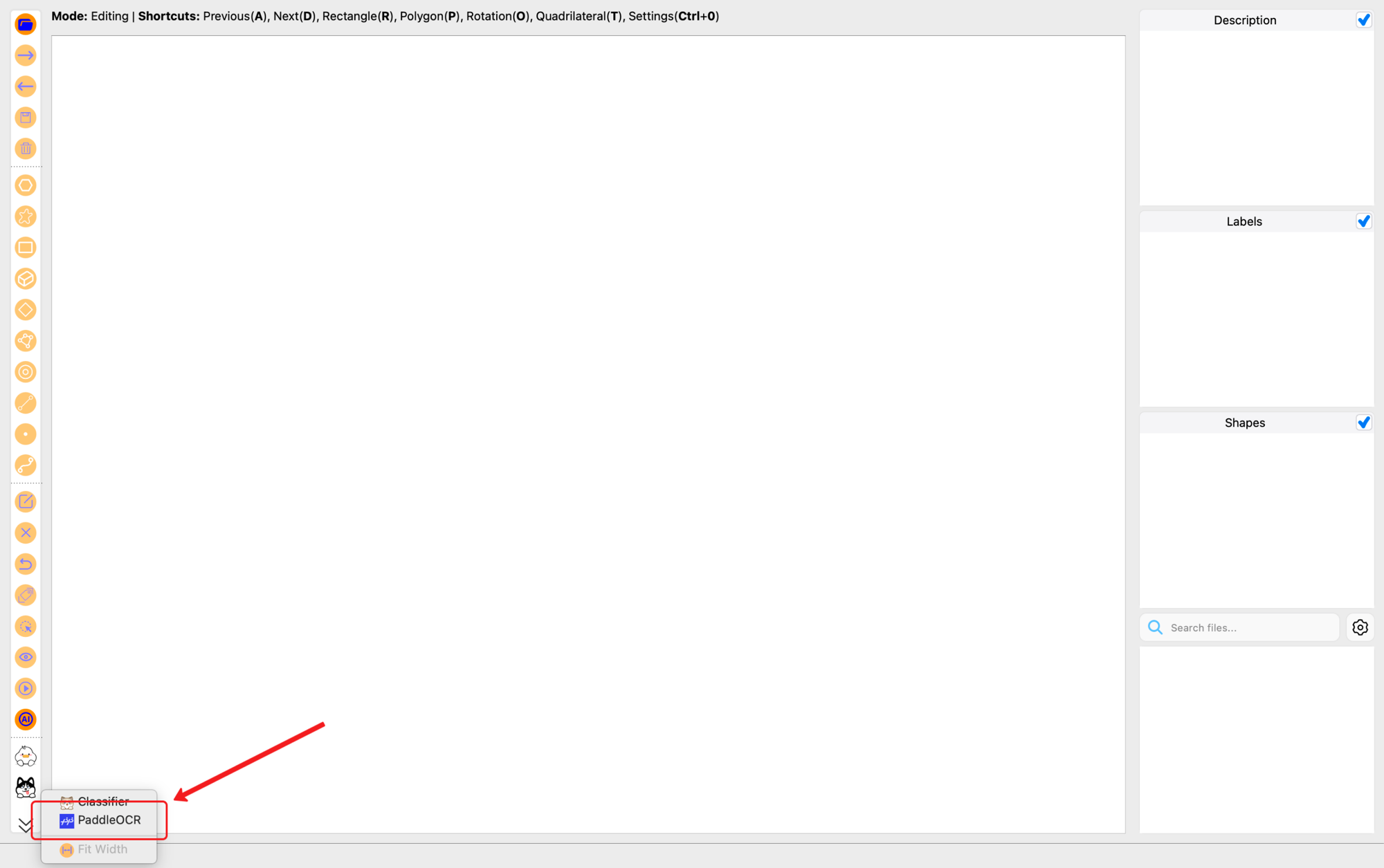
After launch, open the PaddleOCR panel from the `PaddleOCR` icon in the left toolbar, or with the shortcut `Ctrl+4`.
|
||||
|
||||
|
||||
|
||||
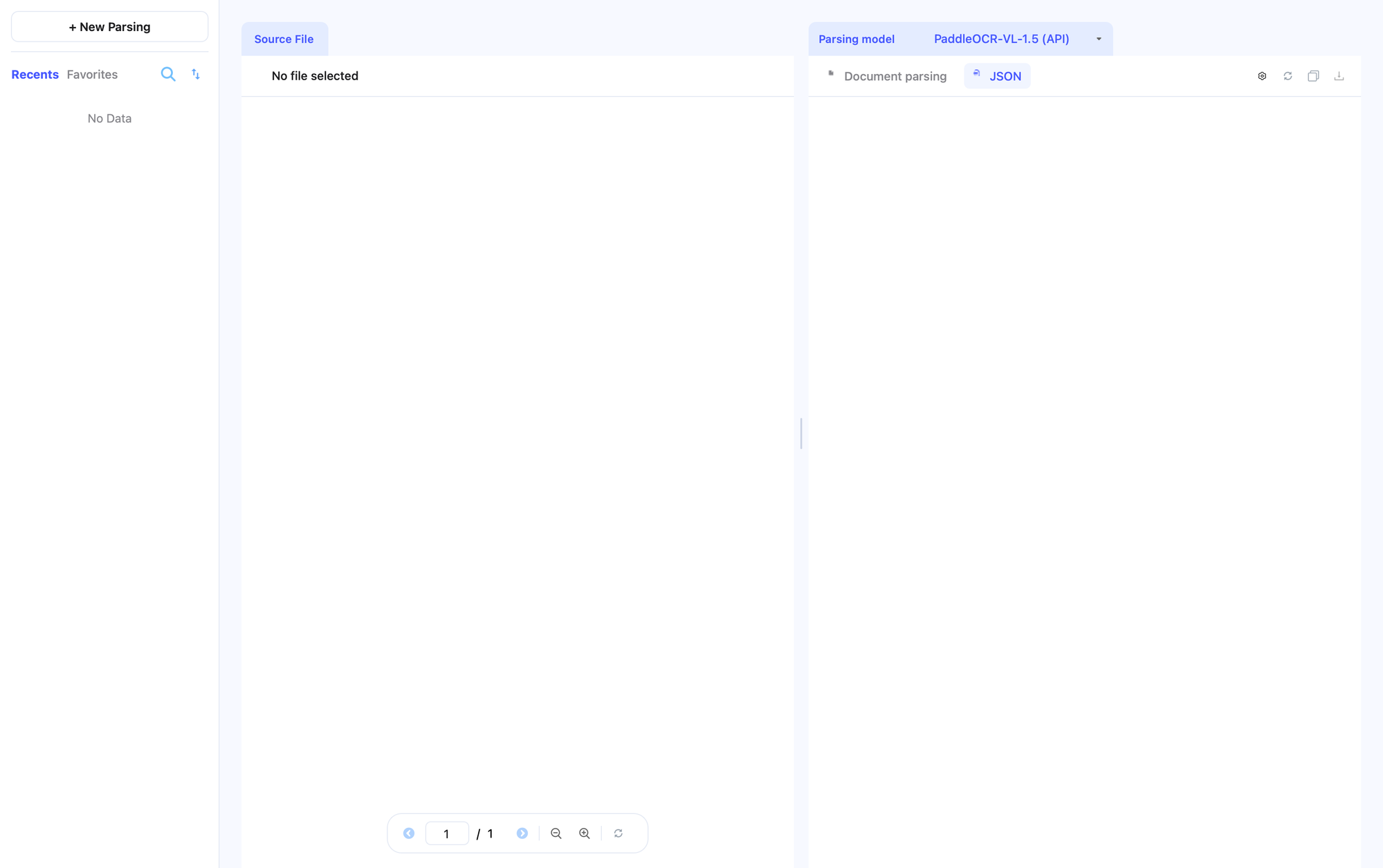
Once opened, the initial PaddleOCR panel looks like this:
|
||||
|
||||
|
||||
|
||||
## 2. Configure the PaddleOCR Official API
|
||||
|
||||
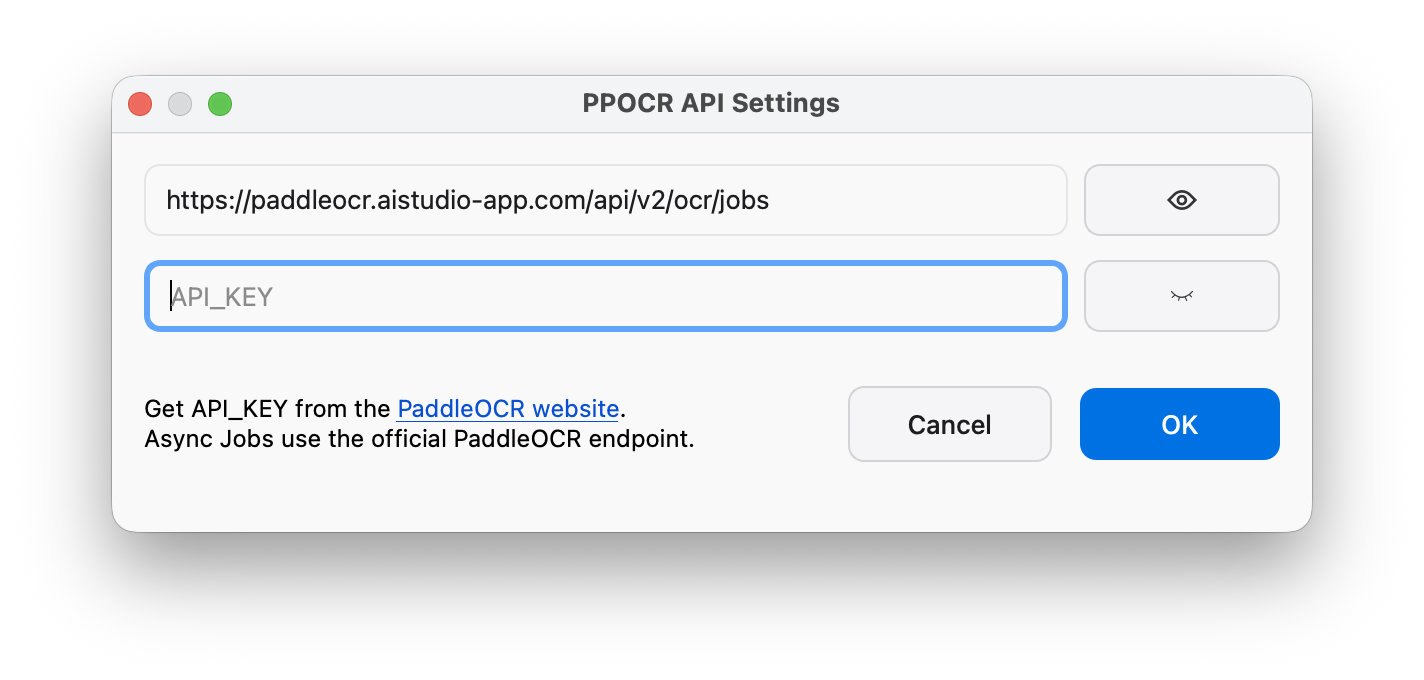
The X-AnyLabeling client supports the PaddleOCR official API out of the box. The first time you open the PaddleOCR panel without API credentials configured, a `PPOCR API Settings` dialog appears automatically. You can reopen it later via the gear button at the top of the right-hand result panel.
|
||||
|
||||
|
||||
|
||||
To obtain the `API_KEY`:
|
||||
|
||||
1. Visit the PaddleOCR website: <https://www.paddleocr.com>
|
||||
2. Click **API** in the top-right corner and select **PaddleOCR-VL-1.5**.
|
||||
3. Open the example code and copy the `TOKEN` (access token).
|
||||
4. Return to X-AnyLabeling, paste it into the `API_KEY` field of `PPOCR API Settings`, and confirm.
|
||||
|
||||
The `API_KEY` is used for request authentication, and the official service offers a free quota of tens of thousands of pages per day. The configuration is persisted locally:
|
||||
|
||||
```text
|
||||
${workspace}/xanylabeling_data/paddleocr/api_settings.json
|
||||
```
|
||||
|
||||
By default, `${workspace}` is the user home directory `~`; if X-AnyLabeling is launched with `--work-dir`, that directory is used instead.
|
||||
|
||||
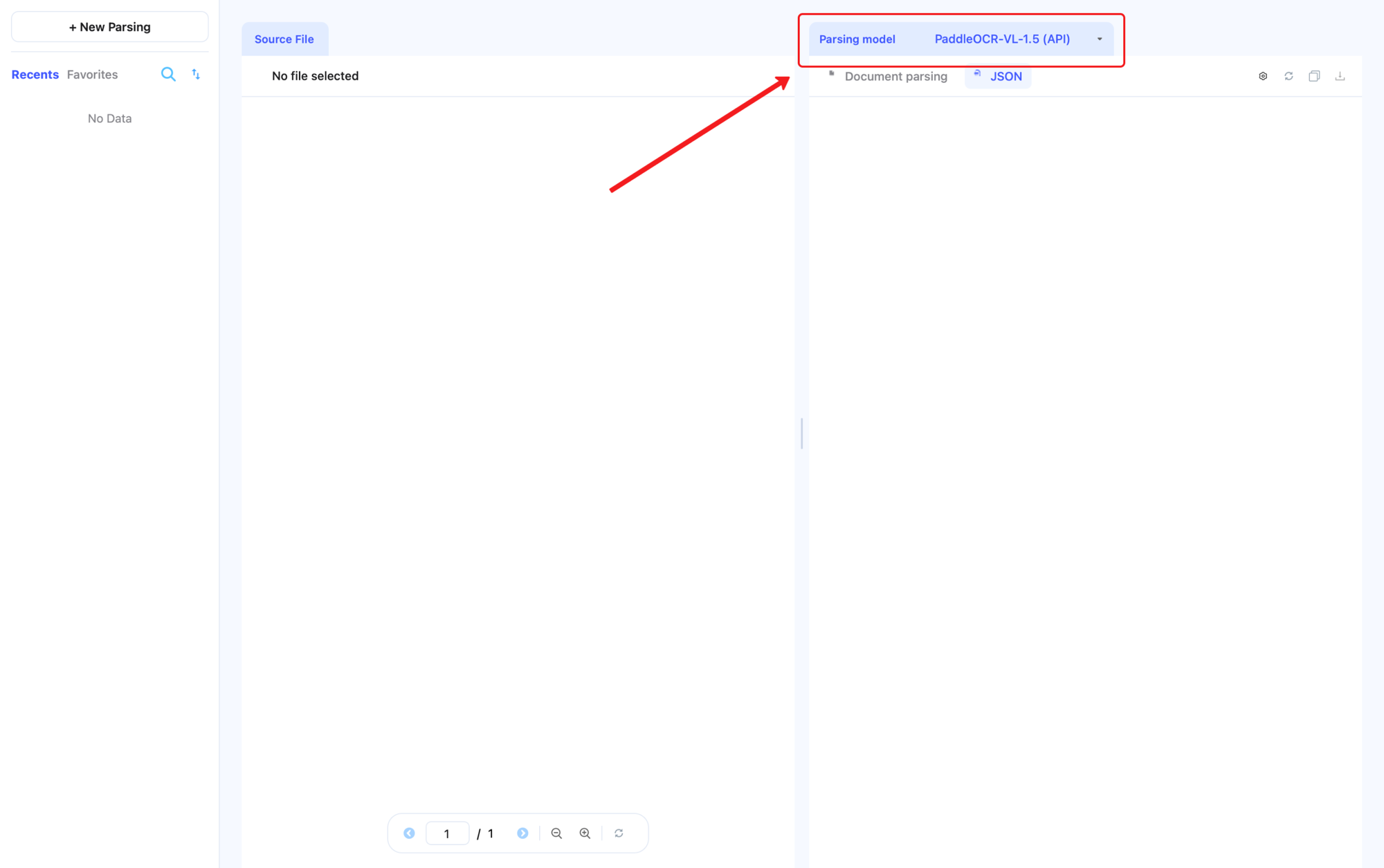
The right-hand `Parsing Model` dropdown currently supports these official API options:
|
||||
|
||||
- `PaddleOCR-VL-1.5 (API)`
|
||||
- `PaddleOCR-VL (API)`
|
||||
|
||||
## 3. Import Documents to Parse
|
||||
|
||||
In the PaddleOCR panel, click `+ New Parsing` at the top of the left panel to import files. Imported files are copied into the local PaddleOCR working directory and added to the parsing queue automatically.
|
||||
|
||||
Supported file types:
|
||||
|
||||
| Type | Extensions |
|
||||
| :--- | :--- |
|
||||
| PDF documents | `.pdf` |
|
||||
| Images | `.bmp`, `.cif`, `.gif`, `.jpeg`, `.jpg`, `.png`, `.tif`, `.tiff`, `.webp` |
|
||||
|
||||
Typical real-world inputs include textbook pages, paper screenshots, receipts, scanned contracts, tabular documents, and government/enterprise materials.
|
||||
|
||||
## 4. Choose a Parsing Model
|
||||
|
||||
The `Parsing Model` dropdown on the right lets you switch between versions of the PaddleOCR-VL series:
|
||||
|
||||
- `PaddleOCR-VL-1.5 (API)` (recommended): achieves 94.5% accuracy on OmniDocBench v1.5, supports polygon localization for greater robustness in scanned, tilted, curved, screen-captured, and complex-lighting scenarios, and adds seal recognition plus text detection and recognition capabilities.
|
||||
- `PaddleOCR-VL (API)`: the initial version.
|
||||
|
||||
|
||||
|
||||
## 5. Run Document Parsing
|
||||
|
||||
Once a model is selected, X-AnyLabeling starts parsing automatically. The model recognizes and structurizes text, formulas, tables, charts, seals, and other elements.
|
||||
|
||||
The colored dot at the lower-left corner of each left-side file item indicates parsing status:
|
||||
|
||||
- Blue: queued or parsing
|
||||
- Green: finished
|
||||
- Red: failed
|
||||
|
||||
## 6. Review Results Against the Source
|
||||
|
||||
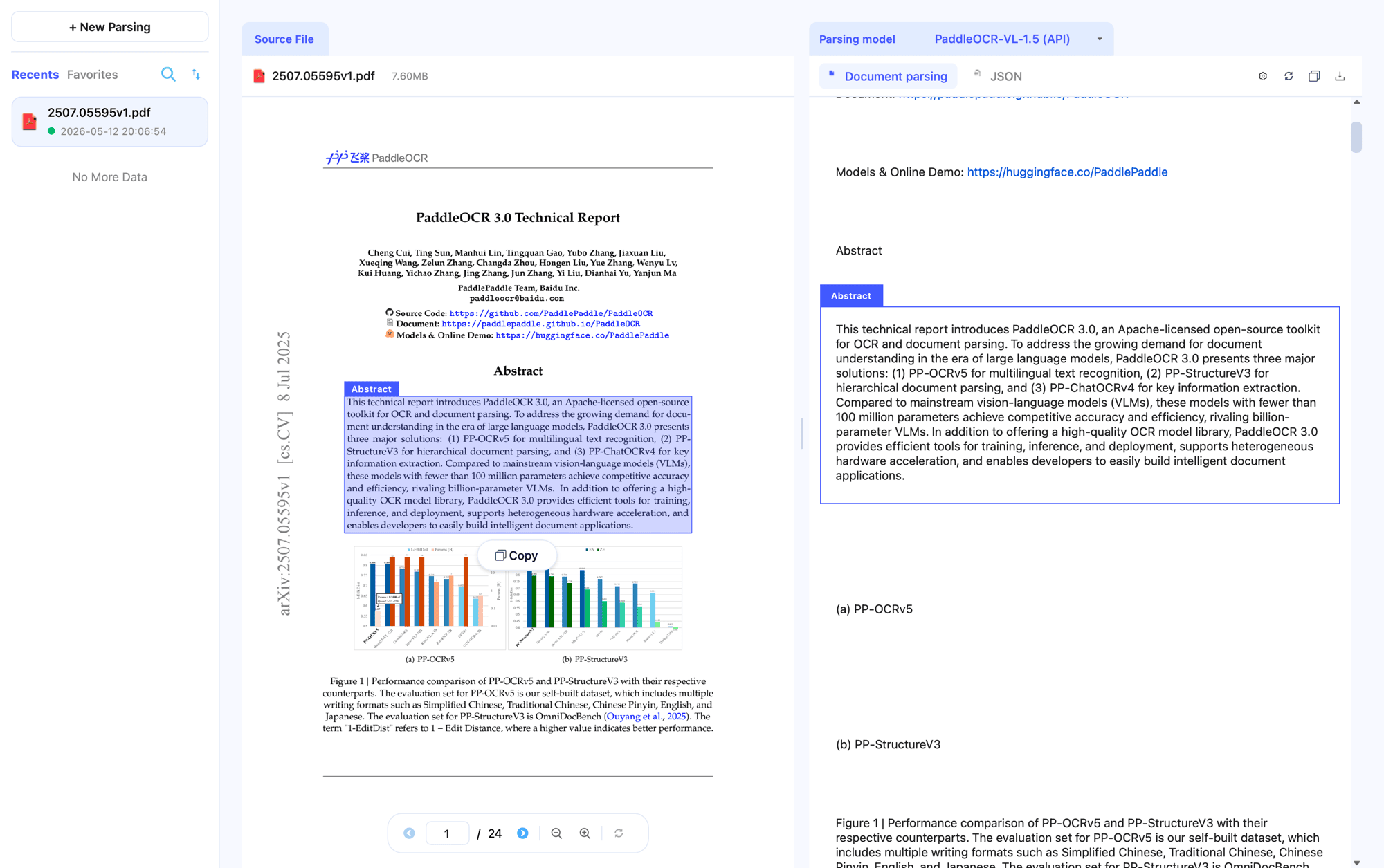
When parsing finishes, X-AnyLabeling shows a side-by-side view: the original document on the left, the model's parsed result on the right. You can review the text, formulas, table structure, chart information, and seal results block by block:
|
||||
|
||||
|
||||
|
||||
- Click any block on either side to highlight the matching block on the other side.
|
||||
- Double-click a block on the right, or click its `Correct` button, to enter edit mode.
|
||||
- Hover over a block in the source preview to reveal a `Copy` button for that block.
|
||||
- Manual corrections are recorded in the JSON as edited blocks; use the re-parse button to refetch model results.
|
||||
|
||||
Dedicated editors are provided for different content types:
|
||||
|
||||
| Editor | Used for |
|
||||
| :--- | :--- |
|
||||
| Rich text editor | Plain text, titles, footers, seals, and other non-table/non-formula blocks |
|
||||
| LaTeX formula editor | `display_formula`, `formula`, `formula_number`, `algorithm` — edits source with live preview |
|
||||
| Table editor | `table` blocks and content recognized as table structure — supports cell editing, row/column add/remove |
|
||||
|
||||
## 7. Switch to the JSON View
|
||||
|
||||
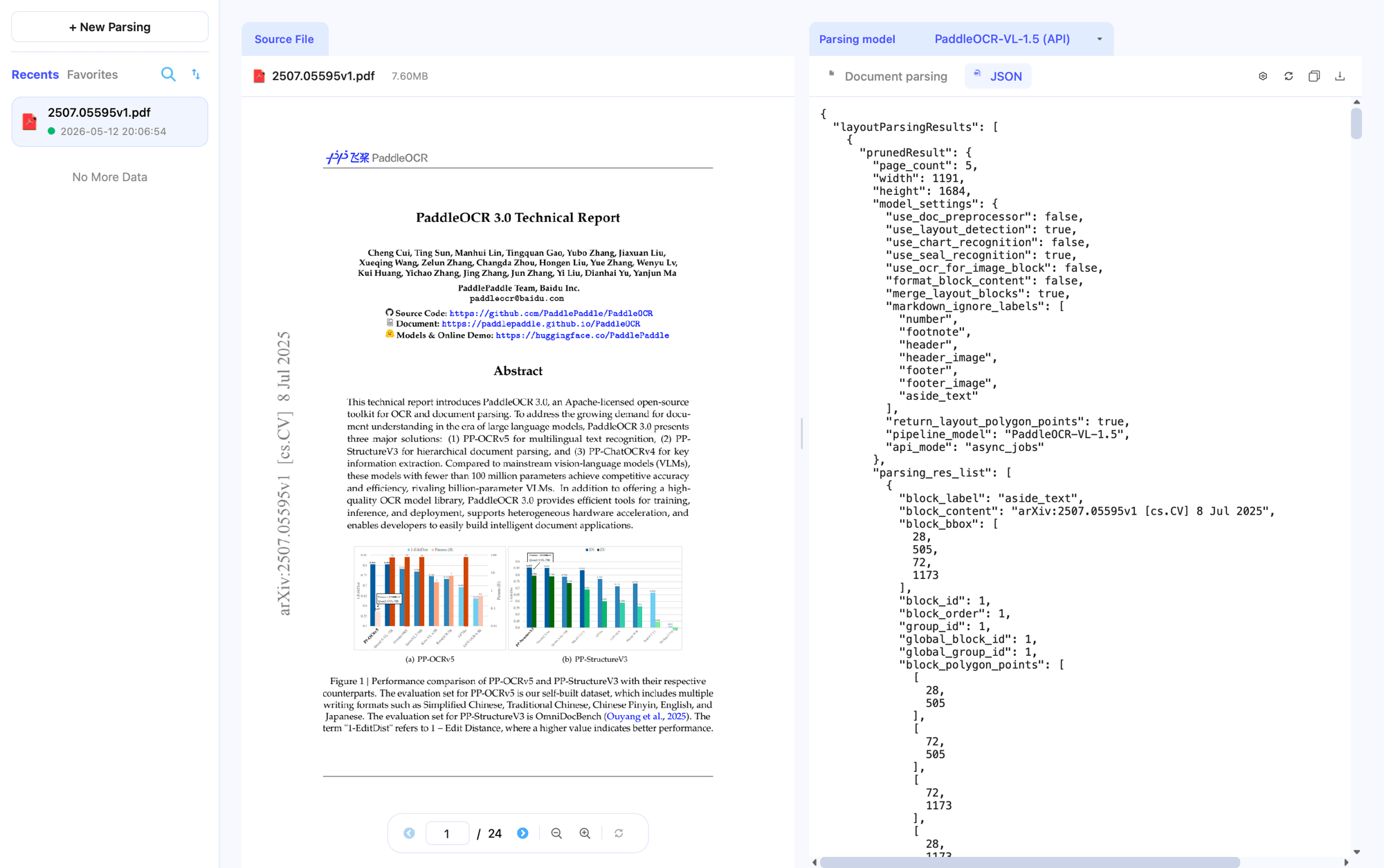
In addition to `Document Parsing`, X-AnyLabeling also offers a `JSON` view:
|
||||
|
||||
- `Document Parsing` view: card-based display of layout blocks, text, formulas, tables, and images — best for human review.
|
||||
- `JSON` view: the full structured result — best for data processing, training-sample construction, evaluation aggregation, and integration with downstream systems.
|
||||
|
||||
|
||||
|
||||
## 8. Export Results
|
||||
|
||||
After reviewing and correcting the results, you can export the annotations for downstream use:
|
||||
|
||||
- Building OCR training datasets
|
||||
- Running model evaluation and error analysis
|
||||
- Curating internal document parsing data
|
||||
- Feeding business systems for automation
|
||||
|
||||
In the `Document Parsing` view, the download button on the right toolbar exports a ZIP containing Markdown and related resources; in the `JSON` view, it exports the full JSON.
|
||||
|
||||
## Local Data Layout
|
||||
|
||||
X-AnyLabeling's PaddleOCR panel stores imported files and parsing results in a local working directory:
|
||||
|
||||
```text
|
||||
${workspace}/xanylabeling_data/paddleocr/
|
||||
├── api_settings.json
|
||||
├── ui_state.json
|
||||
├── files/
|
||||
│ ├── example.pdf
|
||||
│ ├── image.png
|
||||
│ ├── __PDF_example/
|
||||
│ │ ├── page_001.png
|
||||
│ │ └── page_002.png
|
||||
│ └── __BLOCK_IMAGES_image.png/
|
||||
│ └── page_001_block_0001.png
|
||||
└── jsons/
|
||||
├── example.pdf.json
|
||||
└── image.png.json
|
||||
```
|
||||
|
||||
Deleting a file from the left-hand list also removes its source file, local JSON, PDF preview pages, and block crops.
|
||||
|
||||
## References
|
||||
|
||||
- X-AnyLabeling repository: <https://github.com/CVHub520/X-AnyLabeling>
|
||||
- X-AnyLabeling PaddleOCR panel documentation: <https://github.com/CVHub520/X-AnyLabeling/blob/main/docs/zh_cn/paddle_ocr.md>
|
||||
- X-AnyLabeling-Server (local inference): <https://github.com/CVHub520/X-AnyLabeling-Server>
|
||||
- PaddleOCR website: <https://www.paddleocr.com>
|
||||
- PaddleOCR-VL tutorial: [PaddleOCR-VL Tutorial](../version3.x/pipeline_usage/PaddleOCR-VL.md)
|
||||
@@ -0,0 +1,164 @@
|
||||
---
|
||||
comments: true
|
||||
---
|
||||
|
||||
# X-AnyLabeling 文档解析
|
||||
|
||||
## 简介
|
||||
|
||||
**PaddleOCR-VL** 系列模型的文档解析能力已集成至 [X-AnyLabeling](https://github.com/CVHub520/X-AnyLabeling) 标注平台。
|
||||
|
||||
X-AnyLabeling 是由 CVHub 推出的工业级一体化智能标注平台,打通训练、推理、标注全链路。借助其 `PaddleOCR` 面板,开发者可以基于 PaddleOCR-VL 系列模型对图片和 PDF 进行版面解析、文字识别、公式识别、表格识别和印章识别,并在识别完成后对结果进行复核、编辑、复制和导出。
|
||||
|
||||
PaddleOCR-VL 在 X-AnyLabeling 中提供两种接入方式:
|
||||
|
||||
- **官方 API(推荐)**:直接调用 PaddleOCR 官方 API,适合快速验证模型效果、低成本体验和轻量开发场景,无需额外部署推理服务。
|
||||
- **本地部署**:通过 [X-AnyLabeling-Server](https://github.com/CVHub520/X-AnyLabeling-Server) 自行部署推理服务,适合私有化部署、敏感数据处理和持续性标注任务。
|
||||
|
||||
## 1. 安装 X-AnyLabeling
|
||||
|
||||
推荐从官方 Release 下载对应平台的预编译包:
|
||||
|
||||
- Release 地址:<https://github.com/CVHub520/X-AnyLabeling/releases>
|
||||
|
||||
也可以通过 pip 安装:
|
||||
|
||||
```bash
|
||||
pip install x-anylabeling
|
||||
```
|
||||
|
||||
启动后可以通过左侧工具栏中的 `PaddleOCR` 图标,或使用快捷键 `Ctrl+4` 打开 PaddleOCR 面板。
|
||||
|
||||

|
||||
|
||||
打开后即可看到 PaddleOCR 面板的初始界面:
|
||||
|
||||

|
||||
|
||||
## 2. 配置 PaddleOCR 官方 API
|
||||
|
||||
X-AnyLabeling 客户端默认支持 PaddleOCR 官方 API。首次打开 PaddleOCR 面板且尚未配置 API 信息时,界面会自动弹出 `PPOCR API Settings` 配置窗口;后续如需修改配置,也可以点击右侧结果面板顶部的齿轮按钮重新打开。
|
||||
|
||||

|
||||
|
||||
获取 `API_KEY` 的方式:
|
||||
|
||||
1. 访问 PaddleOCR 官方网站:<https://www.paddleocr.com>
|
||||
2. 点击右上角 **API**,选择 **PaddleOCR-VL-1.5**。
|
||||
3. 打开示例代码,复制其中的 `TOKEN`(访问令牌)。
|
||||
4. 回到 X-AnyLabeling 的 `PPOCR API Settings`,将其粘贴到 `API_KEY` 字段并确认即可。
|
||||
|
||||
`API_KEY` 用于接口鉴权,支持申请每天免费解析数万文档页数。配置会保存在本地:
|
||||
|
||||
```text
|
||||
${workspace}/xanylabeling_data/paddleocr/api_settings.json
|
||||
```
|
||||
|
||||
默认情况下,`${workspace}` 为用户主目录 `~`;如果启动 X-AnyLabeling 时传入了 `--work-dir`,则以该目录为准。
|
||||
|
||||
右侧 `Parsing Model` 下拉框当前支持以下官方 API 选项:
|
||||
|
||||
- `PaddleOCR-VL-1.5 (API)`
|
||||
- `PaddleOCR-VL (API)`
|
||||
|
||||
## 3. 导入待解析文档
|
||||
|
||||
打开 PaddleOCR 面板后,点击左侧面板顶部的 `+ New Parsing` 导入文件。导入后文件会自动复制到本地 PaddleOCR 工作目录,并自动加入解析队列。
|
||||
|
||||
当前 PaddleOCR 面板支持的文件类型:
|
||||
|
||||
| 类型 | 后缀 |
|
||||
| :--- | :--- |
|
||||
| PDF 文档 | `.pdf` |
|
||||
| 图片 | `.bmp`, `.cif`, `.gif`, `.jpeg`, `.jpg`, `.png`, `.tif`, `.tiff`, `.webp` |
|
||||
|
||||
适用的真实场景包括教材页面、论文截图、票据图片、合同扫描件、表格文档、政企材料等。
|
||||
|
||||
## 4. 选择解析模型
|
||||
|
||||
在右侧 `Parsing Model` 下拉框中可在 PaddleOCR-VL 系列的不同版本之间切换:
|
||||
|
||||
- `PaddleOCR-VL-1.5 (API)`(推荐):在 OmniDocBench v1.5 上达到 94.5% 精度,支持异形框定位,对扫描、倾斜、弯折、屏幕拍摄及复杂光照等场景具备更强鲁棒性,并新增印章识别与文本检测识别能力。
|
||||
- `PaddleOCR-VL (API)`:初代版本。
|
||||
|
||||

|
||||
|
||||
## 5. 执行 Document Parsing
|
||||
|
||||
选择模型后,X-AnyLabeling 会自动开始解析。模型会对文档中的文本、公式、表格、图表、印章等内容进行识别和结构化处理。
|
||||
|
||||
左侧文件项左下角的彩色点表示解析状态:
|
||||
|
||||
- 蓝色:待解析或正在解析
|
||||
- 绿色:解析完成
|
||||
- 红色:解析失败
|
||||
|
||||
## 6. 对照原文档复核解析结果
|
||||
|
||||
解析完成后,X-AnyLabeling 会呈现左右对照视图:左侧为原始文档,右侧为模型的解析结果。开发者可以逐段检查文字内容、公式表达、表格结构、图表信息和印章结果是否准确,并通过以下操作进行复核:
|
||||
|
||||

|
||||
|
||||
- 单击左侧预览区或右侧结果区中的任意块,可以在两侧快速匹配并高亮对应内容。
|
||||
- 双击右侧识别结果中的某个块,或点击该块的 `纠正` 按钮,进入编辑状态。
|
||||
- 鼠标悬停在源文件预览区的块上时,可以直接点击浮出的 `复制` 按钮复制该块内容。
|
||||
- 对识别结果做人工修正后,JSON 中会记录已编辑块;如需重新获取模型结果,可使用右侧重解析按钮。
|
||||
|
||||
针对不同类型的内容,X-AnyLabeling 提供专用编辑器:
|
||||
|
||||
| 编辑器 | 适用场景 |
|
||||
| :--- | :--- |
|
||||
| 富文本编辑器 | 普通文本、标题、页脚、印章等非表格/公式内容 |
|
||||
| LaTeX 公式编辑器 | `display_formula`, `formula`, `formula_number`, `algorithm`,支持源码编辑与实时预览 |
|
||||
| 表格编辑器 | `table` 或被识别为表格结构的内容,支持单元格编辑、增删行列等 |
|
||||
|
||||
## 7. 切换 JSON 视图查看结果
|
||||
|
||||
除了 `Document Parsing` 视图外,X-AnyLabeling 还支持 `JSON` 视图:
|
||||
|
||||
- `Document Parsing` 视图:以卡片形式展示版面块、文本、公式、表格、图片,适合人工阅读和结果复核。
|
||||
- `JSON` 视图:查看完整的结构化结果,适合开发者进行数据处理、训练样本构建、评测结果整理和业务系统集成。
|
||||
|
||||

|
||||
|
||||
## 8. 导出结果
|
||||
|
||||
完成复核和修正后,可以将标注结果导出,用于后续任务,典型用途包括:
|
||||
|
||||
- 构建 OCR 训练数据集
|
||||
- 进行模型评测和误差分析
|
||||
- 沉淀企业内部文档解析数据
|
||||
- 接入业务系统进行自动化处理
|
||||
|
||||
在 `Document Parsing` 视图下,右侧工具栏的下载按钮会下载包含 Markdown 与相关资源的 ZIP;在 `JSON` 视图下则下载完整 JSON。
|
||||
|
||||
## 数据目录结构
|
||||
|
||||
X-AnyLabeling PaddleOCR 面板会将导入文件和解析结果保存在本地工作目录中:
|
||||
|
||||
```text
|
||||
${workspace}/xanylabeling_data/paddleocr/
|
||||
├── api_settings.json
|
||||
├── ui_state.json
|
||||
├── files/
|
||||
│ ├── example.pdf
|
||||
│ ├── image.png
|
||||
│ ├── __PDF_example/
|
||||
│ │ ├── page_001.png
|
||||
│ │ └── page_002.png
|
||||
│ └── __BLOCK_IMAGES_image.png/
|
||||
│ └── page_001_block_0001.png
|
||||
└── jsons/
|
||||
├── example.pdf.json
|
||||
└── image.png.json
|
||||
```
|
||||
|
||||
删除左侧文件项时,会同时删除源文件、本地 JSON、PDF 预览页和 block 裁剪图。
|
||||
|
||||
## 参考链接
|
||||
|
||||
- X-AnyLabeling 项目主页:<https://github.com/CVHub520/X-AnyLabeling>
|
||||
- X-AnyLabeling PaddleOCR 面板文档:<https://github.com/CVHub520/X-AnyLabeling/blob/main/docs/zh_cn/paddle_ocr.md>
|
||||
- X-AnyLabeling-Server(本地推理服务):<https://github.com/CVHub520/X-AnyLabeling-Server>
|
||||
- PaddleOCR 官方网站:<https://www.paddleocr.com>
|
||||
- PaddleOCR-VL 使用教程:[PaddleOCR-VL 使用教程](../version3.x/pipeline_usage/PaddleOCR-VL.md)
|
||||
@@ -151,6 +151,8 @@ plugins:
|
||||
PaddleOCR-VL产线: PaddleOCR-VL Pipeline
|
||||
PP-DocTranslation产线: PP-DocTranslation Pipeline
|
||||
推理引擎与配置说明: Inference Engine and Configuration
|
||||
数据标注: Data Annotation
|
||||
X-AnyLabeling 文档解析: Document Parsing with X-AnyLabeling
|
||||
多硬件使用: Multi-Devices Usage
|
||||
PaddleOCR 多硬件使用指南: PaddleOCR Multi-Devices Usage Guide
|
||||
昇腾 NPU 飞桨安装教程: Ascend NPU PaddlePaddle Installation Tutorial
|
||||
@@ -364,6 +366,8 @@ nav:
|
||||
- 印章文本识别产线: version3.x/pipeline_usage/seal_recognition.md
|
||||
- 通用表格识别v2产线: version3.x/pipeline_usage/table_recognition_v2.md
|
||||
- PP-DocTranslation产线: version3.x/pipeline_usage/PP-DocTranslation.md
|
||||
- 数据标注:
|
||||
- X-AnyLabeling 文档解析: data_anno_synth/x_anylabeling.md
|
||||
- 多硬件使用:
|
||||
- PaddleOCR 多硬件使用指南: version3.x/other_devices_support/multi_devices_use_guide.md
|
||||
- 昇腾 NPU 飞桨安装教程: version3.x/other_devices_support/paddlepaddle_install_NPU.md
|
||||
|
||||
Reference in new issue
Block a user