 Garrett DelfosseandClaude Opus 5.5
7cd1b2040b
- Experiment, behind `chat-projects` (off by default). First of three stacked PRs: #29301 (memory), #29583 (UI). This PR is API only; the screenshots below are from the UI in #29583. - CRUD under `/api/experimental/organizations/{organization}/chats/projects/{project}`. `GET /api/experimental/chats/projects` lists the caller's projects across all organizations. - `project_id` on chat create and as a chat list filter. A chat joins a project only at creation; there is no move. - Projects are identified by ID. Names are display labels (64 characters, description 1024) with no uniqueness constraint. An optional `icon` URL (usually an emoji image under `/emojis`) is capped at 256 characters and audited. - A user can own at most 100 projects across all organizations; creating another answers 409. Creates count and insert under a per-owner advisory lock so concurrent requests cannot overshoot. - Projects are private to their `owner_id`. Members may only create their own, and a chat can only be bound to a project its owner owns. An unreadable or foreign project on chat create answers 404 so IDs cannot be probed; a project from another organization answers 400. - Permissions ride on the `agents-access` role next to chats (after #30004), so whoever can use Coder Agents can use projects. Owners and org admins reach every project. ### Examples Create a project in an organization: ```http POST /api/experimental/organizations/{organization}/chats/projects {"name": "Platform", "description": "Infra and deploy work", "icon": "/emojis/1f680.png"} ``` ```json { "id": "7c0e4a3e-5b1f-4f7d-9a51-2f3c8f6d2b10", "organization_id": "bb640d07-ca8a-4869-b6bc-ae61ebb2fda1", "owner_id": "0ed9befc-4911-4ccf-a8e2-559bf72daa94", "name": "Platform", "description": "Infra and deploy work", "icon": "/emojis/1f680.png", "created_at": "2026-09-30T15:04:05Z", "updated_at": "2026-09-30T15:04:05Z" } ``` List the caller's projects across organizations with `GET /api/experimental/chats/projects` (an array of the object above). Update with `PATCH .../chats/projects/{project}` and any of `name`, `description`, `icon`; delete with `DELETE`, which detaches its chats. Create a chat in the project, and list only its chats: ```http POST /api/v2/chats {"organization_id": "bb640d07-…", "project_id": "7c0e4a3e-…", "content": [{"type": "text", "text": "Plan the deploy"}]} GET /api/v2/chats?project_id=7c0e4a3e-… ``` At the limit: ```json 409 {"message": "You can have at most 100 chat projects. Delete a project to create another."} ``` <details> <summary>Screenshots (UI from #29583)</summary> 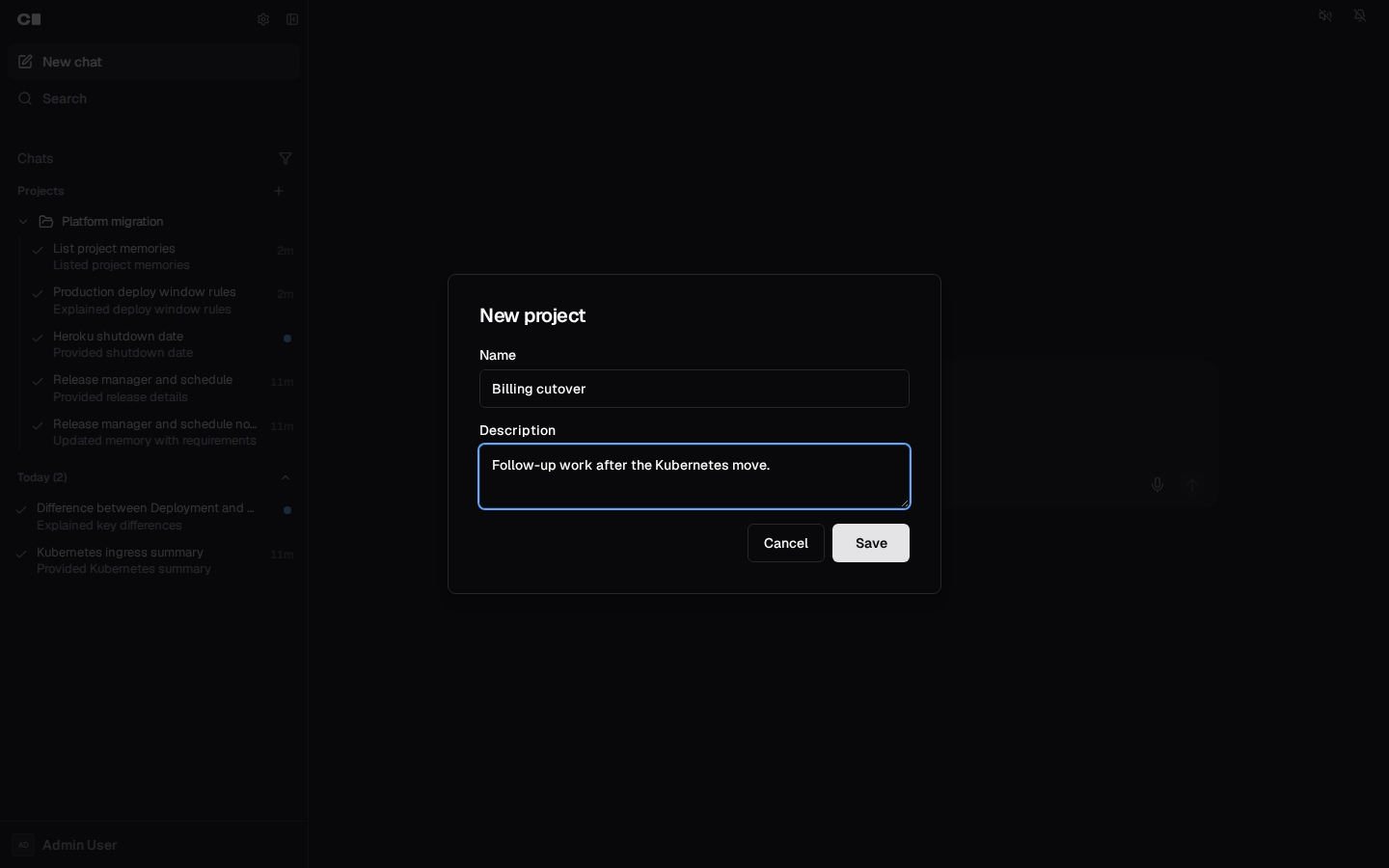 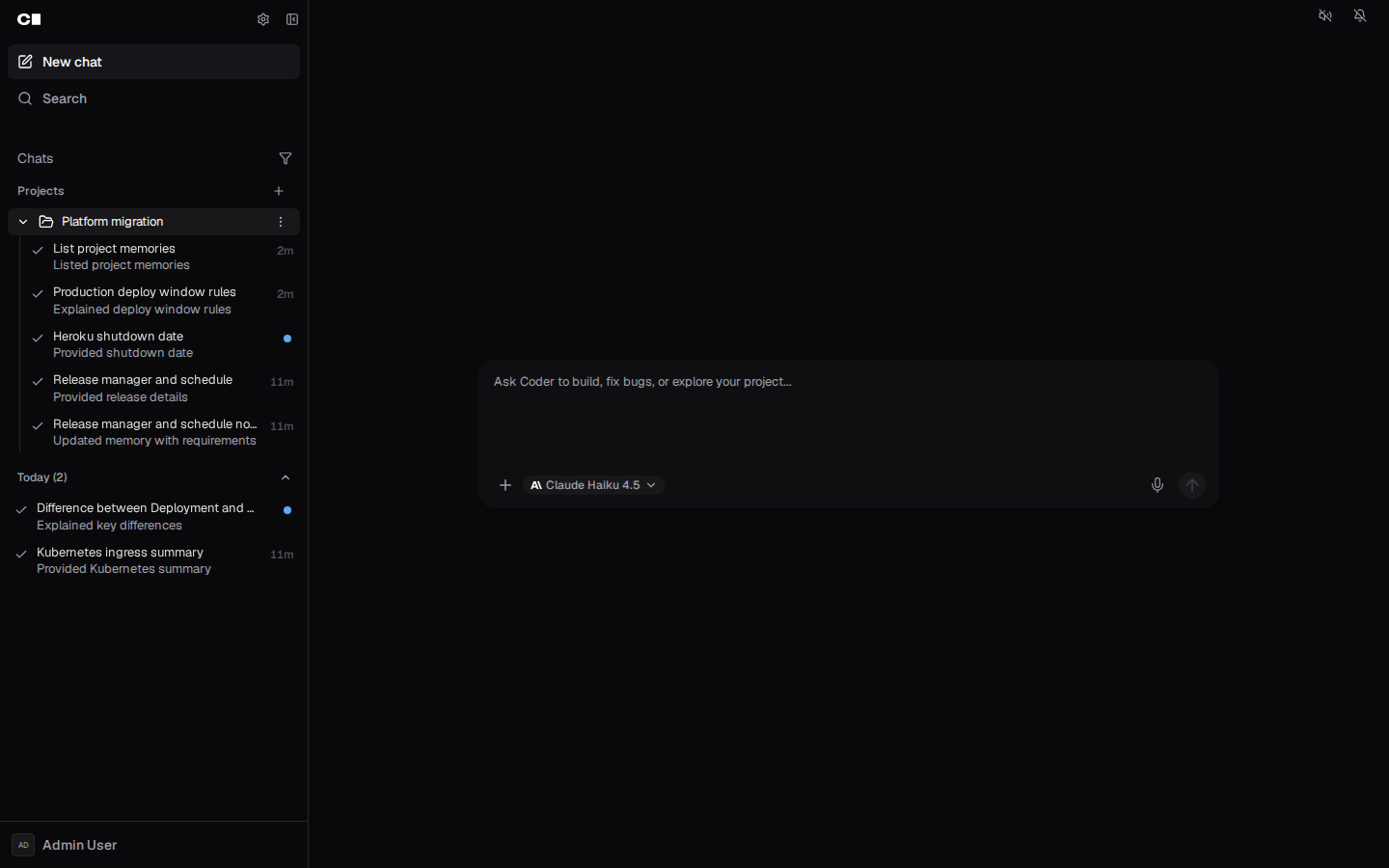 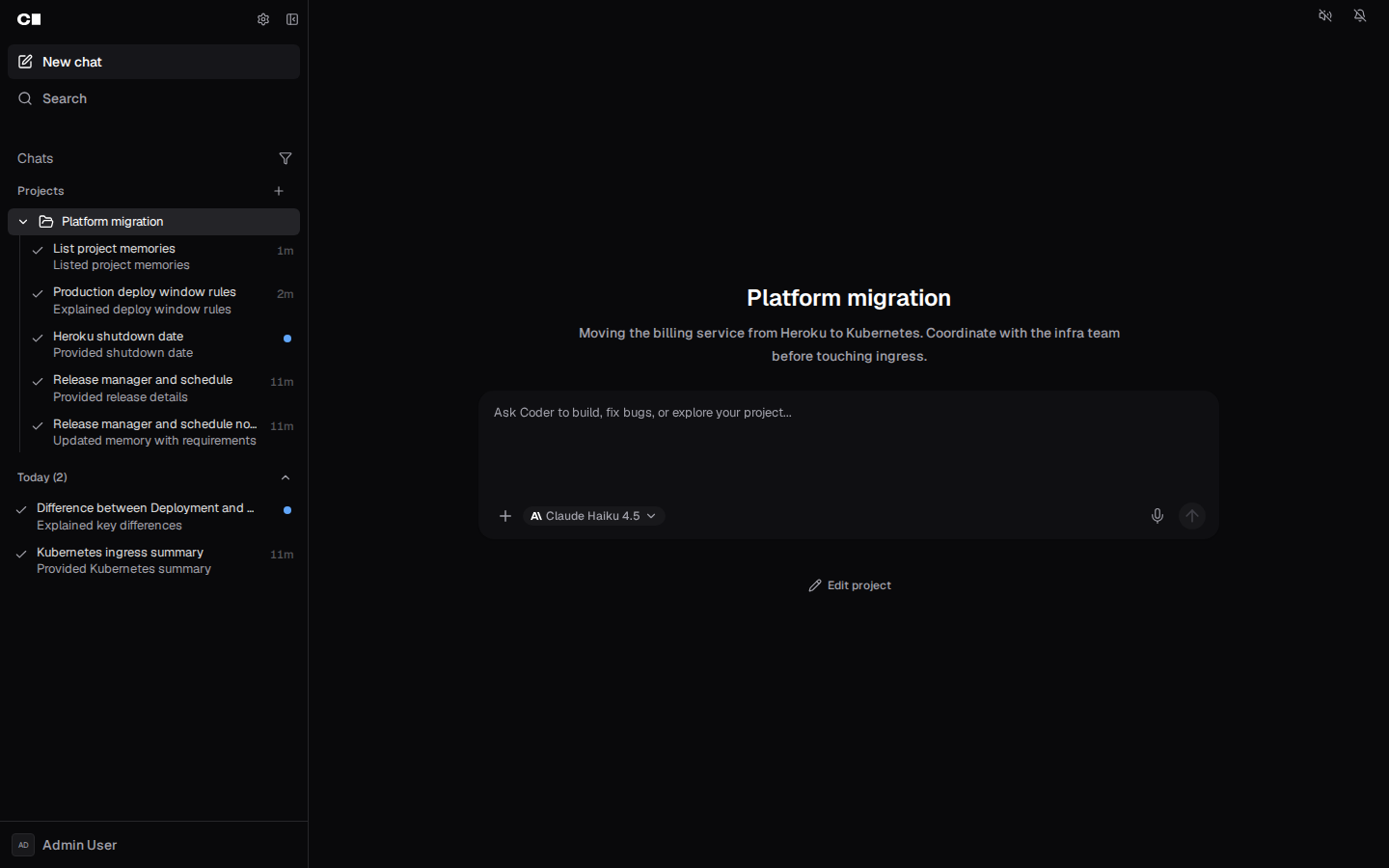 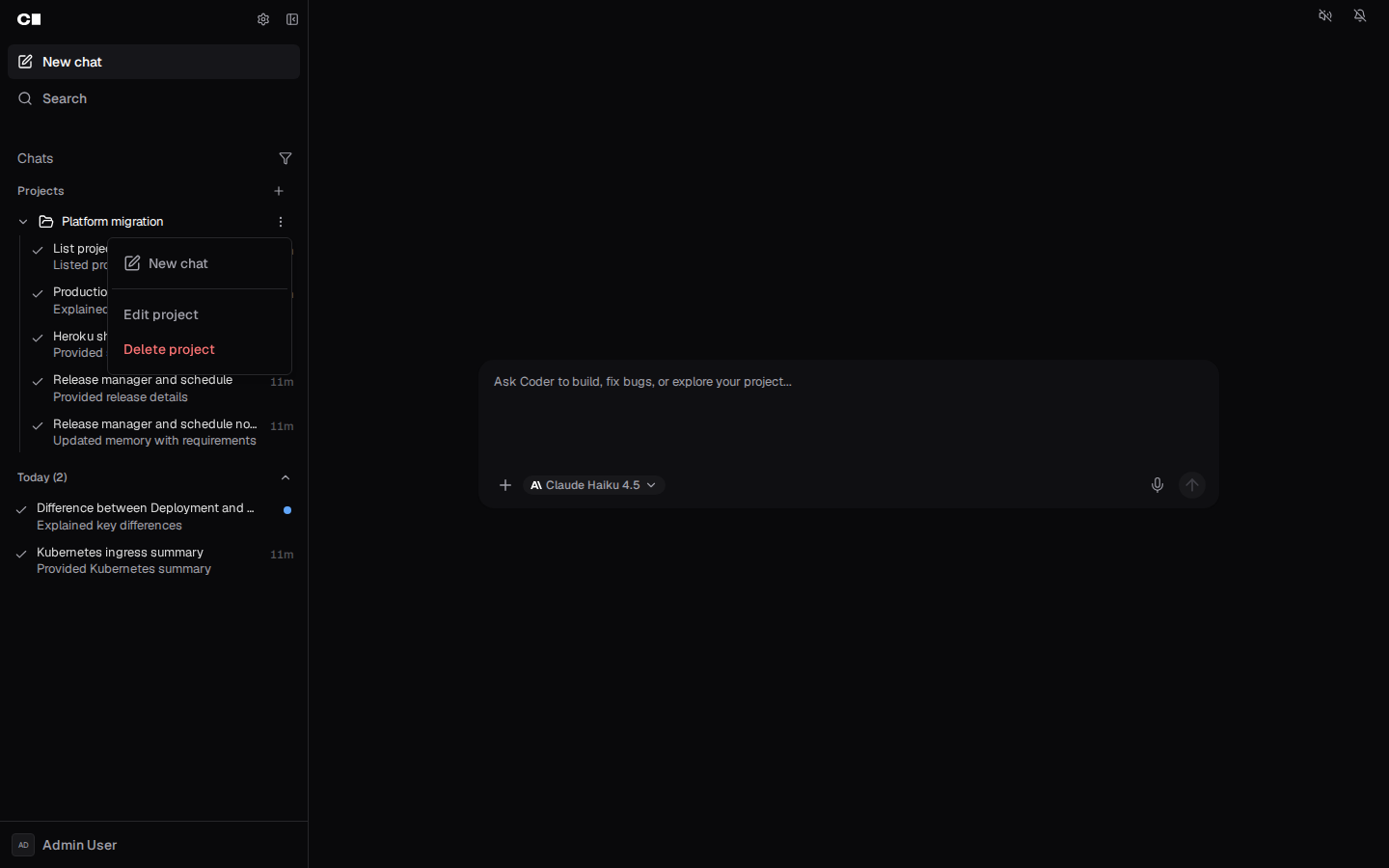 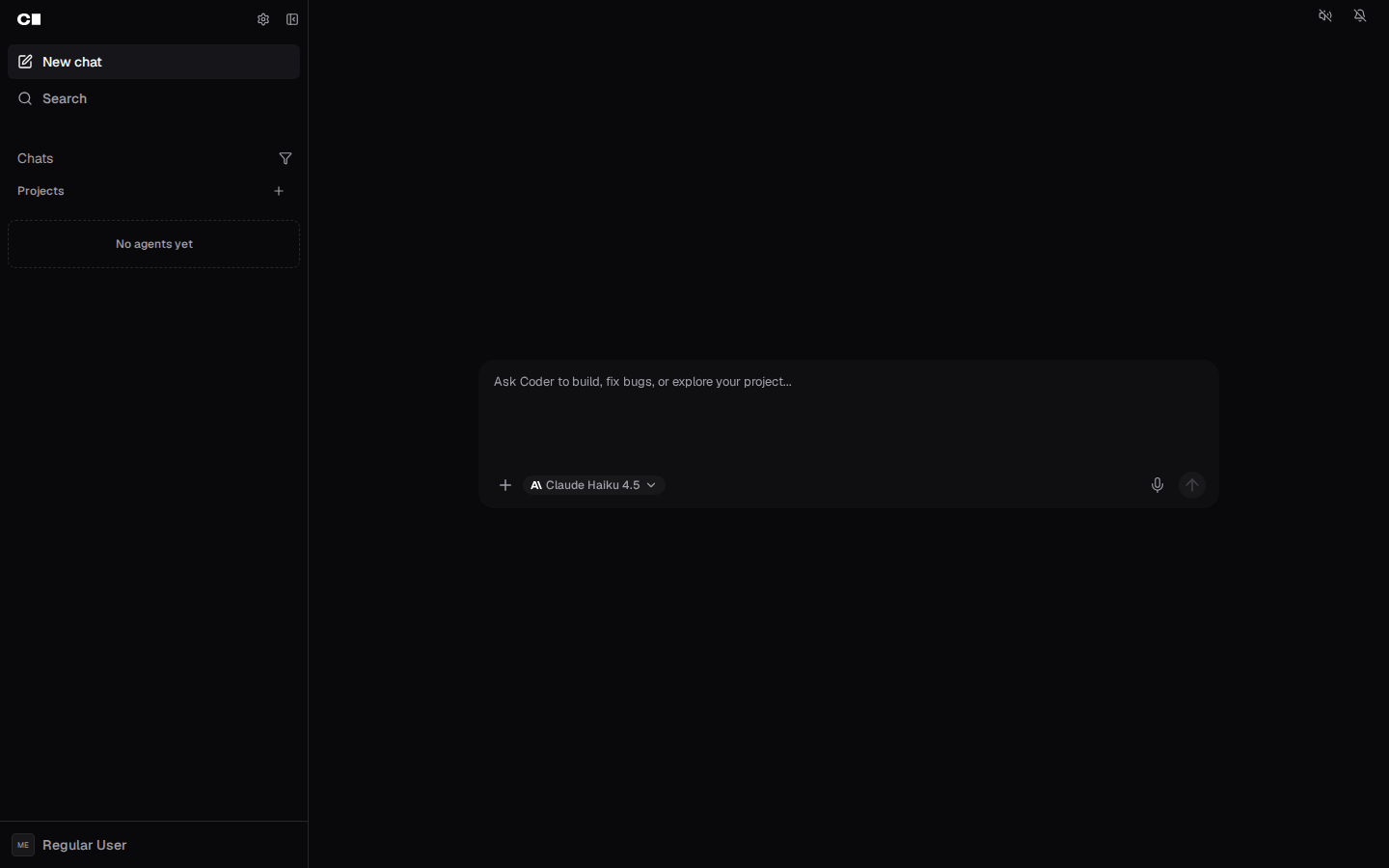 </details> --- Generated with Coder Agents on behalf of @f0ssel. --------- Co-authored-by: Claude Opus 5.5 (1M context) <noreply@anthropic.com>





58 KiB
Generated
title
| title |
|---|
| Users |
Get users
Code samples
# Example request using curl
curl -X GET http://coder-server:8080/api/v2/users \
  -H 'Accept: application/json' \
  -H 'Coder-Session-Token: API_KEY'
GET /api/v2/users
Parameters
| Name | In | Type | Required | Description |
|---|---|---|---|---|
q |
query | string | false | Search query |
after_id |
query | string(uuid) | false | After ID |
limit |
query | integer | false | Page limit |
offset |
query | integer | false | Page offset |
Example responses
200 Response
{
  "count": 0,
  "users": [
    {
      "avatar_url": "http://example.com",
      "created_at": "2019-08-24T14:15:22Z",
      "email": "user@example.com",
      "has_ai_seat": true,
      "id": "497f6eca-6276-4993-bfeb-53cbbbba6f08",
      "is_service_account": true,
      "last_seen_at": "2019-08-24T14:15:22Z",
      "login_type": "",
      "name": "string",
      "organization_ids": [
        "497f6eca-6276-4993-bfeb-53cbbbba6f08"
      ],
      "roles": [
        {
          "display_name": "string",
          "name": "string",
          "organization_id": "string"
        }
      ],
      "status": "active",
      "theme_preference": "string",
      "updated_at": "2019-08-24T14:15:22Z",
      "username": "string"
    }
  ]
}
Responses
| Status | Meaning | Description | Schema |
|---|---|---|---|
| 200 | OK | OK | codersdk.GetUsersResponse |
To perform this operation, you must be authenticated. Learn more.
Create new user
Code samples
# Example request using curl
curl -X POST http://coder-server:8080/api/v2/users \
  -H 'Content-Type: application/json' \
  -H 'Accept: application/json' \
  -H 'Coder-Session-Token: API_KEY'
POST /api/v2/users
Body parameter
{
  "email": "user@example.com",
  "login_type": "",
  "name": "string",
  "organization_ids": [
    "497f6eca-6276-4993-bfeb-53cbbbba6f08"
  ],
  "password": "string",
  "roles": [
    "string"
  ],
  "service_account": true,
  "user_status": "active",
  "username": "string"
}
Parameters
| Name | In | Type | Required | Description |
|---|---|---|---|---|
body |
body | codersdk.CreateUserRequest | true | Create user request |
Example responses
201 Response
{
  "avatar_url": "http://example.com",
  "created_at": "2019-08-24T14:15:22Z",
  "email": "user@example.com",
  "has_ai_seat": true,
  "id": "497f6eca-6276-4993-bfeb-53cbbbba6f08",
  "is_service_account": true,
  "last_seen_at": "2019-08-24T14:15:22Z",
  "login_type": "",
  "name": "string",
  "organization_ids": [
    "497f6eca-6276-4993-bfeb-53cbbbba6f08"
  ],
  "roles": [
    {
      "display_name": "string",
      "name": "string",
      "organization_id": "string"
    }
  ],
  "status": "active",
  "theme_preference": "string",
  "updated_at": "2019-08-24T14:15:22Z",
  "username": "string"
}
Responses
| Status | Meaning | Description | Schema |
|---|---|---|---|
| 201 | Created | Created | codersdk.User |
To perform this operation, you must be authenticated. Learn more.
Get authentication methods
Code samples
# Example request using curl
curl -X GET http://coder-server:8080/api/v2/users/authmethods \
  -H 'Accept: application/json' \
  -H 'Coder-Session-Token: API_KEY'
GET /api/v2/users/authmethods
Example responses
200 Response
{
  "github": {
    "default_provider_configured": true,
    "enabled": true
  },
  "oidc": {
    "enabled": true,
    "iconUrl": "string",
    "signInText": "string"
  },
  "password": {
    "enabled": true
  },
  "terms_of_service_url": "string"
}
Responses
| Status | Meaning | Description | Schema |
|---|---|---|---|
| 200 | OK | OK | codersdk.AuthMethods |
To perform this operation, you must be authenticated. Learn more.
Check initial user created
Code samples
# Example request using curl
curl -X GET http://coder-server:8080/api/v2/users/first \
  -H 'Accept: application/json' \
  -H 'Coder-Session-Token: API_KEY'
GET /api/v2/users/first
Example responses
200 Response
{
  "detail": "string",
  "message": "string",
  "validations": [
    {
      "detail": "string",
      "field": "string"
    }
  ]
}
Responses
| Status | Meaning | Description | Schema |
|---|---|---|---|
| 200 | OK | OK | codersdk.Response |
To perform this operation, you must be authenticated. Learn more.
Create initial user
Code samples
# Example request using curl
curl -X POST http://coder-server:8080/api/v2/users/first \
  -H 'Content-Type: application/json' \
  -H 'Accept: application/json' \
  -H 'Coder-Session-Token: API_KEY'
POST /api/v2/users/first
Body parameter
{
  "email": "string",
  "name": "string",
  "onboarding_info": {
    "newsletter_marketing": true,
    "newsletter_releases": true
  },
  "password": "string",
  "trial": true,
  "trial_info": {
    "company_name": "string",
    "country": "string",
    "developers": "string",
    "first_name": "string",
    "job_title": "string",
    "last_name": "string",
    "phone_number": "string"
  },
  "username": "string"
}
Parameters
| Name | In | Type | Required | Description |
|---|---|---|---|---|
body |
body | codersdk.CreateFirstUserRequest | true | First user request |
Example responses
201 Response
{
  "organization_id": "7c60d51f-b44e-4682-87d6-449835ea4de6",
  "user_id": "a169451c-8525-4352-b8ca-070dd449a1a5"
}
Responses
| Status | Meaning | Description | Schema |
|---|---|---|---|
| 201 | Created | Created | codersdk.CreateFirstUserResponse |
To perform this operation, you must be authenticated. Learn more.
Log out user
Code samples
# Example request using curl
curl -X POST http://coder-server:8080/api/v2/users/logout \
  -H 'Accept: application/json' \
  -H 'Coder-Session-Token: API_KEY'
POST /api/v2/users/logout
Example responses
200 Response
{
  "detail": "string",
  "message": "string",
  "validations": [
    {
      "detail": "string",
      "field": "string"
    }
  ]
}
Responses
| Status | Meaning | Description | Schema |
|---|---|---|---|
| 200 | OK | OK | codersdk.Response |
To perform this operation, you must be authenticated. Learn more.
OAuth 2.0 GitHub Callback
Code samples
# Example request using curl
curl -X GET http://coder-server:8080/api/v2/users/oauth2/github/callback \
  -H 'Coder-Session-Token: API_KEY'
GET /api/v2/users/oauth2/github/callback
Responses
| Status | Meaning | Description | Schema |
|---|---|---|---|
| 307 | Temporary Redirect | Temporary Redirect |
To perform this operation, you must be authenticated. Learn more.
Get Github device auth
Code samples
# Example request using curl
curl -X GET http://coder-server:8080/api/v2/users/oauth2/github/device \
  -H 'Accept: application/json' \
  -H 'Coder-Session-Token: API_KEY'
GET /api/v2/users/oauth2/github/device
Example responses
200 Response
{
  "device_code": "string",
  "expires_in": 0,
  "interval": 0,
  "user_code": "string",
  "verification_uri": "string"
}
Responses
| Status | Meaning | Description | Schema |
|---|---|---|---|
| 200 | OK | OK | codersdk.ExternalAuthDevice |
To perform this operation, you must be authenticated. Learn more.
Get OIDC claims for the authenticated user
Code samples
# Example request using curl
curl -X GET http://coder-server:8080/api/v2/users/oidc-claims \
  -H 'Accept: application/json' \
  -H 'Coder-Session-Token: API_KEY'
GET /api/v2/users/oidc-claims
Example responses
200 Response
{
  "claims": {}
}
Responses
| Status | Meaning | Description | Schema |
|---|---|---|---|
| 200 | OK | OK | codersdk.OIDCClaimsResponse |
To perform this operation, you must be authenticated. Learn more.
OpenID Connect Callback
Code samples
# Example request using curl
curl -X GET http://coder-server:8080/api/v2/users/oidc/callback \
  -H 'Coder-Session-Token: API_KEY'
GET /api/v2/users/oidc/callback
Responses
| Status | Meaning | Description | Schema |
|---|---|---|---|
| 307 | Temporary Redirect | Temporary Redirect |
To perform this operation, you must be authenticated. Learn more.
Get user by name
Code samples
# Example request using curl
curl -X GET http://coder-server:8080/api/v2/users/{user} \
  -H 'Accept: application/json' \
  -H 'Coder-Session-Token: API_KEY'
GET /api/v2/users/{user}
Parameters
| Name | In | Type | Required | Description |
|---|---|---|---|---|
user |
path | string | true | User ID, username, or me |
Example responses
200 Response
{
  "avatar_url": "http://example.com",
  "created_at": "2019-08-24T14:15:22Z",
  "email": "user@example.com",
  "has_ai_seat": true,
  "id": "497f6eca-6276-4993-bfeb-53cbbbba6f08",
  "is_service_account": true,
  "last_seen_at": "2019-08-24T14:15:22Z",
  "login_type": "",
  "name": "string",
  "organization_ids": [
    "497f6eca-6276-4993-bfeb-53cbbbba6f08"
  ],
  "roles": [
    {
      "display_name": "string",
      "name": "string",
      "organization_id": "string"
    }
  ],
  "status": "active",
  "theme_preference": "string",
  "updated_at": "2019-08-24T14:15:22Z",
  "username": "string"
}
Responses
| Status | Meaning | Description | Schema |
|---|---|---|---|
| 200 | OK | OK | codersdk.User |
To perform this operation, you must be authenticated. Learn more.
Delete user
Code samples
# Example request using curl
curl -X DELETE http://coder-server:8080/api/v2/users/{user} \
  -H 'Coder-Session-Token: API_KEY'
DELETE /api/v2/users/{user}
Parameters
| Name | In | Type | Required | Description |
|---|---|---|---|---|
user |
path | string | true | User ID, name, or me |
Responses
| Status | Meaning | Description | Schema |
|---|---|---|---|
| 200 | OK | OK |
To perform this operation, you must be authenticated. Learn more.
Get user appearance settings
Code samples
# Example request using curl
curl -X GET http://coder-server:8080/api/v2/users/{user}/appearance \
  -H 'Accept: application/json' \
  -H 'Coder-Session-Token: API_KEY'
GET /api/v2/users/{user}/appearance
Parameters
| Name | In | Type | Required | Description |
|---|---|---|---|---|
user |
path | string | true | User ID, name, or me |
Example responses
200 Response
{
  "terminal_font": "",
  "theme_dark": "string",
  "theme_light": "string",
  "theme_mode": "",
  "theme_preference": "string"
}
Responses
| Status | Meaning | Description | Schema |
|---|---|---|---|
| 200 | OK | OK | codersdk.UserAppearanceSettings |
To perform this operation, you must be authenticated. Learn more.
Update user appearance settings
Code samples
# Example request using curl
curl -X PUT http://coder-server:8080/api/v2/users/{user}/appearance \
  -H 'Content-Type: application/json' \
  -H 'Accept: application/json' \
  -H 'Coder-Session-Token: API_KEY'
PUT /api/v2/users/{user}/appearance
Body parameter
{
  "terminal_font": "",
  "theme_dark": "light",
  "theme_light": "light",
  "theme_mode": "sync",
  "theme_preference": "string"
}
Parameters
| Name | In | Type | Required | Description |
|---|---|---|---|---|
user |
path | string | true | User ID, name, or me |
body |
body | codersdk.UpdateUserAppearanceSettingsRequest | true | New appearance settings |
Example responses
200 Response
{
  "terminal_font": "",
  "theme_dark": "string",
  "theme_light": "string",
  "theme_mode": "",
  "theme_preference": "string"
}
Responses
| Status | Meaning | Description | Schema |
|---|---|---|---|
| 200 | OK | OK | codersdk.UserAppearanceSettings |
To perform this operation, you must be authenticated. Learn more.
Get autofill build parameters for user
Code samples
# Example request using curl
curl -X GET http://coder-server:8080/api/v2/users/{user}/autofill-parameters?template_id=string \
  -H 'Accept: application/json' \
  -H 'Coder-Session-Token: API_KEY'
GET /api/v2/users/{user}/autofill-parameters
Parameters
| Name | In | Type | Required | Description |
|---|---|---|---|---|
user |
path | string | true | User ID, username, or me |
template_id |
query | string | true | Template ID |
Example responses
200 Response
[
  {
    "name": "string",
    "value": "string"
  }
]
Responses
| Status | Meaning | Description | Schema |
|---|---|---|---|
| 200 | OK | OK | array of codersdk.UserParameter |
Response Schema
Status Code 200
| Name | Type | Required | Restrictions | Description |
|---|---|---|---|---|
[array item] |
array | false | ||
» name |
string | false | ||
» value |
string | false |
To perform this operation, you must be authenticated. Learn more.
Get user Git SSH key
Code samples
# Example request using curl
curl -X GET http://coder-server:8080/api/v2/users/{user}/gitsshkey \
  -H 'Accept: application/json' \
  -H 'Coder-Session-Token: API_KEY'
GET /api/v2/users/{user}/gitsshkey
Parameters
| Name | In | Type | Required | Description |
|---|---|---|---|---|
user |
path | string | true | User ID, name, or me |
Example responses
200 Response
{
  "created_at": "2019-08-24T14:15:22Z",
  "public_key": "string",
  "updated_at": "2019-08-24T14:15:22Z",
  "user_id": "a169451c-8525-4352-b8ca-070dd449a1a5"
}
Responses
| Status | Meaning | Description | Schema |
|---|---|---|---|
| 200 | OK | OK | codersdk.GitSSHKey |
To perform this operation, you must be authenticated. Learn more.
Regenerate user SSH key
Code samples
# Example request using curl
curl -X PUT http://coder-server:8080/api/v2/users/{user}/gitsshkey \
  -H 'Accept: application/json' \
  -H 'Coder-Session-Token: API_KEY'
PUT /api/v2/users/{user}/gitsshkey
Parameters
| Name | In | Type | Required | Description |
|---|---|---|---|---|
user |
path | string | true | User ID, name, or me |
Example responses
200 Response
{
  "created_at": "2019-08-24T14:15:22Z",
  "public_key": "string",
  "updated_at": "2019-08-24T14:15:22Z",
  "user_id": "a169451c-8525-4352-b8ca-070dd449a1a5"
}
Responses
| Status | Meaning | Description | Schema |
|---|---|---|---|
| 200 | OK | OK | codersdk.GitSSHKey |
To perform this operation, you must be authenticated. Learn more.
Create new session key
Code samples
# Example request using curl
curl -X POST http://coder-server:8080/api/v2/users/{user}/keys \
  -H 'Accept: application/json' \
  -H 'Coder-Session-Token: API_KEY'
POST /api/v2/users/{user}/keys
Parameters
| Name | In | Type | Required | Description |
|---|---|---|---|---|
user |
path | string | true | User ID, name, or me |
Example responses
201 Response
{
  "key": "string"
}
Responses
| Status | Meaning | Description | Schema |
|---|---|---|---|
| 201 | Created | Created | codersdk.GenerateAPIKeyResponse |
To perform this operation, you must be authenticated. Learn more.
Get user tokens
Code samples
# Example request using curl
curl -X GET http://coder-server:8080/api/v2/users/{user}/keys/tokens \
  -H 'Accept: application/json' \
  -H 'Coder-Session-Token: API_KEY'
GET /api/v2/users/{user}/keys/tokens
Parameters
| Name | In | Type | Required | Description |
|---|---|---|---|---|
user |
path | string | true | User ID, name, or me |
include_expired |
query | boolean | false | Include expired tokens in the list |
Example responses
200 Response
[
  {
    "allow_list": [
      {
        "id": "string",
        "type": "*"
      }
    ],
    "created_at": "2019-08-24T14:15:22Z",
    "expires_at": "2019-08-24T14:15:22Z",
    "id": "string",
    "last_used": "2019-08-24T14:15:22Z",
    "lifetime_seconds": 0,
    "login_type": "password",
    "scope": "all",
    "scopes": [
      "all"
    ],
    "token_name": "string",
    "updated_at": "2019-08-24T14:15:22Z",
    "user_id": "a169451c-8525-4352-b8ca-070dd449a1a5"
  }
]
Responses
| Status | Meaning | Description | Schema |
|---|---|---|---|
| 200 | OK | OK | array of codersdk.APIKey |
Response Schema
Status Code 200
| Name | Type | Required | Restrictions | Description |
|---|---|---|---|---|
[array item] |
array | false | ||
» allow_list |
array | false | ||
»» id |
string | false | ||
»» type |
codersdk.RBACResource | false | ||
» created_at |
string(date-time) | true | ||
» expires_at |
string(date-time) | true | ||
» id |
string | true | ||
» last_used |
string(date-time) | true | ||
» lifetime_seconds |
integer | true | ||
» login_type |
codersdk.LoginType | true | ||
» scope |
codersdk.APIKeyScope | false | Deprecated: use Scopes instead. | |
» scopes |
array | false | ||
» token_name |
string | true | ||
» updated_at |
string(date-time) | true | ||
» user_id |
string(uuid) | true |
Enumerated Values
| Property | Value(s) |
|---|---|
type |
*, ai_gateway_key, ai_model_price, ai_provider, ai_seat, aibridge_interception, api_key, assign_org_role, assign_role, audit_log, boundary_log, boundary_usage, chat, chat_model_config, chat_project, connection_log, crypto_key, debug_info, deployment_config, deployment_stats, file, group, group_member, idpsync_settings, inbox_notification, license, mcp_server_config, notification_message, notification_preference, notification_template, oauth2_app, oauth2_app_code_token, oauth2_app_secret, organization, organization_member, prebuilt_workspace, provisioner_daemon, provisioner_jobs, replicas, system, tailnet_coordinator, template, usage_event, user, user_secret, user_skill, webpush_subscription, workspace, workspace_agent_devcontainers, workspace_agent_resource_monitor, workspace_build_orchestration, workspace_dormant, workspace_proxy |
login_type |
github, oidc, password, token |
scope |
all, application_connect |
To perform this operation, you must be authenticated. Learn more.
Create token API key
Code samples
# Example request using curl
curl -X POST http://coder-server:8080/api/v2/users/{user}/keys/tokens \
  -H 'Content-Type: application/json' \
  -H 'Accept: application/json' \
  -H 'Coder-Session-Token: API_KEY'
POST /api/v2/users/{user}/keys/tokens
Body parameter
{
  "allow_list": [
    {
      "id": "string",
      "type": "*"
    }
  ],
  "lifetime": 0,
  "scope": "all",
  "scopes": [
    "all"
  ],
  "token_name": "string"
}
Parameters
| Name | In | Type | Required | Description |
|---|---|---|---|---|
user |
path | string | true | User ID, name, or me |
body |
body | codersdk.CreateTokenRequest | true | Create token request |
Example responses
201 Response
{
  "key": "string"
}
Responses
| Status | Meaning | Description | Schema |
|---|---|---|---|
| 201 | Created | Created | codersdk.GenerateAPIKeyResponse |
To perform this operation, you must be authenticated. Learn more.
Get API key by token name
Code samples
# Example request using curl
curl -X GET http://coder-server:8080/api/v2/users/{user}/keys/tokens/{keyname} \
  -H 'Accept: application/json' \
  -H 'Coder-Session-Token: API_KEY'
GET /api/v2/users/{user}/keys/tokens/{keyname}
Parameters
| Name | In | Type | Required | Description |
|---|---|---|---|---|
user |
path | string | true | User ID, name, or me |
keyname |
path | string(string) | true | Key Name |
Example responses
200 Response
{
  "allow_list": [
    {
      "id": "string",
      "type": "*"
    }
  ],
  "created_at": "2019-08-24T14:15:22Z",
  "expires_at": "2019-08-24T14:15:22Z",
  "id": "string",
  "last_used": "2019-08-24T14:15:22Z",
  "lifetime_seconds": 0,
  "login_type": "password",
  "scope": "all",
  "scopes": [
    "all"
  ],
  "token_name": "string",
  "updated_at": "2019-08-24T14:15:22Z",
  "user_id": "a169451c-8525-4352-b8ca-070dd449a1a5"
}
Responses
| Status | Meaning | Description | Schema |
|---|---|---|---|
| 200 | OK | OK | codersdk.APIKey |
To perform this operation, you must be authenticated. Learn more.
Get API key by ID
Code samples
# Example request using curl
curl -X GET http://coder-server:8080/api/v2/users/{user}/keys/{keyid} \
  -H 'Accept: application/json' \
  -H 'Coder-Session-Token: API_KEY'
GET /api/v2/users/{user}/keys/{keyid}
Parameters
| Name | In | Type | Required | Description |
|---|---|---|---|---|
user |
path | string | true | User ID, name, or me |
keyid |
path | string(string) | true | Key ID |
Example responses
200 Response
{
  "allow_list": [
    {
      "id": "string",
      "type": "*"
    }
  ],
  "created_at": "2019-08-24T14:15:22Z",
  "expires_at": "2019-08-24T14:15:22Z",
  "id": "string",
  "last_used": "2019-08-24T14:15:22Z",
  "lifetime_seconds": 0,
  "login_type": "password",
  "scope": "all",
  "scopes": [
    "all"
  ],
  "token_name": "string",
  "updated_at": "2019-08-24T14:15:22Z",
  "user_id": "a169451c-8525-4352-b8ca-070dd449a1a5"
}
Responses
| Status | Meaning | Description | Schema |
|---|---|---|---|
| 200 | OK | OK | codersdk.APIKey |
To perform this operation, you must be authenticated. Learn more.
Delete API key
Code samples
# Example request using curl
curl -X DELETE http://coder-server:8080/api/v2/users/{user}/keys/{keyid} \
  -H 'Coder-Session-Token: API_KEY'
DELETE /api/v2/users/{user}/keys/{keyid}
Parameters
| Name | In | Type | Required | Description |
|---|---|---|---|---|
user |
path | string | true | User ID, name, or me |
keyid |
path | string(string) | true | Key ID |
Responses
| Status | Meaning | Description | Schema |
|---|---|---|---|
| 204 | No Content | No Content |
To perform this operation, you must be authenticated. Learn more.
Expire API key
Code samples
# Example request using curl
curl -X PUT http://coder-server:8080/api/v2/users/{user}/keys/{keyid}/expire \
  -H 'Accept: */*' \
  -H 'Coder-Session-Token: API_KEY'
PUT /api/v2/users/{user}/keys/{keyid}/expire
Parameters
| Name | In | Type | Required | Description |
|---|---|---|---|---|
user |
path | string | true | User ID, name, or me |
keyid |
path | string(string) | true | Key ID |
Example responses
404 Response
Responses
| Status | Meaning | Description | Schema |
|---|---|---|---|
| 204 | No Content | No Content | |
| 404 | Not Found | Not Found | codersdk.Response |
| 500 | Internal Server Error | Internal Server Error | codersdk.Response |
To perform this operation, you must be authenticated. Learn more.
Get user login type
Code samples
# Example request using curl
curl -X GET http://coder-server:8080/api/v2/users/{user}/login-type \
  -H 'Accept: application/json' \
  -H 'Coder-Session-Token: API_KEY'
GET /api/v2/users/{user}/login-type
Parameters
| Name | In | Type | Required | Description |
|---|---|---|---|---|
user |
path | string | true | User ID, name, or me |
Example responses
200 Response
{
  "login_type": ""
}
Responses
| Status | Meaning | Description | Schema |
|---|---|---|---|
| 200 | OK | OK | codersdk.UserLoginType |
To perform this operation, you must be authenticated. Learn more.
Get organizations by user
Code samples
# Example request using curl
curl -X GET http://coder-server:8080/api/v2/users/{user}/organizations \
  -H 'Accept: application/json' \
  -H 'Coder-Session-Token: API_KEY'
GET /api/v2/users/{user}/organizations
Parameters
| Name | In | Type | Required | Description |
|---|---|---|---|---|
user |
path | string | true | User ID, name, or me |
Example responses
200 Response
[
  {
    "created_at": "2019-08-24T14:15:22Z",
    "default_org_member_roles": [
      "string"
    ],
    "description": "string",
    "display_name": "string",
    "icon": "string",
    "id": "497f6eca-6276-4993-bfeb-53cbbbba6f08",
    "is_default": true,
    "name": "string",
    "updated_at": "2019-08-24T14:15:22Z"
  }
]
Responses
| Status | Meaning | Description | Schema |
|---|---|---|---|
| 200 | OK | OK | array of codersdk.Organization |
Response Schema
Status Code 200
| Name | Type | Required | Restrictions | Description |
|---|---|---|---|---|
[array item] |
array | false | ||
» created_at |
string(date-time) | true | ||
» default_org_member_roles |
array | false | Default org member roles are unioned into every member's effective roles at request time. Changes propagate to all members on the next request. | |
» description |
string | false | ||
» display_name |
string | false | ||
» icon |
string | false | ||
» id |
string(uuid) | true | ||
» is_default |
boolean | true | ||
» name |
string | false | ||
» updated_at |
string(date-time) | true |
To perform this operation, you must be authenticated. Learn more.
Get organization by user and organization name
Code samples
# Example request using curl
curl -X GET http://coder-server:8080/api/v2/users/{user}/organizations/{organizationname} \
  -H 'Accept: application/json' \
  -H 'Coder-Session-Token: API_KEY'
GET /api/v2/users/{user}/organizations/{organizationname}
Parameters
| Name | In | Type | Required | Description |
|---|---|---|---|---|
user |
path | string | true | User ID, name, or me |
organizationname |
path | string | true | Organization name |
Example responses
200 Response
{
  "created_at": "2019-08-24T14:15:22Z",
  "default_org_member_roles": [
    "string"
  ],
  "description": "string",
  "display_name": "string",
  "icon": "string",
  "id": "497f6eca-6276-4993-bfeb-53cbbbba6f08",
  "is_default": true,
  "name": "string",
  "updated_at": "2019-08-24T14:15:22Z"
}
Responses
| Status | Meaning | Description | Schema |
|---|---|---|---|
| 200 | OK | OK | codersdk.Organization |
To perform this operation, you must be authenticated. Learn more.
Update user password
Code samples
# Example request using curl
curl -X PUT http://coder-server:8080/api/v2/users/{user}/password \
  -H 'Content-Type: application/json' \
  -H 'Coder-Session-Token: API_KEY'
PUT /api/v2/users/{user}/password
Body parameter
{
  "old_password": "string",
  "password": "string"
}
Parameters
| Name | In | Type | Required | Description |
|---|---|---|---|---|
user |
path | string | true | User ID, name, or me |
body |
body | codersdk.UpdateUserPasswordRequest | true | Update password request |
Responses
| Status | Meaning | Description | Schema |
|---|---|---|---|
| 204 | No Content | No Content |
To perform this operation, you must be authenticated. Learn more.
Get user preference settings
Code samples
# Example request using curl
curl -X GET http://coder-server:8080/api/v2/users/{user}/preferences \
  -H 'Accept: application/json' \
  -H 'Coder-Session-Token: API_KEY'
GET /api/v2/users/{user}/preferences
Parameters
| Name | In | Type | Required | Description |
|---|---|---|---|---|
user |
path | string | true | User ID, name, or me |
Example responses
200 Response
{
  "agent_chat_send_shortcut": "enter",
  "code_diff_display_mode": "auto",
  "collapse_assistant_steps": true,
  "shell_tool_display_mode": "auto",
  "thinking_display_mode": "auto"
}
Responses
| Status | Meaning | Description | Schema |
|---|---|---|---|
| 200 | OK | OK | codersdk.UserPreferenceSettings |
To perform this operation, you must be authenticated. Learn more.
Update user preference settings
Code samples
# Example request using curl
curl -X PUT http://coder-server:8080/api/v2/users/{user}/preferences \
  -H 'Content-Type: application/json' \
  -H 'Accept: application/json' \
  -H 'Coder-Session-Token: API_KEY'
PUT /api/v2/users/{user}/preferences
Body parameter
{
  "agent_chat_send_shortcut": "enter",
  "code_diff_display_mode": "auto",
  "collapse_assistant_steps": true,
  "shell_tool_display_mode": "auto",
  "thinking_display_mode": "auto"
}
Parameters
| Name | In | Type | Required | Description |
|---|---|---|---|---|
user |
path | string | true | User ID, name, or me |
body |
body | codersdk.UpdateUserPreferenceSettingsRequest | true | New preference settings |
Example responses
200 Response
{
  "agent_chat_send_shortcut": "enter",
  "code_diff_display_mode": "auto",
  "collapse_assistant_steps": true,
  "shell_tool_display_mode": "auto",
  "thinking_display_mode": "auto"
}
Responses
| Status | Meaning | Description | Schema |
|---|---|---|---|
| 200 | OK | OK | codersdk.UserPreferenceSettings |
To perform this operation, you must be authenticated. Learn more.
Update user profile
Code samples
# Example request using curl
curl -X PUT http://coder-server:8080/api/v2/users/{user}/profile \
  -H 'Content-Type: application/json' \
  -H 'Accept: application/json' \
  -H 'Coder-Session-Token: API_KEY'
PUT /api/v2/users/{user}/profile
Body parameter
{
  "avatar_url": "http://example.com",
  "name": "string",
  "username": "string"
}
Parameters
| Name | In | Type | Required | Description |
|---|---|---|---|---|
user |
path | string | true | User ID, name, or me |
body |
body | codersdk.UpdateUserProfileRequest | true | Updated profile |
Example responses
200 Response
{
  "avatar_url": "http://example.com",
  "created_at": "2019-08-24T14:15:22Z",
  "email": "user@example.com",
  "has_ai_seat": true,
  "id": "497f6eca-6276-4993-bfeb-53cbbbba6f08",
  "is_service_account": true,
  "last_seen_at": "2019-08-24T14:15:22Z",
  "login_type": "",
  "name": "string",
  "organization_ids": [
    "497f6eca-6276-4993-bfeb-53cbbbba6f08"
  ],
  "roles": [
    {
      "display_name": "string",
      "name": "string",
      "organization_id": "string"
    }
  ],
  "status": "active",
  "theme_preference": "string",
  "updated_at": "2019-08-24T14:15:22Z",
  "username": "string"
}
Responses
| Status | Meaning | Description | Schema |
|---|---|---|---|
| 200 | OK | OK | codersdk.User |
To perform this operation, you must be authenticated. Learn more.
Get user roles
Code samples
# Example request using curl
curl -X GET http://coder-server:8080/api/v2/users/{user}/roles \
  -H 'Accept: application/json' \
  -H 'Coder-Session-Token: API_KEY'
GET /api/v2/users/{user}/roles
Parameters
| Name | In | Type | Required | Description |
|---|---|---|---|---|
user |
path | string | true | User ID, name, or me |
Example responses
200 Response
{
  "avatar_url": "http://example.com",
  "created_at": "2019-08-24T14:15:22Z",
  "email": "user@example.com",
  "has_ai_seat": true,
  "id": "497f6eca-6276-4993-bfeb-53cbbbba6f08",
  "is_service_account": true,
  "last_seen_at": "2019-08-24T14:15:22Z",
  "login_type": "",
  "name": "string",
  "organization_ids": [
    "497f6eca-6276-4993-bfeb-53cbbbba6f08"
  ],
  "roles": [
    {
      "display_name": "string",
      "name": "string",
      "organization_id": "string"
    }
  ],
  "status": "active",
  "theme_preference": "string",
  "updated_at": "2019-08-24T14:15:22Z",
  "username": "string"
}
Responses
| Status | Meaning | Description | Schema |
|---|---|---|---|
| 200 | OK | OK | codersdk.User |
To perform this operation, you must be authenticated. Learn more.
Assign role to user
Code samples
# Example request using curl
curl -X PUT http://coder-server:8080/api/v2/users/{user}/roles \
  -H 'Content-Type: application/json' \
  -H 'Accept: application/json' \
  -H 'Coder-Session-Token: API_KEY'
PUT /api/v2/users/{user}/roles
Body parameter
{
  "roles": [
    "string"
  ]
}
Parameters
| Name | In | Type | Required | Description |
|---|---|---|---|---|
user |
path | string | true | User ID, name, or me |
body |
body | codersdk.UpdateRoles | true | Update roles request |
Example responses
200 Response
{
  "avatar_url": "http://example.com",
  "created_at": "2019-08-24T14:15:22Z",
  "email": "user@example.com",
  "has_ai_seat": true,
  "id": "497f6eca-6276-4993-bfeb-53cbbbba6f08",
  "is_service_account": true,
  "last_seen_at": "2019-08-24T14:15:22Z",
  "login_type": "",
  "name": "string",
  "organization_ids": [
    "497f6eca-6276-4993-bfeb-53cbbbba6f08"
  ],
  "roles": [
    {
      "display_name": "string",
      "name": "string",
      "organization_id": "string"
    }
  ],
  "status": "active",
  "theme_preference": "string",
  "updated_at": "2019-08-24T14:15:22Z",
  "username": "string"
}
Responses
| Status | Meaning | Description | Schema |
|---|---|---|---|
| 200 | OK | OK | codersdk.User |
To perform this operation, you must be authenticated. Learn more.
Activate user account
Code samples
# Example request using curl
curl -X PUT http://coder-server:8080/api/v2/users/{user}/status/activate \
  -H 'Accept: application/json' \
  -H 'Coder-Session-Token: API_KEY'
PUT /api/v2/users/{user}/status/activate
Parameters
| Name | In | Type | Required | Description |
|---|---|---|---|---|
user |
path | string | true | User ID, name, or me |
Example responses
200 Response
{
  "avatar_url": "http://example.com",
  "created_at": "2019-08-24T14:15:22Z",
  "email": "user@example.com",
  "has_ai_seat": true,
  "id": "497f6eca-6276-4993-bfeb-53cbbbba6f08",
  "is_service_account": true,
  "last_seen_at": "2019-08-24T14:15:22Z",
  "login_type": "",
  "name": "string",
  "organization_ids": [
    "497f6eca-6276-4993-bfeb-53cbbbba6f08"
  ],
  "roles": [
    {
      "display_name": "string",
      "name": "string",
      "organization_id": "string"
    }
  ],
  "status": "active",
  "theme_preference": "string",
  "updated_at": "2019-08-24T14:15:22Z",
  "username": "string"
}
Responses
| Status | Meaning | Description | Schema |
|---|---|---|---|
| 200 | OK | OK | codersdk.User |
To perform this operation, you must be authenticated. Learn more.
Suspend user account
Code samples
# Example request using curl
curl -X PUT http://coder-server:8080/api/v2/users/{user}/status/suspend \
  -H 'Accept: application/json' \
  -H 'Coder-Session-Token: API_KEY'
PUT /api/v2/users/{user}/status/suspend
Parameters
| Name | In | Type | Required | Description |
|---|---|---|---|---|
user |
path | string | true | User ID, name, or me |
Example responses
200 Response
{
  "avatar_url": "http://example.com",
  "created_at": "2019-08-24T14:15:22Z",
  "email": "user@example.com",
  "has_ai_seat": true,
  "id": "497f6eca-6276-4993-bfeb-53cbbbba6f08",
  "is_service_account": true,
  "last_seen_at": "2019-08-24T14:15:22Z",
  "login_type": "",
  "name": "string",
  "organization_ids": [
    "497f6eca-6276-4993-bfeb-53cbbbba6f08"
  ],
  "roles": [
    {
      "display_name": "string",
      "name": "string",
      "organization_id": "string"
    }
  ],
  "status": "active",
  "theme_preference": "string",
  "updated_at": "2019-08-24T14:15:22Z",
  "username": "string"
}
Responses
| Status | Meaning | Description | Schema |
|---|---|---|---|
| 200 | OK | OK | codersdk.User |
To perform this operation, you must be authenticated. Learn more.