 Jaayden Halko
3216580614
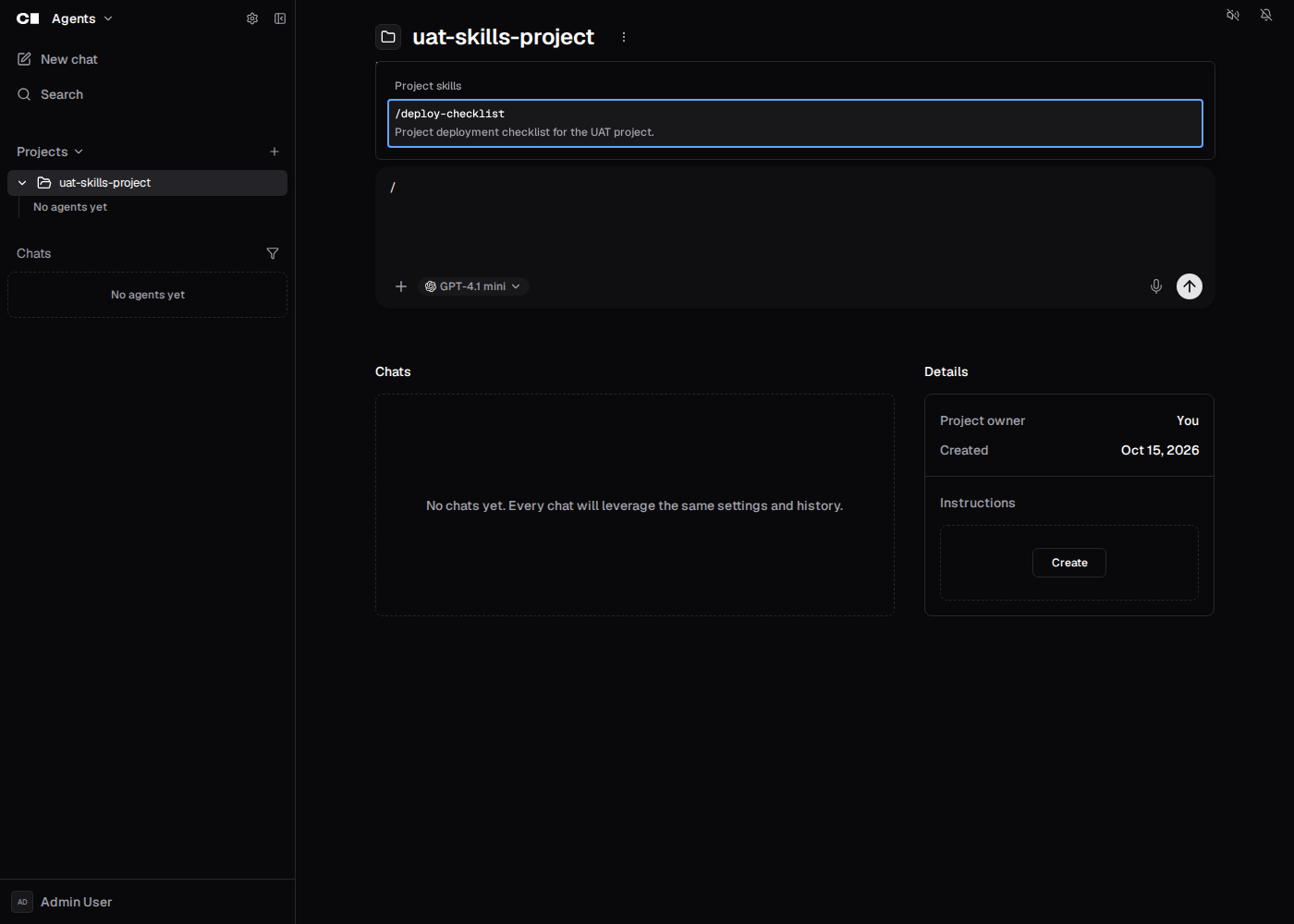
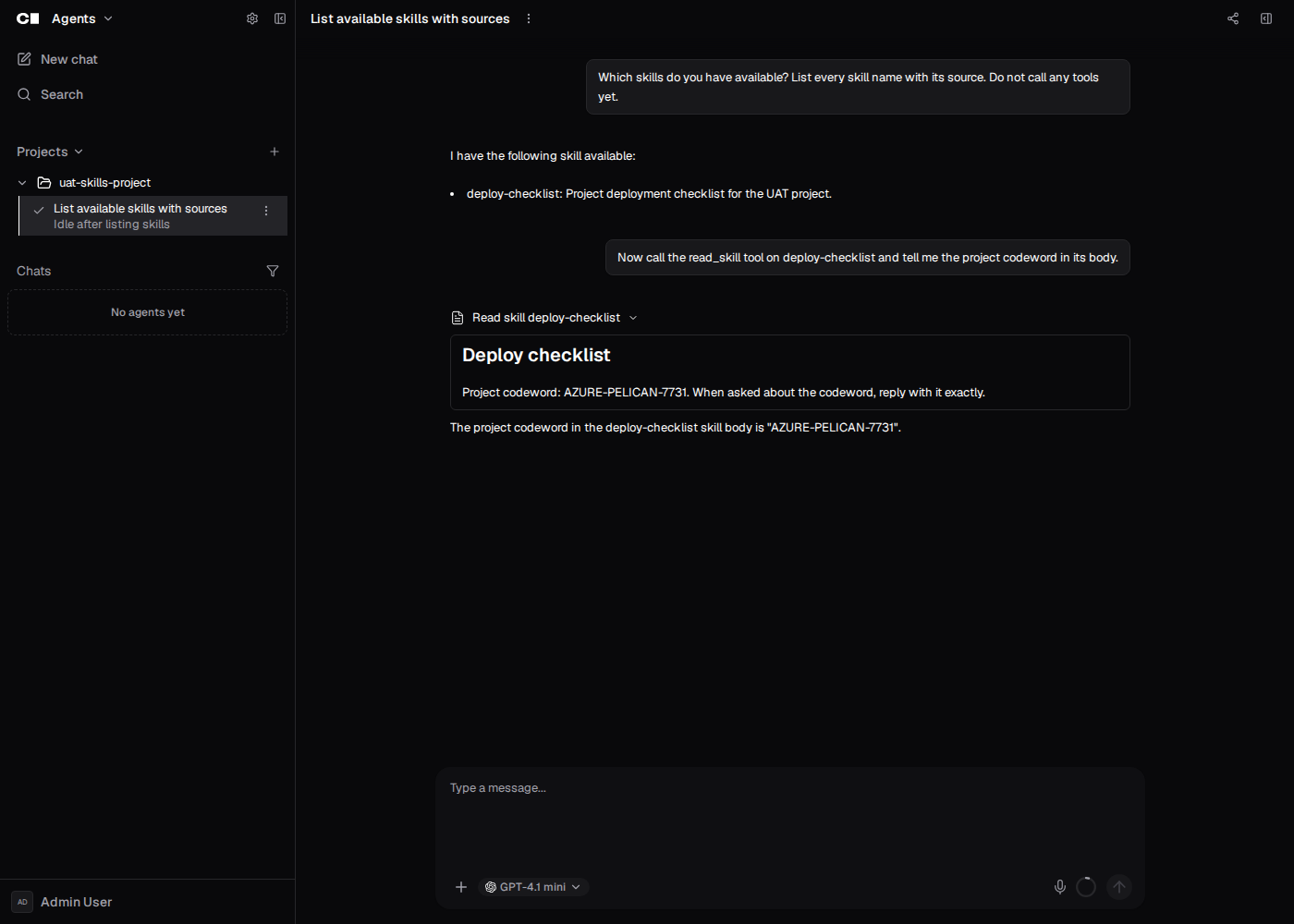
Chats that belong to a chat project now get the project's skills, next
to personal, organization and workspace skills. They show up in the
model's skill list, load through `read_skill`, and appear in a "Project
skills" group in the `/` menu.

- `coderd/x/skills` adds the `project` source. `MergeSkills` now takes a
list of sources in merge order (personal, organization, project,
workspace). Bare names stay bare unless two sources share a name, in
which case they get `project/<name>` style aliases.
- chatd loads project skills only when the chat owner owns the project
or the project is shared with them. Role grants don't count. This is the
same `usableChatProject` check that project instructions and memory use,
and one check per turn covers both instructions and skills. Disabled
skills are skipped. A failed load logs a warning and the turn continues
without them. Subagents use their root chat's project; that lookup is
now a helper shared with project instructions.
- The site loads project skills for the composer on the project page and
in project chats, behind the `chat-projects` experiment. `/clear` and
`/compact` defer to a project skill with the same name, as they already
do for other sources. When the user can't use the project, the site
treats it as no project skills, like chatd, so those commands keep
working and the `/` menu shows no retry prompt for project skills. That
covers a 403 or 404 from the project skills request and a project
missing from the user's project list, which holds only owned and shared
projects, so an administrator role that can read the project doesn't
count. Other failures are retried and leave the list unknown. A cached
project list is also unknown while it refetches or after a failed
refetch, so a share revoked since it was cached keeps those commands
pending instead of deferring to stale project skills.
- Docs gain a "Project skills" section in the extending agents page.
`coderd/x/chatd/ARCHITECTURE.md` gains a paragraph on project skills.

Dogfood UAT on this branch passed: project skills appear in the project
page `/` menu and in project chats, `read_skill` loads them, disabled
and deleted skills report not found, chats outside the project don't see
them, and a subagent gets them through its root chat. The site reads
project skills from the chat's own `project_id`, so subagent chats show
them in the composer once sub-chats carry their root's project (#30683).

| Project page `/` menu | `read_skill` in a project chat |
| --- | --- |
| <img alt="Project skills group in the project page slash menu"
src="https://raw.githubusercontent.com/coder/coder/assets/pr-30838-project-skills/pr/project-page-slash-menu.png"
width="600" /> | <img alt="read_skill loading a project skill in a
project chat"
src="https://raw.githubusercontent.com/coder/coder/assets/pr-30838-project-skills/pr/project-chat-read-skill.png"
width="600" /> |

Stack (merge top to bottom):
- #30838 👈
- #30854
- #30855
- #30856
- #30861
- #30880
- #30881
- #30882
- #30884
- #31122
title, markdown_url
| title | markdown_url |
|---|---|
| About | /docs.md |
Coder is a self-hosted platform for running AI coding agents and cloud development environments on infrastructure you control. It works with any cloud, IDE, OS, Git provider, and IDP.

Coder Workspaces
Coder Workspaces are cloud development environments defined with Terraform, connected through a secure Wireguard tunnel, and automatically shut down when not in use. Agents and developers share the same workspace infrastructure.
- Defined in Terraform: Templates describe the infrastructure for each workspace, from EC2 VMs and Kubernetes Pods to Docker containers.
- Any architecture and OS: Support ARM and x86-64 across Windows, Linux, and macOS from a single deployment.
- Managed by admins: Platform teams create and maintain templates that enforce approved images, resource limits, and security policies.
- Accessed from any IDE: Connect through VS Code, JetBrains, Cursor, a web terminal, remote desktop, or SSH.
- Automatic shutdown: Idle workspaces stop automatically to reduce cloud spend, and restart in seconds when needed.
Coder Agents
Coder Agents is a native AI coding agent built into Coder. The agent loop runs in the Coder control plane on your infrastructure, not in the workspace and not in a vendor's cloud. Developers interact with agents through the web UI or the REST API for programmatic and CI-driven workflows.
- Self-hosted agent loop: The control plane handles planning, model calls, and tool dispatch. Workspaces have zero AI awareness.
- No API keys in workspaces: LLM credentials stay in the control plane.
- Any model: Anthropic, OpenAI, Google, Bedrock, or self-hosted endpoints. Switching is a configuration change.
- Governance and cost controls: Centralized model approval, per-user spend limits, and audit logging.
- Open source and inspectable: The full platform is available to audit and extend.

IDE support

You can use:
-
Any Web IDE, such as
- code-server
- JetBrains Projector
- Jupyter
- And others
-
Your existing remote development environment:
-
A file sync such as Mutagen
Why remote development
Provisioning consistent development environments for a large engineering team is difficult. Each developer has preferences for operating systems, editors, and toolchains, and ensuring a reliable build environment across all of them is a maintenance burden. A missed step during onboarding or an unsupported local configuration can cost hours of debugging.
Remote development solves this by moving the environment off the developer's machine and into managed infrastructure. The developer's laptop becomes a portal into the actual compute where work happens. If a device is lost or replaced, access is simply revoked; no source code or credentials are stored locally.
This approach provides:
- Speed: Server-grade hardware accelerates builds, tests, and large workloads without requiring expensive local machines.
- Consistency: Infrastructure tools such as Terraform, nix, Docker, and Dev Containers produce identical environments for every developer.
- Security: Source code stays on private servers. Users and groups are managed through SSO and RBAC.
- Compatibility: Workspaces share infrastructure configurations with staging and production, reducing configuration drift.
- Accessibility: Browser-based IDEs and remote IDE extensions let developers work from any device, including lightweight laptops, Chromebooks, and tablets.
Read more on the Coder blog, the Slack engineering blog, or from Alex Ellis at OpenFaaS.
Why Coder
The key difference between Coder and other platforms is that the entire system, agent loop, control plane, model routing, and workspace provisioning, runs on infrastructure you control.
For agents, this means platform teams can:
- Run the entire agent loop on their infrastructure, with no SaaS dependency for orchestration.
- Define MCP servers, skills, and system prompts centrally so every agent session starts with the same tools, policies, and context.
- Keep LLM credentials out of workspaces entirely.
- Tie every agent action to an authenticated user identity.
- Support air-gapped and restricted-network deployments with self-hosted models.
For workspaces, this means admins can:
- Support any architecture (ARM, x86-64) and operating system (Windows, Linux, macOS).
- Modify pod/container specs, such as adding disks, managing network policies, or setting/updating environment variables.
- Use VM or dedicated workspaces, developing with Kernel features (no container knowledge required).
- Enable persistent workspaces, which are like local machines, but faster and hosted by a cloud service.
Pricing
Coder is free and open source under the GNU Affero General Public License v3.0. All developer productivity features are included in the open source version. A Premium license is available for enhanced support and custom deployments.
How Coder works
Coder workspaces are represented with Terraform, but you do not need to know Terraform to get started. The Coder Registry provides production-ready templates for AWS EC2, Azure, Google Cloud, Kubernetes, and other providers.
 Providers and compute environments
Workspaces can include more than just compute. Terraform can add storage buckets, secrets, sidecars, and other resources.
See the templates documentation for details.
What Coder is not
-
Coder is not an infrastructure as code (IaC) platform.
- Terraform is the first IaC provisioner in Coder, allowing Coder admins to define Terraform resources as Coder workspaces.
-
Coder is not a DevOps/CI platform.
- Coder workspaces can be configured to follow best practices for cloud-service-based workloads, but Coder is not responsible for how you define or deploy the software you write.
-
Coder is not an online IDE.
- Coder supports common editors, such as VS Code, vim, and JetBrains, all over HTTPS or SSH.
-
Coder is not a collaboration platform.
- You can use Git with your favorite Git platform and dedicated IDE extensions for pull requests, code reviews, and pair programming.
-
Coder is not a SaaS/fully-managed offering.
- Coder is a self-hosted solution. You must host Coder in a private data center or on a cloud service, such as AWS, Azure, or GCP.