 Garrett DelfosseandClaude Opus 5.5
a08ba6a70c
- Experiment, stacked on #29242. UI is in #29583. - Adds **project memory**: `chat_project_memories` rows with a name (lowercase slug, unique per project), a one-line description (150 characters) and a body (8KB). Up to 200 per project, shared by every root chat in the project. Chats outside a project and subagents have no memory. - Memories are immutable: they are created and deleted, never edited. Agent tools are `read_memory`, `save_memory`, `delete_memory` and `consolidate_memory`. Saving an existing name fails and points the agent at `consolidate_memory` to replace it. - **Consolidation is agent-driven, in the turn**, modeled on how Claude Code compacts its memory index when warned it is near its limit. From 160 memories (80%), save results ask the agent to get under 140 (70%) with `consolidate_memory`, choosing what to merge and drop. That tool deletes and saves memories in one transaction under the per-project advisory lock, and rolls back entirely if a delete is missing, a name is taken, or the result exceeds 200. There is no background extraction or consolidation. - **The memory index reaches the model as model-only conversation messages**, not in a tool description or the system prompt. At turn start the chat gets a full `<project-memory-index>` snapshot when its prompt has none (first turn, or after compaction), otherwise a `<project-memory-index-update>` listing only what changed. Tool definitions and the system prompt carry no memory state, so memory writes never invalidate the provider's cached prompt prefix. Writes by other chats, or by this chat mid-turn, reach the model at its next turn. - REST API (create, list, get, delete) under `/api/experimental/organizations/{organization}/chats/projects/{project}/memories`. Memory permissions follow projects onto the `agents-access` role. - **Every memory change is audited** as `ChatProjectMemory` create or delete. REST changes are attributed to the caller. Tool changes (`save_memory`, `delete_memory`, `consolidate_memory`) are attributed to the chat owner, carry the `chat_id`, and record one entry per memory after the change commits, so a rolled-back consolidation records nothing. ### Examples **What the model sees.** The system prompt gets a fixed guidance block with no memory state: ```text <memory> Memory is durable context shared by every chat in the project "platform". Save facts that will matter in future chats: … The memory index is in the conversation: a <project-memory-index> message lists every saved memory, and <project-memory-index-update> messages at the start of later turns list what changed. Changes made during a turn, including your own, appear in the next turn's update. … Memories cannot be edited: replace one that no longer holds with consolidate_memory, or delete it. </memory> ``` On the first turn, after the user's message, the chat gets a model-only row with the full index (hidden in the UI): ```text <project-memory-index> - deploy-day: Deploys happen on Tuesdays - release-owner: Alice owns releases; ping her before tagging </project-memory-index> ``` On a later turn where memories changed, it gets only the difference: ```text <project-memory-index-update> Added or changed: - deploy-day: Deploys happen on Wednesdays (changed 2026-09-30) - staging-url: Staging lives at staging.example.com Removed: - old-ci-notes </project-memory-index-update> ``` Resulting request layout, with the provider's cached prefix unchanged by memory writes: ```text [tools: fixed] [system: fixed <memory> guidance] [turn 1 user] [index snapshot] [assistant/tools …] [turn 2 user] [index update] [assistant …] ``` **Tool calls and results** (produced by the tools in this PR): ```text save_memory {"name":"staging-url","description":"Staging lives at staging.example.com","body":"Staging is https://staging.example.com; deploys from main."} → {"count":3,"saved":"staging-url"} save_memory {"name":"deploy-day", …} // name already exists → error: a memory named "deploy-day" already exists; read it, then replace it with consolidate_memory by deleting "deploy-day" and saving the new version in one call consolidate_memory {"delete":["deploy-day"],"save":[{"name":"deploy-day","description":"Deploys happen on Wednesdays (changed 2026-09-30)","body":"The team deploys every Wednesday since 2026-09-30."}]} → {"count":3,"deleted":["deploy-day"],"saved":["deploy-day"]} read_memory {"name":"deploy-day"} → {"name":"deploy-day","description":"…","body":"…","created_at":"2026-09-30T15:04:05Z","created_by":"alice"} ``` Near and at the cap: ```text save_memory … → {"count":160,"saved":"one-more","warning":"memory is 160/200, approaching the limit. Consolidate it to under 140 memories now with consolidate_memory: merge overlapping memories into one, and drop stale, wrong, or superseded ones."} save_memory … → error: memory is full (200/200); use consolidate_memory to merge overlapping memories and drop stale ones, and include this memory in its save list ``` **REST memory object** (`GET .../chats/projects/{project}/memories`): ```json { "id": "59500000-0000-4000-8000-000000000001", "project_id": "7c0e4a3e-5b1f-4f7d-9a51-2f3c8f6d2b10", "organization_id": "bb640d07-ca8a-4869-b6bc-ae61ebb2fda1", "name": "deploy-day", "description": "Deploys happen on Wednesdays (changed 2026-09-30)", "body": "The team deploys every Wednesday since 2026-09-30.", "created_by": "0ed9befc-4911-4ccf-a8e2-559bf72daa94", "created_by_username": "alice", "created_at": "2026-09-30T15:04:05Z" } ``` Create takes `{"name", "description", "body"}` and answers 409 on a duplicate name or at the cap. <details> <summary>Screenshots (predate the immutable-memory rework; tool output shape has since changed)</summary> 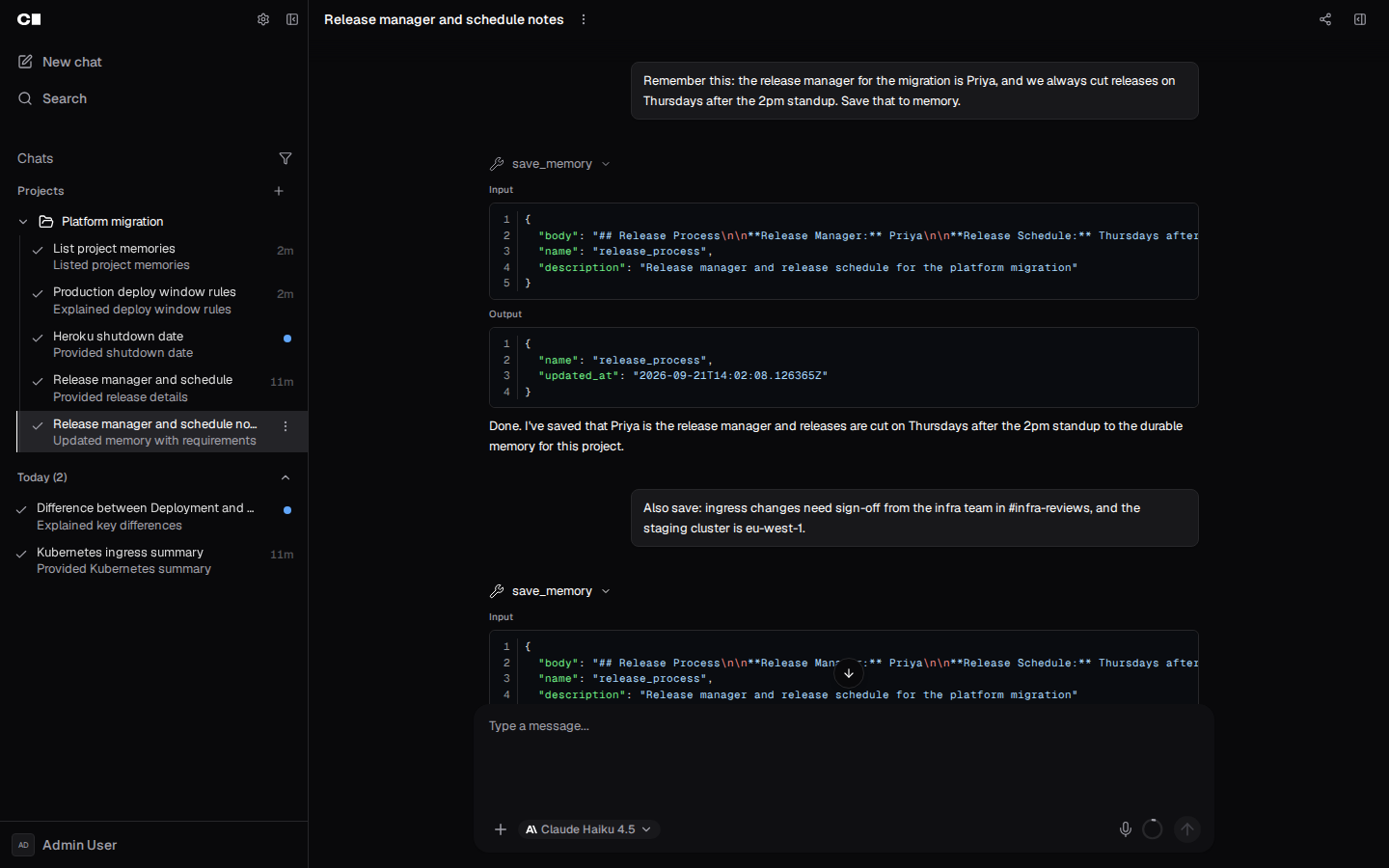 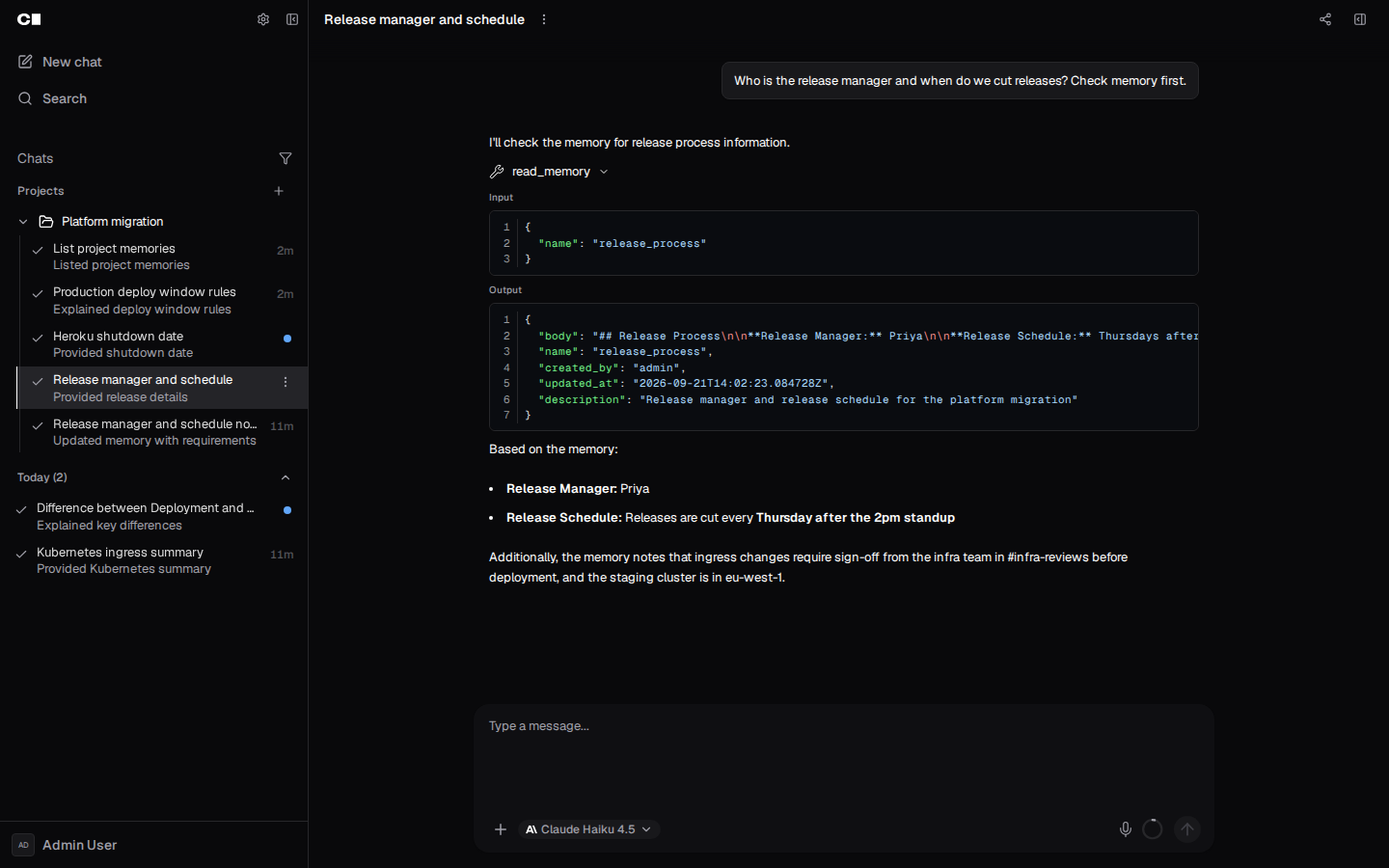 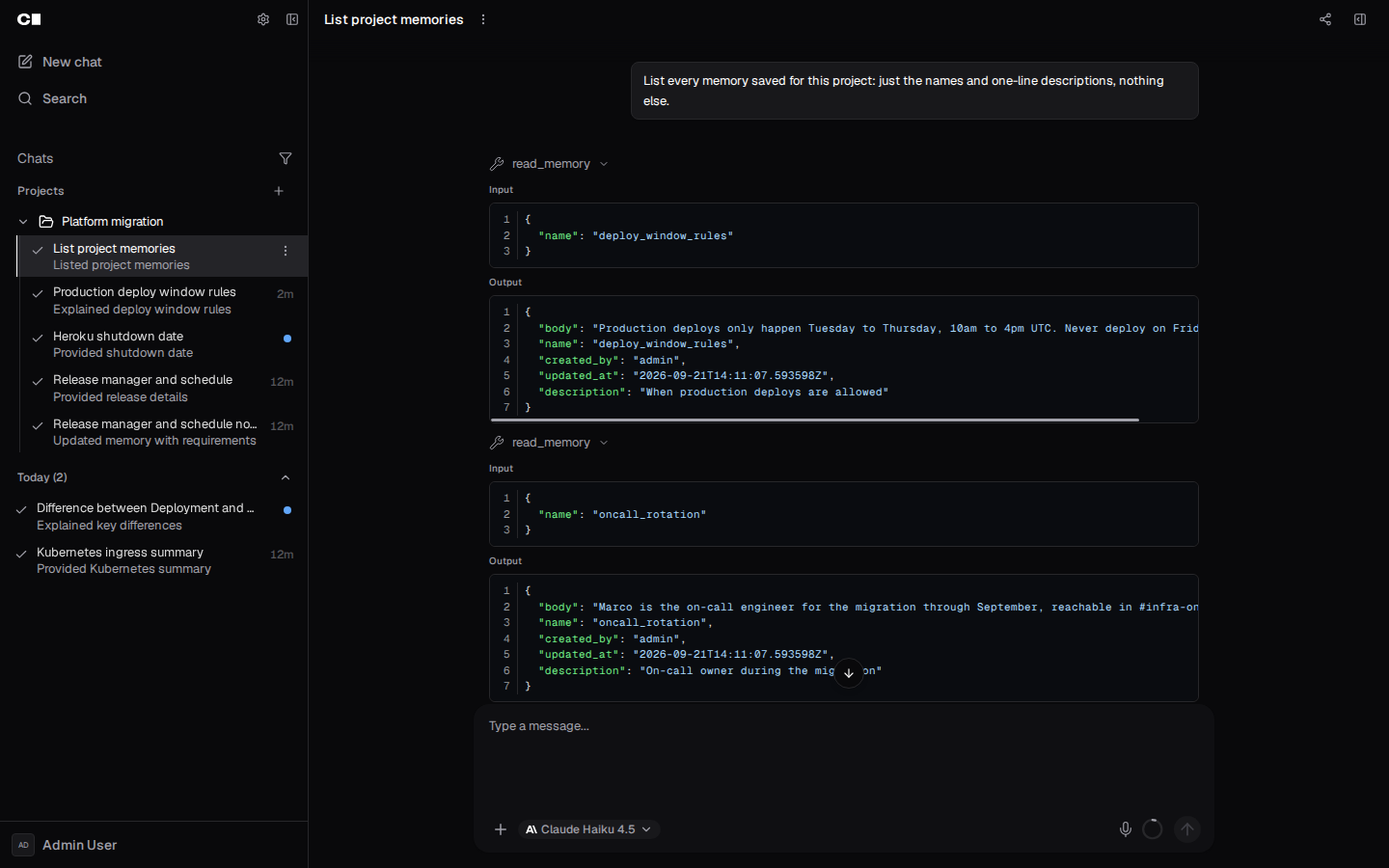 </details> --- Generated with Coder Agents on behalf of @f0ssel. --------- Co-authored-by: Claude Opus 5.5 (1M context) <noreply@anthropic.com>



59 KiB
Generated
title
| title |
|---|
| Users |
Get users
Code samples
# Example request using curl
curl -X GET http://coder-server:8080/api/v2/users \
  -H 'Accept: application/json' \
  -H 'Coder-Session-Token: API_KEY'
GET /api/v2/users
Parameters
| Name | In | Type | Required | Description |
|---|---|---|---|---|
q |
query | string | false | Search query |
after_id |
query | string(uuid) | false | After ID |
limit |
query | integer | false | Page limit |
offset |
query | integer | false | Page offset |
Example responses
200 Response
{
  "count": 0,
  "users": [
    {
      "avatar_url": "http://example.com",
      "created_at": "2019-08-24T14:15:22Z",
      "email": "user@example.com",
      "has_ai_seat": true,
      "id": "497f6eca-6276-4993-bfeb-53cbbbba6f08",
      "is_service_account": true,
      "last_seen_at": "2019-08-24T14:15:22Z",
      "login_type": "",
      "name": "string",
      "organization_ids": [
        "497f6eca-6276-4993-bfeb-53cbbbba6f08"
      ],
      "roles": [
        {
          "display_name": "string",
          "name": "string",
          "organization_id": "string"
        }
      ],
      "status": "active",
      "theme_preference": "string",
      "updated_at": "2019-08-24T14:15:22Z",
      "username": "string"
    }
  ]
}
Responses
| Status | Meaning | Description | Schema |
|---|---|---|---|
| 200 | OK | OK | codersdk.GetUsersResponse |
To perform this operation, you must be authenticated. Learn more.
Create new user
Code samples
# Example request using curl
curl -X POST http://coder-server:8080/api/v2/users \
  -H 'Content-Type: application/json' \
  -H 'Accept: application/json' \
  -H 'Coder-Session-Token: API_KEY'
POST /api/v2/users
Body parameter
{
  "email": "user@example.com",
  "login_type": "",
  "name": "string",
  "organization_ids": [
    "497f6eca-6276-4993-bfeb-53cbbbba6f08"
  ],
  "password": "string",
  "roles": [
    "string"
  ],
  "service_account": true,
  "user_status": "active",
  "username": "string"
}
Parameters
| Name | In | Type | Required | Description |
|---|---|---|---|---|
body |
body | codersdk.CreateUserRequest | true | Create user request |
Example responses
201 Response
{
  "avatar_url": "http://example.com",
  "created_at": "2019-08-24T14:15:22Z",
  "email": "user@example.com",
  "has_ai_seat": true,
  "id": "497f6eca-6276-4993-bfeb-53cbbbba6f08",
  "is_service_account": true,
  "last_seen_at": "2019-08-24T14:15:22Z",
  "login_type": "",
  "name": "string",
  "organization_ids": [
    "497f6eca-6276-4993-bfeb-53cbbbba6f08"
  ],
  "roles": [
    {
      "display_name": "string",
      "name": "string",
      "organization_id": "string"
    }
  ],
  "status": "active",
  "theme_preference": "string",
  "updated_at": "2019-08-24T14:15:22Z",
  "username": "string"
}
Responses
| Status | Meaning | Description | Schema |
|---|---|---|---|
| 201 | Created | Created | codersdk.User |
To perform this operation, you must be authenticated. Learn more.
Get authentication methods
Code samples
# Example request using curl
curl -X GET http://coder-server:8080/api/v2/users/authmethods \
  -H 'Accept: application/json' \
  -H 'Coder-Session-Token: API_KEY'
GET /api/v2/users/authmethods
Example responses
200 Response
{
  "github": {
    "default_provider_configured": true,
    "enabled": true
  },
  "oidc": {
    "enabled": true,
    "iconUrl": "string",
    "signInText": "string"
  },
  "password": {
    "enabled": true
  },
  "terms_of_service_url": "string"
}
Responses
| Status | Meaning | Description | Schema |
|---|---|---|---|
| 200 | OK | OK | codersdk.AuthMethods |
To perform this operation, you must be authenticated. Learn more.
Check initial user created
Code samples
# Example request using curl
curl -X GET http://coder-server:8080/api/v2/users/first \
  -H 'Accept: application/json' \
  -H 'Coder-Session-Token: API_KEY'
GET /api/v2/users/first
Example responses
200 Response
{
  "detail": "string",
  "message": "string",
  "validations": [
    {
      "detail": "string",
      "field": "string"
    }
  ]
}
Responses
| Status | Meaning | Description | Schema |
|---|---|---|---|
| 200 | OK | OK | codersdk.Response |
To perform this operation, you must be authenticated. Learn more.
Create initial user
Code samples
# Example request using curl
curl -X POST http://coder-server:8080/api/v2/users/first \
  -H 'Content-Type: application/json' \
  -H 'Accept: application/json' \
  -H 'Coder-Session-Token: API_KEY'
POST /api/v2/users/first
Body parameter
{
  "email": "string",
  "name": "string",
  "onboarding_info": {
    "newsletter_marketing": true,
    "newsletter_releases": true
  },
  "password": "string",
  "trial": true,
  "trial_info": {
    "company_name": "string",
    "country": "string",
    "developers": "string",
    "first_name": "string",
    "job_title": "string",
    "last_name": "string",
    "phone_number": "string"
  },
  "username": "string"
}
Parameters
| Name | In | Type | Required | Description |
|---|---|---|---|---|
body |
body | codersdk.CreateFirstUserRequest | true | First user request |
Example responses
201 Response
{
  "organization_id": "7c60d51f-b44e-4682-87d6-449835ea4de6",
  "user_id": "a169451c-8525-4352-b8ca-070dd449a1a5"
}
Responses
| Status | Meaning | Description | Schema |
|---|---|---|---|
| 201 | Created | Created | codersdk.CreateFirstUserResponse |
To perform this operation, you must be authenticated. Learn more.
Log out user
Code samples
# Example request using curl
curl -X POST http://coder-server:8080/api/v2/users/logout \
  -H 'Accept: application/json' \
  -H 'Coder-Session-Token: API_KEY'
POST /api/v2/users/logout
Example responses
200 Response
{
  "detail": "string",
  "message": "string",
  "validations": [
    {
      "detail": "string",
      "field": "string"
    }
  ]
}
Responses
| Status | Meaning | Description | Schema |
|---|---|---|---|
| 200 | OK | OK | codersdk.Response |
To perform this operation, you must be authenticated. Learn more.
OAuth 2.0 GitHub Callback
Code samples
# Example request using curl
curl -X GET http://coder-server:8080/api/v2/users/oauth2/github/callback \
  -H 'Coder-Session-Token: API_KEY'
GET /api/v2/users/oauth2/github/callback
Responses
| Status | Meaning | Description | Schema |
|---|---|---|---|
| 307 | Temporary Redirect | Temporary Redirect |
To perform this operation, you must be authenticated. Learn more.
Get Github device auth
Code samples
# Example request using curl
curl -X GET http://coder-server:8080/api/v2/users/oauth2/github/device \
  -H 'Accept: application/json' \
  -H 'Coder-Session-Token: API_KEY'
GET /api/v2/users/oauth2/github/device
Example responses
200 Response
{
  "device_code": "string",
  "expires_in": 0,
  "interval": 0,
  "user_code": "string",
  "verification_uri": "string"
}
Responses
| Status | Meaning | Description | Schema |
|---|---|---|---|
| 200 | OK | OK | codersdk.ExternalAuthDevice |
To perform this operation, you must be authenticated. Learn more.
Get OIDC claims for the authenticated user
Code samples
# Example request using curl
curl -X GET http://coder-server:8080/api/v2/users/oidc-claims \
  -H 'Accept: application/json' \
  -H 'Coder-Session-Token: API_KEY'
GET /api/v2/users/oidc-claims
Example responses
200 Response
{
  "claims": {}
}
Responses
| Status | Meaning | Description | Schema |
|---|---|---|---|
| 200 | OK | OK | codersdk.OIDCClaimsResponse |
To perform this operation, you must be authenticated. Learn more.
OpenID Connect Callback
Code samples
# Example request using curl
curl -X GET http://coder-server:8080/api/v2/users/oidc/callback \
  -H 'Coder-Session-Token: API_KEY'
GET /api/v2/users/oidc/callback
Responses
| Status | Meaning | Description | Schema |
|---|---|---|---|
| 307 | Temporary Redirect | Temporary Redirect |
To perform this operation, you must be authenticated. Learn more.
Get user by name
Code samples
# Example request using curl
curl -X GET http://coder-server:8080/api/v2/users/{user} \
  -H 'Accept: application/json' \
  -H 'Coder-Session-Token: API_KEY'
GET /api/v2/users/{user}
Parameters
| Name | In | Type | Required | Description |
|---|---|---|---|---|
user |
path | string | true | User ID, username, or me |
Example responses
200 Response
{
  "avatar_url": "http://example.com",
  "created_at": "2019-08-24T14:15:22Z",
  "email": "user@example.com",
  "has_ai_seat": true,
  "id": "497f6eca-6276-4993-bfeb-53cbbbba6f08",
  "is_service_account": true,
  "last_seen_at": "2019-08-24T14:15:22Z",
  "login_type": "",
  "name": "string",
  "organization_ids": [
    "497f6eca-6276-4993-bfeb-53cbbbba6f08"
  ],
  "roles": [
    {
      "display_name": "string",
      "name": "string",
      "organization_id": "string"
    }
  ],
  "status": "active",
  "theme_preference": "string",
  "updated_at": "2019-08-24T14:15:22Z",
  "username": "string"
}
Responses
| Status | Meaning | Description | Schema |
|---|---|---|---|
| 200 | OK | OK | codersdk.User |
To perform this operation, you must be authenticated. Learn more.
Delete user
Code samples
# Example request using curl
curl -X DELETE http://coder-server:8080/api/v2/users/{user} \
  -H 'Coder-Session-Token: API_KEY'
DELETE /api/v2/users/{user}
Parameters
| Name | In | Type | Required | Description |
|---|---|---|---|---|
user |
path | string | true | User ID, name, or me |
Responses
| Status | Meaning | Description | Schema |
|---|---|---|---|
| 200 | OK | OK |
To perform this operation, you must be authenticated. Learn more.
Get user appearance settings
Code samples
# Example request using curl
curl -X GET http://coder-server:8080/api/v2/users/{user}/appearance \
  -H 'Accept: application/json' \
  -H 'Coder-Session-Token: API_KEY'
GET /api/v2/users/{user}/appearance
Parameters
| Name | In | Type | Required | Description |
|---|---|---|---|---|
user |
path | string | true | User ID, name, or me |
Example responses
200 Response
{
  "terminal_font": "",
  "theme_dark": "string",
  "theme_light": "string",
  "theme_mode": "",
  "theme_preference": "string"
}
Responses
| Status | Meaning | Description | Schema |
|---|---|---|---|
| 200 | OK | OK | codersdk.UserAppearanceSettings |
To perform this operation, you must be authenticated. Learn more.
Update user appearance settings
Code samples
# Example request using curl
curl -X PUT http://coder-server:8080/api/v2/users/{user}/appearance \
  -H 'Content-Type: application/json' \
  -H 'Accept: application/json' \
  -H 'Coder-Session-Token: API_KEY'
PUT /api/v2/users/{user}/appearance
Body parameter
{
  "terminal_font": "",
  "theme_dark": "light",
  "theme_light": "light",
  "theme_mode": "sync",
  "theme_preference": "string"
}
Parameters
| Name | In | Type | Required | Description |
|---|---|---|---|---|
user |
path | string | true | User ID, name, or me |
body |
body | codersdk.UpdateUserAppearanceSettingsRequest | true | New appearance settings |
Example responses
200 Response
{
  "terminal_font": "",
  "theme_dark": "string",
  "theme_light": "string",
  "theme_mode": "",
  "theme_preference": "string"
}
Responses
| Status | Meaning | Description | Schema |
|---|---|---|---|
| 200 | OK | OK | codersdk.UserAppearanceSettings |
To perform this operation, you must be authenticated. Learn more.
Get autofill build parameters for user
Code samples
# Example request using curl
curl -X GET http://coder-server:8080/api/v2/users/{user}/autofill-parameters?template_id=string \
  -H 'Accept: application/json' \
  -H 'Coder-Session-Token: API_KEY'
GET /api/v2/users/{user}/autofill-parameters
Parameters
| Name | In | Type | Required | Description |
|---|---|---|---|---|
user |
path | string | true | User ID, username, or me |
template_id |
query | string | true | Template ID |
Example responses
200 Response
[
  {
    "name": "string",
    "value": "string"
  }
]
Responses
| Status | Meaning | Description | Schema |
|---|---|---|---|
| 200 | OK | OK | array of codersdk.UserParameter |
Response Schema
Status Code 200
| Name | Type | Required | Restrictions | Description |
|---|---|---|---|---|
[array item] |
array | false | ||
» name |
string | false | ||
» value |
string | false |
To perform this operation, you must be authenticated. Learn more.
Get user Git SSH key
Code samples
# Example request using curl
curl -X GET http://coder-server:8080/api/v2/users/{user}/gitsshkey \
  -H 'Accept: application/json' \
  -H 'Coder-Session-Token: API_KEY'
GET /api/v2/users/{user}/gitsshkey
Parameters
| Name | In | Type | Required | Description |
|---|---|---|---|---|
user |
path | string | true | User ID, name, or me |
Example responses
200 Response
{
  "created_at": "2019-08-24T14:15:22Z",
  "public_key": "string",
  "updated_at": "2019-08-24T14:15:22Z",
  "user_id": "a169451c-8525-4352-b8ca-070dd449a1a5"
}
Responses
| Status | Meaning | Description | Schema |
|---|---|---|---|
| 200 | OK | OK | codersdk.GitSSHKey |
To perform this operation, you must be authenticated. Learn more.
Regenerate user SSH key
Code samples
# Example request using curl
curl -X PUT http://coder-server:8080/api/v2/users/{user}/gitsshkey \
  -H 'Accept: application/json' \
  -H 'Coder-Session-Token: API_KEY'
PUT /api/v2/users/{user}/gitsshkey
Parameters
| Name | In | Type | Required | Description |
|---|---|---|---|---|
user |
path | string | true | User ID, name, or me |
Example responses
200 Response
{
  "created_at": "2019-08-24T14:15:22Z",
  "public_key": "string",
  "updated_at": "2019-08-24T14:15:22Z",
  "user_id": "a169451c-8525-4352-b8ca-070dd449a1a5"
}
Responses
| Status | Meaning | Description | Schema |
|---|---|---|---|
| 200 | OK | OK | codersdk.GitSSHKey |
To perform this operation, you must be authenticated. Learn more.
Create new session key
Code samples
# Example request using curl
curl -X POST http://coder-server:8080/api/v2/users/{user}/keys \
  -H 'Accept: application/json' \
  -H 'Coder-Session-Token: API_KEY'
POST /api/v2/users/{user}/keys
Parameters
| Name | In | Type | Required | Description |
|---|---|---|---|---|
user |
path | string | true | User ID, name, or me |
Example responses
201 Response
{
  "key": "string"
}
Responses
| Status | Meaning | Description | Schema |
|---|---|---|---|
| 201 | Created | Created | codersdk.GenerateAPIKeyResponse |
To perform this operation, you must be authenticated. Learn more.
Get user tokens
Code samples
# Example request using curl
curl -X GET http://coder-server:8080/api/v2/users/{user}/keys/tokens \
  -H 'Accept: application/json' \
  -H 'Coder-Session-Token: API_KEY'
GET /api/v2/users/{user}/keys/tokens
Parameters
| Name | In | Type | Required | Description |
|---|---|---|---|---|
user |
path | string | true | User ID, name, or me |
include_expired |
query | boolean | false | Include expired tokens in the list |
Example responses
200 Response
[
  {
    "allow_list": [
      {
        "id": "string",
        "type": "*"
      }
    ],
    "created_at": "2019-08-24T14:15:22Z",
    "expires_at": "2019-08-24T14:15:22Z",
    "id": "string",
    "last_used": "2019-08-24T14:15:22Z",
    "lifetime_seconds": 0,
    "login_type": "password",
    "scope": "all",
    "scopes": [
      "all"
    ],
    "token_name": "string",
    "updated_at": "2019-08-24T14:15:22Z",
    "user_id": "a169451c-8525-4352-b8ca-070dd449a1a5"
  }
]
Responses
| Status | Meaning | Description | Schema |
|---|---|---|---|
| 200 | OK | OK | array of codersdk.APIKey |
Response Schema
Status Code 200
| Name | Type | Required | Restrictions | Description |
|---|---|---|---|---|
[array item] |
array | false | ||
» allow_list |
array | false | ||
»» id |
string | false | ||
»» type |
codersdk.RBACResource | false | ||
» created_at |
string(date-time) | true | ||
» expires_at |
string(date-time) | true | ||
» id |
string | true | ||
» last_used |
string(date-time) | true | ||
» lifetime_seconds |
integer | true | ||
» login_type |
codersdk.LoginType | true | ||
» scope |
codersdk.APIKeyScope | false | Deprecated: use Scopes instead. | |
» scopes |
array | false | ||
» token_name |
string | true | ||
» updated_at |
string(date-time) | true | ||
» user_id |
string(uuid) | true |
Enumerated Values
| Property | Value(s) |
|---|---|
type |
*, ai_gateway_key, ai_model_price, ai_provider, ai_seat, aibridge_interception, api_key, assign_org_role, assign_role, audit_log, boundary_log, boundary_usage, chat, chat_automation, chat_model_config, chat_project, chat_project_memory, connection_log, crypto_key, debug_info, deployment_config, deployment_stats, file, group, group_member, idpsync_settings, inbox_notification, license, mcp_server_config, notification_message, notification_preference, notification_template, oauth2_app, oauth2_app_code_token, oauth2_app_secret, organization, organization_member, prebuilt_workspace, provisioner_daemon, provisioner_jobs, replicas, system, tailnet_coordinator, template, usage_event, user, user_secret, user_skill, webpush_subscription, workspace, workspace_agent_devcontainers, workspace_agent_resource_monitor, workspace_build_orchestration, workspace_dormant, workspace_proxy |
login_type |
github, oidc, password, token |
scope |
all, application_connect |
To perform this operation, you must be authenticated. Learn more.
Create token API key
Code samples
# Example request using curl
curl -X POST http://coder-server:8080/api/v2/users/{user}/keys/tokens \
  -H 'Content-Type: application/json' \
  -H 'Accept: application/json' \
  -H 'Coder-Session-Token: API_KEY'
POST /api/v2/users/{user}/keys/tokens
Body parameter
{
  "allow_list": [
    {
      "id": "string",
      "type": "*"
    }
  ],
  "lifetime": 0,
  "scope": "all",
  "scopes": [
    "all"
  ],
  "token_name": "string"
}
Parameters
| Name | In | Type | Required | Description |
|---|---|---|---|---|
user |
path | string | true | User ID, name, or me |
body |
body | codersdk.CreateTokenRequest | true | Create token request |
Example responses
201 Response
{
  "key": "string"
}
Responses
| Status | Meaning | Description | Schema |
|---|---|---|---|
| 201 | Created | Created | codersdk.GenerateAPIKeyResponse |
To perform this operation, you must be authenticated. Learn more.
Get API key by token name
Code samples
# Example request using curl
curl -X GET http://coder-server:8080/api/v2/users/{user}/keys/tokens/{keyname} \
  -H 'Accept: application/json' \
  -H 'Coder-Session-Token: API_KEY'
GET /api/v2/users/{user}/keys/tokens/{keyname}
Parameters
| Name | In | Type | Required | Description |
|---|---|---|---|---|
user |
path | string | true | User ID, name, or me |
keyname |
path | string(string) | true | Key Name |
Example responses
200 Response
{
  "allow_list": [
    {
      "id": "string",
      "type": "*"
    }
  ],
  "created_at": "2019-08-24T14:15:22Z",
  "expires_at": "2019-08-24T14:15:22Z",
  "id": "string",
  "last_used": "2019-08-24T14:15:22Z",
  "lifetime_seconds": 0,
  "login_type": "password",
  "scope": "all",
  "scopes": [
    "all"
  ],
  "token_name": "string",
  "updated_at": "2019-08-24T14:15:22Z",
  "user_id": "a169451c-8525-4352-b8ca-070dd449a1a5"
}
Responses
| Status | Meaning | Description | Schema |
|---|---|---|---|
| 200 | OK | OK | codersdk.APIKey |
To perform this operation, you must be authenticated. Learn more.
Get API key by ID
Code samples
# Example request using curl
curl -X GET http://coder-server:8080/api/v2/users/{user}/keys/{keyid} \
  -H 'Accept: application/json' \
  -H 'Coder-Session-Token: API_KEY'
GET /api/v2/users/{user}/keys/{keyid}
Parameters
| Name | In | Type | Required | Description |
|---|---|---|---|---|
user |
path | string | true | User ID, name, or me |
keyid |
path | string(string) | true | Key ID |
Example responses
200 Response
{
  "allow_list": [
    {
      "id": "string",
      "type": "*"
    }
  ],
  "created_at": "2019-08-24T14:15:22Z",
  "expires_at": "2019-08-24T14:15:22Z",
  "id": "string",
  "last_used": "2019-08-24T14:15:22Z",
  "lifetime_seconds": 0,
  "login_type": "password",
  "scope": "all",
  "scopes": [
    "all"
  ],
  "token_name": "string",
  "updated_at": "2019-08-24T14:15:22Z",
  "user_id": "a169451c-8525-4352-b8ca-070dd449a1a5"
}
Responses
| Status | Meaning | Description | Schema |
|---|---|---|---|
| 200 | OK | OK | codersdk.APIKey |
To perform this operation, you must be authenticated. Learn more.
Delete API key
Code samples
# Example request using curl
curl -X DELETE http://coder-server:8080/api/v2/users/{user}/keys/{keyid} \
  -H 'Coder-Session-Token: API_KEY'
DELETE /api/v2/users/{user}/keys/{keyid}
Parameters
| Name | In | Type | Required | Description |
|---|---|---|---|---|
user |
path | string | true | User ID, name, or me |
keyid |
path | string(string) | true | Key ID |
Responses
| Status | Meaning | Description | Schema |
|---|---|---|---|
| 204 | No Content | No Content |
To perform this operation, you must be authenticated. Learn more.
Expire API key
Code samples
# Example request using curl
curl -X PUT http://coder-server:8080/api/v2/users/{user}/keys/{keyid}/expire \
  -H 'Accept: */*' \
  -H 'Coder-Session-Token: API_KEY'
PUT /api/v2/users/{user}/keys/{keyid}/expire
Parameters
| Name | In | Type | Required | Description |
|---|---|---|---|---|
user |
path | string | true | User ID, name, or me |
keyid |
path | string(string) | true | Key ID |
Example responses
404 Response
Responses
| Status | Meaning | Description | Schema |
|---|---|---|---|
| 204 | No Content | No Content | |
| 404 | Not Found | Not Found | codersdk.Response |
| 500 | Internal Server Error | Internal Server Error | codersdk.Response |
To perform this operation, you must be authenticated. Learn more.
Get user login type
Code samples
# Example request using curl
curl -X GET http://coder-server:8080/api/v2/users/{user}/login-type \
  -H 'Accept: application/json' \
  -H 'Coder-Session-Token: API_KEY'
GET /api/v2/users/{user}/login-type
Parameters
| Name | In | Type | Required | Description |
|---|---|---|---|---|
user |
path | string | true | User ID, name, or me |
Example responses
200 Response
{
  "login_type": ""
}
Responses
| Status | Meaning | Description | Schema |
|---|---|---|---|
| 200 | OK | OK | codersdk.UserLoginType |
To perform this operation, you must be authenticated. Learn more.
Get organizations by user
Code samples
# Example request using curl
curl -X GET http://coder-server:8080/api/v2/users/{user}/organizations \
  -H 'Accept: application/json' \
  -H 'Coder-Session-Token: API_KEY'
GET /api/v2/users/{user}/organizations
Parameters
| Name | In | Type | Required | Description |
|---|---|---|---|---|
user |
path | string | true | User ID, name, or me |
Example responses
200 Response
[
  {
    "created_at": "2019-08-24T14:15:22Z",
    "default_org_member_roles": [
      "string"
    ],
    "description": "string",
    "display_name": "string",
    "icon": "string",
    "id": "497f6eca-6276-4993-bfeb-53cbbbba6f08",
    "is_default": true,
    "name": "string",
    "updated_at": "2019-08-24T14:15:22Z"
  }
]
Responses
| Status | Meaning | Description | Schema |
|---|---|---|---|
| 200 | OK | OK | array of codersdk.Organization |
Response Schema
Status Code 200
| Name | Type | Required | Restrictions | Description |
|---|---|---|---|---|
[array item] |
array | false | ||
» created_at |
string(date-time) | true | ||
» default_org_member_roles |
array | false | Default org member roles are unioned into every member's effective roles at request time. Changes propagate to all members on the next request. | |
» description |
string | false | ||
» display_name |
string | false | ||
» icon |
string | false | ||
» id |
string(uuid) | true | ||
» is_default |
boolean | true | ||
» name |
string | false | ||
» updated_at |
string(date-time) | true |
To perform this operation, you must be authenticated. Learn more.
Get organization by user and organization name
Code samples
# Example request using curl
curl -X GET http://coder-server:8080/api/v2/users/{user}/organizations/{organizationname} \
  -H 'Accept: application/json' \
  -H 'Coder-Session-Token: API_KEY'
GET /api/v2/users/{user}/organizations/{organizationname}
Parameters
| Name | In | Type | Required | Description |
|---|---|---|---|---|
user |
path | string | true | User ID, name, or me |
organizationname |
path | string | true | Organization name |
Example responses
200 Response
{
  "created_at": "2019-08-24T14:15:22Z",
  "default_org_member_roles": [
    "string"
  ],
  "description": "string",
  "display_name": "string",
  "icon": "string",
  "id": "497f6eca-6276-4993-bfeb-53cbbbba6f08",
  "is_default": true,
  "name": "string",
  "updated_at": "2019-08-24T14:15:22Z"
}
Responses
| Status | Meaning | Description | Schema |
|---|---|---|---|
| 200 | OK | OK | codersdk.Organization |
To perform this operation, you must be authenticated. Learn more.
Update user password
Code samples
# Example request using curl
curl -X PUT http://coder-server:8080/api/v2/users/{user}/password \
  -H 'Content-Type: application/json' \
  -H 'Coder-Session-Token: API_KEY'
PUT /api/v2/users/{user}/password
Body parameter
{
  "old_password": "string",
  "password": "string"
}
Parameters
| Name | In | Type | Required | Description |
|---|---|---|---|---|
user |
path | string | true | User ID, name, or me |
body |
body | codersdk.UpdateUserPasswordRequest | true | Update password request |
Responses
| Status | Meaning | Description | Schema |
|---|---|---|---|
| 204 | No Content | No Content |
To perform this operation, you must be authenticated. Learn more.
Get user preference settings
Code samples
# Example request using curl
curl -X GET http://coder-server:8080/api/v2/users/{user}/preferences \
  -H 'Accept: application/json' \
  -H 'Coder-Session-Token: API_KEY'
GET /api/v2/users/{user}/preferences
Parameters
| Name | In | Type | Required | Description |
|---|---|---|---|---|
user |
path | string | true | User ID, name, or me |
Example responses
200 Response
{
  "agent_chat_send_shortcut": "enter",
  "code_diff_display_mode": "auto",
  "collapse_assistant_steps": true,
  "shell_tool_display_mode": "auto",
  "thinking_display_mode": "auto"
}
Responses
| Status | Meaning | Description | Schema |
|---|---|---|---|
| 200 | OK | OK | codersdk.UserPreferenceSettings |
To perform this operation, you must be authenticated. Learn more.
Update user preference settings
Code samples
# Example request using curl
curl -X PUT http://coder-server:8080/api/v2/users/{user}/preferences \
  -H 'Content-Type: application/json' \
  -H 'Accept: application/json' \
  -H 'Coder-Session-Token: API_KEY'
PUT /api/v2/users/{user}/preferences
Body parameter
{
  "agent_chat_send_shortcut": "enter",
  "code_diff_display_mode": "auto",
  "collapse_assistant_steps": true,
  "shell_tool_display_mode": "auto",
  "thinking_display_mode": "auto"
}
Parameters
| Name | In | Type | Required | Description |
|---|---|---|---|---|
user |
path | string | true | User ID, name, or me |
body |
body | codersdk.UpdateUserPreferenceSettingsRequest | true | New preference settings |
Example responses
200 Response
{
  "agent_chat_send_shortcut": "enter",
  "code_diff_display_mode": "auto",
  "collapse_assistant_steps": true,
  "shell_tool_display_mode": "auto",
  "thinking_display_mode": "auto"
}
Responses
| Status | Meaning | Description | Schema |
|---|---|---|---|
| 200 | OK | OK | codersdk.UserPreferenceSettings |
To perform this operation, you must be authenticated. Learn more.
Update user profile
Code samples
# Example request using curl
curl -X PUT http://coder-server:8080/api/v2/users/{user}/profile \
  -H 'Content-Type: application/json' \
  -H 'Accept: application/json' \
  -H 'Coder-Session-Token: API_KEY'
PUT /api/v2/users/{user}/profile
Body parameter
{
  "avatar_url": "http://example.com",
  "name": "string",
  "username": "string"
}
Parameters
| Name | In | Type | Required | Description |
|---|---|---|---|---|
user |
path | string | true | User ID, name, or me |
body |
body | codersdk.UpdateUserProfileRequest | true | Updated profile |
Example responses
200 Response
{
  "avatar_url": "http://example.com",
  "created_at": "2019-08-24T14:15:22Z",
  "email": "user@example.com",
  "has_ai_seat": true,
  "id": "497f6eca-6276-4993-bfeb-53cbbbba6f08",
  "is_service_account": true,
  "last_seen_at": "2019-08-24T14:15:22Z",
  "login_type": "",
  "name": "string",
  "organization_ids": [
    "497f6eca-6276-4993-bfeb-53cbbbba6f08"
  ],
  "roles": [
    {
      "display_name": "string",
      "name": "string",
      "organization_id": "string"
    }
  ],
  "status": "active",
  "theme_preference": "string",
  "updated_at": "2019-08-24T14:15:22Z",
  "username": "string"
}
Responses
| Status | Meaning | Description | Schema |
|---|---|---|---|
| 200 | OK | OK | codersdk.User |
To perform this operation, you must be authenticated. Learn more.
Get user roles
Code samples
# Example request using curl
curl -X GET http://coder-server:8080/api/v2/users/{user}/roles \
  -H 'Accept: application/json' \
  -H 'Coder-Session-Token: API_KEY'
GET /api/v2/users/{user}/roles
Parameters
| Name | In | Type | Required | Description |
|---|---|---|---|---|
user |
path | string | true | User ID, name, or me |
Example responses
200 Response
{
  "avatar_url": "http://example.com",
  "created_at": "2019-08-24T14:15:22Z",
  "email": "user@example.com",
  "has_ai_seat": true,
  "id": "497f6eca-6276-4993-bfeb-53cbbbba6f08",
  "is_service_account": true,
  "last_seen_at": "2019-08-24T14:15:22Z",
  "login_type": "",
  "name": "string",
  "organization_ids": [
    "497f6eca-6276-4993-bfeb-53cbbbba6f08"
  ],
  "roles": [
    {
      "display_name": "string",
      "name": "string",
      "organization_id": "string"
    }
  ],
  "status": "active",
  "theme_preference": "string",
  "updated_at": "2019-08-24T14:15:22Z",
  "username": "string"
}
Responses
| Status | Meaning | Description | Schema |
|---|---|---|---|
| 200 | OK | OK | codersdk.User |
To perform this operation, you must be authenticated. Learn more.
Assign role to user
Code samples
# Example request using curl
curl -X PUT http://coder-server:8080/api/v2/users/{user}/roles \
  -H 'Content-Type: application/json' \
  -H 'Accept: application/json' \
  -H 'Coder-Session-Token: API_KEY'
PUT /api/v2/users/{user}/roles
Body parameter
{
  "roles": [
    "string"
  ]
}
Parameters
| Name | In | Type | Required | Description |
|---|---|---|---|---|
user |
path | string | true | User ID, name, or me |
body |
body | codersdk.UpdateRoles | true | Update roles request |
Example responses
200 Response
{
  "avatar_url": "http://example.com",
  "created_at": "2019-08-24T14:15:22Z",
  "email": "user@example.com",
  "has_ai_seat": true,
  "id": "497f6eca-6276-4993-bfeb-53cbbbba6f08",
  "is_service_account": true,
  "last_seen_at": "2019-08-24T14:15:22Z",
  "login_type": "",
  "name": "string",
  "organization_ids": [
    "497f6eca-6276-4993-bfeb-53cbbbba6f08"
  ],
  "roles": [
    {
      "display_name": "string",
      "name": "string",
      "organization_id": "string"
    }
  ],
  "status": "active",
  "theme_preference": "string",
  "updated_at": "2019-08-24T14:15:22Z",
  "username": "string"
}
Responses
| Status | Meaning | Description | Schema |
|---|---|---|---|
| 200 | OK | OK | codersdk.User |
To perform this operation, you must be authenticated. Learn more.
Activate user account
Code samples
# Example request using curl
curl -X PUT http://coder-server:8080/api/v2/users/{user}/status/activate \
  -H 'Accept: application/json' \
  -H 'Coder-Session-Token: API_KEY'
PUT /api/v2/users/{user}/status/activate
Parameters
| Name | In | Type | Required | Description |
|---|---|---|---|---|
user |
path | string | true | User ID, name, or me |
Example responses
200 Response
{
  "avatar_url": "http://example.com",
  "created_at": "2019-08-24T14:15:22Z",
  "email": "user@example.com",
  "has_ai_seat": true,
  "id": "497f6eca-6276-4993-bfeb-53cbbbba6f08",
  "is_service_account": true,
  "last_seen_at": "2019-08-24T14:15:22Z",
  "login_type": "",
  "name": "string",
  "organization_ids": [
    "497f6eca-6276-4993-bfeb-53cbbbba6f08"
  ],
  "roles": [
    {
      "display_name": "string",
      "name": "string",
      "organization_id": "string"
    }
  ],
  "status": "active",
  "theme_preference": "string",
  "updated_at": "2019-08-24T14:15:22Z",
  "username": "string"
}
Responses
| Status | Meaning | Description | Schema |
|---|---|---|---|
| 200 | OK | OK | codersdk.User |
To perform this operation, you must be authenticated. Learn more.
Suspend user account
Code samples
# Example request using curl
curl -X PUT http://coder-server:8080/api/v2/users/{user}/status/suspend \
  -H 'Accept: application/json' \
  -H 'Coder-Session-Token: API_KEY'
PUT /api/v2/users/{user}/status/suspend
Parameters
| Name | In | Type | Required | Description |
|---|---|---|---|---|
user |
path | string | true | User ID, name, or me |
Example responses
200 Response
{
  "avatar_url": "http://example.com",
  "created_at": "2019-08-24T14:15:22Z",
  "email": "user@example.com",
  "has_ai_seat": true,
  "id": "497f6eca-6276-4993-bfeb-53cbbbba6f08",
  "is_service_account": true,
  "last_seen_at": "2019-08-24T14:15:22Z",
  "login_type": "",
  "name": "string",
  "organization_ids": [
    "497f6eca-6276-4993-bfeb-53cbbbba6f08"
  ],
  "roles": [
    {
      "display_name": "string",
      "name": "string",
      "organization_id": "string"
    }
  ],
  "status": "active",
  "theme_preference": "string",
  "updated_at": "2019-08-24T14:15:22Z",
  "username": "string"
}
Responses
| Status | Meaning | Description | Schema |
|---|---|---|---|
| 200 | OK | OK | codersdk.User |
To perform this operation, you must be authenticated. Learn more.