Compare commits
| Author | SHA1 | Date | |
|---|---|---|---|
 Tangyuan |
75e19d5218 | ||
|
Tangyuan
|
db78506007 | ||
|
Tangyuan
|
67b4b9ff00 | ||
|
kjmjh
|
d3ee0d0980 | ||
|
tjy-gitnub
|
f8dd7f20af | ||
|
Morax
|
eb13885d41 | ||
|
Morax
|
81b68cae2f | ||
|
ryan1114-carer
|
fc42c2170d | ||
|
tangyuan0821
|
f7d9e64a7b | ||
|
starry-source
|
59b294efe1 | ||
|
Morax
|
e401cd8d93 | ||
|
starry-source
|
6d10de2030 | ||
|
Morax
|
5a8641a4c2 | ||
|
Morax
|
b3fef6e204 | ||
|
starry-source
|
e03ac96cd9 | ||
|
starry-source
|
611380277a | ||
|
Morax
|
1105507aec | ||
|
starry-source
|
3924c0edee | ||
|
starry-source
|
4105db261a | ||
|
Starry Source
|
d35c685983 | ||
|
starry-source
|
916dba77ea | ||
|
starry-source
|
e7003e7ccc | ||
|
starry-source
|
e0bdf10d05 | ||
|
NB-Group
|
111c4a10ed | ||
|
starry-source
|
965a926327 | ||
|
starry-source
|
9cc10b1499 | ||
|
Tangyuan
|
0bfd23b8ff | ||
|
starry-source
|
12ef8c9a54 | ||
|
starry-source
|
d9e5d7913c | ||
|
starry-source
|
3820cc7348 | ||
|
Morax
|
a0f8dfd8ca | ||
|
starry-source
|
4edf3d52a2 | ||
|
梁皓文
|
e41008ba59 | ||
|
Morax
|
da5befb593 | ||
|
Morax
|
04831941f7 | ||
|
Morax
|
88e26e10d7 | ||
|
Tangyuan
|
1dda066bea | ||
|
NB-Group
|
1d47858b24 | ||
|
梁皓文
|
3490f1cf16 | ||
|
kjmjh
|
aad5be7bd9 | ||
|
kjmjh
|
eeabc0eaef | ||
|
梁皓文
|
54711a2d35 | ||
|
lingbopro
|
5026b402a6 | ||
|
lingbopro
|
378ae6568f | ||
|
lingbopro
|
2f853dfb7c | ||
|
lingbopro
|
b391a0d3f2 | ||
|
lingbopro
|
0db039f964 | ||
|
Program
|
e735fe6f56 | ||
|
梁皓文
|
31dd9f7c05 | ||
|
梁皓文
|
463d6a16a2 | ||
|
NB-Group
|
1546752424 | ||
|
NB-Group
|
7c0b612ec3 | ||
|
梁皓文
|
26a70df346 | ||
|
梁皓文
|
fd0aa13b1a | ||
|
梁皓文
|
26ab8f618b | ||
|
Li Xinhui
|
1ea183c0f5 | ||
|
梁皓文
|
9b4ff3905e | ||
|
lingbopro
|
ce6a2c136d | ||
|
lingbopro
|
dbb80a41b3 | ||
|
kjmjh
|
29dad04eb2 | ||
|
梁皓文
|
ba6dd8ad52 | ||
|
kjmjh
|
4f12654d56 | ||
|
梁皓文
|
efc86ebb89 | ||
|
梁皓文
|
750122de42 | ||
|
梁皓文
|
57e027f9d8 | ||
|
Lingbo
|
fff5392947 | ||
|
敖武
|
170581e6cb | ||
|
red4060
|
4d8c1204e7 | ||
|
Program
|
96df3e46e3 | ||
|
Starry Source
|
a5cb83fd2c | ||
|
User782Tec
|
dc70a3cd7e | ||
|
梁皓文
|
7c31b00932 | ||
|
AlbertZhang
|
ebc6c2f966 | ||
|
AlbertZhang
|
25e3c810f8 | ||
|
User782Tec
|
ad59473ea3 | ||
|
Lingbo
|
1730ba3aab | ||
|
梁皓文
|
70b67094b2 | ||
|
梁皓文
|
62fb0f0c49 | ||
|
梁皓文
|
0b24d1552d | ||
|
Junchen Yi
|
df9d687e88 | ||
|
User782Tec
|
30ac316440 | ||
|
Jobs
|
af5676d58d | ||
|
Jobs
|
e0cd966e1f | ||
|
User782Tec
|
a850c662bf | ||
|
User782Tec
|
2c78d88764 | ||
|
User782Tec
|
9bb6212580 | ||
|
Jobs
|
884dcc50e5 | ||
|
Jobs
|
cdbdff3f53 | ||
|
Jobs
|
b82b638168 | ||
|
User782Tec
|
32908aa219 | ||
|
User782Tec
|
e17d4fa7a0 | ||
|
Jobs
|
f485403e15 | ||
|
User782Tec
|
9da50e175b | ||
|
梁皓文
|
c028b760f3 | ||
|
Jobs
|
025332239f | ||
|
Jobs
|
dfbe0f798c | ||
|
梁皓文
|
a1706750b1 | ||
|
User782Tec
|
4243b4fa36 | ||
|
User782Tec
|
d93a23515e | ||
|
Jobs
|
f3b9c2f02b | ||
|
Jobs
|
168194aee3 | ||
|
Jobs
|
7cea9fb333 | ||
|
梁皓文
|
9324638794 | ||
|
梁皓文
|
a1ac95ea71 | ||
|
梁皓文
|
bce2d02cc2 | ||
|
Junchen Yi
|
2c45d43f1e | ||
|
梁皓文
|
e050428300 | ||
|
User782Tec
|
f953de3705 | ||
|
NB-Group
|
165e70d3a8 | ||
|
skyclouds2001
|
b306018a6a | ||
|
梁皓文
|
e498a8fb2e | ||
|
梁皓文
|
6297f2e298 | ||
|
梁皓文
|
3d44a72a81 | ||
|
User782Tec
|
d4e32e1430 | ||
|
Junchen Yi
|
ddce255338 | ||
|
Junchen Yi
|
94563d5f5b | ||
|
Junchen Yi
|
559e603caf | ||
|
User782Tec
|
6840d0c993 | ||
|
skyclouds2001
|
5a2bc93a54 | ||
|
NB-Group
|
7b5305fd95 | ||
|
Junchen Yi
|
903b5b3978 | ||
|
User782Tec
|
9e1087e95b | ||
|
Junchen Yi
|
24e70e438d | ||
|
Junchen Yi
|
b3c1870c29 | ||
|
Junchen Yi
|
9177497945 | ||
|
Junchen Yi
|
b0b07d2ba5 | ||
|
Junchen Yi
|
ef6c7ddd7e | ||
|
User782Tec
|
02dd4ece8e | ||
|
User782Tec
|
e38bfe06c6 | ||
|
NB-Group
|
7fe531dba4 | ||
|
NB-Group
|
1a823d6168 | ||
|
NB-Group
|
b12eea4b5c | ||
|
NB-Group
|
93ea76df7e | ||
|
NB-Group
|
eaf84b9199 | ||
|
NB-Group
|
235c8ea65f | ||
|
rou
|
eeeb405aed | ||
|
User782Tec
|
ab8c64d113 | ||
|
rou
|
37fd7f3278 | ||
|
rou
|
45b8099c80 | ||
|
NB-Group
|
11b8307462 | ||
|
NB-Group
|
289769bd33 | ||
|
NB-Group
|
11d17e7a27 | ||
|
NB-Group
|
42203ba3af | ||
|
NB-Group
|
655f0a56fe | ||
|
NB-Group
|
10a4292ec5 | ||
|
NB-Group
|
444311916b | ||
|
Starry Source
|
99d625f3f1 | ||
|
NB-Group
|
339227c8df | ||
|
NB-Group
|
f65d9858b8 | ||
|
NB-Group
|
054f97b91a | ||
|
NB-Group
|
d93a5aee53 | ||
|
NB-Group
|
880a17c896 | ||
|
NB-Group
|
003662925c | ||
|
NB-Group
|
483b575bec | ||
|
NB-Group
|
e9bbd89749 | ||
|
NB-Group
|
6bb28d25a2 | ||
|
NB-Group
|
cf50d00d36 | ||
|
User782Tec
|
596c150ee7 | ||
|
lh11117
|
a8c1e64505 | ||
|
lh11117
|
cdaca000fa | ||
|
lh11117
|
76793bc71d | ||
|
lh11117
|
830e1859e6 | ||
|
NB-Group
|
b05c55ea8b | ||
|
NB-Group
|
4f98ca161f | ||
|
User782Tec
|
651aea9118 | ||
|
Effe-jimmy
|
ce5c75cea1 | ||
|
Effe-jimmy
|
e5fec7f1f6 | ||
|
github tjy-gitub
|
4e6c31aef2 | ||
|
github tjy-gitub
|
9c6df2944c | ||
|
User782Tec
|
affeca929c | ||
|
User782Tec
|
4a70b26acc | ||
|
sml2
|
7c117c25c5 | ||
|
XueJourney
|
0b1600481f | ||
|
XueJourney
|
36a4ceb101 | ||
|
XueJourney
|
a5429b1e55 | ||
|
User782Tec
|
c9c9beccf7 | ||
|
User782Tec
|
82808260dc | ||
|
User782Tec
|
b2f78e96c3 | ||
|
keyork
|
3a28835b1b | ||
|
Effe-jimmy
|
20d05d8f40 | ||
|
User782Tec
|
5dba6d4f2b | ||
|
User782Tec
|
25f855bb62 | ||
|
Effe-jimmy
|
cbfed2d6a6 | ||
|
Junchen Yi
|
acf6c5d08d | ||
|
Chenqijia1234
|
311339d398 | ||
|
Junchen Yi
|
4c18e4c1b8 | ||
|
User782Tec
|
b5f5dd7473 | ||
|
User782Tec
|
5c8f944047 | ||
|
Junchen Yi
|
ba55f7a652 | ||
|
Junchen Yi
|
85f64dab05 | ||
|
Junchen Yi
|
f6be80363b | ||
|
Junchen Yi
|
32bf4439c6 | ||
|
Threebody1
|
b9fd99b13b | ||
|
dddddgz
|
6b2317965f | ||
|
User782Tec
|
d0de278790 | ||
|
User782Tec
|
32cf625563 | ||
|
YangQi
|
de92a870d6 | ||
|
User782Tec
|
8c57b60806 | ||
|
YangQi
|
7aedae050f | ||
|
User782Tec
|
0a57b27dd8 | ||
|
User782Tec
|
c755fbf44b | ||
|
lh11117
|
e6d7ddd20e | ||
|
lh11117
|
32c0199203 | ||
|
YangQi
|
82bff7ad4d | ||
|
YangQi
|
53f056f963 | ||
|
User782Tec
|
6f83c61ea4 | ||
|
YangQi
|
f37dafe63b | ||
|
YangQi
|
2f770ab56a | ||
|
User782Tec
|
94355b22e7 | ||
|
User782Tec
|
ae0c8a6416 | ||
|
NB-Group
|
e6d93ccaab | ||
|
ext.zhuyunfeng1
|
f01bc1cf2b | ||
|
User782Tec
|
c867430fb0 | ||
|
lh11117
|
b4cef17470 | ||
|
lh11117
|
d17876ce44 | ||
|
User782Tec
|
acd7e3dc71 | ||
|
User782Tec
|
cc3d909171 | ||
|
echo
|
49d4ae7b6b | ||
|
echo
|
c022fdd196 | ||
|
User782Tec
|
7898bb7980 | ||
|
keyork
|
0701bbb4c9 | ||
|
User782Tec
|
792dea927d | ||
|
keyork
|
de6bccfa79 | ||
|
tjy
|
9266c2903b | ||
|
tjy-gitnub
|
b32ac65e5f | ||
|
tjy-gitnub
|
e86105f065 | ||
|
tjy-gitnub
|
aa4e6ddecc | ||
|
User782Tec
|
13b8c6587f | ||
|
User782Tec
|
0ef02c33a7 | ||
|
User782Tec
|
425467685e | ||
|
ludonghengsb
|
b4f9cc909a | ||
|
Zigao Wang
|
08737f42ae | ||
|
User782Tec
|
1fdf0b71f2 | ||
|
lh11117
|
16eea2e2b9 | ||
|
User782Tec
|
ffeaa15e30 | ||
|
User782Tec
|
fb4197a378 | ||
|
lh11117
|
4ab8f39a1c | ||
|
lh11117
|
b9bd30a373 | ||
|
lh11117
|
3d470ec5ab | ||
|
lh11117
|
ad45e85424 | ||
|
lh11117
|
af06636f34 | ||
|
lh11117
|
353ff3431c | ||
|
User782Tec
|
8c027726fd | ||
|
lh11117
|
2b3670f167 | ||
|
User782Tec
|
584b0c5648 | ||
|
lh11117
|
770a0886f9 | ||
|
lh11117
|
90b7af3460 | ||
|
lh11117
|
d70bed7593 | ||
|
lh11117
|
241a98efdb | ||
|
User782Tec
|
9125c92385 | ||
|
User782Tec
|
f8f39bfa59 | ||
|
User782Tec
|
23580fb284 | ||
|
lh11117
|
b498ae1be5 | ||
|
User782Tec
|
5b65ea0211 | ||
|
User782Tec
|
acff0795b7 | ||
|
User782Tec
|
088b830b94 | ||
|
cong_wang
|
faa0656e71 | ||
|
Iewnfod
|
4d2c94c367 | ||
|
User782Tec
|
989fc25ce0 | ||
|
tjy-gitnub
|
dd5a1a06d4 |
No files matched your search
@@ -0,0 +1,5 @@
|
||||
{
|
||||
"tasks": {
|
||||
"build": "# No build commands are necessary for this project."
|
||||
}
|
||||
}
|
||||
@@ -0,0 +1,43 @@
|
||||
---
|
||||
name: Error Report
|
||||
about: Please report any vulnerabilities you discover during use to us
|
||||
title: "[Bug]"
|
||||
labels: bug
|
||||
assignees: ''
|
||||
|
||||
---
|
||||
|
||||
|
||||
## Note
|
||||
<!-- (please done the following and add x in `[ ]`) -->
|
||||
- [ ] **I understand that irregular questions may be rejected.**
|
||||
- [ ] I have looked it up in opening issue, it's **not** reported by others.
|
||||
- [ ] I have looked it up in closed issue, it's **not refused** by @tjy-gitnub for some reasons.
|
||||
|
||||
## Description
|
||||
|
||||
<!-- Please describe what this vulnerability is like -->
|
||||
|
||||
|
||||
|
||||
## Reproduction
|
||||
|
||||
The vulnerability can be reproduced by following these steps:
|
||||
|
||||
<!-- Please describe the steps to reproduce the vulnerability) -->
|
||||
|
||||
<!-- uncomment the following part if you need -->
|
||||
<!-- ## Screenshots
|
||||
|
||||
(If available, please attach relevant screenshots or videos here)
|
||||
|
||||
## Test Environment
|
||||
|
||||
Browser: [Please enter the browser you are using here, such as Edge, Chrome, Firefox, Safari, Opera, etc.]
|
||||
Browser Version: [Please enter the browser version here]
|
||||
Operating System: [Please enter the operating system you are using here, such as iOS 15, Windows 11, Android 13, Ubuntu 22.04.2 LTS, etc.]
|
||||
|
||||
## Others
|
||||
|
||||
(If there is any other content, please add it here)
|
||||
-->
|
||||
@@ -0,0 +1,25 @@
|
||||
---
|
||||
name: New Proposal
|
||||
about: Please provide us with your valuable suggestions
|
||||
title: "[NP]"
|
||||
labels: enhancement
|
||||
assignees: ''
|
||||
|
||||
---
|
||||
## Note
|
||||
<!-- (please done the following and add x in `[ ]`) -->
|
||||
- [ ] **I understand that irregular questions may be rejected.**
|
||||
- [ ] I have looked it up in opening issue, it's **not** suggested by others.
|
||||
- [ ] I have looked it up in closed issue, it's **not refused** by @tjy-gitnub for some reasons.
|
||||
|
||||
## Description
|
||||
|
||||
<!-- Please briefly describe the suggestion -->
|
||||
|
||||
## Plan
|
||||
|
||||
<!-- Please propose the implementation plan or desired features here -->
|
||||
|
||||
## Others
|
||||
|
||||
<!-- If there is any other content, please add it here -->
|
||||
@@ -0,0 +1,25 @@
|
||||
---
|
||||
name: 提出建议
|
||||
about: 请向我们提出宝贵的建议
|
||||
title: "[建议]"
|
||||
labels: enhancement
|
||||
assignees: ''
|
||||
|
||||
---
|
||||
|
||||
## 注意事项
|
||||
<!-- (请完成以下操作并在 `[ ]` 中添加 x 用于标记完成) -->
|
||||
- [ ] **我理解不符合提问规范的问题可能会被拒绝。**
|
||||
- [ ] 我已经在打开的问题中查找过,此建议**没有**被其他人提议过。
|
||||
- [ ] 我已经在关闭的问题中查找过,它**没有出于某些原因被 @tjy-gitnub 拒绝采纳**。
|
||||
## 描述
|
||||
|
||||
<!-- 请简要描述一下建议 -->
|
||||
|
||||
## 方案
|
||||
|
||||
<!-- 请在这里提出施行建议的方案或希望有的功能 -->
|
||||
|
||||
## 其他
|
||||
|
||||
<!-- 如果有其他的内容,请在这里进行补充 -->
|
||||
@@ -0,0 +1,41 @@
|
||||
---
|
||||
name: 漏洞汇报
|
||||
about: 请向我们汇报您在使用过程中发现的漏洞
|
||||
title: "[漏洞]"
|
||||
labels: bug
|
||||
assignees: ''
|
||||
|
||||
---
|
||||
## 注意事项
|
||||
<!--(请完成以下操作并在`[ ]`中添加x标记完成)-->
|
||||
- [ ] **我已知悉不符合提问规范的问题可能会被拒绝。**
|
||||
- [ ] 我已经阅读过所有打开的问题,**没有**其他人报告过此问题。
|
||||
- [ ] 我在关闭的问题中查找过,它**没有由于某些原因被 @tjy-gitnub 拒绝处理**。
|
||||
|
||||
## 描述
|
||||
|
||||
<!-- 请描述一下这个漏洞是什么样的 -->
|
||||
|
||||
|
||||
## 重现
|
||||
|
||||
按以下步骤可重新复现该漏洞:
|
||||
|
||||
<!-- 请用步骤的方式描述一下如何重新复现该漏洞 -->
|
||||
|
||||
<!-- 请根据需要取消注释以下部分 -->
|
||||
<!-- ## 截图
|
||||
|
||||
(如果有的话,请在这里附上相关的截图或视频)
|
||||
|
||||
## 测试环境
|
||||
|
||||
浏览器:[请在这里填入使用的浏览器,如Edge, Chrome, Firefox, Safari, Opera等]
|
||||
浏览器版本:[请在这里填入浏览器的版本]
|
||||
操作系统:[请在这里填入使用的操作系统,如iOS 15, Windows 11, Android 13, Ubuntu 22.04.2 LTS等]
|
||||
|
||||
## 其他
|
||||
|
||||
(如果有其他的内容,请在这里进行补充)
|
||||
|
||||
-->
|
||||
@@ -1 +1,5 @@
|
||||
web.config
|
||||
web.config
|
||||
.vscode
|
||||
.idea
|
||||
|
||||
.DS_Store
|
||||
@@ -0,0 +1,130 @@
|
||||
# 贡献指南
|
||||
|
||||
感谢所有为本项目做出贡献的开发者和大家的支持!
|
||||
|
||||
如果您喜欢本项目,欢迎给这个项目点一颗Star、给我们赞助一下或为我们做出一些重要的贡献qwq~
|
||||
|
||||
请不要提交无意义的PR哦~这里点名批评:
|
||||
<img width="673" alt="image" src="https://github.com/tjy-gitnub/win12/assets/121747915/2da6f2d8-369a-4ef7-a87e-7ac4ecacd78b">
|
||||
|
||||
## 漏洞汇报
|
||||
|
||||
1. 请使用最新版本,以确认该漏洞是否已经被修复。
|
||||
|
||||
2. 请确认该漏洞或错误是不是属于您所使用的问题。如,使用较为老旧的浏览器(如IE等)、关闭了浏览器部分特性(如禁止存储数据等)
|
||||
|
||||
3. 请清楚地描述漏洞,以便我们更好地进行修复。
|
||||
|
||||
4. 您可以使用“漏洞汇报”Issue模板进行反馈,但请正确地填写其中的内容。
|
||||
|
||||
5. 禁止在内容中添加任何违反法律或政治敏感的内容,否则将会采取锁定+视情况封禁的处理。
|
||||
|
||||
## 提出建议
|
||||
|
||||
1. 请使用最新版本,以确认该建议是否已被实现/解决。
|
||||
|
||||
2. 请清楚地描述建议,以便我们更好地进行实现/解决。
|
||||
|
||||
3. 您可以使用“提出建议”Issue模板进行反馈,但请正确地填写其中的内容。
|
||||
|
||||
4. 禁止在内容中添加任何违反法律或政治敏感的内容,否则将会采取锁定+视情况封禁的处理。
|
||||
|
||||
## 提交代码
|
||||
|
||||
注意:请严格按照下面的,以及desktop.html开头的开发规范编辑代码,否则不予合并
|
||||
|
||||
1. 请尽量一次Commit提交全部内容。可以追加Commits,但尽量不要超过5个Commits。
|
||||
|
||||
2. 请尽量使用Git命令行、Github Desktop、[https://github.dev](https://github.dev/tjy-gitnub/win12)等方式进行提交。请不要直接在浏览器中上传文件来提交。
|
||||
|
||||
3. 禁止上传任何违反法律或政治敏感的内容,否则将会采取锁定+视情况封禁的处理(温馨提示:时事新闻也不行)。
|
||||
|
||||
4. 提交时请不要随意取提交标题及内容,例如:
|
||||
|
||||
- 好的例子:修复xx无法正常使用的问题、新增xx应用
|
||||
|
||||
- 坏的例子:阿巴阿巴、这个玩意忘弄了、bug太多了...qwq
|
||||
|
||||
5. 格式化要求:
|
||||
|
||||
- 请不要使用格式化工具格式化HTML文件
|
||||
|
||||
- 对于JavaScript和CSS文件,可以使用Visual Studio Code自带的格式化工具格式化
|
||||
|
||||
### 提交信息要求
|
||||
|
||||
1. 若更新具有一定重要性或量级时,请按照以下格式:
|
||||
|
||||
```
|
||||
v11.4.5 - 更新了xxx
|
||||
|
||||
(更新来自 @Somebody)
|
||||
- 更新了...
|
||||
- 优化了...
|
||||
- 修复了...
|
||||
...
|
||||
```
|
||||
|
||||
- 使用该格式的要求:
|
||||
|
||||
1. 该更新提交前必须告知我们。
|
||||
|
||||
- 说明:
|
||||
|
||||
1. 标题要带有版本号、主要更新内容。
|
||||
|
||||
2. 内容第一行注明更新来源。
|
||||
|
||||
3. 内容要用列表的方式阐述更新内容。
|
||||
|
||||
- 注意:
|
||||
|
||||
1. 请不要任意选取版本号。若您不清楚,可以通过我们的交流群与我们取得联系(<https://teams.live.com/l/invite/FEA0yrNkE_bAn-ddwI>)并分配到版本号。
|
||||
|
||||
2. 在更新时,记住要在“关于 Windows 12 网页版”应用的更新记录中,添加关于该更新的相关内容。
|
||||
|
||||
2. 若满足下列条件,提交内容不作过于标准的规定:
|
||||
|
||||
- 更新内容较少。
|
||||
|
||||
- 更新内容没有重要的更改。
|
||||
|
||||
尽管没有标准的规定,但仍然需要:
|
||||
|
||||
1. 提交标题应当清晰明了,能简要概括更新的主要内容。
|
||||
|
||||
2. 提交内容应当注明提交者,并以列表或其他方式进行对本次更新内容的阐述。
|
||||
|
||||
### 开发规范
|
||||
|
||||
1. 对于HTML文件的规定
|
||||
|
||||
详见 `desktop.html` 开头的代码规范,务必认真阅读。
|
||||
|
||||
2. 对JS文件的规定
|
||||
|
||||
1. 请按照以下代码风格进行开发:
|
||||
|
||||
```js
|
||||
var sum = 0;
|
||||
for (var i = 0; i < 10; i++) {
|
||||
sum += i;
|
||||
}
|
||||
console.log(sum);
|
||||
```
|
||||
|
||||
2. 对于函数名及变量命名,请使用驼峰式命名法,如:
|
||||
|
||||
- isLoaded
|
||||
|
||||
- storagedItems
|
||||
|
||||
3. 对于类名,请使用帕斯卡命名法(大驼峰式命名法),如:
|
||||
|
||||
- WindowManager
|
||||
|
||||
- Widgets
|
||||
|
||||
4. 对于代码规范的规定:
|
||||
|
||||
1. 对于那些不需要展开的代码,尽量压成一行
|
||||
@@ -1,76 +1,212 @@
|
||||
# Windows 12 网页版
|
||||
> [!NOTE]
|
||||
> 无偿请求帮助我们翻译此项目!目前暂仅需英语。详见[此](lang/readme.md)。
|
||||
|
||||
> 关于收到的一些没有联系方式的匿名反馈,我在[这里](#其它)统一作一下答复
|
||||
<p align="center">
|
||||
<img src="./icon/windows12.svg" width="100" height="100">
|
||||
</p>
|
||||
<h1 align="center">Windows 12 网页版</h1>
|
||||
<p align="center" class="shields">
|
||||
<span href="https://github.com/tjy-gitnub/win12/issues" style="text-decoration:none">
|
||||
<img src="https://img.shields.io/github/issues/tjy-gitnub/win12.svg" alt="GitHub issues"/>
|
||||
</span>
|
||||
<span href="https://github.com/tjy-gitnub/win12/stargazers" style="text-decoration:none">
|
||||
<img src="https://img.shields.io/github/stars/tjy-gitnub/win12.svg" alt="GitHub stars"/>
|
||||
</span>
|
||||
<span href="https://github.com/tjy-gitnub/win12/network" style="text-decoration:none">
|
||||
<img src="https://img.shields.io/github/forks/tjy-gitnub/win12.svg" alt="GitHub forks"/>
|
||||
</span>
|
||||
<span href="https://github.com/tjy-gitnub/win12/blob/master/LICENSE" style="text-decoration:none">
|
||||
<img src="https://img.shields.io/github/license/tjy-gitnub/win12" alt="GitHub License"/>
|
||||
</pan>
|
||||
</p>
|
||||
<p align="center" class="language" title="Language selection 语言选择">
|
||||
<a href="readme/README_en_us.md">English</a> |
|
||||
<b>简体中文</b> |
|
||||
<a href="readme/README_fr_fr.md">Français</a>
|
||||
</p>
|
||||
<details align="center">
|
||||
<summary>Star History</summary>
|
||||
<a href="https://star-history.com/#tjy-gitnub/win12&Date" style="text-decoration:none">
|
||||
<img src="https://api.star-history.com/svg?repos=tjy-gitnub/win12&type=Date" alt="Star History Chart">
|
||||
</a>
|
||||
</details>
|
||||
|
||||
> 🎉🎉项目在Github上突破✨100✨stars✨啦!🎊🎈`o(^o^)o`
|
||||
> 向在座的各位的支持表示诚挚的感谢!
|
||||
## 公告
|
||||
|
||||
### 重要!
|
||||
|
||||
无偿恳请各位有能力的用户为我们制作宣传片!
|
||||
详情请见[宣传片公告](https://github.com/tjy-gitnub/win12/wiki/%E5%AE%A3%E4%BC%A0%E7%89%87%E5%85%AC%E5%91%8A)
|
||||
|
||||
- [Windows 12 网页版](#windows-12-网页版)
|
||||
- [前前言](#前前言)
|
||||
- [前言](#前言)
|
||||
- [特别感谢](#特别感谢)
|
||||
- [效果展示](#效果展示)
|
||||
- [在线体验](#在线体验)
|
||||
- [安装和使用](#安装和使用)
|
||||
- [前景规划](#前景规划)
|
||||
- [其它](#其它)
|
||||
- [开源说明](#开源说明)
|
||||
- [贡献须知](#贡献须知)
|
||||
- [AI Copilot 实现](#ai-copilot-实现)
|
||||
|
||||
|
||||
|
||||
## 前前言
|
||||
|
||||
最近(不久之前)看到有一些冒充我们的,在此做个声明:
|
||||
|
||||
我们项目的核心开发团队是由 tjy-gitnub(初三),NB-group(预备),782(初一),三位开发者组成的!
|
||||
|
||||
(如果你要为我们制作宣传视频,也请顺带把我们的b站账号挂一下
|
||||
|
||||
我们只在 GitHub、Bilibili 和爱发电上有官方账号!
|
||||
|
||||
GitHub:
|
||||
|
||||
去贡献者里看一下吧~
|
||||
|
||||
Bilibili:
|
||||
|
||||
tjy-gitnub:
|
||||
|
||||
[](https://space.bilibili.com/2010692096/)
|
||||
|
||||
NB-group:
|
||||
|
||||
[](https://space.bilibili.com/1570243738/)
|
||||
|
||||
782:
|
||||
|
||||
[](https://space.bilibili.com/1046361194/)
|
||||
|
||||
爱发电:
|
||||
|
||||
全世界唯一可以捐款的官方账号!擦亮你的双眼!不要给其他人捐款!
|
||||
|
||||

|
||||
|
||||
链接:<https://afdian.com/a/qstudio>
|
||||
|
||||
**我们的项目及源代码绝对不进行强制收费!如果看到倒卖本项目且没有注明原项目链接的,或违反EPL-2.0开源协议及本项目开源说明的,欢迎举报!**
|
||||
|
||||
## 前言
|
||||
最近看到 Windows 12 概念版(Power by PowerPoint)后深受启发,决定做一个Windows12网页版,就像 [Windows 11 网页版](https://win11.blueedge.me/)一样。
|
||||
|
||||
参考[前景规划](#前景规划)
|
||||
最近(很久以前)看到 Windows 12 概念版(Powered by PowerPoint)后深受启发,决定做一个 Windows 12 网页版,就像 [Windows 11 网页版](https://win11.blueedge.me/) 一样。
|
||||
|
||||
参考 [前景规划](#前景规划)。
|
||||
|
||||
精美的 ui 设计,流畅丰富的动画,各种高级的功能(相较于网页版)。
|
||||
|
||||
精美的ui设计,流畅丰富的动画,各种高级的功能(相较于网页版)
|
||||
> 移动端适配不太完善,开桌面版网站凑合着用吧 `>v-)o`
|
||||
|
||||
话不多说,来看一下截图
|
||||
### 特别感谢
|
||||
|
||||
特别感谢以下赞助者:
|
||||
|
||||
- CursoR_光标(<https://afdian.com/a/cursor>)
|
||||
- Baymax(<https://afdian.com/u/a131cd504dea11eeb6be5254001e7c00>)
|
||||
|
||||
在此对以上赞助者表示公开鸣谢!
|
||||
|
||||
## 效果展示
|
||||
> 新的版本有很多变化,仅供参考,请以实物为准 (你点一下 [这里](https://tjy-gitnub.github.io/win12/desktop.html) 就知道了啊,不麻烦`-_-)o` )
|
||||
|
||||
> 新的版本有很多变化,仅供参考,请以实物为准(你点一下 [这里](https://tjy-gitnub.github.io/win12/desktop.html) 就知道了啊,不麻烦`-_-)o` )
|
||||
|
||||
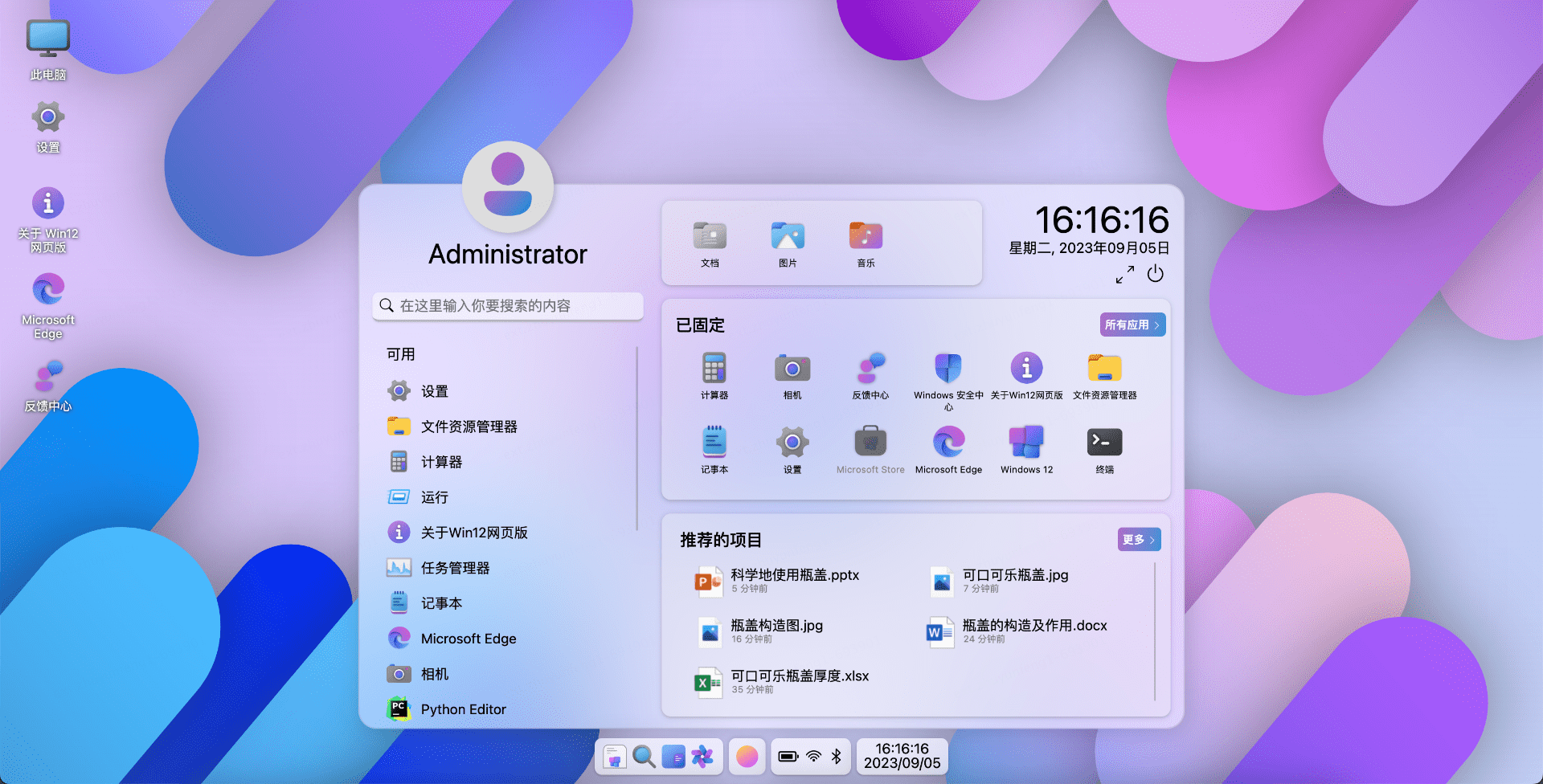
|
||||
|
||||
*开始菜单*
|
||||
|
||||
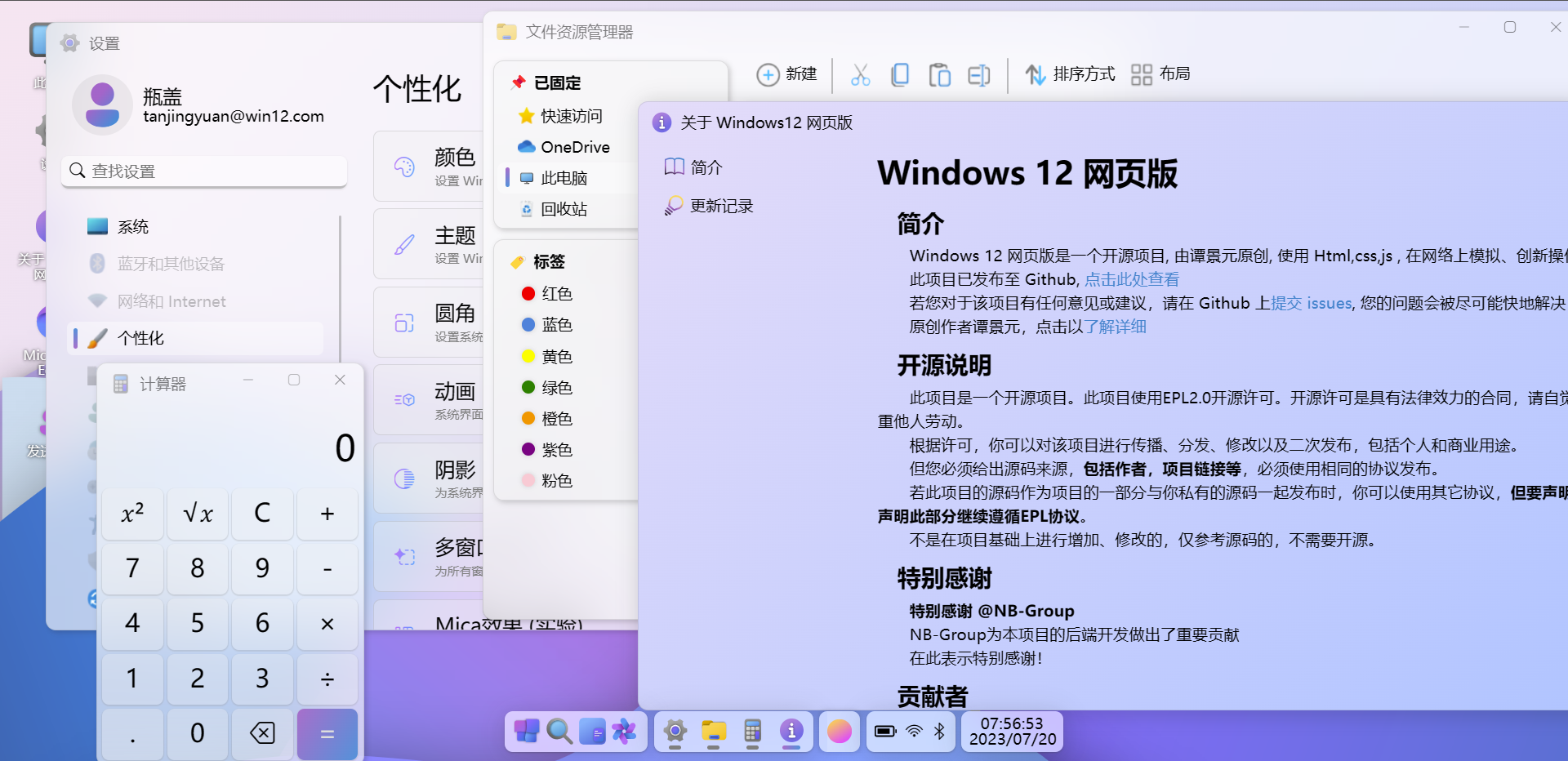
|
||||
|
||||
*丰富的应用*
|
||||
|
||||
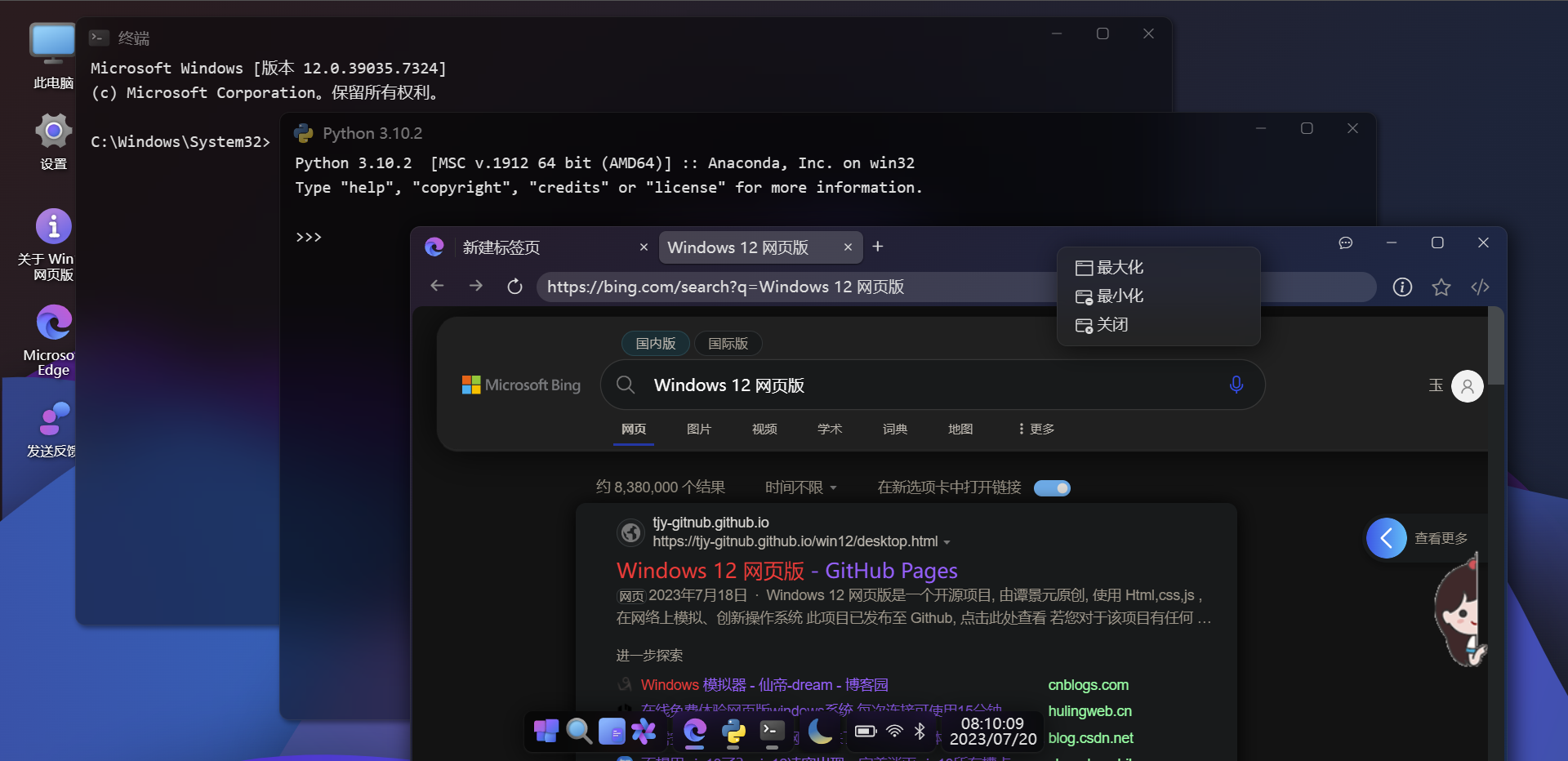
|
||||
|
||||
*深色模式*
|
||||
|
||||
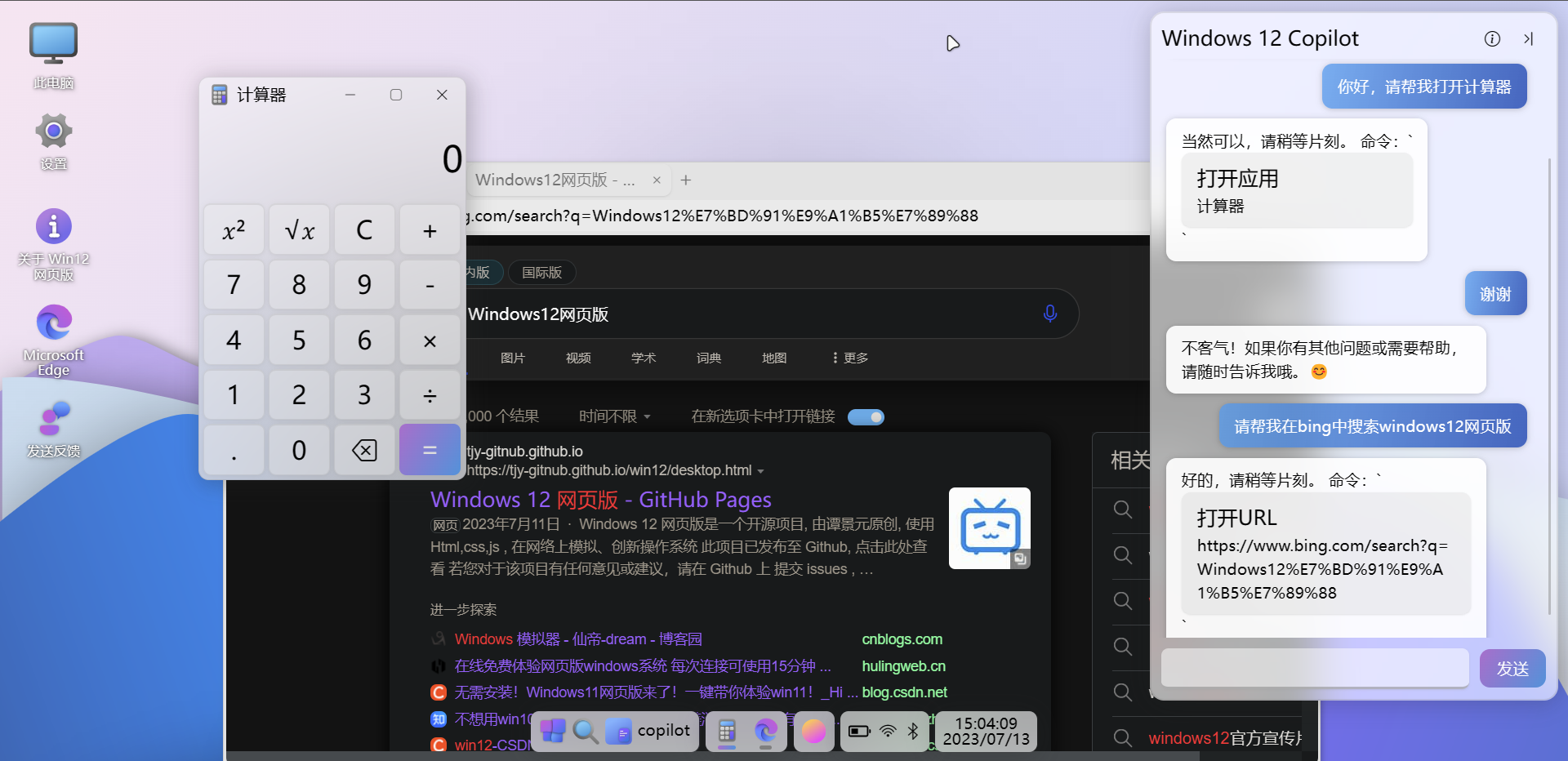
|
||||
*深色模式*
|
||||
|
||||
*AI Copilot*
|
||||
|
||||
## 在线体验
|
||||
|
||||
[在线预览](https://tjy-gitnub.github.io/win12/desktop.html)
|
||||
有点慢,稍等一下
|
||||
|
||||
有点慢,稍等一下~
|
||||
|
||||
## 安装和使用
|
||||
下载代码,无需安装,打开desktop.html即可
|
||||
|
||||
下载代码,无需安装,打开 `desktop.html` 即可。
|
||||
|
||||
## 前景规划
|
||||
|
||||
关于该项目的路径规划:
|
||||
|
||||
- [x] 基本功能与应用
|
||||
- [x] 外观整体优化
|
||||
- [x] 加入特效
|
||||
- [x] 窗口功能
|
||||
- [x] 应用完善
|
||||
- [x] 添加更多个性化方面的设置
|
||||
- [x] 添加Edge应用
|
||||
- [x] 添加 Edge 应用
|
||||
- [ ] 为更多应用添加标签页
|
||||
- [ ] 完善小组件,添加到桌面等功能
|
||||
- [x] 完善小组件,添加到桌面等功能
|
||||
- [x] 动态壁纸
|
||||
- [ ] 更多任务栏的自定义
|
||||
- [ ] 丰富应用生态
|
||||
- [ ] 丰富应用生态,添加 Microsoft Store
|
||||
- [ ] 完善设置及 Windows 更新
|
||||
|
||||
下面是一些...呃......畅..想 `~o~)/`:
|
||||
|
||||
下面是一些...呃......畅..想 `~o~)/`
|
||||
- [x] 建立文件系统
|
||||
- [ ] 建立自己的可执行文件机制
|
||||
- [ ] 将exe文件转化并执行
|
||||
- [ ] 提供更多api供应用调用
|
||||
- [ ] 内置浏览器内核,成为应用
|
||||
- [ ] 将 .exe 文件转化并执行
|
||||
- [ ] 提供更多 api 供应用调用
|
||||
- [x] 内置浏览器内核,成为应用
|
||||
- [ ] 将项目更名为 "Windows 12"
|
||||
- [ ] 封装到Windows中系统中
|
||||
- [ ] 封装到 Windows 系统中
|
||||
- [ ] 将启动程序设为此应用
|
||||
- [ ] 去除多余系统功能,封装成独立的操作系统
|
||||
- [ ] 将项目更名为 "Doswin 1.0"
|
||||
- [ ] 适配量子计算机
|
||||
- [ ] 接入chatgpt
|
||||
- [x] 接入ChatGPT
|
||||
- [ ] 将项目更名为 "550W"
|
||||
|
||||
## 开源说明
|
||||
|
||||
本项目作者:谭景元(tjy-gitnub)
|
||||
|
||||
本项目链接:<https://github.com/tjy-gitnub/win12>
|
||||
|
||||
此项目是一个开源项目。此项目使用 EPL v2.0 开源许可。开源许可是具有法律效力的合同,请自觉遵守开源许可,尊重他人劳动。
|
||||
|
||||
根据许可,你可以对该项目进行传播、分发、修改以及二次发布,包括个人和商业用途,但我方不鼓励一切商业用途。
|
||||
|
||||
您必须给出源码来源,**包括作者,项目链接**(见上)等,必须使用相同的协议开源。
|
||||
|
||||
若此项目的源码作为项目的一部分与你私有的源码一起发布时,你可以使用其它协议,**但要声明 EPL 部分的内容并声明此部分继续遵循 EPL 协议**。
|
||||
|
||||
不是在该项目基础上进行增加、修改的,仅参考源码的,不需要开源,但也仅供学习用途。
|
||||
|
||||
由于近期发现大量滥用行为,在此规定附加条例:
|
||||
|
||||
- 任何使用或分享本项目者,必须在介绍里附上原作者及项目链接,不得故意隐瞒原项目中的署名信息、原作者或项目链接,不得限制查看原项目中的署名信息、原作者或项目链接,且不得修改原项目中的署名信息;
|
||||
|
||||
- 将本项目用于商业用途者,需要**标明原作者及项目链接**,且**必须**以 EPL-2.0 协议开源。未经修改的源代码**不得用于**商业用途;
|
||||
|
||||
- 任何使用或分享本项目者,不得移除或故意隐藏、限制查看本声明;
|
||||
|
||||
- 请您遵守上述规定,我方有权通过法律手段进行合法维权。
|
||||
|
||||
## 贡献须知
|
||||
|
||||
详情请见 [贡献指南](./CONTRIBUTING.md)。
|
||||
|
||||
## AI Copilot 实现
|
||||
|
||||
详情请见 [AI Copilot 实现](./scripts/AI%20Copilot%20service/README.md)
|
||||
|
||||
|
||||
|
||||
|
||||

|
Before Width: | Height: | Size: 1.9 KiB After Width: | Height: | Size: 1.9 KiB |

|
Before Width: | Height: | Size: 3.5 KiB After Width: | Height: | Size: 3.5 KiB |

@@ -0,0 +1 @@
|
||||
<svg xmlns="http://www.w3.org/2000/svg" viewBox="0 0 2048 2048" width="32" height="32" fill="none"><path d="M1600 1152q93 0 174 35t143 96 96 142 35 175q0 93-35 174t-96 143-142 96-175 35q-93 0-174-35t-143-96-96-142-35-175q0-93 35-174t96-143 142-96 175-35zm-320 448q0 66 25 124t68 102 102 69 125 25q47 0 92-13t84-40l-443-443q-26 39-39 84t-14 92zm587 176q26-39 39-84t14-92q0-66-25-124t-69-101-102-69-124-26q-47 0-92 13t-84 40l443 443zm-774 125q22 36 48 69t57 62q-43 8-86 12t-88 4q-141 0-272-36t-244-104-207-160-161-207-103-245-37-272q0-141 36-272t104-244 160-207 207-161T752 37t272-37q141 0 272 36t244 104 207 160 161 207 103 245 37 272q0 44-4 87t-12 87q-54-59-118-98l4-38q2-19 2-38 0-130-38-256h-362q8 62 11 123t5 124q-33 3-65 10t-64 18v-39q0-60-4-118t-12-118H657q-9 64-13 127t-4 129q0 65 4 128t13 128h446q-37 59-60 128H679q8 37 23 89t37 109 51 113 64 101 78 72 92 28q18 0 35-5t34-14zm739-1261q-38-81-91-152t-120-131-143-104-162-75q36 49 64 105t51 115 40 121 29 121h332zm-808-512q-49 0-91 27t-78 73-65 101-51 113-37 109-23 89h690q-8-37-23-89t-37-109-51-113-64-101-78-72-92-28zm-292 50q-85 29-162 74T427 357 308 487t-92 153h332q12-59 28-120t39-121 52-116 65-105zm-604 846q0 130 38 256h362q-8-64-12-127t-4-129q0-65 4-128t12-128H166q-38 126-38 256zm88 384q38 81 91 152t120 131 143 104 162 75q-36-49-65-105t-51-115-39-121-29-121H216z" fill="#101010"/></svg>
|
||||
|
After Width: | Height: | Size: 1.3 KiB |

@@ -0,0 +1 @@
|
||||
<svg xmlns="http://www.w3.org/2000/svg" width="24" height="24" viewBox="0 0 24 24" fill="none" stroke="currentColor" stroke-width="2" stroke-linecap="round" stroke-linejoin="round" class="feather feather-minimize-2"><polyline points="4 14 10 14 10 20"></polyline><polyline points="20 10 14 10 14 4"></polyline><line x1="14" y1="10" x2="21" y2="3"></line><line x1="3" y1="21" x2="10" y2="14"></line></svg>
|
||||
|
After Width: | Height: | Size: 404 B |

@@ -0,0 +1 @@
|
||||
<svg xmlns="http://www.w3.org/2000/svg" width="24" height="24" viewBox="0 0 24 24" fill="none" stroke="currentColor" stroke-width="2" stroke-linecap="round" stroke-linejoin="round" class="feather feather-maximize-2"><polyline points="15 3 21 3 21 9"></polyline><polyline points="9 21 3 21 3 15"></polyline><line x1="21" y1="3" x2="14" y2="10"></line><line x1="3" y1="21" x2="10" y2="14"></line></svg>
|
||||
|
After Width: | Height: | Size: 400 B |

|
Before Width: | Height: | Size: 1.2 KiB After Width: | Height: | Size: 1.2 KiB |

|
Before Width: | Height: | Size: 3.1 KiB After Width: | Height: | Size: 3.1 KiB |

|
Before Width: | Height: | Size: 1.7 KiB After Width: | Height: | Size: 1.7 KiB |

|
Before Width: | Height: | Size: 9.1 KiB After Width: | Height: | Size: 9.1 KiB |

|
Before Width: | Height: | Size: 34 KiB After Width: | Height: | Size: 34 KiB |

|
Before Width: | Height: | Size: 7.7 KiB After Width: | Height: | Size: 7.7 KiB |

|
Before Width: | Height: | Size: 665 B After Width: | Height: | Size: 665 B |

|
Before Width: | Height: | Size: 759 B After Width: | Height: | Size: 759 B |

|
Before Width: | Height: | Size: 1.1 KiB After Width: | Height: | Size: 1.1 KiB |

|
Before Width: | Height: | Size: 2.6 KiB After Width: | Height: | Size: 2.6 KiB |

|
Before Width: | Height: | Size: 6.5 KiB After Width: | Height: | Size: 6.5 KiB |

|
Before Width: | Height: | Size: 1.5 KiB After Width: | Height: | Size: 1.5 KiB |

|
Before Width: | Height: | Size: 1.6 KiB After Width: | Height: | Size: 1.6 KiB |

|
Before Width: | Height: | Size: 1.4 KiB After Width: | Height: | Size: 1.4 KiB |

|
Before Width: | Height: | Size: 1.7 KiB After Width: | Height: | Size: 1.7 KiB |

|
Before Width: | Height: | Size: 1.7 KiB After Width: | Height: | Size: 1.7 KiB |

|
Before Width: | Height: | Size: 1.3 KiB After Width: | Height: | Size: 1.3 KiB |

|
Before Width: | Height: | Size: 953 B After Width: | Height: | Size: 953 B |

|
Before Width: | Height: | Size: 1.2 KiB After Width: | Height: | Size: 1.2 KiB |

|
Before Width: | Height: | Size: 1.2 KiB After Width: | Height: | Size: 1.2 KiB |

|
Before Width: | Height: | Size: 1.2 KiB After Width: | Height: | Size: 1.2 KiB |

|
Before Width: | Height: | Size: 1.2 KiB After Width: | Height: | Size: 1.2 KiB |

|
After Width: | Height: | Size: 2.2 KiB |

|
After Width: | Height: | Size: 234 B |

|
After Width: | Height: | Size: 11 KiB |

|
Before Width: | Height: | Size: 983 B After Width: | Height: | Size: 983 B |

|
Before Width: | Height: | Size: 1.0 KiB After Width: | Height: | Size: 1.0 KiB |

|
Before Width: | Height: | Size: 832 B After Width: | Height: | Size: 832 B |

|
Before Width: | Height: | Size: 868 B After Width: | Height: | Size: 868 B |

|
Before Width: | Height: | Size: 1.5 KiB After Width: | Height: | Size: 1.5 KiB |

|
Before Width: | Height: | Size: 1.3 KiB After Width: | Height: | Size: 1.3 KiB |

|
Before Width: | Height: | Size: 1020 B After Width: | Height: | Size: 1020 B |

|
Before Width: | Height: | Size: 4.8 KiB After Width: | Height: | Size: 4.8 KiB |

|
Before Width: | Height: | Size: 18 KiB After Width: | Height: | Size: 18 KiB |
@@ -124,6 +124,11 @@
|
||||
|
||||
#contri>.a>.name {
|
||||
font-size: 17px;
|
||||
margin: 0px 6px;
|
||||
/* border: 6px; */
|
||||
white-space: nowrap;
|
||||
text-overflow: ellipsis;
|
||||
overflow: hidden;
|
||||
}
|
||||
|
||||
#contri>.a>.cbs>.num {
|
||||
@@ -144,24 +149,26 @@
|
||||
#win-winver>.logo{
|
||||
display: flex;
|
||||
justify-content: center;
|
||||
align-items: center;
|
||||
}
|
||||
|
||||
#win-winver>.logo>.img{
|
||||
background: url(../../icon/logo.svg) center;
|
||||
background-size: cover;
|
||||
height: 80px;
|
||||
width: 80px;
|
||||
height: 70px;
|
||||
width: 70px;
|
||||
margin:10px;
|
||||
}
|
||||
|
||||
#win-winver>.logo>p{
|
||||
background-image: linear-gradient(100deg, var(--theme-1), var(--theme-2));
|
||||
background-image: linear-gradient(100deg, #b660d9,#2983cc);
|
||||
-webkit-background-clip: text;
|
||||
background-clip: text;
|
||||
-webkit-text-fill-color: transparent;
|
||||
font-size: 45px;
|
||||
font-weight: 550;
|
||||
font-family: 'Microsoft Yahei UI';
|
||||
/* font-weight: 450; */
|
||||
font-family:
|
||||
'Microsoft Yahei UI';
|
||||
margin: 15px;
|
||||
}
|
||||
|
||||
@@ -186,4 +193,4 @@
|
||||
#win-winver>.bottom{
|
||||
position: absolute;
|
||||
bottom: 80px;
|
||||
}
|
||||
}
|
||||
@@ -0,0 +1,157 @@
|
||||
@font-face {
|
||||
font-family: 'dos';
|
||||
src: url(../../fonts/dos.ttf);
|
||||
}
|
||||
|
||||
body {
|
||||
background-color: #aaaaaa;
|
||||
}
|
||||
|
||||
html,
|
||||
body {
|
||||
width: 100%;
|
||||
height: 100%;
|
||||
}
|
||||
|
||||
|
||||
* {
|
||||
font-family: 'dos', monospace;
|
||||
padding: 0px;
|
||||
margin: 0px;
|
||||
border: 0px;
|
||||
cursor: none;
|
||||
-webkit-user-select: none;
|
||||
-moz-user-select: none;
|
||||
-o-user-select: none;
|
||||
user-select: none;
|
||||
scrollbar-width: none;
|
||||
-ms-overflow-style: none;
|
||||
box-sizing: border-box;
|
||||
}
|
||||
|
||||
::-webkit-scrollbar {
|
||||
display: none;
|
||||
}
|
||||
|
||||
.tit {
|
||||
font-size: 1.2rem;
|
||||
text-align: center;
|
||||
background-color: #4ba7a8;
|
||||
list-style-type: none;
|
||||
margin: 0px;
|
||||
padding: 5px;
|
||||
}
|
||||
|
||||
body {
|
||||
display: flex;
|
||||
flex-direction: column;
|
||||
}
|
||||
|
||||
.pages {
|
||||
background-color: #0100a2;
|
||||
padding: 5px;
|
||||
}
|
||||
|
||||
a {
|
||||
text-decoration: none;
|
||||
}
|
||||
|
||||
.tab {
|
||||
font-size: 110%;
|
||||
color: #aaaaaa;
|
||||
background-color: #0100a2;
|
||||
margin: 5px;
|
||||
padding: 5px;
|
||||
}
|
||||
|
||||
.tab.foc {
|
||||
color: #ffffff !important;
|
||||
}
|
||||
|
||||
.tab.show {
|
||||
color: #0100a2;
|
||||
background-color: #aaaaaa;
|
||||
}
|
||||
|
||||
.option {
|
||||
color: #0100a2;
|
||||
background-color: #aaaaaa;
|
||||
padding: 0 10px;
|
||||
}
|
||||
|
||||
.page {
|
||||
margin: 20px;
|
||||
padding: 20px;
|
||||
border: 3.5px solid #000;
|
||||
height: 100%;
|
||||
display: none;
|
||||
overflow-y: auto;
|
||||
}
|
||||
|
||||
.page.show {
|
||||
display: block !important;
|
||||
}
|
||||
|
||||
.exit {
|
||||
color: #0100a2;
|
||||
padding: 5px;
|
||||
}
|
||||
|
||||
.confirm-button {
|
||||
background-color: #ffffff;
|
||||
color: #000000;
|
||||
}
|
||||
|
||||
#mainPage>.table,
|
||||
#advancedPage>.table,
|
||||
#bootPage>.table,
|
||||
#securityPage>.table {
|
||||
display: grid;
|
||||
grid-template-columns: auto auto;
|
||||
gap: 10px;
|
||||
width: fit-content;
|
||||
}
|
||||
|
||||
#confirmContainer {
|
||||
width: 100%;
|
||||
height: 100%;
|
||||
position: fixed;
|
||||
top: 0px;
|
||||
left: 0px;
|
||||
display: none;
|
||||
justify-content: center;
|
||||
align-items: center;
|
||||
}
|
||||
|
||||
#exit_confirm {
|
||||
width: calc(30% + 50px);
|
||||
height: calc(15% + 70px);
|
||||
background-color: #ffffff;
|
||||
padding: 20px 10px;
|
||||
box-shadow: rgb(0, 0, 0) 8px 16px 0px 0px;
|
||||
}
|
||||
|
||||
#confirm {
|
||||
border: 3.5px solid #000;
|
||||
height: 100%;
|
||||
padding: 20px 10px;
|
||||
text-align: center;
|
||||
display: grid;
|
||||
grid-template-rows: auto auto;
|
||||
}
|
||||
|
||||
#confirm>*:first-child {
|
||||
align-self: flex-start;
|
||||
}
|
||||
|
||||
#confirm>*:last-child {
|
||||
align-self: flex-end;
|
||||
}
|
||||
|
||||
.submenu {
|
||||
padding-left: 20px;
|
||||
display: grid;
|
||||
grid-template-columns: auto auto;
|
||||
gap: 5px;
|
||||
margin-bottom: 15px;
|
||||
}
|
||||
@@ -1,3 +1,21 @@
|
||||
@keyframes shine {
|
||||
0% {
|
||||
border-color: #111;
|
||||
}
|
||||
49% {
|
||||
border-color: #111;
|
||||
}
|
||||
51% {
|
||||
border-color: transparent;
|
||||
}
|
||||
98% {
|
||||
border-color: transparent;
|
||||
}
|
||||
100% {
|
||||
border-color: #111;
|
||||
}
|
||||
}
|
||||
|
||||
#win-calc {
|
||||
display: flex;
|
||||
flex-direction: column;
|
||||
@@ -5,13 +23,28 @@
|
||||
}
|
||||
|
||||
#calc-input {
|
||||
height: 90px;
|
||||
/* height: 90px; */
|
||||
border: none;
|
||||
border-right: 2px solid transparent;
|
||||
outline: none;
|
||||
background-color: #00000000;
|
||||
font-size: 35px;
|
||||
text-align: end;
|
||||
color: var(--text);
|
||||
width: 100%;
|
||||
}
|
||||
|
||||
#win-calc>.container {
|
||||
height: 90px;
|
||||
display: flex;
|
||||
align-items: center;
|
||||
}
|
||||
|
||||
#calc-input:focus {
|
||||
border-color: #111;
|
||||
animation-name: shine;
|
||||
animation-duration: 1s;
|
||||
animation-iteration-count: infinite;
|
||||
}
|
||||
|
||||
#win-calc>.keyb {
|
||||
@@ -40,6 +73,10 @@
|
||||
transform-origin: bottom;
|
||||
}
|
||||
|
||||
#win-calc>.keyb>.checked {
|
||||
background-color: var(--mm) !important;
|
||||
}
|
||||
|
||||
#win-calc>.keyb>.b.u {
|
||||
padding-top: 5px;
|
||||
}
|
||||
|
||||
@@ -19,7 +19,9 @@
|
||||
#copilot.show{
|
||||
right: 10px;
|
||||
box-shadow: 1px 2px 25px var(--sd);
|
||||
backdrop-filter: blur(20px) saturate(1.3);
|
||||
backdrop-filter: blur(60px) saturate(3) contrast(0.6);
|
||||
/* backdrop-filter: blur(80px) saturate(1.3); */
|
||||
-webkit-backdrop-filter: blur(60px) saturate(3) contrast(0.6);
|
||||
}
|
||||
|
||||
#copilot>.titbar{
|
||||
@@ -82,7 +84,7 @@
|
||||
border-radius: 10px;
|
||||
box-shadow: 0 1px 6px var(--sd);
|
||||
max-width: calc(100% - 40px);
|
||||
word-break:break-all;
|
||||
word-break:break-word;
|
||||
animation: msg 400ms cubic-bezier(0,0,0,1);
|
||||
user-select:text;
|
||||
}
|
||||
|
||||
@@ -2,135 +2,6 @@
|
||||
padding-bottom: 55px;
|
||||
}
|
||||
|
||||
.window.edge>.titbar>.tabs {
|
||||
display: flex;
|
||||
flex-grow: 1 !important;
|
||||
height: calc(100% - 2px);
|
||||
padding: 2px 1px;
|
||||
/* overflow-x:auto; */
|
||||
overflow: hidden;
|
||||
align-items: center;
|
||||
margin-top: 2px;
|
||||
}
|
||||
|
||||
.window.edge>.titbar>.tabs>.tab {
|
||||
display: flex;
|
||||
border-radius: 7px;
|
||||
max-width: 200px;
|
||||
display: flex;
|
||||
justify-content: space-between;
|
||||
/* padding: 4px 0; */
|
||||
align-items: center;
|
||||
width: 0;
|
||||
flex-grow: 1;
|
||||
max-width: 200px;
|
||||
min-width: none;
|
||||
overflow: hidden;
|
||||
transition: 50ms;
|
||||
height: 100%;
|
||||
}
|
||||
|
||||
.window.edge>.titbar>.tabs>.tab::before {
|
||||
content: '';
|
||||
position: relative;
|
||||
width: 1.5px;
|
||||
height: 19px;
|
||||
background: var(--hr);
|
||||
/* opacity: 0.3; */
|
||||
transition: 50ms;
|
||||
}
|
||||
|
||||
.window.edge>.titbar>.tabs>.tab p {
|
||||
overflow: hidden;
|
||||
display: -webkit-box;
|
||||
box-orient: vertical;
|
||||
-webkit-box-orient: vertical;
|
||||
line-clamp: 1;
|
||||
-webkit-line-clamp: 1;
|
||||
}
|
||||
|
||||
.window.edge>.titbar>.tabs>.tab.show {
|
||||
background: var(--hover) !important;
|
||||
box-shadow: 0 1px 2px var(--sd);
|
||||
}
|
||||
|
||||
.window.edge>.titbar>.tabs>.tab.close {
|
||||
transform: translateY(calc(100% + 5px)) !important;
|
||||
opacity: 0.6;
|
||||
transition: 150ms;
|
||||
}
|
||||
|
||||
.window.edge>.titbar>.tabs>.tab.left {
|
||||
transform: translateX(-100%) !important;
|
||||
transition: 150ms;
|
||||
}
|
||||
|
||||
.window.edge>.titbar>.tabs>.tab.right {
|
||||
transform: translateX(100%) !important;
|
||||
transition: 150ms;
|
||||
}
|
||||
|
||||
.window.edge>.titbar>.tabs>.tab.moving {
|
||||
/* background: var(--unfoc) !important; */
|
||||
background: var(--bggrey) !important;
|
||||
z-index: 1;
|
||||
}
|
||||
|
||||
.window.edge>.titbar>.tabs>.tab:hover {
|
||||
background: var(--hover-b);
|
||||
}
|
||||
|
||||
.window.edge>.titbar>.tabs>.tab:hover::before,
|
||||
.window.edge>.titbar>.tabs>.tab:hover+.tab::before,
|
||||
.window.edge>.titbar>.tabs>.tab.show::before,
|
||||
.window.edge>.titbar>.tabs>.tab.show+.tab::before {
|
||||
opacity: 0;
|
||||
}
|
||||
|
||||
.window.edge>.titbar>.tabs>.tab>p {
|
||||
font-size: 15px;
|
||||
margin-left: 7px;
|
||||
margin-top: 1px;
|
||||
flex-grow: 1;
|
||||
}
|
||||
|
||||
.window.edge>.titbar>.tabs>.tab>.clbtn {
|
||||
border-radius: 4px;
|
||||
display: block;
|
||||
margin: 0 5px 0 0;
|
||||
width: 18px;
|
||||
height: 18px;
|
||||
}
|
||||
|
||||
.window.edge>.titbar>.tabs>.tab>.clbtn::before {
|
||||
position: relative;
|
||||
top: -3px;
|
||||
left: 1px;
|
||||
}
|
||||
|
||||
.window.edge>.titbar>.tabs>.tab>.clbtn:hover {
|
||||
background: var(--hover);
|
||||
}
|
||||
|
||||
.window.edge>.titbar>.tabs>.new {
|
||||
border-radius: 7px;
|
||||
margin: 3px 2px;
|
||||
height: 25px;
|
||||
width: 25px;
|
||||
font-size: 20px;
|
||||
text-align: center;
|
||||
transition: 50ms;
|
||||
}
|
||||
|
||||
.window.edge>.titbar>.tabs>.new::before {
|
||||
position: relative;
|
||||
top: -3px;
|
||||
}
|
||||
|
||||
.window.edge>.titbar>.tabs>.new:hover {
|
||||
background-color: var(--hover-half);
|
||||
}
|
||||
|
||||
#win-edge {
|
||||
display: flex;
|
||||
flex-direction: column;
|
||||
@@ -153,6 +24,11 @@
|
||||
--top:2px;
|
||||
}
|
||||
|
||||
#win-edge>.tool>.a.disabled {
|
||||
filter: contrast(0.2);
|
||||
pointer-events: none;
|
||||
}
|
||||
|
||||
#win-edge>.tool>.a>.bi::before {
|
||||
position: relative;
|
||||
top: var(--top);
|
||||
@@ -239,4 +115,8 @@
|
||||
.reloading>svg>circle:last-child {
|
||||
stroke: #2983cc;
|
||||
stroke-width: 2px;
|
||||
}
|
||||
}
|
||||
|
||||
#voiceBall {
|
||||
aspect-ratio: 1;
|
||||
}
|
||||
@@ -1,100 +1,125 @@
|
||||
.window.explorer>.titbar>.tabs>.tab>p>img{
|
||||
width: 25px;
|
||||
height: 25px;
|
||||
margin-right: 5px;
|
||||
}
|
||||
|
||||
.window.explorer>.titbar>.tabs>.tab>p{
|
||||
display: flex !important;
|
||||
align-items: center;
|
||||
}
|
||||
|
||||
#win-explorer {
|
||||
display: flex;
|
||||
flex-direction: column;
|
||||
}
|
||||
|
||||
#win-explorer>.menu {
|
||||
#win-explorer>.page {
|
||||
display: flex;
|
||||
flex-grow: 1;
|
||||
overflow: hidden;
|
||||
}
|
||||
|
||||
#win-explorer>.page>.menu {
|
||||
min-width: 250px;
|
||||
height: 100%;
|
||||
overflow-y: auto;
|
||||
margin-right: 6px;
|
||||
padding-right: 2px;
|
||||
}
|
||||
|
||||
#win-explorer>.menu>.card {
|
||||
margin: 10px 15px 15px 15px;
|
||||
#win-explorer>.page>.menu>.card {
|
||||
margin: 10px 0 10px 15px;
|
||||
border-radius: 8px;
|
||||
background-color: var(--card);
|
||||
padding: 4px;
|
||||
box-shadow: 0 1px 2px 1px var(--s3d);
|
||||
border: 1.5px solid #6f6f6f30;
|
||||
/* border: 1.5px solid #6f6f6f30; */
|
||||
}
|
||||
|
||||
#win-explorer>.menu>.card>.title {
|
||||
#win-explorer>.page>.menu>.card>.title {
|
||||
padding: 6px 10px;
|
||||
font-weight: 550;
|
||||
}
|
||||
|
||||
#win-explorer>.menu>.card>list>a {
|
||||
#win-explorer>.page>.menu>.card>list>a {
|
||||
padding: 4px 5px 4px 20px;
|
||||
font-size: 15px;
|
||||
border-radius: 7px;
|
||||
transition: 100ms;
|
||||
display: flex;
|
||||
height: 30px;
|
||||
align-items: center;
|
||||
}
|
||||
|
||||
#win-explorer>.menu>.card>list>a.check {
|
||||
#win-explorer>.page>.menu>.card>list>a.check {
|
||||
background-color: var(--hover) !important;
|
||||
}
|
||||
|
||||
#win-explorer>.menu>.pinned>list>a>img {
|
||||
#win-explorer>.page>.menu>.pinned>list>a>img {
|
||||
width: 18px;
|
||||
height: 18px;
|
||||
margin-top: 2px;
|
||||
/* margin-top: 2px; */
|
||||
margin-right: 5px;
|
||||
}
|
||||
|
||||
#win-explorer>.menu>.tags>list>a>span {
|
||||
#win-explorer>.page>.menu>.tags>list>a>span:first-child {
|
||||
width: 13px;
|
||||
height: 13px;
|
||||
margin-left: 4px;
|
||||
margin-top: 4px;
|
||||
/* margin-top: 4px; */
|
||||
margin-right: 7px;
|
||||
border-radius: 50%;
|
||||
box-shadow: 0 0 5px var(--sd);
|
||||
}
|
||||
|
||||
#win-explorer>.main {
|
||||
#win-explorer>.page>.main {
|
||||
flex-grow: 1;
|
||||
height: calc(100% - 32px);
|
||||
height: 100%;
|
||||
display: flex;
|
||||
flex-direction: column;
|
||||
overflow: hidden;
|
||||
padding-left: 2px;
|
||||
}
|
||||
|
||||
#win-explorer>.main>.tool {
|
||||
#win-explorer>.page>.main>.tool {
|
||||
width: 100%;
|
||||
height: 55px;
|
||||
height: 42px;
|
||||
display: flex;
|
||||
padding: 0 10px 5px 10px;
|
||||
/* align-items: center; */
|
||||
margin-top: 3px;
|
||||
align-items: center;
|
||||
}
|
||||
|
||||
#win-explorer>.main>.tool>.b {
|
||||
height: 35px;
|
||||
padding: 7px 9px;
|
||||
#win-explorer>.page>.main>.tool>.b {
|
||||
height: 33px;
|
||||
padding: 6px 8px;
|
||||
border-radius: 7px;
|
||||
transition: 100ms;
|
||||
margin: 0 1px;
|
||||
}
|
||||
|
||||
#win-explorer>.main>.tool>.b.t {
|
||||
#win-explorer>.page>.main>.tool>.b.t {
|
||||
display: flex;
|
||||
align-items: center;
|
||||
font-size: 15px;
|
||||
}
|
||||
|
||||
#win-explorer>.main>.tool>.b.t>img {
|
||||
#win-explorer>.page>.main>.tool>.b.t>img {
|
||||
display: flex;
|
||||
margin-right: 5px;
|
||||
}
|
||||
|
||||
#win-explorer>.main>.tool>.b:hover {
|
||||
#win-explorer>.page>.main>.tool>.b:hover {
|
||||
background-color: var(--hover);
|
||||
}
|
||||
|
||||
#win-explorer>.main>.tool>.b>img {
|
||||
#win-explorer>.page>.main>.tool>.b>img {
|
||||
width: 20px;
|
||||
height: 20px;
|
||||
}
|
||||
|
||||
#win-explorer>.main>.tool>.hr {
|
||||
#win-explorer>.page>.main>.tool>.hr {
|
||||
width: 2px;
|
||||
height: 25px;
|
||||
background-color: #7f7f7f7f;
|
||||
@@ -102,64 +127,72 @@
|
||||
margin: 5px 3px;
|
||||
}
|
||||
|
||||
#win-explorer>.main>.content {
|
||||
#win-explorer>.page>.main>.content {
|
||||
width: calc(100% - 15px);
|
||||
flex-grow: 1;
|
||||
background-color: var(--card);
|
||||
border-radius: 8px;
|
||||
margin: -10px 15px 10px 0;
|
||||
padding: 8px;
|
||||
margin: 0 15px 10px 0;
|
||||
padding: 13px 10px 40px 10px;
|
||||
overflow-y: auto;
|
||||
border: 1.5px solid #6f6f6f30;
|
||||
/* border: 1.5px solid #6f6f6f30; */
|
||||
box-shadow: 0 1px 2px 1px var(--s3d);
|
||||
}
|
||||
|
||||
#win-explorer>.main>.content>.tool {
|
||||
height: 40px;
|
||||
#win-explorer>.path {
|
||||
height: 35px;
|
||||
width: 100%;
|
||||
display: flex;
|
||||
padding: 10px 0 0 10px;
|
||||
margin-bottom: 10px;
|
||||
padding: 4px 10px 0 10px;
|
||||
align-items: center;
|
||||
/* margin-bottom: 10px; */
|
||||
}
|
||||
|
||||
#win-explorer>.main>.content>.tool>.btn>.bi::before {
|
||||
position: relative;
|
||||
top: -2px;
|
||||
/* #win-explorer>.path>.btn>.bi {
|
||||
font-size: 15px;
|
||||
} */
|
||||
|
||||
#win-explorer>.path>.front.disabled, #win-explorer>.path>.back.disabled {
|
||||
filter: contrast(0.2);
|
||||
pointer-events: none;
|
||||
}
|
||||
|
||||
#win-explorer>.main>.content>.tool>.btn {
|
||||
#win-explorer>.path>.btn {
|
||||
transition: 100ms;
|
||||
font-size: 17px;
|
||||
text-align: center;
|
||||
padding-top: 4px;
|
||||
min-width: 33px;
|
||||
}
|
||||
|
||||
#win-explorer>.main>.content>.tool>.tit>img {
|
||||
width: 22px;
|
||||
height: 22px;
|
||||
margin-top: 2px;
|
||||
}
|
||||
|
||||
#win-explorer>.main>.content>.tool>.tit {
|
||||
#win-explorer>.path>.tit {
|
||||
overflow: hidden;
|
||||
display: flex;
|
||||
/* background-color: var(--bg70); */
|
||||
flex-grow: 1 !important;
|
||||
flex-grow: 1;
|
||||
margin: 0px 10px 0px 5px;
|
||||
border-radius: 7px;
|
||||
height: 32px;
|
||||
/* align-items: center; */
|
||||
}
|
||||
|
||||
#win-explorer>.main>.content>.tool>.tit>.path{
|
||||
#win-explorer>.path>.tit>img {
|
||||
width: 22px;
|
||||
height: 22px;
|
||||
margin-top: 2px;
|
||||
}
|
||||
|
||||
#win-explorer>.path>.tit>.path{
|
||||
display: flex;
|
||||
align-items: center;
|
||||
min-width: 0;
|
||||
overflow-y:hidden;
|
||||
/* flex-grow: 1; */
|
||||
width: calc(100% - 35px);
|
||||
}
|
||||
|
||||
#win-explorer>.main>.content>.tool>.tit>.path::-webkit-scrollbar{
|
||||
#win-explorer>.path>.tit>.path::-webkit-scrollbar{
|
||||
height: 2px;
|
||||
}
|
||||
#win-explorer>.main>.content>.tool>.tit>.path::-webkit-scrollbar-thumb {
|
||||
#win-explorer>.path>.tit>.path::-webkit-scrollbar-thumb {
|
||||
background: #7f7f7f70;
|
||||
background-clip: padding-box;
|
||||
border: 0px solid transparent;
|
||||
@@ -167,14 +200,13 @@
|
||||
}
|
||||
|
||||
|
||||
#win-explorer>.main>.content>.tool>.tit>.path>* {
|
||||
#win-explorer>.path>.tit>.path>* {
|
||||
display: block;
|
||||
/* width: min-content; */
|
||||
height: 100%;
|
||||
white-space:nowrap;
|
||||
}
|
||||
|
||||
#win-explorer>.main>.content>.tool>.tit>.path>.arrow {
|
||||
#win-explorer>.path>.tit>.path>.arrow {
|
||||
opacity: 0.4;
|
||||
font-size: 14px;
|
||||
line-height: 1;
|
||||
@@ -182,18 +214,23 @@
|
||||
margin: 0 4px;
|
||||
}
|
||||
|
||||
#win-explorer>.main>.content>.tool>.tit>.path>.text:hover {
|
||||
background-color: var(--hover-b);
|
||||
}
|
||||
|
||||
#win-explorer>.main>.content>.tool>.tit>.path>.text {
|
||||
#win-explorer>.path>.tit>.path>.text {
|
||||
padding: 2px 5px;
|
||||
height: min-content;
|
||||
border-radius: 5px;
|
||||
font-size: 15px;
|
||||
transition: 50ms;
|
||||
}
|
||||
|
||||
#win-explorer>.main>.content>.tool>.tit>.icon {
|
||||
#win-explorer>.path>.tit>.path>.text:hover {
|
||||
background-color: var(--hover-b);
|
||||
}
|
||||
|
||||
#win-explorer>.path>.tit>.path>.text:active {
|
||||
opacity: 0.8;
|
||||
}
|
||||
|
||||
#win-explorer>.path>.tit>.icon {
|
||||
width: 25.6px;
|
||||
margin-top: -1px;
|
||||
margin-left: 3px;
|
||||
@@ -203,7 +240,7 @@
|
||||
background-repeat: no-repeat;
|
||||
}
|
||||
|
||||
/* #win-explorer>.main>.content>.tool>.tit:hover{
|
||||
/* #win-explorer>.path>.tit:hover{
|
||||
height: min-content;
|
||||
min-width: 100px;
|
||||
background: var(--unfoc);
|
||||
@@ -215,37 +252,43 @@
|
||||
z-index: 1;
|
||||
} */
|
||||
|
||||
/* #win-explorer>.main>.content>.tool>.search{
|
||||
/* #win-explorer>.path>.search{
|
||||
flex-grow: 1;
|
||||
} */
|
||||
|
||||
#win-explorer>.main>.content>.tool>.search>* {
|
||||
#win-explorer>.path>.search {
|
||||
min-width: 170px;
|
||||
width: 26%;
|
||||
max-width: 400px;
|
||||
}
|
||||
|
||||
#win-explorer>.path>.search>* {
|
||||
float: right;
|
||||
margin-right: 10px;
|
||||
}
|
||||
|
||||
#win-explorer>.main>.content>.tool>.search>.input {
|
||||
width: 300px;
|
||||
#win-explorer>.path>.search>.input {
|
||||
padding-left: 30px;
|
||||
white-space: nowrap;
|
||||
text-overflow: ellipsis;
|
||||
}
|
||||
|
||||
#win-explorer>.main>.content>.tool>.search>input-before {
|
||||
#win-explorer>.path>.search>input-before {
|
||||
margin-top: 4px;
|
||||
margin-right: -23px;
|
||||
}
|
||||
|
||||
#win-explorer>.main>.content>.view {
|
||||
#win-explorer>.page>.main>.content>.view {
|
||||
width: 100%;
|
||||
height: max-content;
|
||||
display: flex;
|
||||
flex-direction: column;
|
||||
}
|
||||
|
||||
#win-explorer>.main>.content>.view>* {
|
||||
/* #win-explorer>.page>.main>.content>.view>* {
|
||||
animation: exp-show 200ms;
|
||||
}
|
||||
} */
|
||||
|
||||
@keyframes exp-show {
|
||||
/* @keyframes exp-show {
|
||||
0% {
|
||||
transform: translateX(-10px);
|
||||
opacity: 0;
|
||||
@@ -255,40 +298,53 @@
|
||||
transform: none;
|
||||
opacity: 1;
|
||||
}
|
||||
}
|
||||
} */
|
||||
|
||||
#win-explorer>.main>.content>.view>.info {
|
||||
#win-explorer>.page>.main>.content>.view>.info {
|
||||
color: #888;
|
||||
text-align: center;
|
||||
}
|
||||
|
||||
#win-explorer>.main>.content>.view>.item {
|
||||
#win-explorer>.page>.main>.content>.view>.item {
|
||||
width: 100%;
|
||||
padding: 2px 5px;
|
||||
border-radius: 5px;
|
||||
display: flex;
|
||||
border: 1.5px solid transparent;
|
||||
transition: 40ms, transform 400ms cubic-bezier(0.14, 1.02, 0.17, 0.03);
|
||||
font-size: 14px;
|
||||
align-items: center;
|
||||
height: 30px;
|
||||
transition: 50ms;
|
||||
}
|
||||
|
||||
#win-explorer>.main>.content>.view>.item:active {
|
||||
transform: scale(0.99);
|
||||
transform-origin: bottom;
|
||||
#win-explorer>.page>.main>.content>.view>.item:active {
|
||||
/* transform: scale(0.99); */
|
||||
/* transform-origin: bottom; */
|
||||
opacity: 0.7;
|
||||
}
|
||||
|
||||
#win-explorer>.main>.content>.view>.item>img {
|
||||
width: 26px;
|
||||
height: 26px;
|
||||
#win-explorer>.page>.main>.content>.view>.item>img {
|
||||
width: 25px;
|
||||
height: 25px;
|
||||
margin-right: 5px;
|
||||
}
|
||||
|
||||
#win-explorer>.main>.content>.view>.item.file>img {
|
||||
#win-explorer>.page>.main>.content>.view>.item.file>img {
|
||||
width: 22px;
|
||||
height: 22px;
|
||||
margin: 2px;
|
||||
margin-left: 2px;
|
||||
margin-right: 7px;
|
||||
}
|
||||
|
||||
#win-explorer>.main>.content>.view>.item:hover {
|
||||
#win-explorer>.page>.main>.content>.view>.item:hover {
|
||||
background-color: var(--hover);
|
||||
/* border: 1.5px solid #6f6f6f30; */
|
||||
box-shadow: 0 1px 2px var(--s3d);
|
||||
}
|
||||
|
||||
#win-explorer>.page>.main>.content>.view>.item>.input {
|
||||
border-radius: 5px;
|
||||
/* background: none; */
|
||||
font-size: 14px;
|
||||
border-width: 2px;
|
||||
}
|
||||
@@ -5,8 +5,7 @@
|
||||
justify-content: center;
|
||||
align-items: center;
|
||||
flex-direction: column;
|
||||
/* background: linear-gradient(130deg, #ad6eca, #3b91d8); */
|
||||
background-image: url('../../img/login.jpg'); /* Lucas Andrade, CC BY SA-4.0 */
|
||||
background-image: url('../../img/login.jpg');
|
||||
background-size: cover;
|
||||
background-repeat: no-repeat;
|
||||
background-position: 50% 50%;
|
||||
@@ -20,30 +19,37 @@
|
||||
}
|
||||
|
||||
#login {
|
||||
cursor: pointer;
|
||||
padding: 4px 50px 4px 50px;
|
||||
border: 2px solid #aaa;
|
||||
background-color: #eeeeee80;
|
||||
backdrop-filter: blur(10px) brightness(2);
|
||||
color: #121212;
|
||||
transition: background-color 300ms, transform cubic-bezier(0.14, 1.02, 0.17, 0.03) 300ms;
|
||||
font-size: 18px;
|
||||
border-radius: 10px;
|
||||
background-color: #eeeeee40;
|
||||
width: 100px;
|
||||
padding: 5.5px 8px;
|
||||
color: #fff;
|
||||
border-radius: 6px;
|
||||
font-size: 15.8px;
|
||||
text-align: center;
|
||||
border: 3px solid #00000000;
|
||||
transition: 50ms;
|
||||
margin-bottom: -40px;
|
||||
z-index: 1;
|
||||
}
|
||||
|
||||
#login:hover {
|
||||
background-color: #fafafa50;
|
||||
border-color: #ffffff50;
|
||||
transition: 50ms;
|
||||
}
|
||||
|
||||
#login:active {
|
||||
transform: scale(0.9);
|
||||
filter: brightness(2);
|
||||
scale: 0.97;
|
||||
border-color: #00000000;
|
||||
background-color: #eeeeee70;
|
||||
transition: 80ms;
|
||||
}
|
||||
|
||||
#login-after {
|
||||
color: #fefefe;
|
||||
font-family: Arial, Helvetica, sans-serif;
|
||||
font-size: 18px;
|
||||
margin: 6px 0px 6px 0px;
|
||||
#login-welc{
|
||||
height: 100px;
|
||||
display: flex;
|
||||
flex-direction: column;
|
||||
align-items: center;
|
||||
}
|
||||
|
||||
#loginback>div.user {
|
||||
@@ -71,6 +77,7 @@
|
||||
#loginback.close,
|
||||
#loginback.close>div.user {
|
||||
filter: brightness(0);
|
||||
/* backdrop-filter: brightness(0); */
|
||||
}
|
||||
|
||||
#loginback.close>div.name,
|
||||
@@ -87,28 +94,41 @@
|
||||
position: absolute;
|
||||
bottom: 20px;
|
||||
right: 20px;
|
||||
width: 165px;
|
||||
justify-content: space-evenly;
|
||||
/* width: 165px; */
|
||||
/* justify-content: space-evenly; */
|
||||
color: #fff;
|
||||
align-items: center;
|
||||
}
|
||||
|
||||
#loginback .power>* {
|
||||
cursor: pointer;
|
||||
transition: all 300ms;
|
||||
font-size: 44px;
|
||||
transition: 100ms;
|
||||
font-size: 30px;
|
||||
display: flex;
|
||||
justify-content: center;
|
||||
align-items: center;
|
||||
padding: 10px;
|
||||
padding: 7px;
|
||||
border-radius: 7px;
|
||||
transition: transform cubic-bezier(0.14, 1.02, 0.17, 0.03) 300ms;
|
||||
}
|
||||
|
||||
#loginback .power>*:hover {
|
||||
background-color: var(--card);
|
||||
background-color: #ffffff30;
|
||||
}
|
||||
|
||||
#loginback .power>*:active {
|
||||
transform: scale(0.95);
|
||||
opacity: 0.7;
|
||||
}
|
||||
|
||||
#loginback>.langselect{
|
||||
position: absolute;
|
||||
bottom: 80px;
|
||||
right: 10px;
|
||||
}
|
||||
|
||||
#loginback>.langselect>*{
|
||||
padding: 4px 18px;
|
||||
}
|
||||
#loginback>.langselect>.selected{
|
||||
pointer-events: none;
|
||||
font-weight: bold;
|
||||
}
|
||||
@@ -0,0 +1,165 @@
|
||||
@font-face {
|
||||
font-family: StoreIcons;
|
||||
src: url("../icons/msstore/icons.ttf");
|
||||
}
|
||||
/* I love CSS! */
|
||||
#win-msstore {
|
||||
display: grid;
|
||||
grid-template-columns: 80px auto;
|
||||
|
||||
& icon {
|
||||
font-family: StoreIcons;
|
||||
}
|
||||
|
||||
&>.menu {
|
||||
& .m-icon {
|
||||
color: transparent;
|
||||
-webkit-text-stroke: 2px #000;
|
||||
}
|
||||
|
||||
&>list {
|
||||
margin-left: 5px;
|
||||
overflow-y: auto;
|
||||
padding-right: 10px;
|
||||
border-radius: 6px;
|
||||
height: 100%;
|
||||
|
||||
& icon {
|
||||
font-size: 1.8em;
|
||||
margin-bottom: 0px;
|
||||
line-height: 1.1;
|
||||
transition: all 500ms;
|
||||
}
|
||||
|
||||
& .t2 {
|
||||
font-size: 0.7em !important;
|
||||
color: var(--text2);
|
||||
transition: all 500ms;
|
||||
overflow: hidden;
|
||||
opacity: 1.0;
|
||||
}
|
||||
|
||||
&>a {
|
||||
padding: 5px 10px;
|
||||
height: 59px !important;
|
||||
display: flex;
|
||||
flex-direction: column;
|
||||
justify-content: center;
|
||||
align-items: center;
|
||||
margin-bottom: 4px;
|
||||
border-radius: 6px;
|
||||
transition: all 500ms;
|
||||
overflow: hidden;
|
||||
position: relative;
|
||||
|
||||
&.check {
|
||||
background-color: var(--hover) !important;
|
||||
|
||||
& icon {
|
||||
font-size: 2.3em;
|
||||
background-image: linear-gradient(to right bottom, var(--theme-1), var(--theme-2));
|
||||
-webkit-background-clip: text;
|
||||
background-clip: text;
|
||||
color: #00000022;
|
||||
}
|
||||
|
||||
& .t2 {
|
||||
opacity: 0.0;
|
||||
margin-bottom: -20px;
|
||||
}
|
||||
}
|
||||
}
|
||||
|
||||
&>span.focs {
|
||||
height: 26px;
|
||||
margin-top: -47px;
|
||||
}
|
||||
}
|
||||
}
|
||||
|
||||
&>.page {
|
||||
background-color: var(--bg50);
|
||||
border-radius: 10px 0px 0px 0px;
|
||||
|
||||
&>.cnt {
|
||||
transition: transform 300ms cubic-bezier(0, 0, 0, 1), opacity 300ms 50ms, height 0ms, padding 0ms;
|
||||
transform: translate(0, 50%);
|
||||
opacity: 0;
|
||||
height: 0px;
|
||||
padding: 0px;
|
||||
overflow: hidden;
|
||||
|
||||
&.show {
|
||||
height: 100%;
|
||||
transform: none !important;
|
||||
opacity: 1;
|
||||
overflow-y: auto;
|
||||
min-height: 0px;
|
||||
}
|
||||
|
||||
&.home {
|
||||
&>.container {
|
||||
height: 100%;
|
||||
display: grid;
|
||||
grid-template-rows: auto min-content;
|
||||
padding: 0px 15px 30px 15px;
|
||||
|
||||
&>.apps {
|
||||
&>.tit {
|
||||
margin-left: 30px;
|
||||
font-size: 1.6em;
|
||||
line-height: 1.5;
|
||||
}
|
||||
|
||||
&>.app-cards {
|
||||
display: grid;
|
||||
grid-template-columns: auto auto auto;
|
||||
grid-template-rows: auto auto auto;
|
||||
|
||||
&>* {
|
||||
background-color: var(--hover);
|
||||
margin: 10px;
|
||||
border-radius: 10px;
|
||||
padding: 14px;
|
||||
display: flex;
|
||||
|
||||
&>.left {
|
||||
width: 70px;
|
||||
height: 70px;
|
||||
background: initial;
|
||||
}
|
||||
|
||||
&>.right {
|
||||
width: 100%;
|
||||
|
||||
&>.tit {
|
||||
width: 100%;
|
||||
|
||||
&>.up {
|
||||
width: 100%;
|
||||
display: flex;
|
||||
align-items: center;
|
||||
justify-content: space-between;
|
||||
|
||||
&>.type {
|
||||
font-size: 0.85em;
|
||||
padding: 4px 8px;
|
||||
border-radius: 5px;
|
||||
background-color: var(--fill);
|
||||
color: var(--text2);
|
||||
}
|
||||
}
|
||||
}
|
||||
}
|
||||
}
|
||||
}
|
||||
}
|
||||
}
|
||||
}
|
||||
}
|
||||
}
|
||||
}
|
||||
|
||||
.m-icon {
|
||||
font-family: StoreIcons;
|
||||
}
|
||||
@@ -11,20 +11,21 @@
|
||||
|
||||
#win-notepad>.text-box{
|
||||
border-radius: 10px 10px 0px 0px;
|
||||
width: 100%;
|
||||
/* width: 100%; */
|
||||
border: none;
|
||||
background-color: var(--card);
|
||||
opacity: 0.8;
|
||||
transform: translate(0,8px);
|
||||
outline: none;
|
||||
box-shadow: 0 -3px 3px var(--sd);
|
||||
box-shadow: 0 -3px 5px var(--s3d);
|
||||
padding: 10px;
|
||||
resize: none;
|
||||
font-size: 15px;
|
||||
line-height: 1.25;
|
||||
color: var(--text);
|
||||
height: calc(100% - 65px);
|
||||
height: calc(100% - 35px);
|
||||
transition: 200ms;
|
||||
margin: 0 10px;
|
||||
}
|
||||
|
||||
#win-notepad>.text-box *:not(div):not(br){
|
||||
@@ -45,7 +46,7 @@
|
||||
#win-notepad>.text-box:focus{
|
||||
transform: none;
|
||||
opacity: 1;
|
||||
box-shadow: 0 -6px 6px var(--sd);
|
||||
box-shadow: 0 -5px 7px var(--s3d);
|
||||
}
|
||||
|
||||
#win-notepad>.text-box::selection{
|
||||
|
||||
@@ -0,0 +1,174 @@
|
||||
.rainbow-container-main {
|
||||
font-size: 11vmin;
|
||||
display: flex;
|
||||
}
|
||||
.draggable {
|
||||
width: 100px;
|
||||
height: 30px;
|
||||
position: absolute;
|
||||
cursor: move;
|
||||
z-index: 98;
|
||||
}
|
||||
.no-drag {
|
||||
cursor: default;
|
||||
}
|
||||
.rainbow-container {
|
||||
z-index: 1;
|
||||
transform: rotate(0deg) translateZ(0);
|
||||
transform-origin: center center;
|
||||
width: 1em;
|
||||
height: 1em;
|
||||
border: 1px solid rgba(255, 255, 255, 0.4);
|
||||
-webkit-animation: rainbow 3s infinite linear;
|
||||
border-radius: 0.5em;
|
||||
box-shadow: 0 0 0.3em 0.05em #2c116e, inset 0.03em 0 0.1em 0.02em #de66e4;
|
||||
transform-style: preserve-3d;
|
||||
perspective: 1em;
|
||||
}
|
||||
|
||||
@keyframes rainbow {
|
||||
0% {
|
||||
transform: rotate(0deg) translateZ(0);
|
||||
box-shadow: 0 0 0.3em 0.05em #2c116e, inset 0.03em 0 0.1em 0.02em #de66e4;
|
||||
}
|
||||
25% {
|
||||
transform: rotate(90deg) translateZ(0);
|
||||
box-shadow: 0 0 0.3em 0.05em #28126a, inset 0.03em 0 0.1em 0.02em #34ceaa;
|
||||
}
|
||||
50% {
|
||||
transform: rotate(180deg) translateZ(0);
|
||||
box-shadow: 0 0 0.3em 0.05em #28126a, inset 0.03em 0 0.1em 0.02em #19b3f5;
|
||||
}
|
||||
75% {
|
||||
transform: rotate(270deg) translateZ(0);
|
||||
box-shadow: 0 0 0.3em 0.05em #28126a, inset 0.03em 0 0.1em 0.02em #3d52ac;
|
||||
}
|
||||
100% {
|
||||
transform: rotate(360deg) translateZ(0);
|
||||
box-shadow: 0 0 0.3em 0.05em #28126a, inset 0.03em 0 0.1em 0.02em #de66e4;
|
||||
}
|
||||
}
|
||||
.rainbow-container {
|
||||
position: relative;
|
||||
}
|
||||
.rainbow-container > div {
|
||||
position: absolute;
|
||||
top: 0.1em;
|
||||
left: 0.1em;
|
||||
width: 0.8em;
|
||||
height: 0.8em;
|
||||
border-radius: 50%;
|
||||
}
|
||||
|
||||
.rainbow-container .green {
|
||||
background: -webkit-linear-gradient(left, rgba(255, 255, 255, 0) 0%, rgba(255, 255, 255, 0) 60%, rgba(115, 213, 186, 0.8) 100%);
|
||||
transform: rotateY(0) skew(14deg) rotate3d(1.1, 1, 0.9, 0);
|
||||
animation: curve-rotate-green 6s infinite linear;
|
||||
}
|
||||
|
||||
.rainbow-container .pink {
|
||||
background: -webkit-linear-gradient(left, rgba(255, 255, 255, 0) 0%, rgba(255, 255, 255, 0) 50%, rgba(215, 115, 229, 0.8) 100%);
|
||||
transform: rotateY(180deg) skew(14deg) rotate3d(1.1, 1, 0.9, 0);
|
||||
animation: curve-rotate-pink 3s infinite linear;
|
||||
}
|
||||
|
||||
@-webkit-keyframes curve-rotate-green {
|
||||
0% {
|
||||
transform: rotateY(0) skew(14deg) rotate3d(1.1, 1, 0.9, 0deg);
|
||||
}
|
||||
50% {
|
||||
transform: rotateY(0) skew(14deg) rotate3d(1.1, 1, 0.9, 180deg);
|
||||
}
|
||||
100% {
|
||||
transform: rotateY(0) skew(14deg) rotate3d(1.1, 1, 0.9, 360deg);
|
||||
}
|
||||
}
|
||||
@-moz-keyframes curve-rotate-green {
|
||||
0% {
|
||||
transform: rotateY(0) skew(14deg) rotate3d(1.1, 1, 0.9, 0deg);
|
||||
}
|
||||
50% {
|
||||
transform: rotateY(0) skew(14deg) rotate3d(1.1, 1, 0.9, 180deg);
|
||||
}
|
||||
100% {
|
||||
transform: rotateY(0) skew(14deg) rotate3d(1.1, 1, 0.9, 360deg);
|
||||
}
|
||||
}
|
||||
@-o-keyframes curve-rotate-green {
|
||||
0% {
|
||||
transform: rotateY(0) skew(14deg) rotate3d(1.1, 1, 0.9, 0deg);
|
||||
}
|
||||
50% {
|
||||
transform: rotateY(0) skew(14deg) rotate3d(1.1, 1, 0.9, 180deg);
|
||||
}
|
||||
100% {
|
||||
transform: rotateY(0) skew(14deg) rotate3d(1.1, 1, 0.9, 360deg);
|
||||
}
|
||||
}
|
||||
@keyframes curve-rotate-green {
|
||||
0% {
|
||||
transform: rotateY(0) skew(14deg) rotate3d(1.1, 1, 0.9, 0deg);
|
||||
}
|
||||
50% {
|
||||
transform: rotateY(0) skew(14deg) rotate3d(1.1, 1, 0.9, 180deg);
|
||||
}
|
||||
100% {
|
||||
transform: rotateY(0) skew(14deg) rotate3d(1.1, 1, 0.9, 360deg);
|
||||
}
|
||||
}
|
||||
@-webkit-keyframes curve-rotate-pink {
|
||||
0% {
|
||||
transform: rotateY(180deg) skew(14deg) rotate3d(1.1, 1, 0.9, 0deg);
|
||||
}
|
||||
50% {
|
||||
transform: rotateY(180deg) skew(14deg) rotate3d(1.1, 1, 0.9, 180deg);
|
||||
}
|
||||
100% {
|
||||
transform: rotateY(180deg) skew(14deg) rotate3d(1.1, 1, 0.9, 360deg);
|
||||
}
|
||||
}
|
||||
@-moz-keyframes curve-rotate-pink {
|
||||
0% {
|
||||
transform: rotateY(180deg) skew(14deg) rotate3d(1.1, 1, 0.9, 0deg);
|
||||
}
|
||||
50% {
|
||||
transform: rotateY(180deg) skew(14deg) rotate3d(1.1, 1, 0.9, 180deg);
|
||||
}
|
||||
100% {
|
||||
transform: rotateY(180deg) skew(14deg) rotate3d(1.1, 1, 0.9, 360deg);
|
||||
}
|
||||
}
|
||||
@-o-keyframes curve-rotate-pink {
|
||||
0% {
|
||||
transform: rotateY(180deg) skew(14deg) rotate3d(1.1, 1, 0.9, 0deg);
|
||||
}
|
||||
50% {
|
||||
transform: rotateY(180deg) skew(14deg) rotate3d(1.1, 1, 0.9, 180deg);
|
||||
}
|
||||
100% {
|
||||
transform: rotateY(180deg) skew(14deg) rotate3d(1.1, 1, 0.9, 360deg);
|
||||
}
|
||||
}
|
||||
@keyframes curve-rotate-pink {
|
||||
0% {
|
||||
transform: rotateY(180deg) skew(14deg) rotate3d(1.1, 1, 0.9, 0deg);
|
||||
}
|
||||
50% {
|
||||
transform: rotateY(180deg) skew(14deg) rotate3d(1.1, 1, 0.9, 180deg);
|
||||
}
|
||||
100% {
|
||||
transform: rotateY(180deg) skew(14deg) rotate3d(1.1, 1, 0.9, 360deg);
|
||||
}
|
||||
}
|
||||
.footer {
|
||||
position: fixed;
|
||||
bottom: 1em;
|
||||
right: 1em;
|
||||
font-size: 12px;
|
||||
font-style: italic;
|
||||
color: white;
|
||||
}
|
||||
.footer a {
|
||||
color: white;
|
||||
}
|
||||
|
||||
@@ -10,10 +10,16 @@
|
||||
|
||||
#win-run>.top>.icon {
|
||||
min-width: 70px;
|
||||
background-image: url('../../icon/run.png');
|
||||
background-image: url('../../icon/run.svg');
|
||||
background-position: 50% 50%;
|
||||
background-repeat: no-repeat;
|
||||
background-size: contain;
|
||||
margin-right: 10px;
|
||||
}
|
||||
|
||||
#win-run>.top>.text {
|
||||
font-size: 15px;
|
||||
line-height: 1.2;
|
||||
}
|
||||
|
||||
#win-run>.open {
|
||||
|
||||
@@ -5,7 +5,7 @@
|
||||
|
||||
#win-setting>.page>.cnt>.title {
|
||||
font-size: 29px;
|
||||
padding: 2px 5px 10px 5px;
|
||||
padding: 10px 5px 10px 5px;
|
||||
display: block;
|
||||
margin: 0;
|
||||
}
|
||||
@@ -28,9 +28,10 @@
|
||||
|
||||
|
||||
#win-setting>.menu {
|
||||
width: 30%;
|
||||
min-width: 246px;
|
||||
max-width: 300px;
|
||||
width: 30% !important;
|
||||
overflow: hidden;
|
||||
min-width: 280px;
|
||||
/* max-width: 30%; */
|
||||
padding: 3px 5px 5px 15px;
|
||||
}
|
||||
|
||||
@@ -73,7 +74,7 @@
|
||||
min-width: 60px;
|
||||
height: 60px;
|
||||
border-radius: 50%;
|
||||
padding: 8px;
|
||||
padding: 11px;
|
||||
}
|
||||
|
||||
#win-setting>.menu>list {
|
||||
@@ -99,6 +100,10 @@
|
||||
filter: contrast(0.6) brightness(0.8) opacity(0.3);
|
||||
}
|
||||
|
||||
#win-setting>.menu>list>a.enable:not(.avlb) {
|
||||
filter: contrast(0.7) opacity(0.7) !important;
|
||||
}
|
||||
|
||||
#win-setting>.menu>list>a>p {
|
||||
margin: 5px 7px;
|
||||
}
|
||||
@@ -149,19 +154,25 @@
|
||||
color: var(--text);
|
||||
background: var(--card);
|
||||
margin-bottom: 7px;
|
||||
border-radius: 7px;
|
||||
border: 1.5px solid #6f6f6f30;
|
||||
border-radius: 8px;
|
||||
/* border: 1.5px solid #6f6f6f30; */
|
||||
box-shadow: 0 1px 2px 0px var(--s3d);
|
||||
text-decoration: none;
|
||||
display: flex;
|
||||
padding: 10px 15px;
|
||||
justify-content: center;
|
||||
/* box-shadow: 0 1px 2px 1.5px var(--s3d); */
|
||||
transition: transform 300ms cubic-bezier(0.14, 1.02, 0.17, 0.03);
|
||||
transition: 100ms;
|
||||
justify-content: space-around;
|
||||
border: 2px solid #00000000;
|
||||
background-clip: padding-box;
|
||||
align-items: center;
|
||||
}
|
||||
|
||||
.setting-list>a:hover {
|
||||
text-decoration: none;
|
||||
background-color: var(--hover-half);
|
||||
background-color: var(--hover);
|
||||
border-color: var(--hover);
|
||||
}
|
||||
|
||||
.setting-list>a:active {
|
||||
@@ -169,16 +180,16 @@
|
||||
}
|
||||
|
||||
.setting-list>a.dp {
|
||||
margin-bottom: 0px;
|
||||
margin-bottom: 1px;
|
||||
z-index: 1;
|
||||
}
|
||||
|
||||
.setting-list>a.dp.show {
|
||||
border-bottom: none;
|
||||
/* border-bottom: none; */
|
||||
border-bottom-left-radius: 0;
|
||||
border-bottom-right-radius: 0;
|
||||
/* box-shadow: 2px 1px 3px var(--sd); */
|
||||
margin-bottom: 1px;
|
||||
box-shadow: 0 0.5px 1px 1px var(--s3d);
|
||||
}
|
||||
|
||||
.setting-list>a.dp>.bi::before {
|
||||
@@ -198,32 +209,25 @@
|
||||
}
|
||||
|
||||
.setting-list>div.dp {
|
||||
border: 1.5px solid #6f6f6f30;
|
||||
border-top: none;
|
||||
border-top-left-radius: 0;
|
||||
border-top-right-radius: 0;
|
||||
max-height: 0;
|
||||
/* transition: max-height 300ms,padding 100ms 200ms linear,opacity 200ms 100ms,transform 200ms 200ms; */
|
||||
transition: max-height 300ms, padding 300ms 100ms, opacity 200ms;
|
||||
overflow: hidden;
|
||||
display: block;
|
||||
padding: 0 15px;
|
||||
/* transform: translate(0,-100%); */
|
||||
/* transform-origin: bottom; */
|
||||
opacity: 0;
|
||||
/* display: none; */
|
||||
margin:0 0 6px 0;
|
||||
box-shadow: none;
|
||||
}
|
||||
|
||||
.setting-list>div.dp.show {
|
||||
padding: 10px 15px;
|
||||
transition: max-height 300ms, padding 200ms 50ms, opacity 200ms 100ms;
|
||||
/* transition: max-height 300ms 100ms,padding 100ms 50ms linear,opacity 200ms 100ms,transform 300ms 50ms; */
|
||||
/* transform: none; */
|
||||
max-height: 1000px;
|
||||
/* padding: 10px 15px; */
|
||||
opacity: 1;
|
||||
/* display: block; */
|
||||
box-shadow: 0 1px 2px 1px var(--s3d);
|
||||
}
|
||||
|
||||
.checkbox {
|
||||
@@ -269,10 +273,10 @@
|
||||
}
|
||||
|
||||
div.app-color .color {
|
||||
width: 25px;
|
||||
height: 25px;
|
||||
width: 30px;
|
||||
height: 30px;
|
||||
border-radius: 8px;
|
||||
margin: 5px 0 0 5px;
|
||||
margin: 3px 0 0 5px;
|
||||
outline: none;
|
||||
border: none;
|
||||
padding: 0;
|
||||
@@ -296,7 +300,7 @@ div.app-color input[type=color] {
|
||||
.setting-list>*>icon {
|
||||
font-family: SettingsIcons;
|
||||
font-size: 20px;
|
||||
margin: 10px 20px 0 5px;
|
||||
margin: 10px 20px 10px 5px;
|
||||
background-image: linear-gradient(100deg, var(--theme-1), var(--theme-2));
|
||||
-webkit-background-clip: text;
|
||||
background-clip: text;
|
||||
@@ -309,8 +313,8 @@ div.app-color input[type=color] {
|
||||
}
|
||||
|
||||
.setting-list>*>div>p:first-child {
|
||||
font-size: 20px;
|
||||
margin: 0 0 0 0;
|
||||
font-size: 19px;
|
||||
margin: 3px 0 0 0;
|
||||
}
|
||||
|
||||
.setting-list>*>div>p:last-child {
|
||||
@@ -375,15 +379,99 @@ div.app-color input[type=color] {
|
||||
|
||||
#win-setting>.page>.cnt.update>.lo{
|
||||
display: flex;
|
||||
align-items: center;
|
||||
}
|
||||
|
||||
#win-setting>.page>.cnt.update>.lo>div{
|
||||
#win-setting>.page>.cnt.update>.lo div{
|
||||
flex-grow: 1;
|
||||
font-size: 20px;
|
||||
padding: 20px 5px;
|
||||
}
|
||||
#win-setting>.page>.cnt.update>.lo>div>.detail{
|
||||
#win-setting>.page>.cnt.update>.lo div>.detail{
|
||||
flex-grow: 1;
|
||||
font-size: 14px;
|
||||
color: #7f7f7f;
|
||||
}
|
||||
}
|
||||
|
||||
#win-setting>.page>.cnt.update>.lo>.update-main {
|
||||
display: flex;
|
||||
justify-content: center;
|
||||
}
|
||||
|
||||
#win-setting>.page>.cnt.update>.lo>.update-main>div {
|
||||
display: flex;
|
||||
align-items: center;
|
||||
}
|
||||
|
||||
#win-setting>.page>.cnt.update>.lo>.update-main>div:first-child {
|
||||
flex-direction: column;
|
||||
align-items: flex-start;
|
||||
}
|
||||
|
||||
#win-setting>.page>.cnt.update>.lo>.update-main>div:last-child {
|
||||
justify-content: flex-end;
|
||||
}
|
||||
|
||||
#win-setting>.page>.cnt.update .disabled {
|
||||
opacity: 0.5;
|
||||
pointer-events: none;
|
||||
}
|
||||
.blueteeth-tips-text{
|
||||
font-size:8px;
|
||||
}
|
||||
.setting-user-svg{
|
||||
width: 100px;
|
||||
height: 100px;
|
||||
background-color: var(--hover-b);
|
||||
/* box-shadow: 0 0 10px var(--sd); */
|
||||
width: 60px;
|
||||
min-width: 60px;
|
||||
height: 60px;
|
||||
border-radius: 50%;
|
||||
padding: 11px;
|
||||
margin-right: 15px;
|
||||
margin-bottom: 15px;
|
||||
}
|
||||
/* 时间 必须样式 @Junchen Yi 2023-9-16 */
|
||||
.selectLanguageA{
|
||||
min-height: 67px;
|
||||
display: flex;
|
||||
align-items: center;
|
||||
justify-content: flex-start;
|
||||
filter: opacity(1);
|
||||
}
|
||||
|
||||
.languageSelect {
|
||||
width: 130px;
|
||||
height: 30px;
|
||||
text-align: left;
|
||||
border-radius: 12px;
|
||||
background: var(--card);
|
||||
color: var(--text);
|
||||
position: absolute;
|
||||
right: 40px;
|
||||
margin-right: -20px;
|
||||
}
|
||||
.languageSelect option {
|
||||
/* 添加样式,例如设置字体颜色和背景颜色 */
|
||||
color: var(--text);
|
||||
background-color: #fff;
|
||||
padding: 5px;
|
||||
}
|
||||
.settingTimeItem{
|
||||
margin-left: 30px;
|
||||
margin-bottom: 20px;
|
||||
display: flex;
|
||||
flex-direction: row;
|
||||
flex-wrap: nowrap;
|
||||
align-content: center;
|
||||
justify-content: flex-start;
|
||||
align-items: center;
|
||||
}
|
||||
.settingTimeTitle{
|
||||
|
||||
}
|
||||
.settingTime{
|
||||
font-size: 28px;
|
||||
}
|
||||
/* 时间 必须样式 end @Junchen Yi 2023-9-16 */
|
||||
@@ -1,140 +1,185 @@
|
||||
@font-face {
|
||||
font-family: t-icon;
|
||||
src: url('../icons/taskmgr/icons.ttf');
|
||||
}
|
||||
|
||||
.t-icon {
|
||||
font-family: t-icon;
|
||||
}
|
||||
|
||||
#win-taskmgr {
|
||||
display: grid;
|
||||
grid-template-columns: 280px auto;
|
||||
}
|
||||
transition: grid-template-columns 200ms;
|
||||
|
||||
#win-taskmgr>.menu>list.focs {
|
||||
margin: 0px 15px 0px 5px;
|
||||
}
|
||||
/* 左侧菜单 */
|
||||
&>.menu {
|
||||
|
||||
#win-taskmgr>.menu>list.focs>a {
|
||||
padding: 5px 20px;
|
||||
font-size: 15px;
|
||||
display: flex;
|
||||
gap: 10px;
|
||||
margin-bottom: 3px;
|
||||
}
|
||||
/* 选项卡列表 */
|
||||
&>list.focs {
|
||||
margin: 0px 15px 0px 5px;
|
||||
position: relative;
|
||||
height: 100%;
|
||||
|
||||
#win-taskmgr>.main {
|
||||
max-height: 100%;
|
||||
min-height: 0px;
|
||||
background-color: var(--bg70);
|
||||
padding: 15px;
|
||||
border-radius: 10px 0px 0px 0px;
|
||||
}
|
||||
&>a {
|
||||
padding: 5px 20px;
|
||||
font-size: 15px;
|
||||
display: flex;
|
||||
gap: 10px;
|
||||
margin-bottom: 3px;
|
||||
overflow: hidden;
|
||||
|
||||
#win-taskmgr>.menu>list.focs>a.check {
|
||||
background-color: var(--hover);
|
||||
}
|
||||
&>p {
|
||||
overflow-x: auto;
|
||||
display: flex;
|
||||
align-items: center;
|
||||
}
|
||||
|
||||
#win-taskmgr>.main>.cnt {
|
||||
transition: transform 300ms cubic-bezier(0,0,0,1), opacity 300ms 50ms, height 0ms, padding 0ms;
|
||||
transform: translate(0, 50%);
|
||||
opacity: 0;
|
||||
height: 0px;
|
||||
padding: 0px;
|
||||
overflow: hidden;
|
||||
}
|
||||
&.check {
|
||||
background-color: var(--hover);
|
||||
}
|
||||
}
|
||||
}
|
||||
|
||||
#win-taskmgr>.main>.cnt>.tit {
|
||||
font-size: 1.2em;
|
||||
}
|
||||
/* 折叠按钮 */
|
||||
&>.fold {
|
||||
padding: 5px 20px;
|
||||
margin-left: 5px;
|
||||
display: block;
|
||||
border-radius: 7px;
|
||||
max-width: 58px;
|
||||
margin-bottom: 3px;
|
||||
transition: 80ms, transform 400ms cubic-bezier(0.14, 1.02, 0.17, 0.03) !important;
|
||||
|
||||
.window.max>#win-taskmgr>.main>.cnt.show {
|
||||
padding-bottom: 55px;
|
||||
}
|
||||
&:hover {
|
||||
color: var(--text);
|
||||
background-color: var(--hover-half);
|
||||
text-decoration: none;
|
||||
box-shadow: 0 1px 2px var(--s3d);
|
||||
}
|
||||
|
||||
#win-taskmgr>.main>.cnt.show {
|
||||
height: 100%;
|
||||
transform: none !important;
|
||||
opacity: 1;
|
||||
overflow-y: auto;
|
||||
min-height: 0px;
|
||||
}
|
||||
&:active {
|
||||
transform: scale(0.93);
|
||||
filter: opacity(0.75);
|
||||
}
|
||||
}
|
||||
}
|
||||
|
||||
#win-taskmgr>.main>.cnt.performance.show {
|
||||
display: flex;
|
||||
flex-direction: column;
|
||||
}
|
||||
/* 右侧内容区 */
|
||||
&>.main {
|
||||
max-height: 100%;
|
||||
min-height: 0px;
|
||||
background-color: var(--bg70);
|
||||
padding: 15px;
|
||||
border-radius: 10px 0px 0px 0px;
|
||||
|
||||
#win-taskmgr>.main>.cnt.processes>table {
|
||||
width: 100%;
|
||||
border-spacing: 0px;
|
||||
table-layout: fixed;
|
||||
}
|
||||
/* 页面 */
|
||||
&>.cnt {
|
||||
transition: transform 300ms cubic-bezier(0, 0, 0, 1), opacity 300ms 50ms, height 0ms, padding 0ms;
|
||||
transform: translate(0, 50%);
|
||||
opacity: 0;
|
||||
height: 0px;
|
||||
padding: 0px;
|
||||
overflow: hidden;
|
||||
|
||||
#win-taskmgr>.main>.cnt.processes>table th {
|
||||
font-weight: normal !important;
|
||||
font-size: 0.78em;
|
||||
vertical-align: bottom;
|
||||
/* border-left: 1px solid black; */
|
||||
border-right: 1px solid var(--hr);
|
||||
border-bottom: 1px solid var(--hr);
|
||||
color: var(--text2);
|
||||
padding: 0px 10px;
|
||||
position: relative;
|
||||
}
|
||||
&>.tit {
|
||||
font-size: 1.2em;
|
||||
}
|
||||
|
||||
#win-taskmgr>.main>.cnt.processes>table th>i {
|
||||
position: absolute;
|
||||
left: 6%;
|
||||
top: 10%;
|
||||
}
|
||||
&.show {
|
||||
height: 100%;
|
||||
transform: none !important;
|
||||
opacity: 1;
|
||||
overflow-y: auto;
|
||||
min-height: 0px;
|
||||
}
|
||||
|
||||
#win-taskmgr>.main>.cnt.processes>table td {
|
||||
border-right: 1px solid var(--hr);
|
||||
padding: 4px 10px;
|
||||
height: 25px;
|
||||
/* line-height: 2; */
|
||||
}
|
||||
/* 进程页面 */
|
||||
&.processes {
|
||||
&.show {
|
||||
display: flex;
|
||||
flex-direction: column;
|
||||
}
|
||||
|
||||
#win-taskmgr>.main>.cnt.processes>table td>* {
|
||||
display: inline-block;
|
||||
}
|
||||
/* 表格 */
|
||||
&>table {
|
||||
width: 100%;
|
||||
border-spacing: 0px;
|
||||
table-layout: fixed;
|
||||
|
||||
#win-taskmgr>.main>.cnt.processes>table tr.select {
|
||||
background-color: var(--hover);
|
||||
}
|
||||
& th {
|
||||
font-weight: normal !important;
|
||||
font-size: 0.78em;
|
||||
vertical-align: bottom;
|
||||
/* border-left: 1px solid black; */
|
||||
border-right: 1px solid var(--hr);
|
||||
border-bottom: 1px solid var(--hr);
|
||||
color: var(--text2);
|
||||
padding: 0px 10px;
|
||||
position: relative;
|
||||
|
||||
#win-taskmgr>.main>.cnt.processes>table td .icon {
|
||||
width: 21px;
|
||||
height: 21px;
|
||||
vertical-align: -5px;
|
||||
margin: 0px 8px;
|
||||
background-size: contain;
|
||||
background-position: 50% 50%;
|
||||
background-repeat: no-repeat;
|
||||
display: inline-block;
|
||||
}
|
||||
/*
|
||||
#win-taskmgr>.main>.cnt.processes>table td:first-child {
|
||||
display: block !important;
|
||||
} */
|
||||
&>i {
|
||||
position: absolute;
|
||||
left: 6%;
|
||||
top: 10%;
|
||||
}
|
||||
|
||||
#win-taskmgr>.main>.cnt.processes>table td>.text {
|
||||
text-overflow: ellipsis;
|
||||
overflow: hidden;
|
||||
line-clamp: 1;
|
||||
-webkit-line-clamp: 1;
|
||||
display: -webkit-inline-box;
|
||||
-webkit-box-orient: vertical;
|
||||
vertical-align: -5px;
|
||||
/* width: 100%; */
|
||||
}
|
||||
&>.value {
|
||||
font-size: 1.45em !important;
|
||||
color: var(--text) !important;
|
||||
}
|
||||
|
||||
#win-taskmgr>.main>.cnt.processes>table th>.value {
|
||||
font-size: 1.45em !important;
|
||||
color: var(--text) !important;
|
||||
}
|
||||
&.align-right {
|
||||
text-align: right;
|
||||
width: 95px;
|
||||
transition: background-color 80ms;
|
||||
}
|
||||
|
||||
#win-taskmgr>.main>.cnt.processes>table th.align-right {
|
||||
text-align: right;
|
||||
width: 95px;
|
||||
transition: background-color 80ms;
|
||||
}
|
||||
&.power {
|
||||
width: 120px;
|
||||
}
|
||||
}
|
||||
|
||||
#win-taskmgr>.main>.cnt.processes>table th.power {
|
||||
width: 120px;
|
||||
& td {
|
||||
border-right: 1px solid var(--hr);
|
||||
padding: 4px 10px;
|
||||
height: 25px;
|
||||
/* line-height: 2; */
|
||||
|
||||
&>* {
|
||||
display: inline-block;
|
||||
}
|
||||
|
||||
& .icon {
|
||||
width: 21px;
|
||||
height: 21px;
|
||||
vertical-align: -5px;
|
||||
margin: 0px 8px;
|
||||
background-size: contain;
|
||||
background-position: 50% 50%;
|
||||
background-repeat: no-repeat;
|
||||
display: inline-block;
|
||||
}
|
||||
|
||||
&>.text {
|
||||
text-overflow: ellipsis;
|
||||
overflow: hidden;
|
||||
line-clamp: 1;
|
||||
-webkit-line-clamp: 1;
|
||||
display: -webkit-inline-box;
|
||||
-webkit-box-orient: vertical;
|
||||
vertical-align: -5px;
|
||||
/* width: 100%; */
|
||||
}
|
||||
}
|
||||
|
||||
& tr.select {
|
||||
background-color: var(--hover);
|
||||
}
|
||||
}
|
||||
}
|
||||
}
|
||||
}
|
||||
}
|
||||
|
||||
#win-taskmgr>.main>.cnt.processes>table th.align-right:hover {
|
||||
@@ -203,10 +248,8 @@
|
||||
}
|
||||
|
||||
#win-taskmgr>.main>.cnt.performance>.content>.select-menu>*>.left>* {
|
||||
background-repeat: no-repeat;
|
||||
background-size: 100% 100%;
|
||||
background-position: 50% 50%;
|
||||
height: 100%;
|
||||
width: 100%;
|
||||
border: 1px solid;
|
||||
}
|
||||
|
||||
@@ -240,7 +283,7 @@
|
||||
}
|
||||
|
||||
#win-taskmgr>.main>.cnt.performance>.content>.performance-graph>* {
|
||||
transition: transform 300ms cubic-bezier(0,0,0,1), opacity 300ms 50ms, height 0ms;
|
||||
transition: transform 300ms cubic-bezier(0, 0, 0, 1), opacity 300ms 50ms, height 0ms;
|
||||
transform: translate(0, 50%);
|
||||
opacity: 0;
|
||||
height: 0px;
|
||||
@@ -279,19 +322,22 @@
|
||||
margin-bottom: 10px;
|
||||
}
|
||||
|
||||
#win-taskmgr>.main>.cnt.performance>.content>.performance-graph>*>.graph {
|
||||
#win-taskmgr>.main>.cnt.performance>.content>.performance-graph>*>.graph,
|
||||
#win-taskmgr>.main>.cnt.performance>.content>.performance-graph>*>.graph2 {
|
||||
/* margin: 20px 0px; */
|
||||
position: relative;
|
||||
min-height: 120px;
|
||||
height: 100%;
|
||||
}
|
||||
|
||||
#win-taskmgr>.main>.cnt.performance>.content>.performance-graph>*>.graph.minor {
|
||||
#win-taskmgr>.main>.cnt.performance>.content>.performance-graph>*>.minor {
|
||||
height: 50px !important;
|
||||
min-height: 50px !important;
|
||||
}
|
||||
|
||||
#win-taskmgr>.main>.cnt.performance>.content>.performance-graph>*>.graph>canvas {
|
||||
#win-taskmgr>.main>.cnt.performance>.content>.performance-graph>*>.graph>*,
|
||||
#win-taskmgr>.main>.cnt.performance>.content>.performance-graph>*>.graph2>*,
|
||||
#win-taskmgr>.main>.cnt.performance>.content>.performance-graph .graph-gpu svg {
|
||||
width: 100%;
|
||||
height: 100%;
|
||||
position: absolute;
|
||||
|
||||
@@ -2,7 +2,7 @@
|
||||
--text: #ddd;
|
||||
--bg: #000000;
|
||||
--bg50: #00000060;
|
||||
--bg70: #000000b7;
|
||||
--bg70: radial-gradient(rgba(26, 31, 53, 0.96) 25%, rgba(32, 32, 32, 0.96) 100%);
|
||||
--sd: #000000a0;
|
||||
--card: #72727240;
|
||||
--hover: #aaaaaa40;
|
||||
@@ -63,4 +63,4 @@
|
||||
background: #ddd;
|
||||
background-clip: content-box;
|
||||
color: #333;
|
||||
}
|
||||
}
|
||||

|
Before Width: | Height: | Size: 13 KiB |

@@ -1 +1 @@
|
||||
<svg viewBox="57,1,720,720" xmlns="http://www.w3.org/2000/svg" xmlns:xlink="http://www.w3.org/1999/xlink" overflow="hidden"><defs><filter id="fx0" x="-10%" y="-10%" width="120%" height="120%" filterUnits="userSpaceOnUse" primitiveUnits="userSpaceOnUse"><feComponentTransfer color-interpolation-filters="sRGB"><feFuncR type="discrete" tableValues="0 0"/><feFuncG type="discrete" tableValues="0 0"/><feFuncB type="discrete" tableValues="0 0"/><feFuncA type="linear" slope="0.478431" intercept="0"/></feComponentTransfer><feGaussianBlur stdDeviation="3.55556 3.55556"/></filter><filter id="fx1" x="-10%" y="-10%" width="120%" height="120%" filterUnits="userSpaceOnUse" primitiveUnits="userSpaceOnUse"><feComponentTransfer color-interpolation-filters="sRGB"><feFuncR type="discrete" tableValues="0 0"/><feFuncG type="discrete" tableValues="0 0"/><feFuncB type="discrete" tableValues="0 0"/><feFuncA type="linear" slope="0.290196" intercept="0"/></feComponentTransfer><feGaussianBlur stdDeviation="4.67267 4.68837"/></filter><filter id="fx2" x="-10%" y="-10%" width="120%" height="120%" filterUnits="userSpaceOnUse" primitiveUnits="userSpaceOnUse"><feComponentTransfer color-interpolation-filters="sRGB"><feFuncR type="discrete" tableValues="0 0"/><feFuncG type="discrete" tableValues="0 0"/><feFuncB type="discrete" tableValues="0 0"/><feFuncA type="linear" slope="0.4" intercept="0"/></feComponentTransfer><feGaussianBlur stdDeviation="6.22222 6.20861"/></filter><filter id="fx3" x="-10%" y="-10%" width="120%" height="120%" filterUnits="userSpaceOnUse" primitiveUnits="userSpaceOnUse"><feComponentTransfer color-interpolation-filters="sRGB"><feFuncR type="discrete" tableValues="0 0"/><feFuncG type="discrete" tableValues="0 0"/><feFuncB type="discrete" tableValues="0 0"/><feFuncA type="linear" slope="0.4" intercept="0"/></feComponentTransfer><feGaussianBlur stdDeviation="6.22222 6.20655"/></filter><filter id="fx4" x="-10%" y="-10%" width="120%" height="120%" filterUnits="userSpaceOnUse" primitiveUnits="userSpaceOnUse"><feComponentTransfer color-interpolation-filters="sRGB"><feFuncR type="discrete" tableValues="0 0"/><feFuncG type="discrete" tableValues="0 0"/><feFuncB type="discrete" tableValues="0 0"/><feFuncA type="linear" slope="0.4" intercept="0"/></feComponentTransfer><feGaussianBlur stdDeviation="6.23474 6.22222"/></filter><filter id="fx5" x="-10%" y="-10%" width="120%" height="120%" filterUnits="userSpaceOnUse" primitiveUnits="userSpaceOnUse"><feComponentTransfer color-interpolation-filters="sRGB"><feFuncR type="discrete" tableValues="0 0"/><feFuncG type="discrete" tableValues="0 0"/><feFuncB type="discrete" tableValues="0 0"/><feFuncA type="linear" slope="0.4" intercept="0"/></feComponentTransfer><feGaussianBlur stdDeviation="6.23121 6.23941"/></filter><filter id="fx6" x="-10%" y="-10%" width="120%" height="120%" filterUnits="userSpaceOnUse" primitiveUnits="userSpaceOnUse"><feComponentTransfer color-interpolation-filters="sRGB"><feFuncR type="discrete" tableValues="0 0"/><feFuncG type="discrete" tableValues="0 0"/><feFuncB type="discrete" tableValues="0 0"/><feFuncA type="linear" slope="0.4" intercept="0"/></feComponentTransfer><feGaussianBlur stdDeviation="6.23226 6.24303"/></filter><linearGradient x1="1028.52" y1="686.009" x2="251.478" y2="33.9913" gradientUnits="userSpaceOnUse" spreadMethod="reflect" id="fill7"><stop offset="0" stop-color="#1B2439"/><stop offset="0.33" stop-color="#1B2439"/><stop offset="0.86" stop-color="#2C1C1F"/><stop offset="1" stop-color="#2C1C1F"/></linearGradient><linearGradient x1="367.5" y1="11.9199" x2="367.5" y2="194.08" gradientUnits="userSpaceOnUse" spreadMethod="reflect" id="fill8"><stop offset="0" stop-color="#511F89"/><stop offset="0.22" stop-color="#511F89"/><stop offset="1" stop-color="#262626" stop-opacity="0"/></linearGradient><linearGradient x1="640.5" y1="339" x2="640.5" y2="523" gradientUnits="userSpaceOnUse" spreadMethod="reflect" id="fill9"><stop offset="0" stop-color="#511F89"/><stop offset="0.22" stop-color="#511F89"/><stop offset="1" stop-color="#262626" stop-opacity="0"/></linearGradient><clipPath id="clip10"><rect x="0" y="0" width="389" height="108"/></clipPath><linearGradient x1="194.5" y1="14.5674" x2="194.5" y2="93.4326" gradientUnits="userSpaceOnUse" spreadMethod="reflect" id="fill11"><stop offset="0" stop-color="#2A4286"/><stop offset="0.34" stop-color="#2A4286"/><stop offset="1" stop-color="#262626" stop-opacity="0.180392"/></linearGradient><linearGradient x1="640.5" y1="358" x2="640.5" y2="515" gradientUnits="userSpaceOnUse" spreadMethod="reflect" id="fill12"><stop offset="0" stop-color="#2A4286"/><stop offset="0.34" stop-color="#2A4286"/><stop offset="1" stop-color="#262626" stop-opacity="0.180392"/></linearGradient><linearGradient x1="580.864" y1="484.5" x2="240.157" y2="608.508" gradientUnits="userSpaceOnUse" spreadMethod="reflect" id="fill13"><stop offset="0" stop-color="#016BC3"/><stop offset="0.99" stop-color="#314CA1"/><stop offset="1" stop-color="#314CA1"/></lineaLine truncated
|
||||
<svg viewBox="35,32,720,720" xmlns="http://www.w3.org/2000/svg" xmlns:xlink="http://www.w3.org/1999/xlink" overflow="hidden"><defs><filter id="fx0" x="-10%" y="-10%" width="120%" height="120%" filterUnits="userSpaceOnUse" primitiveUnits="userSpaceOnUse"><feComponentTransfer color-interpolation-filters="sRGB"><feFuncR type="discrete" tableValues="0 0"/><feFuncG type="discrete" tableValues="0 0"/><feFuncB type="discrete" tableValues="0 0"/><feFuncA type="linear" slope="0.670588" intercept="0"/></feComponentTransfer><feGaussianBlur stdDeviation="6.22222 6.22222"/></filter><filter id="fx1" x="-10%" y="-10%" width="120%" height="120%" filterUnits="userSpaceOnUse" primitiveUnits="userSpaceOnUse"><feComponentTransfer color-interpolation-filters="sRGB"><feFuncR type="discrete" tableValues="0 0"/><feFuncG type="discrete" tableValues="0 0"/><feFuncB type="discrete" tableValues="0 0"/><feFuncA type="linear" slope="0.670588" intercept="0"/></feComponentTransfer><feGaussianBlur stdDeviation="6.26289 6.26289"/></filter><filter id="fx2" x="-10%" y="-10%" width="120%" height="120%" filterUnits="userSpaceOnUse" primitiveUnits="userSpaceOnUse"><feComponentTransfer color-interpolation-filters="sRGB"><feFuncR type="discrete" tableValues="0 0"/><feFuncG type="discrete" tableValues="0 0"/><feFuncB type="discrete" tableValues="0 0"/><feFuncA type="linear" slope="0.670588" intercept="0"/></feComponentTransfer><feGaussianBlur stdDeviation="6.26455 6.26455"/></filter><filter id="fx3" x="-10%" y="-10%" width="120%" height="120%" filterUnits="userSpaceOnUse" primitiveUnits="userSpaceOnUse"><feComponentTransfer color-interpolation-filters="sRGB"><feFuncR type="discrete" tableValues="0 0"/><feFuncG type="discrete" tableValues="0 0"/><feFuncB type="discrete" tableValues="0 0"/><feFuncA type="linear" slope="0.670588" intercept="0"/></feComponentTransfer><feGaussianBlur stdDeviation="6.22222 6.22222"/></filter><filter id="fx4" x="-10%" y="-10%" width="120%" height="120%" filterUnits="userSpaceOnUse" primitiveUnits="userSpaceOnUse"><feComponentTransfer color-interpolation-filters="sRGB"><feFuncR type="discrete" tableValues="0 0"/><feFuncG type="discrete" tableValues="0 0"/><feFuncB type="discrete" tableValues="0 0"/><feFuncA type="linear" slope="0.670588" intercept="0"/></feComponentTransfer><feGaussianBlur stdDeviation="6.25993 6.25993"/></filter><filter id="fx5" x="-10%" y="-10%" width="120%" height="120%" filterUnits="userSpaceOnUse" primitiveUnits="userSpaceOnUse"><feComponentTransfer color-interpolation-filters="sRGB"><feFuncR type="discrete" tableValues="0 0"/><feFuncG type="discrete" tableValues="0 0"/><feFuncB type="discrete" tableValues="0 0"/><feFuncA type="linear" slope="0.670588" intercept="0"/></feComponentTransfer><feGaussianBlur stdDeviation="6.25698 6.25698"/></filter><filter id="fx6" x="-10%" y="-10%" width="120%" height="120%" filterUnits="userSpaceOnUse" primitiveUnits="userSpaceOnUse"><feComponentTransfer color-interpolation-filters="sRGB"><feFuncR type="discrete" tableValues="0 0"/><feFuncG type="discrete" tableValues="0 0"/><feFuncB type="discrete" tableValues="0 0"/><feFuncA type="linear" slope="0.670588" intercept="0"/></feComponentTransfer><feGaussianBlur stdDeviation="6.26185 6.22222"/></filter><filter id="fx7" x="-10%" y="-10%" width="120%" height="120%" filterUnits="userSpaceOnUse" primitiveUnits="userSpaceOnUse"><feComponentTransfer color-interpolation-filters="sRGB"><feFuncR type="discrete" tableValues="0 0"/><feFuncG type="discrete" tableValues="0 0"/><feFuncB type="discrete" tableValues="0 0"/><feFuncA type="linear" slope="0.670588" intercept="0"/></feComponentTransfer><feGaussianBlur stdDeviation="6.22222 6.26185"/></filter><filter id="fx8" x="-10%" y="-10%" width="120%" height="120%" filterUnits="userSpaceOnUse" primitiveUnits="userSpaceOnUse"><feComponentTransfer color-interpolation-filters="sRGB"><feFuncR type="discrete" tableValues="0 0"/><feFuncG type="discrete" tableValues="0 0"/><feFuncB type="discrete" tableValues="0 0"/><feFuncA type="linear" slope="0.670588" intercept="0"/></feComponentTransfer><feGaussianBlur stdDeviation="6.2566 6.2566"/></filter><filter id="fx9" x="-10%" y="-10%" width="120%" height="120%" filterUnits="userSpaceOnUse" primitiveUnits="userSpaceOnUse"><feComponentTransfer color-interpolation-filters="sRGB"><feFuncR type="discrete" tableValues="0 0"/><feFuncG type="discrete" tableValues="0 0"/><feFuncB type="discrete" tableValues="0 0"/><feFuncA type="linear" slope="0.670588" intercept="0"/></feComponentTransfer><feGaussianBlur stdDeviation="6.25738 6.25738"/></filter><filter id="fx10" x="-10%" y="-10%" width="120%" height="120%" filterUnits="userSpaceOnUse" primitiveUnits="userSpaceOnUse"><feComponentTransfer color-interpolation-filters="sRGB"><feFuncR type="discrete" tableValues="0 0"/><feFuncG type="discrete" tableValues="0 0"/><feFuncB type="discrete" tableValues="0 0"/><feFuncA type="linear" slope="0.670588" intercept="0"/></feComponentTransfer><feGaussianBlur stdDeviation="6Line truncated
|
||||
|
Before Width: | Height: | Size: 79 KiB After Width: | Height: | Size: 327 KiB |

@@ -1 +1 @@
|
||||
<svg viewBox="57,1,720,720" xmlns="http://www.w3.org/2000/svg" xmlns:xlink="http://www.w3.org/1999/xlink" overflow="hidden"><defs><filter id="fx0" x="-10%" y="-10%" width="120%" height="120%" filterUnits="userSpaceOnUse" primitiveUnits="userSpaceOnUse"><feComponentTransfer color-interpolation-filters="sRGB"><feFuncR type="discrete" tableValues="0 0"/><feFuncG type="discrete" tableValues="0 0"/><feFuncB type="discrete" tableValues="0 0"/><feFuncA type="linear" slope="0.478431" intercept="0"/></feComponentTransfer><feGaussianBlur stdDeviation="3.55556 3.55556"/></filter><filter id="fx1" x="-10%" y="-10%" width="120%" height="120%" filterUnits="userSpaceOnUse" primitiveUnits="userSpaceOnUse"><feComponentTransfer color-interpolation-filters="sRGB"><feFuncR type="discrete" tableValues="0 0"/><feFuncG type="discrete" tableValues="0 0"/><feFuncB type="discrete" tableValues="0 0"/><feFuncA type="linear" slope="0.290196" intercept="0"/></feComponentTransfer><feGaussianBlur stdDeviation="4.67267 4.68837"/></filter><filter id="fx2" x="-10%" y="-10%" width="120%" height="120%" filterUnits="userSpaceOnUse" primitiveUnits="userSpaceOnUse"><feComponentTransfer color-interpolation-filters="sRGB"><feFuncR type="discrete" tableValues="0 0"/><feFuncG type="discrete" tableValues="0 0"/><feFuncB type="discrete" tableValues="0 0"/><feFuncA type="linear" slope="0.4" intercept="0"/></feComponentTransfer><feGaussianBlur stdDeviation="6.22222 6.20861"/></filter><filter id="fx3" x="-10%" y="-10%" width="120%" height="120%" filterUnits="userSpaceOnUse" primitiveUnits="userSpaceOnUse"><feComponentTransfer color-interpolation-filters="sRGB"><feFuncR type="discrete" tableValues="0 0"/><feFuncG type="discrete" tableValues="0 0"/><feFuncB type="discrete" tableValues="0 0"/><feFuncA type="linear" slope="0.4" intercept="0"/></feComponentTransfer><feGaussianBlur stdDeviation="6.22222 6.20655"/></filter><filter id="fx4" x="-10%" y="-10%" width="120%" height="120%" filterUnits="userSpaceOnUse" primitiveUnits="userSpaceOnUse"><feComponentTransfer color-interpolation-filters="sRGB"><feFuncR type="discrete" tableValues="0 0"/><feFuncG type="discrete" tableValues="0 0"/><feFuncB type="discrete" tableValues="0 0"/><feFuncA type="linear" slope="0.4" intercept="0"/></feComponentTransfer><feGaussianBlur stdDeviation="6.23474 6.22222"/></filter><filter id="fx5" x="-10%" y="-10%" width="120%" height="120%" filterUnits="userSpaceOnUse" primitiveUnits="userSpaceOnUse"><feComponentTransfer color-interpolation-filters="sRGB"><feFuncR type="discrete" tableValues="0 0"/><feFuncG type="discrete" tableValues="0 0"/><feFuncB type="discrete" tableValues="0 0"/><feFuncA type="linear" slope="0.4" intercept="0"/></feComponentTransfer><feGaussianBlur stdDeviation="6.23121 6.23941"/></filter><filter id="fx6" x="-10%" y="-10%" width="120%" height="120%" filterUnits="userSpaceOnUse" primitiveUnits="userSpaceOnUse"><feComponentTransfer color-interpolation-filters="sRGB"><feFuncR type="discrete" tableValues="0 0"/><feFuncG type="discrete" tableValues="0 0"/><feFuncB type="discrete" tableValues="0 0"/><feFuncA type="linear" slope="0.4" intercept="0"/></feComponentTransfer><feGaussianBlur stdDeviation="6.23226 6.24303"/></filter><linearGradient x1="1028.52" y1="686.009" x2="251.478" y2="33.9913" gradientUnits="userSpaceOnUse" spreadMethod="reflect" id="fill7"><stop offset="0" stop-color="#CAD1F6"/><stop offset="0.33" stop-color="#CAD1F6"/><stop offset="0.86" stop-color="#F7E5F1"/><stop offset="1" stop-color="#F7E5F1"/></linearGradient><linearGradient x1="367" y1="11.9199" x2="367" y2="194.08" gradientUnits="userSpaceOnUse" spreadMethod="reflect" id="fill8"><stop offset="0" stop-color="#BDAAEC"/><stop offset="0.22" stop-color="#BDAAEC"/><stop offset="1" stop-color="#F1F2F3" stop-opacity="0.501961"/></linearGradient><linearGradient x1="639" y1="339" x2="639" y2="523" gradientUnits="userSpaceOnUse" spreadMethod="reflect" id="fill9"><stop offset="0" stop-color="#BDAAEC"/><stop offset="0.22" stop-color="#BDAAEC"/><stop offset="1" stop-color="#F1F2F3" stop-opacity="0.501961"/></linearGradient><clipPath id="clip10"><rect x="0" y="0" width="389" height="108"/></clipPath><linearGradient x1="194.5" y1="14.5674" x2="194.5" y2="93.4326" gradientUnits="userSpaceOnUse" spreadMethod="reflect" id="fill11"><stop offset="0" stop-color="#C8DCEE"/><stop offset="0.34" stop-color="#C8DCEE"/><stop offset="1" stop-color="#F1F2F3" stop-opacity="0.709804"/></linearGradient><linearGradient x1="640.5" y1="358" x2="640.5" y2="515" gradientUnits="userSpaceOnUse" spreadMethod="reflect" id="fill12"><stop offset="0" stop-color="#C8DCEE"/><stop offset="0.34" stop-color="#C8DCEE"/><stop offset="1" stop-color="#F1F2F3" stop-opacity="0.709804"/></linearGradient><linearGradient x1="580.864" y1="484.5" x2="240.157" y2="608.508" gradientUnits="userSpaceOnUse" spreadMethod="reflect" id="fill13"><stop offset="0" stop-color="#008FFA"/><stop offset="0.0102041" stop-color="#008EF9"/><stop offset="0.0204082" stop-colorLine truncated
|
||||
<svg viewBox="23,20,720,720" xmlns="http://www.w3.org/2000/svg" xmlns:xlink="http://www.w3.org/1999/xlink" overflow="hidden"><defs><filter id="fx0" x="-10%" y="-10%" width="120%" height="120%" filterUnits="userSpaceOnUse" primitiveUnits="userSpaceOnUse"><feComponentTransfer color-interpolation-filters="sRGB"><feFuncR type="discrete" tableValues="0 0"/><feFuncG type="discrete" tableValues="0 0"/><feFuncB type="discrete" tableValues="0 0"/><feFuncA type="linear" slope="0.219608" intercept="0"/></feComponentTransfer><feGaussianBlur stdDeviation="4.22222 4.22222"/></filter><filter id="fx1" x="-10%" y="-10%" width="120%" height="120%" filterUnits="userSpaceOnUse" primitiveUnits="userSpaceOnUse"><feComponentTransfer color-interpolation-filters="sRGB"><feFuncR type="discrete" tableValues="0 0"/><feFuncG type="discrete" tableValues="0 0"/><feFuncB type="discrete" tableValues="0 0"/><feFuncA type="linear" slope="0.219608" intercept="0"/></feComponentTransfer><feGaussianBlur stdDeviation="4.25495 4.25495"/></filter><filter id="fx2" x="-10%" y="-10%" width="120%" height="120%" filterUnits="userSpaceOnUse" primitiveUnits="userSpaceOnUse"><feComponentTransfer color-interpolation-filters="sRGB"><feFuncR type="discrete" tableValues="0 0"/><feFuncG type="discrete" tableValues="0 0"/><feFuncB type="discrete" tableValues="0 0"/><feFuncA type="linear" slope="0.219608" intercept="0"/></feComponentTransfer><feGaussianBlur stdDeviation="4.25655 4.25655"/></filter><filter id="fx3" x="-10%" y="-10%" width="120%" height="120%" filterUnits="userSpaceOnUse" primitiveUnits="userSpaceOnUse"><feComponentTransfer color-interpolation-filters="sRGB"><feFuncR type="discrete" tableValues="0 0"/><feFuncG type="discrete" tableValues="0 0"/><feFuncB type="discrete" tableValues="0 0"/><feFuncA type="linear" slope="0.219608" intercept="0"/></feComponentTransfer><feGaussianBlur stdDeviation="4.22222 4.22222"/></filter><filter id="fx4" x="-10%" y="-10%" width="120%" height="120%" filterUnits="userSpaceOnUse" primitiveUnits="userSpaceOnUse"><feComponentTransfer color-interpolation-filters="sRGB"><feFuncR type="discrete" tableValues="0 0"/><feFuncG type="discrete" tableValues="0 0"/><feFuncB type="discrete" tableValues="0 0"/><feFuncA type="linear" slope="0.219608" intercept="0"/></feComponentTransfer><feGaussianBlur stdDeviation="4.25217 4.25217"/></filter><filter id="fx5" x="-10%" y="-10%" width="120%" height="120%" filterUnits="userSpaceOnUse" primitiveUnits="userSpaceOnUse"><feComponentTransfer color-interpolation-filters="sRGB"><feFuncR type="discrete" tableValues="0 0"/><feFuncG type="discrete" tableValues="0 0"/><feFuncB type="discrete" tableValues="0 0"/><feFuncA type="linear" slope="0.219608" intercept="0"/></feComponentTransfer><feGaussianBlur stdDeviation="4.24946 4.24946"/></filter><filter id="fx6" x="-10%" y="-10%" width="120%" height="120%" filterUnits="userSpaceOnUse" primitiveUnits="userSpaceOnUse"><feComponentTransfer color-interpolation-filters="sRGB"><feFuncR type="discrete" tableValues="0 0"/><feFuncG type="discrete" tableValues="0 0"/><feFuncB type="discrete" tableValues="0 0"/><feFuncA type="linear" slope="0.219608" intercept="0"/></feComponentTransfer><feGaussianBlur stdDeviation="4.25397 4.22222"/></filter><filter id="fx7" x="-10%" y="-10%" width="120%" height="120%" filterUnits="userSpaceOnUse" primitiveUnits="userSpaceOnUse"><feComponentTransfer color-interpolation-filters="sRGB"><feFuncR type="discrete" tableValues="0 0"/><feFuncG type="discrete" tableValues="0 0"/><feFuncB type="discrete" tableValues="0 0"/><feFuncA type="linear" slope="0.219608" intercept="0"/></feComponentTransfer><feGaussianBlur stdDeviation="4.22222 4.25397"/></filter><filter id="fx8" x="-10%" y="-10%" width="120%" height="120%" filterUnits="userSpaceOnUse" primitiveUnits="userSpaceOnUse"><feComponentTransfer color-interpolation-filters="sRGB"><feFuncR type="discrete" tableValues="0 0"/><feFuncG type="discrete" tableValues="0 0"/><feFuncB type="discrete" tableValues="0 0"/><feFuncA type="linear" slope="0.219608" intercept="0"/></feComponentTransfer><feGaussianBlur stdDeviation="4.24912 4.24912"/></filter><filter id="fx9" x="-10%" y="-10%" width="120%" height="120%" filterUnits="userSpaceOnUse" primitiveUnits="userSpaceOnUse"><feComponentTransfer color-interpolation-filters="sRGB"><feFuncR type="discrete" tableValues="0 0"/><feFuncG type="discrete" tableValues="0 0"/><feFuncB type="discrete" tableValues="0 0"/><feFuncA type="linear" slope="0.219608" intercept="0"/></feComponentTransfer><feGaussianBlur stdDeviation="4.24982 4.24982"/></filter><filter id="fx10" x="-10%" y="-10%" width="120%" height="120%" filterUnits="userSpaceOnUse" primitiveUnits="userSpaceOnUse"><feComponentTransfer color-interpolation-filters="sRGB"><feFuncR type="discrete" tableValues="0 0"/><feFuncG type="discrete" tableValues="0 0"/><feFuncB type="discrete" tableValues="0 0"/><feFuncA type="linear" slope="0.219608" intercept="0"/></feComponentTransfer><feGaussianBlur stdDeviation=Line truncated
|
||||
|
Before Width: | Height: | Size: 73 KiB After Width: | Height: | Size: 192 KiB |
@@ -0,0 +1,121 @@
|
||||
<!DOCTYPE html>
|
||||
<html lang="en">
|
||||
|
||||
<head>
|
||||
<meta charset="UTF-8">
|
||||
<meta name="viewport" content="width=device-width, initial-scale=1.0">
|
||||
<!-- 更改页面标题以提高搜索引擎可搜索性 -->
|
||||
<title>Windows 12 BIOS Setup</title>
|
||||
<!-- 使用相对路径引用外部CSS文件 -->
|
||||
<link rel="stylesheet" href="./apps/style/bios.css">
|
||||
<link rel="shortcut icon" href="./pwa/logo.png" type="image/x-icon">
|
||||
</head>
|
||||
|
||||
<body id="body" ontouchstart="return;">
|
||||
<div id="confirmContainer">
|
||||
<div id="exit_confirm">
|
||||
<div id="confirm" data-show="false">
|
||||
<p id="confirm-tit"> Save configuration changes and exit now? </p>
|
||||
<div class="btns" style="display: flex;justify-content: space-around;">
|
||||
<a class="confirm-button" id="ok-btn" style="background-color: #000;color: #fff;" click="" ontouchstart="">[OK]</a>
|
||||
<a class="confirm-button" style="color: #000;background-color: #fff;" ontouchstart="$('#confirmContainer').css('display', 'none');$('#confirm').attr('data-show', 'false');" click="$('#confirmContainer').css('display', 'none');$('#confirm').attr('data-show', 'false');" id="cancel-btn">[Cancel]</a>
|
||||
</div>
|
||||
</div>
|
||||
</div>
|
||||
</div>
|
||||
|
||||
<div id="background"></div>
|
||||
|
||||
<head>
|
||||
<nav>
|
||||
<p class="tit">BIOS Setup Utility</p>
|
||||
</nav>
|
||||
<nav class="pages" style="padding-left: 15px;">
|
||||
<a class="tab tab0" id="main" click="tab = 0; changePage(0)" ontouchstart="changePage(0)">Main</a>
|
||||
<a class="tab tab1" id="advanced" click="tab = 1; changePage(1)" ontouchstart="changePage(1)">Advanced</a>
|
||||
<a class="tab tab2" id="boot" click="tab = 2; changePage(2)" ontouchstart="changePage(2)">Boot</a>
|
||||
<a class="tab tab3" id="security" click="tab = 3; changePage(3)" ontouchstart="changePage(3)">Security</a>
|
||||
<a class="tab tab4" id="exit" click="tab = 4; changePage(4)" ontouchstart="changePage(4)">Exit</a>
|
||||
</nav>
|
||||
</head>
|
||||
<div id="mainPage" class="page page0">
|
||||
<div class="table">
|
||||
<div>System Time: </div>
|
||||
<div id="time">[11:45:14]</div>
|
||||
<div>System Date: </div>
|
||||
<div id="date">[11/4/5141]</div>
|
||||
<div>BIOS Version: </div>
|
||||
<div>Win12 BIOS v1.0.0</div>
|
||||
<div>Processor: </div>
|
||||
<div>The Wandering Earth (R) NB (R) Quantum Chip 550W @ 8192</div>
|
||||
<div>Memory Size: </div>
|
||||
<div>100 GB</div>
|
||||
</div>
|
||||
</div>
|
||||
<div id="advancedPage" class="page page1">
|
||||
<div class="table">
|
||||
<div>CPU Configuration</div>
|
||||
<div class="submenu">
|
||||
<div>Intel Hyper-Threading: </div>
|
||||
<div class="option">[Enabled]</div>
|
||||
<div>Intel Turbo Boost: </div>
|
||||
<div class="option">[Enabled]</div>
|
||||
<div>CPU Core Ratio: </div>
|
||||
<div class="option">[Auto]</div>
|
||||
</div>
|
||||
<div>Memory Configuration</div>
|
||||
<div class="submenu">
|
||||
<div>Memory Frequency: </div>
|
||||
<div class="option">[Auto]</div>
|
||||
<div>Memory Timing Mode: </div>
|
||||
<div class="option">[Auto]</div>
|
||||
<div>XMP Profile: </div>
|
||||
<div class="option">[Disabled]</div>
|
||||
</div>
|
||||
</div>
|
||||
</div>
|
||||
<div id="bootPage" class="page page2">
|
||||
<div class="table">
|
||||
<div>Boot Configuration</div>
|
||||
<div class="submenu">
|
||||
<div>Fast Boot: </div>
|
||||
<div class="option">[Enabled]</div>
|
||||
<div>Boot Mode: </div>
|
||||
<div class="option">[UEFI]</div>
|
||||
<div>Boot Priority Order:</div>
|
||||
<div class="submenu">
|
||||
<div>1. Windows Boot Manager</div>
|
||||
<div>2. SATA HDD</div>
|
||||
<div>3. USB Device</div>
|
||||
<div>4. Network Boot</div>
|
||||
</div>
|
||||
</div>
|
||||
</div>
|
||||
</div>
|
||||
<div id="securityPage" class="page page3">
|
||||
<div class="table">
|
||||
<div>Security Configuration</div>
|
||||
<div class="submenu">
|
||||
<div>Administrator Password: </div>
|
||||
<div class="option">[Not Set]</div>
|
||||
<div>User Password: </div>
|
||||
<div class="option">[Not Set]</div>
|
||||
<div>Secure Boot: </div>
|
||||
<div class="option">[Enabled]</div>
|
||||
<div>TPM State: </div>
|
||||
<div class="option">[Enabled]</div>
|
||||
</div>
|
||||
</div>
|
||||
</div>
|
||||
<div id="exitPage" class="page page4">
|
||||
<div class="container">
|
||||
<div click="BIOS_confirm(' Save configuration changes and exit now? ','toBoot()')" ontouchstart="BIOS_confirm(' Save configuration changes and exit now? ','toBoot()')" class="exit" id="e1">Exit Saving Changes</div>
|
||||
<div click="BIOS_confirm(' Discard changes and exit setup? ','toBoot()');" ontouchstart="BIOS_confirm(' Discard changes and exit setup? ','toBoot()');" class="exit" id="e2">Exit Discarding Changes</div>
|
||||
<div click="BIOS_confirm(' Restore default setup? ','$(`#confirmContainer`).css(`display`, `none`);$(`#confirm`).attr(`data-show`, `false`);');" ontouchstart="BIOS_confirm(' Restore default setup? ','$(`#confirmContainer`).css(`display`, none); $(`#confirm`).attr(`data-show`, `false`);');" class="exit" id="e3">Restore Defaults</div>
|
||||
</div>
|
||||
</div>
|
||||
<script src="./scripts/jq.min.js"></script>
|
||||
<script src="scripts/bios_kernel.js"></script>
|
||||
</body>
|
||||
|
||||
</html>
|
||||
@@ -2,12 +2,15 @@
|
||||
<html lang="en" style="height: 100%;">
|
||||
|
||||
<head>
|
||||
<meta charset="UTF-8" />
|
||||
<meta http-equiv="X-UA-Compatible" content="IE=edge" />
|
||||
<meta name="viewport" content="width=device-width, initial-scale=1.0, maximum-scale=1.0, user-scalable=no" />
|
||||
<meta name="format-detection" content="telephone=no" />
|
||||
<meta charset="UTF-8">
|
||||
<meta http-equiv="X-UA-Compatible" content="IE=edge">
|
||||
<meta name="viewport" content="width=device-width, initial-scale=1.0, maximum-scale=1.0, user-scalable=no">
|
||||
<meta name="format-detection" content="telephone=no">
|
||||
|
||||
<!-- 添加有关网页的描述信息 -->
|
||||
<meta name="description" content="Windows 12 Web Version - 一个开放源项目,提供对 Windows 12 的网络预览。">
|
||||
|
||||
<!-- Windows 12 网页版 谭景元原创 -->
|
||||
<!-- Windows 12 网页版 星源原创 -->
|
||||
|
||||
<!-- Windows 12 网页版是一个开放源项目,
|
||||
希望让用户在网络上预先体验 Windows 12,
|
||||
@@ -23,8 +26,15 @@
|
||||
</head>
|
||||
<body>
|
||||
<style>
|
||||
*{
|
||||
user-select: none;
|
||||
}
|
||||
body{
|
||||
width: 100%;
|
||||
height: 100%;
|
||||
background-color: #005eaa;
|
||||
/* cursor: default; */
|
||||
/* 有链接呢,看不到鼠标怎么点 from stsc */
|
||||
}
|
||||
#box{
|
||||
display: flex;
|
||||
@@ -77,7 +87,7 @@
|
||||
left: -40px;
|
||||
}
|
||||
95%{
|
||||
top: -45px;
|
||||
top: -50px;
|
||||
left: -40px;
|
||||
}
|
||||
/* 63%{
|
||||
@@ -86,7 +96,7 @@
|
||||
} */
|
||||
}
|
||||
#happy-face>.eye.a{
|
||||
top: -45px;
|
||||
top: -50px;
|
||||
left: -40px;
|
||||
animation: eyea 2s;
|
||||
}
|
||||
@@ -117,8 +127,8 @@
|
||||
}
|
||||
}
|
||||
#happy-face>.eye.b{
|
||||
left: -76px;
|
||||
top: -125px;
|
||||
left: -75px;
|
||||
top: -120px;
|
||||
animation: eyeb 2s;
|
||||
}
|
||||
@keyframes mou{
|
||||
@@ -190,18 +200,19 @@
|
||||
width: 150px;
|
||||
height: 150px;
|
||||
fill: #005eaa;
|
||||
background-color: #fff;
|
||||
}
|
||||
#detail{
|
||||
display: flex;
|
||||
}
|
||||
.link{
|
||||
color: #efefef;
|
||||
text-decoration-line: underline !important;
|
||||
text-decoration: none;
|
||||
transition: 100ms;
|
||||
cursor: pointer;
|
||||
}
|
||||
.link:hover{
|
||||
color: #bbb;
|
||||
color: #aaa;
|
||||
}
|
||||
</style>
|
||||
<div id="box">
|
||||
@@ -210,12 +221,74 @@
|
||||
<p class="eye b">.</p>
|
||||
<p class="mouse">)</p>
|
||||
</div>
|
||||
<p id="tx1">你的设备遇到问题,需要重启。<br>我们只假装收集某些错误信息,然后为你重新启动。</p>
|
||||
<p id="prog">11.4% 完成</p>
|
||||
<p id="tx1">你的设备遇到问题,需要重启。<br>我们只假装收集某些错误信息,然后为你重新蓝屏。</p>
|
||||
<p id="prog"><span id="complete">0</span>% 完成</p>
|
||||
<div id="detail">
|
||||
<svg id="qr" xmlns="http://www.w3.org/2000/svg" version="1.2" baseProfile="tiny" shape-rendering="crispEdges" viewBox="20 15 305 305" viewport-fill="rgb(255,255,255)" viewport-fill-opacity="1" fill-opacity="1" style="background-color:rgb(255,255,255);background-color:rgba(255, 255, 255, 1);"><rect x="42" y="37" width="9" height="63"/><rect x="42" y="109" width="9" height="18"/><rect x="42" y="136" width="9" height="18"/><rect x="42" y="163" width="18" height="9"/><rect x="42" y="181" width="9" height="18"/><rect x="42" y="217" width="36" height="9"/><rect x="42" y="235" width="9" height="63"/><rect x="51" y="37" width="54" height="9"/><rect x="51" y="91" width="54" height="9"/><rect x="51" y="109" width="9" height="9"/><rect x="51" y="145" width="9" height="9"/><rect x="51" y="172" width="9" height="9"/><rect x="51" y="235" width="54" height="9"/><rect x="51" y="289" width="54" height="9"/><rect x="60" y="55" width="27" height="27"/><rect x="60" y="118" width="18" height="9"/><rect x="60" y="136" width="9" height="9"/><rect x="60" y="181" width="9" height="9"/><rect x="60" y="199" width="9" height="9"/><rect x="60" y="253" width="27" height="27"/><rect x="69" y="127" width="72" height="9"/><rect x="69" y="145" width="9" height="9"/><rect x="69" y="190" width="9" height="9"/><rect x="69" y="208" width="9" height="18"/><rect x="78" y="109" width="27" height="9"/><rect x="78" y="154" width="9" height="27"/><rect x="78" y="208" width="9" height="9"/><rect x="87" y="145" width="18" height="9"/><rect x="87" y="190" width="9" height="18"/><rect x="96" y="46" width="9" height="54"/><rect x="96" y="163" width="9" height="9"/><rect x="96" y="181" width="45" height="9"/><rect x="96" y="199" width="9" height="9"/><rect x="96" y="217" width="18" height="9"/><rect x="96" y="244" width="9" height="54"/><rect x="105" y="118" width="9" height="27"/><rect x="105" y="154" width="18" height="9"/><rect x="105" y="172" width="9" height="18"/><rect x="105" y="208" width="9" height="18"/><rect x="114" y="37" width="9" height="36"/><rect x="114" y="82" width="9" height="18"/><rect x="114" y="163" width="18" height="9"/><rect x="114" y="190" width="9" height="18"/><rect x="114" y="226" width="27" height="9"/><rect x="114" y="244" width="9" height="18"/><rect x="114" y="280" width="9" height="18"/><rect x="123" y="55" width="9" height="36"/><rect x="123" y="136" width="9" height="9"/><rect x="123" y="190" width="9" height="9"/><rect x="123" y="235" width="27" height="9"/><rect x="123" y="253" width="18" height="18"/><rect x="123" y="289" width="9" height="9"/><rect x="132" y="64" width="9" height="54"/><rect x="132" y="154" width="9" height="9"/><rect x="132" y="199" width="9" height="9"/><rect x="132" y="271" width="9" height="18"/><rect x="141" y="46" width="27" height="9"/><rect x="141" y="100" width="9" height="9"/><rect x="141" y="145" width="9" height="9"/><rect x="141" y="163" width="9" height="18"/><rect x="141" y="217" width="36" height="9"/><rect x="141" y="244" width="9" height="9"/><rect x="141" y="262" width="9" height="18"/><rect x="150" y="55" width="18" height="27"/><rect x="150" y="91" width="9" height="9"/><rect x="150" y="109" width="18" height="9"/><rect x="150" y="136" width="9" height="9"/><rect x="150" y="154" width="18" height="18"/><rect x="150" y="181" width="27" height="9"/><rect x="150" y="208" width="27" height="27"/><rect x="150" y="271" width="45" height="9"/><rect x="150" y="289" width="27" height="9"/><rect x="159" y="37" width="9" height="45"/><rect x="159" y="118" width="9" height="18"/><rect x="159" y="145" width="9" height="27"/><rect x="159" y="190" width="9" height="54"/><rect x="159" y="262" width="9" height="36"/><rect x="168" y="73" width="9" height="36"/><rect x="168" y="118" width="27" height="9"/><rect x="168" y="136" width="9" height="18"/><rect x="168" y="172" width="9" height="18"/><rect x="168" y="199" width="9" height="36"/><rect x="168" y="244" width="9" height="9"/><rect x="177" y="37" width="18" height="9"/><rect x="177" y="55" width="9" height="18"/><rect x="177" y="127" width="9" height="18"/><rect x="177" y="154" width="9" height="27"/><rect x="177" y="190" width="18" height="9"/><rect x="177" y="226" width="18" height="9"/><rect x="186" y="82" width="9" height="27"/><rect x="186" y="163" width="9" height="9"/><rect x="186" y="181" width="9" height="63"/><rect x="186" y="253" width="9" height="27"/><rect x="195" y="46" width="9" height="18"/><rect x="195" y="82" width="9" height="9"/><rect x="195" y="109" width="9" height="9"/><rect x="195" y="181" width="9" height="9"/><rect x="195" y="208" width="9" height="18"/><rect x="195" y="280" width="9" height="9"/><rect x="204" y="37" width="9" height="9"/><rect x="204" y="91" width="9" height="9"/><rect x="204" y="127" width="18" height="9"/><rect x="204" y="199" width="9" height="18"/><rect x="204" y="226" width="9" height="18"/><rect x="204" y="253" width="9" height="9"/><rect x="204" y="271" width="18" height="9"/><recLine truncated
|
||||
<p id="dtx">有关此问题的详细信息和可能的解决方案,请访问<br><a onclick="window.open('https:\/\/www.bilibili.com/video/BV1GJ411x7h7','_blank')" class="link">https://www.windows12.com/stopcode</a><br><br>如果致电支持人员,请向他们提供以下信息<br>终止代码: SYSTEM_IS_LISTENING_TO_MUSIC</p>
|
||||
<svg id="qr" xmlns="http://www.w3.org/2000/svg" version="1.2" baseProfile="tiny" shape-rendering="crispEdges" viewBox="20 15 305 305" style="background-color:rgba(255, 255, 255, 1);"><rect x="42" y="37" width="9" height="63"/><rect x="42" y="109" width="9" height="18"/><rect x="42" y="136" width="9" height="18"/><rect x="42" y="163" width="18" height="9"/><rect x="42" y="181" width="9" height="18"/><rect x="42" y="217" width="36" height="9"/><rect x="42" y="235" width="9" height="63"/><rect x="51" y="37" width="54" height="9"/><rect x="51" y="91" width="54" height="9"/><rect x="51" y="109" width="9" height="9"/><rect x="51" y="145" width="9" height="9"/><rect x="51" y="172" width="9" height="9"/><rect x="51" y="235" width="54" height="9"/><rect x="51" y="289" width="54" height="9"/><rect x="60" y="55" width="27" height="27"/><rect x="60" y="118" width="18" height="9"/><rect x="60" y="136" width="9" height="9"/><rect x="60" y="181" width="9" height="9"/><rect x="60" y="199" width="9" height="9"/><rect x="60" y="253" width="27" height="27"/><rect x="69" y="127" width="72" height="9"/><rect x="69" y="145" width="9" height="9"/><rect x="69" y="190" width="9" height="9"/><rect x="69" y="208" width="9" height="18"/><rect x="78" y="109" width="27" height="9"/><rect x="78" y="154" width="9" height="27"/><rect x="78" y="208" width="9" height="9"/><rect x="87" y="145" width="18" height="9"/><rect x="87" y="190" width="9" height="18"/><rect x="96" y="46" width="9" height="54"/><rect x="96" y="163" width="9" height="9"/><rect x="96" y="181" width="45" height="9"/><rect x="96" y="199" width="9" height="9"/><rect x="96" y="217" width="18" height="9"/><rect x="96" y="244" width="9" height="54"/><rect x="105" y="118" width="9" height="27"/><rect x="105" y="154" width="18" height="9"/><rect x="105" y="172" width="9" height="18"/><rect x="105" y="208" width="9" height="18"/><rect x="114" y="37" width="9" height="36"/><rect x="114" y="82" width="9" height="18"/><rect x="114" y="163" width="18" height="9"/><rect x="114" y="190" width="9" height="18"/><rect x="114" y="226" width="27" height="9"/><rect x="114" y="244" width="9" height="18"/><rect x="114" y="280" width="9" height="18"/><rect x="123" y="55" width="9" height="36"/><rect x="123" y="136" width="9" height="9"/><rect x="123" y="190" width="9" height="9"/><rect x="123" y="235" width="27" height="9"/><rect x="123" y="253" width="18" height="18"/><rect x="123" y="289" width="9" height="9"/><rect x="132" y="64" width="9" height="54"/><rect x="132" y="154" width="9" height="9"/><rect x="132" y="199" width="9" height="9"/><rect x="132" y="271" width="9" height="18"/><rect x="141" y="46" width="27" height="9"/><rect x="141" y="100" width="9" height="9"/><rect x="141" y="145" width="9" height="9"/><rect x="141" y="163" width="9" height="18"/><rect x="141" y="217" width="36" height="9"/><rect x="141" y="244" width="9" height="9"/><rect x="141" y="262" width="9" height="18"/><rect x="150" y="55" width="18" height="27"/><rect x="150" y="91" width="9" height="9"/><rect x="150" y="109" width="18" height="9"/><rect x="150" y="136" width="9" height="9"/><rect x="150" y="154" width="18" height="18"/><rect x="150" y="181" width="27" height="9"/><rect x="150" y="208" width="27" height="27"/><rect x="150" y="271" width="45" height="9"/><rect x="150" y="289" width="27" height="9"/><rect x="159" y="37" width="9" height="45"/><rect x="159" y="118" width="9" height="18"/><rect x="159" y="145" width="9" height="27"/><rect x="159" y="190" width="9" height="54"/><rect x="159" y="262" width="9" height="36"/><rect x="168" y="73" width="9" height="36"/><rect x="168" y="118" width="27" height="9"/><rect x="168" y="136" width="9" height="18"/><rect x="168" y="172" width="9" height="18"/><rect x="168" y="199" width="9" height="36"/><rect x="168" y="244" width="9" height="9"/><rect x="177" y="37" width="18" height="9"/><rect x="177" y="55" width="9" height="18"/><rect x="177" y="127" width="9" height="18"/><rect x="177" y="154" width="9" height="27"/><rect x="177" y="190" width="18" height="9"/><rect x="177" y="226" width="18" height="9"/><rect x="186" y="82" width="9" height="27"/><rect x="186" y="163" width="9" height="9"/><rect x="186" y="181" width="9" height="63"/><rect x="186" y="253" width="9" height="27"/><rect x="195" y="46" width="9" height="18"/><rect x="195" y="82" width="9" height="9"/><rect x="195" y="109" width="9" height="9"/><rect x="195" y="181" width="9" height="9"/><rect x="195" y="208" width="9" height="18"/><rect x="195" y="280" width="9" height="9"/><rect x="204" y="37" width="9" height="9"/><rect x="204" y="91" width="9" height="9"/><rect x="204" y="127" width="18" height="9"/><rect x="204" y="199" width="9" height="18"/><rect x="204" y="226" width="9" height="18"/><rect x="204" y="253" width="9" height="9"/><rect x="204" y="271" width="18" height="9"/><rect x="213" y="55" width="9" height="9"/><rect x="213" y="73" width="18" height="9"/><rect x="213" y="100" widthLine truncated
|
||||
<p id="dtx">有关此问题的详细信息和可能的解决方案,请访问<br><a onclick="window.open('https:\/\/www.bilibili.com/video/BV1GJ411x7h7','_blank')" class="link">https://www.windows.com/stopcode</a><br><br>如果致电支持人员,请向他们提供以下信息:<br>终止代码: <span id="stopcode" style="user-select:text;">YOU_MAY_DID_NOT_STAR_THIS_PROJECT</span></p>
|
||||
</div>
|
||||
</div>
|
||||
<script src="scripts/jq.min.js"></script>
|
||||
<script>
|
||||
function sleep(millisecond, callback) {
|
||||
// 延迟指定的毫秒数后执行回调函数
|
||||
setTimeout(callback, millisecond);
|
||||
}
|
||||
|
||||
function update_complete() {
|
||||
// 更新complete元素的文本内容,将其值加1
|
||||
complete.innerText = (parseInt(complete.innerText) + 1).toString();
|
||||
}
|
||||
function next_loop(element) {
|
||||
// 将complete元素的文本内容解析为整数
|
||||
var i = parseInt(complete.innerText, 10);
|
||||
// 定义延迟时间数组
|
||||
var delays = [300, 200, 100, 50];
|
||||
|
||||
if (i >= 100) {
|
||||
// 重新加载页面
|
||||
$('html').css('filter','brightness(0)')
|
||||
setTimeout(() => {
|
||||
reload();
|
||||
}, 2000);
|
||||
return;
|
||||
}
|
||||
|
||||
var delay;
|
||||
if (i < 20) {
|
||||
// 对应i小于20时的延迟时间
|
||||
delay = delays[0];
|
||||
} else if (i < 60) {
|
||||
// 对应i小于60时的延迟时间
|
||||
delay = delays[1];
|
||||
} else if (i < 80) {
|
||||
// 对应i小于80时的延迟时间
|
||||
delay = delays[2];
|
||||
} else {
|
||||
// 对应i大于等于80时的延迟时间
|
||||
delay = delays[3];
|
||||
}
|
||||
|
||||
sleep(delay, function () {
|
||||
// 更新complete元素的值
|
||||
update_complete();
|
||||
// 递归调用next_loop函数,形成循环
|
||||
next_loop();
|
||||
});
|
||||
}
|
||||
|
||||
function reload() {
|
||||
// 重新加载页面
|
||||
window.location.reload();
|
||||
}
|
||||
|
||||
let complete = document.getElementById("complete");
|
||||
next_loop();
|
||||
// 从URL参数中获取名为"code"的值
|
||||
var r = window.location.search.substr(1).match(/(^|&)code=([^&]*)(&|$)/);
|
||||
if(r!=null){
|
||||
document.getElementById('stopcode').innerHTML = r[2];
|
||||
}
|
||||
</script>
|
||||
</body>
|
||||
</html>
|
||||
@@ -0,0 +1,67 @@
|
||||
<!DOCTYPE html>
|
||||
<html lang="en">
|
||||
<head>
|
||||
<meta charset="UTF-8">
|
||||
<title>Windows 12 Web Version</title> <!-- 优化:更具描述性的页面标题 -->
|
||||
<meta name="viewport" content="width=device-width, initial-scale=1.0, maximum-scale=1.0, user-scalable=no">
|
||||
<!-- 优化:添加 viewport meta 标签,确保在移动设备上的适配性 -->
|
||||
<style>
|
||||
@font-face {
|
||||
font-family: 'dos';
|
||||
src: url(./fonts/dos.ttf);
|
||||
}
|
||||
|
||||
html {
|
||||
background-color: #000000;
|
||||
}
|
||||
|
||||
* {
|
||||
font-family: 'dos';
|
||||
margin: 0; /* 优化:合并重复的 CSS 属性 */
|
||||
padding: 0;
|
||||
border: 0;
|
||||
user-select: none;
|
||||
scrollbar-width: none;
|
||||
-webkit-user-select: none;
|
||||
-moz-user-select: none;
|
||||
-o-user-select: none;
|
||||
}
|
||||
|
||||
::-webkit-scrollbar {
|
||||
display: none;
|
||||
}
|
||||
|
||||
body {
|
||||
background-color: black;
|
||||
color: white;
|
||||
cursor: none; /* 优化:使用 CSS 属性来隐藏鼠标指针 */
|
||||
}
|
||||
|
||||
.loading {
|
||||
display: flex;
|
||||
align-items: center;
|
||||
justify-content: center;
|
||||
}
|
||||
|
||||
#info {
|
||||
position: absolute;
|
||||
bottom: 10px;
|
||||
width: 100%;
|
||||
}
|
||||
</style>
|
||||
</head>
|
||||
|
||||
<body id="body" scroll="no">
|
||||
<div id="info">
|
||||
<div class="loading">
|
||||
<p>Starting</p>
|
||||
<div id="load" style="background-color: #acabac; width: 200px; height: 20px;"></div>
|
||||
<div id="back" style="background-color: #565656; width: 200px; height: 20px;"></div>
|
||||
<br>
|
||||
</div>
|
||||
<p style="text-align: center;">Press F2 or touch screen to enter SETUP</p>
|
||||
</div>
|
||||
<script src="./scripts/jq.min.js"></script>
|
||||
<script src="./scripts/boot_kernel.js"></script>
|
||||
</body>
|
||||
</html>
|
||||
@@ -0,0 +1,550 @@
|
||||
# 更新记录
|
||||
## v1.0.0~v7.4.2
|
||||
> *v7.4.2之后的更新记录请前往“关于 Windows 12 网页版”应用内查看*
|
||||
|
||||
|
||||
<details><summary><span>v7.4.2</span> AI Copilot 3.0!</summary><p>
|
||||
  -(更新来自@NB-Group)<br>
|
||||
  -笑死,昨天刚修好就又寄了,这次的船新版本绝对稳定,(理论上)再也不会寄</p>
|
||||
</p></details>
|
||||
<details><summary><span>v7.4.1</span> AI Copilot 2.0!</summary><p>
|
||||
  -(更新来自@NB-Group)<br />
|
||||
  -修复了ai无法使用的问题</p>
|
||||
</p></details>
|
||||
<details><summary><span>v7.4.0</span> AI Copilot!</summary><p>
|
||||
  -(更新来自@NB-Group)<br>
|
||||
  -去掉一些奇怪的东西<br />
|
||||
  -经过我114年的开发,AI Copilot 2.0诞生了!<br />
|
||||
  -开源了AI后端的代码<br />
|
||||
  -细节优化和修复</p>
|
||||
</p></details>
|
||||
<details><summary><span>v7.3.7</span> 细节更改</summary><p>
|
||||
  -加入一些奇怪的东西<br />
|
||||
  -细节优化和修复</p>
|
||||
</p></details>
|
||||
<details><summary><span>v7.3.6</span> 语音识别球</summary><p>
|
||||
  (更新来自@NB-Group)<br/>
|
||||
  -增加语音识别球<br />
|
||||
  -细节优化和修复</p>
|
||||
</p></details>
|
||||
<details><summary><span>v7.3.5</span> 整顿代码</summary><p>
|
||||
  -整顿代码,贡献者必须按本文件开头以及CONTRIBUTING.md的规范编辑代码,否则不予合并,感谢理解<br/>
|
||||
  -重绘新增的一些图标<br>
|
||||
  -细节优化和修复</p>
|
||||
</p></details>
|
||||
<details><summary><span>v7.3.4</span> Edge更新</summary><p>
|
||||
  (更新来自@lh11117)<br>
|
||||
  -Edge 支持全屏<br/>
|
||||
  -Edge 支持收藏夹</p>
|
||||
</p></details>
|
||||
<details><summary><span>v7.3.3</span> 细节优化</summary><p>
|
||||
  细节优化</p>
|
||||
</p></details>
|
||||
<details><summary><span>v7.3.2</span> 细节更改</summary><p>
|
||||
  (更新来自 @tjy-gitnub )<br />
|
||||
  -新增了部分本地化语言功能<br />
|
||||
  -更新壁纸<br />
|
||||
  -优化样式<br />
|
||||
  -优化shutdown命令<br />
|
||||
  -其他更新与优化<br />
|
||||
  -修复了点击标签页无法切换焦点的问题<br />
|
||||
  -各位可以抽时间去看看README.md,一些特殊情况</p>
|
||||
</p></details>
|
||||
<details><summary><span>v7.3.1</span> Bug修复与细节优化</summary><p>
|
||||
  -删除changelog.md中重复的字(更新来自 @ZigaoWang )<br />
|
||||
  -修复BIOS无法正确访问的问题(更新来自 @ludonghengsb )</p>
|
||||
</p></details>
|
||||
<details><summary><span>v7.3.0</span> 桌面小组件、Dock自动隐藏、计算器完善和Windows 更新</summary><p>
|
||||
  (更新来自 @User782Tec )<br />
|
||||
  -新增了桌面小组件,可将小组件添加到桌面并调整位置<br />
|
||||
  -新增了编辑模式,可快捷编辑小组件的位置,并提供了相关的快捷入口<br />
|
||||
  -新增了窗口全屏且Dock不在使用时自动隐藏的功能<br />
|
||||
  -为Microsoft Edge浏览器和文件资源管理器新增了后退/前进的功能<br />
|
||||
  -又双叒叕优化计算器的精度问题与安全性问题<br />
|
||||
  -重写更新机制,并完善 Windows 更新<br />
|
||||
  -修复了文件资源管理器中右键文件失效的问题<br />
|
||||
  -修复了文件资源管理器中无法正确显示文件夹中文件的问题<br />
|
||||
  -更换了Python Editor的图标<br />
|
||||
  -完善了开源说明<br />
|
||||
  -其他细节与修复</p>
|
||||
</p></details>
|
||||
<details><summary><span>v7.2.1</span> README更新、“关于”应用显示实时Star数量、个性化设置支持保存</summary><p>
|
||||
  (更新来自 @lh11117 )<br />
|
||||
  -README更新<br />
|
||||
  -“关于”应用显示实时Star数量<br />
|
||||
  -个性化设置支持保存<br /></p>
|
||||
</p></details>
|
||||
<details><summary><span>v7.2.0</span> 优化运行、添加Windows12应用、添加WSA</summary><p>
|
||||
  (更新来自 @lh11117 )<br />
|
||||
  -优化运行<br />
|
||||
  -添加Windows12应用<br />
|
||||
  -添加WSA<br />
|
||||
  -添加shutdown命令<br />
|
||||
  -添加BIOS系统<br />
|
||||
  -支持桌面图标删除<br />
|
||||
  -更丰富的文件目录<br />
|
||||
  -任务管理器支持置顶<br /></p>
|
||||
</p></details>
|
||||
<details><summary><span>v7.1.0</span> 计算器进一步修复、离线页面的深色模式</summary><p>
|
||||
  (更新来自 @lh11117)<br />
|
||||
  -进一步修复了计算器精度缺陷和接受输入非法内容的问题<br />
|
||||
  -为Microsoft Edge浏览器的离线界面添加了深色模式版本<br />
|
||||
  -其他一些细节修复<br /></p>
|
||||
</p></details>
|
||||
<details><summary><span>v7.0.2</span> 计算器修复</summary><p>
|
||||
  (更新来自 @cong1223 和 @iewnfod)<br />
|
||||
  -修复计算器计算加减乘除、平方、平方根等运算的精度问题(来自 @cong1223)<br />
|
||||
  -只允许calc-input输入数字(来自 @iewnfod)<br /></p>
|
||||
</p></details>
|
||||
<details><summary><span>v7.0.1</span> 资源管理器标签页、离线界面与新闻</summary><p>
|
||||
  -文件资源管理器的标签页(来自 @tjy-gitnub)<br />
|
||||
  -新增了Microsoft Edge浏览器的离线界面(来自 @User782Tec)<br />
|
||||
  -新增新闻(来自 @Nick-DL)<br />
|
||||
  -优化部分UI<br />
|
||||
  -细节优化和修复</p>
|
||||
</p></details>
|
||||
<details><summary><span>v7.0.0</span> AI助手,新增多个应用与功能</summary><p>
|
||||
  -Windows 12 AI Copilot(@NB-Group提供api, @tjy-gitnub魔改)<br />
|
||||
  -任务管理器(由 @User782Tec 提供)<br />
|
||||
  -安全中心(由 @NB-Group 提供)<br />
|
||||
  -适配文件系统(由 @NB-Group 提供)(别问我为啥现在才出,要问问@NB-Group)<br />
|
||||
  -窗口云母(Mica)效果(由 @tjy-gitnub 提供,在设置中启用)<br />
|
||||
  -文件资源管理器导航栏(由 @User782Tec 提供)<br />
|
||||
  -任务管理器小组件(由 @User782Tec 提供)<br />
|
||||
  -全新壁纸(由 @tjy-gitnub 提供)<br />
|
||||
  -新增新闻(来自 @for-the-zero)<br />
|
||||
  -修复了终端的灾难性bug<br />
|
||||
  -优化部分UI<br />
|
||||
  -细节优化和修复</p>
|
||||
</p></details>
|
||||
<details>
|
||||
<summary><span>v6.0.0</span> 文件系统,窗口大小,天气小组件,任务栏小组件</summary><p>
|
||||
|
||||
  -新增文件系统(由 @NB-Group 之后提供)<br />
|
||||
  -窗口大小调整功能(由 @User782Tec 提供)<br />
|
||||
  -保存桌面布局(由 @User782Tec 提供)<br />
|
||||
  -天气小组件(由 @tjy-gitnub 提供)<br />
|
||||
  -小组件添加到任务栏(由 @tjy-gitnub 提供,目前仅支持天气小组件)<br />
|
||||
  -引入全新提示框(由 @tjy-gitnub 提供)<br />
|
||||
  -新的反馈通道<br />
|
||||
  -修复了有时开机动画不能正确显示的问题<br />
|
||||
  -修复了登录界面不显示的问题<br />
|
||||
  -适配新的主题格式,加速预览图显示<br />
|
||||
  -细节优化和修复</p>
|
||||
</p></details>
|
||||
<details>
|
||||
<summary><span>v5.4.2</span> 灾难性程序错误修复</summary><p>
|
||||
|
||||
  -修复pwa将主题获取请求拦截的重大灾难性事故<br />
|
||||
  -细节优化和修复
|
||||
</p>
|
||||
</p></details>
|
||||
<details>
|
||||
<summary><span>v5.4.1</span> bug修复</summary><p>
|
||||
|
||||
  <strong>(更新来自 @tjy-gitnub)</strong><br />
|
||||
  -修复pwa将动态请求拦截的灾难性事故<br />
|
||||
  -调整大家梦寐以求的开始菜单滚动条<br />
|
||||
  -新增开始菜单固定项右键取消固定选项<br />
|
||||
  -适配主题格式的一些更改<br />
|
||||
  -细节优化和修复
|
||||
</p>
|
||||
</p></details>
|
||||
<details>
|
||||
<summary><span>v5.4.0</span> 新版logo与图标,UI优化,自定主题与winver</summary><p>
|
||||
|
||||
  <strong>(更新来自 @tjy-gitnub,其实我想发v6的)</strong><br />
|
||||
  -新Logo:新版logo<br />
|
||||
  -新图标:重绘替换了win11的图标<br />
|
||||
  -自定主题:支持用户更改和上传自己的主题<br />
|
||||
  -版本信息:新增winver<br />
|
||||
  -新UI:加入win11的悬停立体高亮<br />
|
||||
  -启动优化:加快速度,修复本地因获取电量失败无法启动的问题<br />
|
||||
  -UI适配:稍稍更改了不适配的UI<br />
|
||||
  -Bug修复:右键菜单无法关闭<br />
|
||||
  -代码优化:对某些重复代码整理归纳,引入应用的初始化load配置<br />
|
||||
  -细节优化和修复<br />
|
||||
</p>
|
||||
</p></details>
|
||||
<details>
|
||||
<summary><span>v5.3.1</span> 问题修复</summary><p>
|
||||
|
||||
  <strong>更新来自 @User782Tec</strong><br />
|
||||
  -修复了样式不正常的问题<br />
|
||||
  -修复了部分情况下Edge浏览器中加载动画圆圈位置不正确的问题<br />
|
||||
  -修复了开始菜单无法滚动的问题<br />
|
||||
  -修复了控制面板的样式问题<br />
|
||||
</p>
|
||||
</p></details>
|
||||
<details>
|
||||
<summary><span>v5.3.0</span> 触控设备适配、“运行”应用、“白板”应用、控制中心与细节修复</summary><p>
|
||||
|
||||
  <strong>更新来自 @NB-Group 和 @User782Tec</strong><br />
|
||||
  -新增“运行”应用,可根据输入内容运行命令、打开文件夹或访问网站<br />
|
||||
  -新增白板应用,可进行作画并保存<br />
|
||||
  -新增控制中心,可调整显示器亮度<br />
|
||||
  -新增了右键点击任务栏图标后可以关闭应用的功能<br />
|
||||
  -新增了将应用固定到开始菜单的功能<br />
|
||||
  -新增了在Edge浏览器中获取网页标题的功能(此项更新由@NB-Group提供后端,@User782Tec完善前端)<br />
|
||||
  -适配触控设备在Edge浏览器中进行标签页拖动排序操作<br />
|
||||
  -修复了Edge浏览器中标签页拖动排序功能中计算位置不正确等的问题<br />
|
||||
  -修复了部分情况下Edge浏览器中加载动画圆圈位置不正确的问题<br />
|
||||
  -修复了部分情况下终端不能正常运作的问题(详见由NebulaTechs提出的Issue#87)<br />
|
||||
  -修复了部分情况下Edge浏览器中无法正确显示标签页的问题<br />
|
||||
  -其他一些更改<br />
|
||||
  -格式化部分文档<br />
|
||||
</p>
|
||||
</p></details>
|
||||
<details>
|
||||
<summary><span>v5.2.4</span> Python编辑器</summary><p>
|
||||
|
||||
  <strong>更新来自 @NB-Group</strong><br />
|
||||
  -新增 Python 编辑器应用,编辑器自带自动补全,代码高亮和运行功能。<br />
|
||||
</p>
|
||||
</p></details>
|
||||
<details>
|
||||
<summary><span>v5.2.3</span> 登录界面优化和Python解释器</summary><p>
|
||||
|
||||
  <strong>更新来自 @NB-Group 和 @User782Tec</strong><br />
|
||||
  -改进了登录界面,增加锁定壁纸及电源操作<br />
|
||||
  -兼容开发环境,在本地开发时不启用缓存和PWA<br />
|
||||
  -新增了Python解释器(此项更新由@NB-Group提供灵感与框架,@User782Tec完善)<br />
|
||||
  -修复了终端选择不正常的问题<br />
|
||||
  -改进了终端,可通过应用标识符来打开应用<br />
|
||||
  -格式化部分文档<br />
|
||||
</p>
|
||||
</p></details>
|
||||
<details>
|
||||
<summary><span>v5.2.2</span> 细节优化</summary><p>
|
||||
|
||||
  -对相机外观和代码进行了优化<br />
|
||||
  -添加登录背景,一些外观优化<br />
|
||||
  -开源许可的完善<br />
|
||||
  -一些优化和修复<br />
|
||||
  -吊一下胃口:v6将使用全新图标(壁纸?),支持自定义主题 >_-)o
|
||||
</p>
|
||||
</p></details>
|
||||
<details>
|
||||
<summary><span>v5.2.1</span> 登录界面,开机音效和细节优化</summary><p>
|
||||
|
||||
  <strong>更新来自 @User782Tec</strong><br />
|
||||
  -为网站添加Favicon和标题<br />
|
||||
  -Edge浏览器中,超出标签页范围的文字将会被隐藏以避免文字溢出的问题<br />
|
||||
  -微调Edge浏览器中加载动画的位置<br />
|
||||
  -新增了开机音效和登录界面<br />
|
||||
  -格式化部分文档<br />
|
||||
</p>
|
||||
</p></details>
|
||||
<details>
|
||||
<summary><span>v5.2.0</span> 相机应用及细节修复</summary><p>
|
||||
|
||||
  <strong>更新来自 @User782Tec</strong><br />
|
||||
  -新增“相机”应用,支持拍照功能<br />
|
||||
  -优化焦点控制,关闭焦点窗口后,焦点会转移至下面一个窗口,更加符合原生体验<br />
|
||||
  -计算器优化,优化符号及输入<br />
|
||||
  -修复桌面批量选择框在左上角出现蓝点的问题<br />
|
||||
  -修复部分情况下标题栏不显示的问题<br />
|
||||
  -优化窗口布局<br />
|
||||
  -修正部分非标准CSS特性<br />
|
||||
  -格式化部分文档<br />
|
||||
</p>
|
||||
</p></details>
|
||||
<details>
|
||||
<summary><span>v5.1.2</span> 细节修复和更改</summary><p>
|
||||
|
||||
  -修复关于加载失效的问题<br />
|
||||
  -设置加载圈圈为主题色<br />
|
||||
  -添加刷新圈圈动画<br />
|
||||
  -优化窗口拖拽代码<br />
|
||||
  -其它一些更改<br />
|
||||
  -提示:在github项目页的一些<a
|
||||
onclick="window.open('https://github.com/tjy-gitnub/win12','_blank');"
|
||||
win12_title="https://github.com/tjy-gitnub/win12" class="jump">公告</a>
|
||||
</p>
|
||||
</p></details>
|
||||
<details>
|
||||
<summary><span>v5.1.1</span> 网页加载动画与新增应用</summary><p>
|
||||
|
||||
  更新来自 @User782Tec<br />
|
||||
  -优化了桌面文件拖拽选择选择<br />
|
||||
  -Edge浏览器中网页加载时的标签页动画<br />
|
||||
  -增加了点击窗口图标后弹出菜单的功能(部分触控设备不能触发上下文菜单)<br />
|
||||
  -增加应用 VSCode 与 哔哩哔哩<br />
|
||||
  -其它: 格式化文档和修复
|
||||
</p>
|
||||
</p></details>
|
||||
<details>
|
||||
<summary><span>v5.1.0</span> 标签页拖动排序与云母效果</summary><p>
|
||||
|
||||
  -标签页:可拖动标签页排序(仅桌面端)<br />
|
||||
  -云母效果(试验):在设置中启用并按"用法"操作<br />
|
||||
  -其它:细节优化和修复
|
||||
</p>
|
||||
</p></details>
|
||||
<details>
|
||||
<summary><span>v5.0.2</span> 贡献与Edge标签页</summary><p>
|
||||
|
||||
  -贡献:关于应用新增贡献者数据<br />
|
||||
  -新标签页:对深色模式的适配,较高安全限制浏览器的适配<br />
|
||||
  -标签页:新增标签页关闭动画<br />
|
||||
  -兼容性:系统控件的防误触<br />
|
||||
  -其它:细节优化和修复
|
||||
</p>
|
||||
</p></details>
|
||||
<details>
|
||||
<summary><span>v5.0.1</span> 漏洞修复</summary><p>
|
||||
|
||||
<strong>更新由 @User782Tec 提供</strong><br />
|
||||
  -修复了 issues #67中的问题<br />
|
||||
  -修复了关闭所有Edge浏览器中的标签页后仍保留Edge浏览器的问题<br />
|
||||
  -完善Edge浏览器内输入内容的正则表达式匹配<br />
|
||||
  -略微修改Edge浏览器中输入框<br />
|
||||
  -新标签页<br />
|
||||
  -细节优化和修复
|
||||
</p>
|
||||
</p></details>
|
||||
<details>
|
||||
<summary><span>v5.0.0</span> 新增Edge</summary><p>
|
||||
|
||||
<strong>🎉🎉项目在Github上突破✨100✨stars✨啦!🎊🎈</strong><br />
|
||||
  -新增:Microsoft Edge应用(可以在Edge应用中提出反馈与建议,谢谢)<br />
|
||||
  -新增:桌面拖动选择框(没什么大用)<br />
|
||||
  -返璞归真:取消列表悬停效果<br />
|
||||
  -丰富:在文件资源管理器中添加了一些文件<br />
|
||||
  -精简:减小动画数量和幅度<br />
|
||||
  -修复:关于记事本的另存为问题<br />
|
||||
  -彩蛋:你发现动态壁纸了吗?<br />
|
||||
  -其它:细节优化和修复
|
||||
</p>
|
||||
</p></details>
|
||||
<details><summary><span>v4.3.0</span> 其实我想发布成5.0版的</summary><p>
|
||||
  -搜索菜单重新设计<br />
|
||||
  -列表悬停立体效果(全局,深色模式可能会明显一点,灵感源于win11,大家可以帮忙找一个浅色模式的边框颜色)<br />
|
||||
  -新增鼠标悬停提示框(全局)<br />
|
||||
  -记事本全新设计与功能(向Word努力)<br />
|
||||
  -计算器新样式<br />
|
||||
  -新增多开亚克力设置<br />
|
||||
  -关于应用更新记录动画<br />
|
||||
  -文件资源管理器的新动画<br />
|
||||
  -桌面图标点击效果<br />
|
||||
  -修复设置的小竖条位置问题<br />
|
||||
  -新闻<br />
|
||||
  -细节优化和修复</p>
|
||||
</p></details>
|
||||
<details><summary><span>v4.2.0</span> 外观整改</summary><p>
|
||||
  -新的计算器外观<br />
|
||||
  -卡片外观优化<br />
|
||||
  -设置新增菜单前面的小竖线<br />
|
||||
  -右键菜单阴影特效<br />
|
||||
  -细节优化和修复</p>
|
||||
</p></details>
|
||||
<details><summary><span>v4.1.0</span> 新的设置项,新背景</summary><p>
|
||||
  -在设置中添加开关特效的选项<br />
|
||||
  -背景添加阴影效果<br />
|
||||
  -设置的一些动画效果<br />
|
||||
  -一些外观优化<br />
|
||||
  -细节优化和修复</p>
|
||||
</p></details>
|
||||
<details><summary><span>v4.0.0</span> 记录用户偏好,动画更新,新壁纸,分屏</summary><p>
|
||||
  -记录用户偏好设置(更新后不保留) @xqwcom<br />
|
||||
  -没错又是动画更新<br />
|
||||
  -开始/任务栏/右键菜单/列表/切换等全面动画升级<br />
|
||||
  -新壁纸(好看吗?)<br />
|
||||
  -拖动窗口至左右边缘分屏<br />
|
||||
  -细节优化和修复</p>
|
||||
</p></details>
|
||||
<details><summary><span>v3.9.0</span> 新增主题色设置功能,布局优化</summary><p>
|
||||
  <i>更新部分来源 @User782Tec 的pr</i><br />
|
||||
  -新增系统主题色设置功能<br />
|
||||
  -记事本字体选择布局优化<br />
|
||||
  -"关于"应用的改进<br />
|
||||
  -细节优化和修复</p>
|
||||
</p></details>
|
||||
<details><summary><span>v3.8.0</span> 记事本字体,窗口焦点逻辑改善</summary><p>
|
||||
  <i>更新主要来源 @User782Tec 的pr</i><br />
|
||||
  -详见<a href="https://github.com/tjy-gitnub/win12/pull/50">pull</a>中的详细<br />
|
||||
  -窗口焦点逻辑改善<br />
|
||||
  -细节优化和修复</p>
|
||||
</p></details>
|
||||
<details><summary><span>v3.7.0</span> 窗口最大化完善,让颜色更"喜庆"一点</summary><p>
|
||||
  <i>更新部分来源 @User782Tec 的pr</i><br />
|
||||
  -增加最大化窗口下拖还原功能<br />
|
||||
  -最大化窗口还原后保留之前的位置<br />
|
||||
  -让系统的色调更"喜庆"一点<br />
|
||||
  -增加 @iamkezo1 提供的新闻<br />
|
||||
  -压缩背景图片加速<br />
|
||||
  -禁用缩放<br />
|
||||
  -细节优化和修复</p>
|
||||
</p></details>
|
||||
<details><summary><span>v3.6.1</span> Windows12新年特别版</summary><p>
|
||||
  -增加主题色控制功能<br />
|
||||
  -测试新的更新机制<br />
|
||||
  -细节优化和修复</p>
|
||||
</p></details>
|
||||
<details><summary><span>v3.6.0</span> 更新机制改进,新增office和终端</summary><p>
|
||||
  -使用新的更新机制,更新速度提升<br />
|
||||
  -新增终端应用<br />
|
||||
  -新增Office<br />
|
||||
  -修改关机后黑屏而不是白屏<br />
|
||||
  -更新记录仅显示最近的,优化速度<br />
|
||||
  -细节优化和修复</p>
|
||||
</p></details>
|
||||
<details><summary><span>v3.5.0</span> 窗口层级和焦点控制</summary><p>
|
||||
  -增加了窗口层级的控制<br>
|
||||
  -非焦点窗口关闭模糊效果以提速<br>
|
||||
  -新增 @Planet-xu 提供的新闻<br>
|
||||
  -修复了下拉菜单停留的问题 @Samtjs<br>
|
||||
  -细节优化和修复</p>
|
||||
</p></details>
|
||||
<details><summary><span>v3.4.1</span> 移动端适配</summary><p>
|
||||
  -适配了移动端的双(改成单击)<br>
|
||||
  -适配了移动端的拖动窗口<br>
|
||||
  -优化任务栏按钮点击效果<br>
|
||||
  -更改右键菜单样式<br>
|
||||
  -下拉菜单悬停展开<br>
|
||||
  -细节优化和修复</p>
|
||||
<i>感谢 @User782Tec</i>
|
||||
</p></details>
|
||||
<details><summary><span>v3.4.0</span> 动画优化</summary><p>
|
||||
  -别问我为什么动画占一个新版<br>
|
||||
  -基本上所有动画都进行了更新优化<br>
|
||||
  -修复了上个版本没删完的标题栏问题<br>
|
||||
  -修改了开始菜单的图标<br>
|
||||
  -细节优化和修复</p>
|
||||
</p></details>
|
||||
<details><summary><span>v3.3.0</span> 增加计算器小组件</summary><p>
|
||||
  -增加了计算器小组件<br>
|
||||
  -修复了小组件新闻图片无法加载的问题<br>
|
||||
  -移除了上一个版本的新窗口标题栏<br>
|
||||
  -在一些图标按钮上悬停鼠标显示提示<br>
|
||||
  -去除了所有链接的左下角链接提示<br>
|
||||
  -细节优化和修复</p>
|
||||
</p></details>
|
||||
<details><summary><span>v3.2.0</span> 增加小组件菜单</summary><p>
|
||||
  -增加了小组件(资讯和兴趣)菜单<br>
|
||||
  -小组件菜单中的新闻内容<br>
|
||||
  -小组件按钮动画效果<br>
|
||||
  -应用窗口标题栏样式新增<br>
|
||||
  -对计算器的计算代码的精简<br>
|
||||
  -细节优化和修复</p>
|
||||
</p></details>
|
||||
<details><summary><span>v3.1.0</span> 增加文件浏览功能,一些新功能</summary><p>
|
||||
  -文件资源管理器浏览功能<br>
|
||||
  -对PWA更新的优化<br>
|
||||
  -文件资源管理器右键菜单<br>
|
||||
  -增加应用启动的加载动画<br>
|
||||
  -增加应用启动初始化<br>
|
||||
  -记事本新增"编辑"菜单<br>
|
||||
  -下拉菜单整体优化<br>
|
||||
  -右键菜单优化<br>
|
||||
  -在输入框中允许浏览器的右键菜单<br>
|
||||
  -双击窗口标题栏最大化<br>
|
||||
  -细节优化和修复</p>
|
||||
</p></details>
|
||||
<details><summary><span>v3.0.0</span> 桌面图标、记事本、可安装到电脑</summary><p>
|
||||
  -可以在Edge、Chrome等主流浏览器中将Win12安装为pwa应用¹<br>
|
||||
  -新增桌面图标,并增加桌面右键菜单"刷新"功能<br>
|
||||
  -可以将开始菜单应用右键添加到桌面<br>
|
||||
  -新增"记事本"应用<br>
|
||||
  -新的深色模式切换按钮<br>
|
||||
  -改进了窗口的外观<br>
|
||||
  -细节优化和修复<br>
|
||||
<i>1: 正常会有安装的提示,会在链接栏右上角,安装后可离线使用,有网会自动更新。感谢 @dzc120223 的建议</i>
|
||||
</p>
|
||||
</p></details>
|
||||
<details><summary><span>v2.3.1</span> bug修复、外观优化</summary><p>
|
||||
  -修复了拖动窗口图标触发拖拽事件的错误<br>
|
||||
  -修复了其它拖拽图片的错误<br>
|
||||
  -右键菜单的外观优化<br>
|
||||
  -深色模式的可读性优化<br>
|
||||
  -细节优化和修复</p>
|
||||
</p></details>
|
||||
<details><summary><span>v2.3.0</span> 开始外观优化、日历菜单、任务栏图标动画</summary><p>
|
||||
  -开始菜单外观优化、更加松散<br>
|
||||
  -新增任务栏中的日历菜单<br>
|
||||
  -任务栏图标添加动画效果<br>
|
||||
  -窗口最小化动画优化<br>
|
||||
  -右键菜单的完善<br>
|
||||
  -细节优化和修复</p>
|
||||
</p></details>
|
||||
<details><summary><span>v2.2.0</span> 开始、搜索按钮动画,右键菜单优化,新列表点击效果</summary><p>
|
||||
  -开始、搜索按钮新增点击动画<br>
|
||||
  -优化右键菜单<br>
|
||||
  -桌面右键菜单新增<br>
|
||||
  -新的列表点击效果<br>
|
||||
  -任务栏动画效果优化<br>
|
||||
  -细节优化和修复</p>
|
||||
</p></details>
|
||||
<details><summary><span>v2.1.1</span> 更多右键菜单,win10主题列表悬停效果</summary><p>
|
||||
  -在开始、任务栏、更新消息支持更多右键菜单<br>
|
||||
  -右键菜单超出界面的优化<br>
|
||||
  -列表win10悬停效果<br>
|
||||
  -点击或右击消息可在窗口中查看详细<br>
|
||||
  -修复了时间无法显示星期日的问题<br>
|
||||
  -细节优化</p>
|
||||
</p></details>
|
||||
<details><summary><span>v2.1.0</span> 右键菜单,细节优化更改</summary><p>
|
||||
  -在窗口标题、桌面、开始菜单支持右键菜单<br>
|
||||
  -在其它元素上禁用右键菜单<br>
|
||||
  -列表点击根据鼠标位置偏移<br>
|
||||
  -新增更新消息图标<br>
|
||||
  -修复了按钮点击缩小效果不正常显示的问题<br>
|
||||
  -修复了更新消息在开机前显示的问题<br>
|
||||
  -细节优化</p>
|
||||
</p></details>
|
||||
<details><summary><span>v2.0.0</span> 深色主题、更新提示、新点击效果、拖至顶部最大化</summary><p>
|
||||
  -支持深色模式<br>
|
||||
  -在每次更新后显示更新提示<br>
|
||||
  -去除原 win10 主题点击、悬停动画<br>
|
||||
  -新的列表项点击动画<br>
|
||||
  -将窗口拖至顶部最大化<br>
|
||||
  -优化开始菜单固定项点击效果</p>
|
||||
</p></details>
|
||||
<details><summary><span>v1.1.4</span> 动画优化、显示时间</summary><p>
|
||||
  -优化窗口最大最小化动、开始、搜索等动画<br>
|
||||
  -计算器外观优化<br>
|
||||
  -"准备"深色主题😏<br>
|
||||
  -在开始菜单中显示当前的时间<br>
|
||||
  -一些细节优化</p>
|
||||
</p></details>
|
||||
<details><summary><span>v1.1.3</span> 列表 悬停、点击 效果</summary><p>
|
||||
  -在开始菜单、设置、关于、文件资源管理器、计算器中使用新的列表悬停、点击效果<br>
|
||||
  -在任务栏、关于中使用主题色(蓝紫渐变)<br>
|
||||
  -任务栏应用圆角优化<br>
|
||||
  -增加任务栏右下角托盘(未完全实现)<br>
|
||||
  -使启动时不显示鼠标,更加逼真</p>
|
||||
</p></details>
|
||||
<details><summary><span>v1.1.2</span> 外观优化</summary><p>
|
||||
  -透明效果改善<br>
|
||||
  -在所有应用中使用主题色(蓝紫渐变)<br>
|
||||
  -Dock(任务)栏圆角优化<br>
|
||||
  -在设置中使用新的头像<br>
|
||||
  -加速窗口动画,更加贴近原生</p>
|
||||
</p></details>
|
||||
<details><summary><span>v1.1.1</span> 外观优化,修复了一些 Bug</summary><p>
|
||||
  -外观优化,阴影增加<br>
|
||||
  -修复了开始、搜索菜单关闭时高度会闪一下的问题<br>
|
||||
  -开始菜单用户头像美化<br>
|
||||
  -修复了"关于"应用切换标签时文字改变导致动画流畅的问题<br>
|
||||
  -使页面不能滚动,更加逼真</p>
|
||||
</p></details>
|
||||
<details><summary><span>v1.1.0</span> 增加最小化功能,图标美化</summary><p>
|
||||
  -新增最小化窗口功能<br>
|
||||
  -图标部分美化<br>
|
||||
  -开始、搜索按钮点击动画美化<br>
|
||||
  -修复计算器 "𝑥²" 键无效的问题<br>
|
||||
  -修复窗口打开并最大化后最小化不正常的问题<br>
|
||||
  -修复多次打开应用任务栏显示错误的问题<br>
|
||||
  -简化js关于拖动窗口的代码</p>
|
||||
</p></details>
|
||||
<details><summary><span>v1.0.1</span> Bug和一些错别字</summary><p>
|
||||
  上传了才发现有 Bug 😅</p>
|
||||
</p></details>
|
||||
<details><summary><span>v1.0.0</span> 计算器功能增加,优化体验与开始菜单,新增关于应用</summary><p>
|
||||
  -使开始菜单和搜索窗口在高度不足的页面中更好地显示,页面高度过小也可能显示不全,还是建议使用电脑<br>
|
||||
  -计算器增加平方与开方功能<br>
|
||||
  -开始菜单中不可用应用用灰色显示,更加简洁方便<br>
|
||||
  -新增 "关于Win12网页版" 应用,包含关于本项目的说明和历史更新记录<br>
|
||||
  -优化开始菜单和搜索窗口的显示动画<br>
|
||||
  -优化电脑端按钮的体验</p>
|
||||
</p></details>
|
||||
@@ -0,0 +1,84 @@
|
||||
<!DOCTYPE html>
|
||||
<html lang="en">
|
||||
<head>
|
||||
<meta charset="UTF-8">
|
||||
<meta name="viewport" content="width=device-width, initial-scale=1.0">
|
||||
<title>Windows 12 网页版 - 网络连接问题解决方案</title> <!-- 优化:修改页面标题以包含关键词 -->
|
||||
<meta name="description" content="Windows 12 网页版网络连接问题解决方案。提供关于网络连接的帮助和建议。"> <!-- 优化:添加描述性 meta 标签 -->
|
||||
<style>
|
||||
* {
|
||||
padding: 0;
|
||||
margin: 0;
|
||||
font-family: Arial, Helvetica, sans-serif;
|
||||
}
|
||||
|
||||
html,body {
|
||||
width: 100%;
|
||||
height: 100%;
|
||||
}
|
||||
|
||||
body {
|
||||
display: flex;
|
||||
justify-content: center;
|
||||
align-items: center;
|
||||
}
|
||||
|
||||
.container {
|
||||
width: max(60%, 600px);
|
||||
padding: 50px;
|
||||
}
|
||||
|
||||
.container * {
|
||||
margin: 20px 0;
|
||||
}
|
||||
|
||||
.container .tit {
|
||||
font-weight: 700;
|
||||
font-size: 1.56em;
|
||||
padding: 5px 0;
|
||||
}
|
||||
|
||||
.container p.bold {
|
||||
font-weight: 700;
|
||||
font-size: 1.2em;
|
||||
}
|
||||
|
||||
.container p.last {
|
||||
font-size: 0.85em;
|
||||
color: #888888;
|
||||
margin-top: 30px;
|
||||
}
|
||||
|
||||
.container ul {
|
||||
list-style-position: inside;
|
||||
}
|
||||
|
||||
.container>.pic {
|
||||
width: 100px;
|
||||
height: 100px;
|
||||
background-image: url("apps/icons/edge/disconnected.svg");
|
||||
background-size: contain;
|
||||
background-repeat: no-repeat;
|
||||
background-position: center;
|
||||
/* 优化:居中背景图像 */
|
||||
}
|
||||
</style>
|
||||
</head>
|
||||
<body>
|
||||
<div class="container">
|
||||
<div class="pic"></div>
|
||||
<div class="tit">你似乎未连接到网络</div> <!-- 优化:更具体的标题 -->
|
||||
<div class="content">
|
||||
<p>Web 因你而不同。让我们帮你重新联机!</p>
|
||||
<p class="bold">请尝试以下方法:</p> <!-- 优化:更具体的建议 -->
|
||||
<ul>
|
||||
<li>检查网络电缆、调制解调器和路由器</li>
|
||||
<li>重新连接到无线网络</li>
|
||||
</ul>
|
||||
<p class="last">
|
||||
错误代码:ERR_INTERNET_DISCONNECTED。<br>
|
||||
错误说明:该错误表示您的设备已与互联网断开连接。请检查您的网络连接设备,如网线是否插好,Wi-Fi 是否连接正常,或移动网络是否开启,以确保您的设备能够正常访问互联网。
|
||||
</p>
|
||||
</div>
|
||||
</body>
|
||||
</html>
|
||||
@@ -0,0 +1,93 @@
|
||||
<!DOCTYPE html>
|
||||
<html lang="en">
|
||||
<head>
|
||||
<meta charset="UTF-8">
|
||||
<meta name="viewport" content="width=device-width, initial-scale=1.0">
|
||||
<title>Windows 12 网页版 - 网络连接问题解决方案</title> <!-- 优化:修改页面标题以包含关键词 -->
|
||||
<meta name="description" content="Windows 12 网页版网络连接问题解决方案。提供关于网络连接的帮助和建议。"> <!-- 优化:添加描述性 meta 标签 -->
|
||||
<style>
|
||||
* {
|
||||
padding: 0;
|
||||
margin: 0;
|
||||
font-family: Arial, Helvetica, sans-serif;
|
||||
}
|
||||
|
||||
html,body {
|
||||
width: 100%;
|
||||
height: 100%;
|
||||
}
|
||||
|
||||
body {
|
||||
display: flex;
|
||||
justify-content: center;
|
||||
align-items: center;
|
||||
}
|
||||
|
||||
.container {
|
||||
width: max(60%, 600px);
|
||||
padding: 50px;
|
||||
}
|
||||
|
||||
.container * {
|
||||
margin: 20px 0;
|
||||
}
|
||||
|
||||
.container .tit {
|
||||
font-weight: 700;
|
||||
font-size: 1.56em;
|
||||
padding: 5px 0;
|
||||
color: #e8e6e3;
|
||||
}
|
||||
|
||||
.container .tit2 {
|
||||
color: #e8e6e3;
|
||||
}
|
||||
|
||||
.container p.bold {
|
||||
font-weight: 700;
|
||||
font-size: 1.2em;
|
||||
color: #e8e6e3;
|
||||
}
|
||||
|
||||
.container p.last {
|
||||
font-size: 0.85em;
|
||||
color: #aba499;
|
||||
margin-top: 30px;
|
||||
}
|
||||
|
||||
.container ul {
|
||||
list-style-position: inside;
|
||||
}
|
||||
|
||||
.container>.pic {
|
||||
width: 100px;
|
||||
height: 100px;
|
||||
background-image: url("data:image/svg+xml;base64,PHN2ZyB4bWxucz0iaHR0cDovL3d3dy53My5vcmcvMjAwMC9zdmciIHhtbG5zOnhsaW5rPSJodHRwOi8vd3d3LnczLm9yZy8xOTk5L3hsaW5rIiB3aWR0aD0iMzIiIGhlaWdodD0iMzIiPjxkZWZzPjxmaWx0ZXIgaWQ9ImRhcmtyZWFkZXItaW1hZ2UtZmlsdGVyIj48ZmVDb2xvck1hdHJpeCB0eXBlPSJtYXRyaXgiIHZhbHVlcz0iMC4yNDkgLTAuNjE0IC0wLjY3MiAwLjAwMCAxLjAzNSAtMC42NDYgMC4yODggLTAuNjY0IDAuMDAwIDEuMDIwIC0wLjYzNiAtMC42MDkgMC4yNTAgMC4wMDAgMC45OTQgMC4wMDAgMC4wMDAgMC4wMDAgMS4wMDAgMC4wMDAiIC8+PC9maWx0ZXI+PC9kZWZzPjxpbWFnZSB3aWR0aD0iMzIiIGhlaWdodD0iMzIiIGZpbHRlcj0idXJsKCNkYXJrcmVhZGVyLWltYWdlLWZpbHRlcikiIHhsaW5rOmhyZWY9ImRhdGE6aW1hZ2Uvc3ZnK3htbDtiYXNlNjQsUEhOMlp5QjRiV3h1Y3owaWFIUjBjRG92TDNkM2R5NTNNeTV2Y21jdk1qQXdNQzl6ZG1jaUlIWnBaWGRDYjNnOUlqQWdNQ0F5TURRNElESXdORGdpSUhkcFpIUm9QU0l6TWlJZ2FHVnBaMmgwUFNJek1pSWdabWxzYkQwaWJtOXVaU0krUEhCaGRHZ2daRDBpVFRFMk1EQWdNVEUxTW5FNU15QXdJREUzTkNBek5YUXhORE1nT1RZZ09UWWdNVFF5SURNMUlERTNOWEV3SURrekxUTTFJREUzTkhRdE9UWWdNVFF6TFRFME1pQTVOaTB4TnpVZ016VnhMVGt6SURBdE1UYzBMVE0xZEMweE5ETXRPVFl0T1RZdE1UUXlMVE0xTFRFM05YRXdMVGt6SURNMUxURTNOSFE1TmkweE5ETWdNVFF5TFRrMklERTNOUzB6TlhwdExUTXlNQ0EwTkRoeE1DQTJOaUF5TlNBeE1qUjBOamdnTVRBeUlERXdNaUEyT1NBeE1qVWdNalZ4TkRjZ01DQTVNaTB4TTNRNE5DMDBNR3d0TkRRekxUUTBNM0V0TWpZZ016a3RNemtnT0RSMExURTBJRGt5ZW0wMU9EY2dNVGMyY1RJMkxUTTVJRE01TFRnMGRERTBMVGt5Y1RBdE5qWXRNalV0TVRJMGRDMDJPUzB4TURFdE1UQXlMVFk1TFRFeU5DMHlObkV0TkRjZ01DMDVNaUF4TTNRdE9EUWdOREJzTkRReklEUTBNM3B0TFRjM05DQXhNalZ4TWpJZ016WWdORGdnTmpsME5UY2dOakp4TFRReklEZ3RPRFlnTVRKMExUZzRJRFJ4TFRFME1TQXdMVEkzTWkwek5uUXRNalEwTFRFd05DMHlNRGN0TVRZd0xURTJNUzB5TURjdE1UQXpMVEkwTlMwek55MHlOekp4TUMweE5ERWdNell0TWpjeWRERXdOQzB5TkRRZ01UWXdMVEl3TnlBeU1EY3RNVFl4VkRjMU1pQXpOM1F5TnpJdE16ZHhNVFF4SURBZ01qY3lJRE0yZERJME5DQXhNRFFnTWpBM0lERTJNQ0F4TmpFZ01qQTNJREV3TXlBeU5EVWdNemNnTWpjeWNUQWdORFF0TkNBNE4zUXRNVElnT0RkeExUVTBMVFU1TFRFeE9DMDVPR3cwTFRNNGNUSXRNVGtnTWkwek9DQXdMVEV6TUMwek9DMHlOVFpvTFRNMk1uRTRJRFl5SURFeElERXlNM1ExSURFeU5IRXRNek1nTXkwMk5TQXhNSFF0TmpRZ01UaDJMVE01Y1RBdE5qQXROQzB4TVRoMExURXlMVEV4T0VnMk5UZHhMVGtnTmpRdE1UTWdNVEkzZEMwMElERXlPWEV3SURZMUlEUWdNVEk0ZERFeklERXlPR2cwTkRaeExUTTNJRFU1TFRZd0lERXlPRWcyTnpseE9DQXpOeUF5TXlBNE9YUXpOeUF4TURrZ05URWdNVEV6SURZMElERXdNU0EzT0NBM01pQTVNaUF5T0hFeE9DQXdJRE0xTFRWME16UXRNVFI2YlRjek9TMHhNall4Y1Mwek9DMDRNUzA1TVMweE5USjBMVEV5TUMweE16RXRNVFF6TFRFd05DMHhOakl0TnpWeE16WWdORGtnTmpRZ01UQTFkRFV4SURFeE5TQTBNQ0F4TWpFZ01qa2dNVEl4YURNek1ucHRMVGd3T0MwMU1USnhMVFE1SURBdE9URWdNamQwTFRjNElEY3pMVFkxSURFd01TMDFNU0F4TVRNdE16Y2dNVEE1TFRJeklEZzVhRFk1TUhFdE9DMHpOeTB5TXkwNE9YUXRNemN0TVRBNUxUVXhMVEV4TXkwMk5DMHhNREV0TnpndE56SXRPVEl0TWpoNmJTMHlPVElnTlRCeExUZzFJREk1TFRFMk1pQTNORlEwTWpjZ016VTNJRE13T0NBME9EZDBMVGt5SURFMU0yZ3pNekp4TVRJdE5Ua2dNamd0TVRJd2RETTVMVEV5TVNBMU1pMHhNVFlnTmpVdE1UQTFlbTB0TmpBMElEZzBObkV3SURFek1DQXpPQ0F5TlRab016WXljUzA0TFRZMExURXlMVEV5TjNRdE5DMHhNamx4TUMwMk5TQTBMVEV5T0hReE1pMHhNamhJTVRZMmNTMHpPQ0F4TWpZdE16Z2dNalUyZW0wNE9DQXpPRFJ4TXpnZ09ERWdPVEVnTVRVeWRERXlNQ0F4TXpFZ01UUXpJREV3TkNBeE5qSWdOelZ4TFRNMkxUUTVMVFkxTFRFd05YUXROVEV0TVRFMUxUTTVMVEV5TVMweU9TMHhNakZJTWpFMmVpSWdabWxzYkQwaUl6RXdNVEF4TUNJdlBqd3ZjM1puUGc9PSIgLz48L3N2Zz4=");
|
||||
background-size: contain;
|
||||
background-repeat: no-repeat;
|
||||
background-position: 50% 50%;
|
||||
}
|
||||
|
||||
.container .tips1, .tips2{
|
||||
color:#e8e6e3;
|
||||
}
|
||||
</style>
|
||||
</head>
|
||||
<body>
|
||||
<div class="container">
|
||||
<div class="pic"></div>
|
||||
<div class="tit">你似乎未连接到网络</div> <!-- 优化:更具体的标题 -->
|
||||
<div class="content">
|
||||
<p class="tit2">Web 因你而不同。让我们帮你重新联机!</p> <!-- 优化:更具体的副标题 -->
|
||||
<p class="bold">请尝试以下方法:</p>
|
||||
<ul>
|
||||
<li class="tips1">检查网络电缆、调制解调器和路由器</li> <!-- 优化:更具体的建议 -->
|
||||
<li class="tips2">重新连接到无线网络</li>
|
||||
<!-- 优化:更具体的建议 -->
|
||||
</ul>
|
||||
<p class="last">错误代码:ERR_INTERNET_DISCONNECTED。<br>
|
||||
错误说明:该错误表示您的设备已与互联网断开连接。请检查您的网络连接设备,如网线是否插好,Wi-Fi 是否连接正常,或移动网络是否开启,以确保您的设备能够正常访问互联网。</p> <!-- 优化:提供错误代码 -->
|
||||
</div>
|
||||
</div>
|
||||
</body>
|
||||
</html>
|
||||
@@ -34,7 +34,7 @@ let taskmgrTasks = [
|
||||
},
|
||||
{
|
||||
name: 'Python Editor(Python程序编辑器)',
|
||||
icon: 'icon/pythonEditor.png',
|
||||
icon: 'icon/pythonEditor.svg',
|
||||
link: 'pythonEditor'
|
||||
},
|
||||
{
|
||||
|
||||
|
Before Width: | Height: | Size: 263 KiB |
@@ -0,0 +1,498 @@
|
||||
<!DOCTYPE html>
|
||||
<html lang="zh-CN">
|
||||
<head>
|
||||
<meta charset="UTF-8">
|
||||
<meta name="viewport" content="width=device-width, initial-scale=1.0">
|
||||
<title>win12扫雷</title>
|
||||
<style>
|
||||
body {
|
||||
font-family: sans-serif;
|
||||
background-color: #f0f0f0;
|
||||
display: flex;
|
||||
justify-content: center;
|
||||
align-items: center;
|
||||
min-height: 100vh;
|
||||
margin: 0;
|
||||
background: linear-gradient(to bottom, #c0c0c0, #d0d0d0);
|
||||
}
|
||||
|
||||
.container {
|
||||
background-color: #c0c0c0;
|
||||
border: 2px solid #808080;
|
||||
padding: 10px;
|
||||
box-shadow: 3px 3px 5px rgba(0, 0, 0, 0.3);
|
||||
background: linear-gradient(to bottom, #c0c0c0, #d0d0d0);
|
||||
}
|
||||
|
||||
.game-info {
|
||||
display: flex;
|
||||
justify-content: space-between;
|
||||
margin-bottom: 10px;
|
||||
padding: 5px;
|
||||
background-color: #c0c0c0;
|
||||
border: 1px solid #808080;
|
||||
background: linear-gradient(to bottom, #c0c0c0, #d0d0d0);
|
||||
}
|
||||
|
||||
#timer, #mines-left {
|
||||
font-size: 1.2em;
|
||||
padding: 5px;
|
||||
background-color: black;
|
||||
color: red;
|
||||
width: 50px;
|
||||
text-align: center;
|
||||
border: 2px inset #808080;
|
||||
}
|
||||
|
||||
.face-button {
|
||||
font-size: 1.5em;
|
||||
background-color: #c0c0c0;
|
||||
border: 2px solid #808080;
|
||||
cursor: pointer;
|
||||
padding: 5px 10px;
|
||||
border-style: outset;
|
||||
background: linear-gradient(to bottom, #c0c0c0, #d0d0d0);
|
||||
}
|
||||
|
||||
.face-button:active {
|
||||
border-style: inset;
|
||||
}
|
||||
|
||||
.grid {
|
||||
display: grid;
|
||||
border: 2px solid #808080;
|
||||
background-color: #c0c0c0;
|
||||
border-style: inset;
|
||||
}
|
||||
|
||||
.cell {
|
||||
width: 25px;
|
||||
height: 25px;
|
||||
border: 2px solid #808080;
|
||||
box-sizing: border-box;
|
||||
text-align: center;
|
||||
font-size: 1.1em;
|
||||
cursor: pointer;
|
||||
border-style: outset;
|
||||
user-select: none;
|
||||
background: linear-gradient(to bottom, #c0c0c0, #d0d0d0);
|
||||
position: relative;
|
||||
}
|
||||
|
||||
.cell:active {
|
||||
border-style: inset;
|
||||
}
|
||||
|
||||
.cell.revealed {
|
||||
border-style: none;
|
||||
background-color: #d0d0d0;
|
||||
background: linear-gradient(to bottom, #d0d0d0, #e0e0e0);
|
||||
}
|
||||
|
||||
.cell.mine {
|
||||
background-color: red;
|
||||
color: white;
|
||||
}
|
||||
|
||||
.cell.flagged::before { /* 这里写完才知道忘加了 */
|
||||
content: "🚩";
|
||||
position: absolute;
|
||||
top: 50%;
|
||||
left: 50%;
|
||||
transform: translate(-50%, -50%);
|
||||
font-size: 1.2em;
|
||||
}
|
||||
|
||||
|
||||
.win12-button {
|
||||
background-color: #c0c0c0;
|
||||
border: 2px solid #808080;
|
||||
border-style: outset;
|
||||
padding: 5px 10px;
|
||||
cursor: pointer;
|
||||
background: linear-gradient(to bottom, #c0c0c0, #d0d0d0);
|
||||
}
|
||||
|
||||
.win12-button:active {
|
||||
border-style: inset;
|
||||
}
|
||||
|
||||
.modal {
|
||||
display: none;
|
||||
position: fixed;
|
||||
top: 0;
|
||||
left: 0;
|
||||
width: 100%;
|
||||
height: 100%;
|
||||
background-color: rgba(0, 0, 0, 0.5);
|
||||
justify-content: center;
|
||||
align-items: center;
|
||||
}
|
||||
|
||||
.modal-content {
|
||||
background-color: #fefefe;
|
||||
padding: 20px;
|
||||
border: 1px solid #888;
|
||||
width: 80%;
|
||||
max-width: 500px;
|
||||
background: linear-gradient(to bottom, #f0f0f0, #f8f8f8);
|
||||
}
|
||||
|
||||
.close {
|
||||
color: #aaa;
|
||||
float: right;
|
||||
font-size: 28px;
|
||||
font-weight: bold;
|
||||
cursor: pointer;
|
||||
}
|
||||
|
||||
.close:hover,
|
||||
.close:focus {
|
||||
color: black;
|
||||
text-decoration: none;
|
||||
cursor: pointer;
|
||||
}
|
||||
|
||||
.difficulty-selector {
|
||||
display: flex;
|
||||
gap: 10px;
|
||||
margin-bottom: 10px;
|
||||
}
|
||||
|
||||
.custom-difficulty {
|
||||
display: flex;
|
||||
flex-direction: column;
|
||||
gap: 5px;
|
||||
}
|
||||
|
||||
.custom-difficulty label {
|
||||
font-size: 14px;
|
||||
}
|
||||
|
||||
.custom-difficulty input {
|
||||
padding: 5px;
|
||||
border: 1px solid #ccc;
|
||||
border-radius: 3px;
|
||||
}
|
||||
</style>
|
||||
</head>
|
||||
<body>
|
||||
|
||||
<div class="container">
|
||||
<div class="game-info">
|
||||
<div id="mines-left">0</div>
|
||||
<button class="face-button" id="reset-button">🙂</button>
|
||||
<div id="timer">0</div>
|
||||
</div>
|
||||
<div class="grid" id="grid"></div>
|
||||
|
||||
<!-- Modal -->
|
||||
<div id="modal" class="modal">
|
||||
<div class="modal-content">
|
||||
<span class="close" id="close-modal">×</span>
|
||||
<h2>游戏结束!</h2>
|
||||
<p id="modal-message"></p>
|
||||
<button class="win12-button" id="restart-button">重新开始</button>
|
||||
</div>
|
||||
</div>
|
||||
|
||||
<!-- 模式-->
|
||||
<div class="difficulty-selector">
|
||||
<button class="win12-button" data-difficulty="easy">简单 (9x9, 10雷)</button>
|
||||
<button class="win12-button" data-difficulty="medium">中等 (16x16, 40雷)</button>
|
||||
<button class="win12-button" data-difficulty="hard">困难 (16x30, 99雷)</button>
|
||||
<div class="custom-difficulty">
|
||||
<label for="custom-rows">行数:</label>
|
||||
<input type="number" id="custom-rows" value="16" min="5" max="30">
|
||||
<label for="custom-cols">列数:</label>
|
||||
<input type="number" id="custom-cols" value="16" min="5" max="30">
|
||||
<label for="custom-mines">雷数:</label>
|
||||
<input type="number" id="custom-mines" value="40" min="1" max="899">
|
||||
<button class="win12-button" id="custom-button">自定义</button>
|
||||
</div>
|
||||
</div>
|
||||
|
||||
</div>
|
||||
|
||||
<script>
|
||||
const gridElement = document.getElementById('grid');
|
||||
const minesLeftElement = document.getElementById('mines-left');
|
||||
const resetButton = document.getElementById('reset-button');
|
||||
const timerElement = document.getElementById('timer');
|
||||
const modal = document.getElementById('modal');
|
||||
const closeModalButton = document.getElementById('close-modal');
|
||||
const restartButton = document.getElementById('restart-button');
|
||||
const modalMessage = document.getElementById('modal-message');
|
||||
const difficultyButtons = document.querySelectorAll('.difficulty-selector button[data-difficulty]');
|
||||
const customButton = document.getElementById('custom-button');
|
||||
const customRowsInput = document.getElementById('custom-rows');
|
||||
const customColsInput = document.getElementById('custom-cols');
|
||||
const customMinesInput = document.getElementById('custom-mines');
|
||||
//好丑啊这里
|
||||
|
||||
|
||||
let grid = [];
|
||||
let rows = 9;
|
||||
let cols = 9;
|
||||
let mines = 10;
|
||||
let minesLeft = mines;
|
||||
let isGameOver = false;
|
||||
let timerInterval;
|
||||
let seconds = 0;
|
||||
let firstClick = true;
|
||||
|
||||
|
||||
function createGrid() {
|
||||
grid = [];
|
||||
for (let i = 0; i < rows; i++) {
|
||||
grid.push(Array(cols).fill(0));
|
||||
}
|
||||
}
|
||||
|
||||
|
||||
function placeMines(initialRow, initialCol) {
|
||||
let minesPlaced = 0;
|
||||
while (minesPlaced < mines) {
|
||||
const row = Math.floor(Math.random() * rows);
|
||||
const col = Math.floor(Math.random() * cols);
|
||||
|
||||
if (grid[row][col] !== 'mine' && (row !== initialRow || col !== initialCol)) {
|
||||
grid[row][col] = 'mine';
|
||||
minesPlaced++;
|
||||
}
|
||||
}
|
||||
}
|
||||
|
||||
|
||||
|
||||
function calculateNumbers() {
|
||||
for (let i = 0; i < rows; i++) {
|
||||
for (let j = 0; j < cols; j++) {
|
||||
if (grid[i][j] !== 'mine') {
|
||||
let count = 0;
|
||||
for (let x = -1; x <= 1; x++) {
|
||||
for (let y = -1; y <= 1; y++) {
|
||||
if (i + x >= 0 && i + x < rows && j + y >= 0 && j + y < cols && grid[i + x][j + y] === 'mine') {
|
||||
count++;
|
||||
}
|
||||
}
|
||||
}
|
||||
grid[i][j] = count;
|
||||
}
|
||||
}
|
||||
}
|
||||
}
|
||||
|
||||
|
||||
function renderGrid() {
|
||||
gridElement.innerHTML = '';
|
||||
gridElement.style.gridTemplateColumns = `repeat(${cols}, 1fr)`;
|
||||
|
||||
for (let i = 0; i < rows; i++) {
|
||||
for (let j = 0; j < cols; j++) {
|
||||
const cell = document.createElement('div');
|
||||
cell.classList.add('cell');
|
||||
cell.dataset.row = i;
|
||||
cell.dataset.col = j;
|
||||
|
||||
cell.addEventListener('click', handleCellClick);
|
||||
cell.addEventListener('contextmenu', handleCellRightClick);
|
||||
|
||||
gridElement.appendChild(cell);
|
||||
}
|
||||
}
|
||||
}
|
||||
|
||||
|
||||
function handleCellClick(event) {
|
||||
if (isGameOver) return;
|
||||
|
||||
const cell = event.target;
|
||||
const row = parseInt(cell.dataset.row);
|
||||
const col = parseInt(cell.dataset.col);
|
||||
|
||||
if(firstClick) {
|
||||
placeMines(row, col);
|
||||
calculateNumbers();
|
||||
firstClick = false;
|
||||
startTimer();
|
||||
}
|
||||
|
||||
|
||||
if (cell.classList.contains('flagged')) return; // Ignore clicks on flagged cells
|
||||
|
||||
revealCell(row, col);
|
||||
}
|
||||
|
||||
function handleCellRightClick(event) {
|
||||
event.preventDefault(); // Prevent default context menu
|
||||
if (isGameOver) return;
|
||||
|
||||
const cell = event.target;
|
||||
const row = parseInt(cell.dataset.row);
|
||||
const col = parseInt(cell.dataset.col);
|
||||
|
||||
toggleFlag(row, col, cell);
|
||||
}
|
||||
|
||||
function toggleFlag(row, col, cell) {
|
||||
if (grid[row][col] === 'revealed') return;
|
||||
|
||||
if (cell.classList.contains('flagged')) {
|
||||
cell.classList.remove('flagged');
|
||||
minesLeft++;
|
||||
} else {
|
||||
if(minesLeft > 0){
|
||||
cell.classList.add('flagged');
|
||||
minesLeft--;
|
||||
}
|
||||
|
||||
}
|
||||
minesLeftElement.textContent = minesLeft;
|
||||
}
|
||||
|
||||
|
||||
function revealCell(row, col) {
|
||||
if (row < 0 || row >= rows || col < 0 || col >= cols || grid[row][col] === 'revealed') return;
|
||||
|
||||
const cell = document.querySelector(`[data-row="${row}"][data-col="${col}"]`);
|
||||
if (!cell || cell.classList.contains('flagged')) return;
|
||||
|
||||
|
||||
if (grid[row][col] === 'mine') {
|
||||
cell.classList.add('mine', 'revealed');
|
||||
gameOver(false);
|
||||
return;
|
||||
}
|
||||
|
||||
const value = grid[row][col];
|
||||
grid[row][col] = 'revealed';
|
||||
cell.classList.add('revealed');
|
||||
cell.textContent = value === 0 ? '' : value;
|
||||
|
||||
|
||||
if (value === 0) {
|
||||
for (let x = -1; x <= 1; x++) {
|
||||
for (let y = -1; y <= 1; y++) {
|
||||
revealCell(row + x, col + y);
|
||||
}
|
||||
}
|
||||
}
|
||||
|
||||
checkWin();
|
||||
}
|
||||
|
||||
function gameOver(win) {
|
||||
isGameOver = true;
|
||||
stopTimer();
|
||||
resetButton.textContent = win ? "😎" : "🤯";
|
||||
|
||||
// Reveal all mines
|
||||
for (let i = 0; i < rows; i++) {
|
||||
for (let j = 0; j < cols; j++) {
|
||||
const cell = document.querySelector(`[data-row="${i}"][data-col="${j}"]`);
|
||||
if (grid[i][j] === 'mine' && cell) {
|
||||
cell.classList.add('mine', 'revealed');
|
||||
}
|
||||
}
|
||||
}
|
||||
|
||||
modalMessage.textContent = win ? "恭喜,你赢了!" : "游戏结束,你输了!";
|
||||
modal.style.display = "flex";
|
||||
}
|
||||
|
||||
|
||||
function checkWin() {
|
||||
let revealedCount = 0;
|
||||
for (let i = 0; i < rows; i++) {
|
||||
for (let j = 0; j < cols; j++) {
|
||||
if (grid[i][j] === 'revealed') {
|
||||
revealedCount++;
|
||||
}
|
||||
}
|
||||
}
|
||||
if (revealedCount === rows * cols - mines) {
|
||||
gameOver(true);
|
||||
}
|
||||
}
|
||||
|
||||
|
||||
function resetGame() {
|
||||
isGameOver = false;
|
||||
stopTimer();
|
||||
seconds = 0;
|
||||
firstClick = true;
|
||||
timerElement.textContent = '0';
|
||||
resetButton.textContent = '🙂';
|
||||
minesLeft = mines;
|
||||
minesLeftElement.textContent = minesLeft;
|
||||
createGrid();
|
||||
renderGrid();
|
||||
}
|
||||
|
||||
function startTimer() {
|
||||
timerInterval = setInterval(() => {
|
||||
seconds++;
|
||||
timerElement.textContent = seconds;
|
||||
}, 1000);
|
||||
}
|
||||
|
||||
function stopTimer() {
|
||||
clearInterval(timerInterval);
|
||||
}
|
||||
|
||||
|
||||
// Event listeners
|
||||
resetButton.addEventListener('click', resetGame);
|
||||
|
||||
closeModalButton.addEventListener('click', () => {
|
||||
modal.style.display = "none";
|
||||
});
|
||||
|
||||
restartButton.addEventListener('click', () => {
|
||||
modal.style.display = "none";
|
||||
resetGame();
|
||||
});
|
||||
|
||||
difficultyButtons.forEach(button => {
|
||||
button.addEventListener('click', () => {
|
||||
const difficulty = button.dataset.difficulty;
|
||||
if (difficulty === 'easy') {
|
||||
rows = 9;
|
||||
cols = 9;
|
||||
mines = 10;
|
||||
} else if (difficulty === 'medium') {
|
||||
rows = 16;
|
||||
cols = 16;
|
||||
mines = 40;
|
||||
} else if (difficulty === 'hard') {
|
||||
rows = 16;
|
||||
cols = 30;
|
||||
mines = 99;
|
||||
}
|
||||
resetGame();
|
||||
});
|
||||
});
|
||||
|
||||
customButton.addEventListener('click', () => {
|
||||
const customRows = parseInt(customRowsInput.value);
|
||||
const customCols = parseInt(customColsInput.value);
|
||||
const customMines = parseInt(customMinesInput.value);
|
||||
|
||||
if (customRows >= 5 && customRows <= 30 && customCols >= 5 && customCols <= 30 && customMines >= 1 && customMines < customRows * customCols) {
|
||||
rows = customRows;
|
||||
cols = customCols;
|
||||
mines = customMines;
|
||||
resetGame();
|
||||
} else {
|
||||
alert("自定义参数不合法,请重新设置。");
|
||||
}
|
||||
});
|
||||
|
||||
|
||||
// Initialize game
|
||||
resetGame(); // Start with default settings
|
||||
</script>
|
||||
|
||||
</body>
|
||||
</html>
|
||||

|
Before Width: | Height: | Size: 5.5 KiB After Width: | Height: | Size: 5.5 KiB |

|
Before Width: | Height: | Size: 7.7 KiB After Width: | Height: | Size: 7.7 KiB |

|
Before Width: | Height: | Size: 15 KiB After Width: | Height: | Size: 15 KiB |

|
Before Width: | Height: | Size: 10 KiB After Width: | Height: | Size: 10 KiB |

|
Before Width: | Height: | Size: 3.5 KiB After Width: | Height: | Size: 3.5 KiB |

|
Before Width: | Height: | Size: 4.0 KiB After Width: | Height: | Size: 4.0 KiB |

|
Before Width: | Height: | Size: 6.9 KiB After Width: | Height: | Size: 6.9 KiB |

|
Before Width: | Height: | Size: 11 KiB After Width: | Height: | Size: 11 KiB |

|
Before Width: | Height: | Size: 4.3 KiB After Width: | Height: | Size: 4.3 KiB |